We recommend users to move to the latest version OpManager 10.1 build #10100 released on May 7th, 2013 (README) (How can I find my Build number?)
Note:
Choose your upgrade path
Remember to restart OpManager after applying each .ppm file for the changes to take effect.
Instructions to download the appropriate OpManager JRE PPM file
We have moved to the JRE version 1.6 from OpManager build 9400 onwards. The following instructions will help you move from the older OpManager JRE version to version 1.6.
To know which OpManager JRE upgrade PPM to download, follow the instructions below:
- In the Web Client, click the "Support" link on the top right corner of the page and select "Support" from the drop down menu.

- Look at the OS Name and Version and OpManager Version on which OpManager is installed under the 'Installation & JVM information' pane (screenshot given below).

- Now download the corresponding OpManager JRE PPM file to the OS Name and the bit version from the below link. For e.g. If you have installed OpManager in a Windows 64 bit OS, download 'JRE - 64 bit' from the 'For Windows' column.
Download OpManager JRE PPM file
- Copy the downloaded OpManager JRE Upgrade PPM file under OpManager installation directory '/' folder e.g. C:\Program Files (x86)\ManageEngine\OpManager.
- Now download and upgrade the Service Pack PPM as usual (Upgrade path table | Instructions to apply the Service Pack). Do not use JRE PPM file in Update Manager tool. It is enough if you just apply the Service Pack PPM. The Update Manager tool will internally handle the JRM upgrade before applying the Service Pack.
Instructions to apply the Upgrade Pack⁄Service Pack

How to Upgrade OpManager
- Video Tutorial
- Shut down OpManager. (If OpManager is running as a windows service, stop the service from 'Control Panel' > 'Services' window and close the window)
- Start command prompt as an administrator [cmd > right click --> run as administrator] Click here to see the screenshot.
- Backup database - Go to '<OpManager-home-directory>/bin/backup' folder and run the script 'BackupDB.bat'.
- End the processes: Open the Task Manager and make sure the processes 'java.exe' or 'wrapper.exe' of OpManager and the plug-ins (NetFlow, NCM & IPAM) are terminated. If not, terminate the processes.
- Backup OpManager folder: Take a copy of '<OpManager-home-directory>' folder. This step is to back up the product configuration settings and the plug-in data.
- Launch Update Manager - Go to '<OpManager-home-directory>/bin' folder and run the script 'UpdateManager.bat' (UpdateManager.sh for Linux).
- Click 'Browse' button to select the Upgrade Pack file (the .ppm file that you'd downloaded) and choose 'Install'.
- Follow the on-screen instructions to apply the Service/Upgrade Pack.
- Once the upgrade is complete, start OpManager Service for the changes to take effect.
Remember, if you are applying more than one upgrade pack, you have to follow the above instructions for applying each upgrade pack.
For instance, if you are on build 9010 and have to move to 9200, here is how you should go about it.
- Follow steps 1 to 9 to upgrade to build 9100. Ensure you start OpManager after this upgrade.
- Again stop OpManager and follow steps 1 to 9 to move to build 9200.
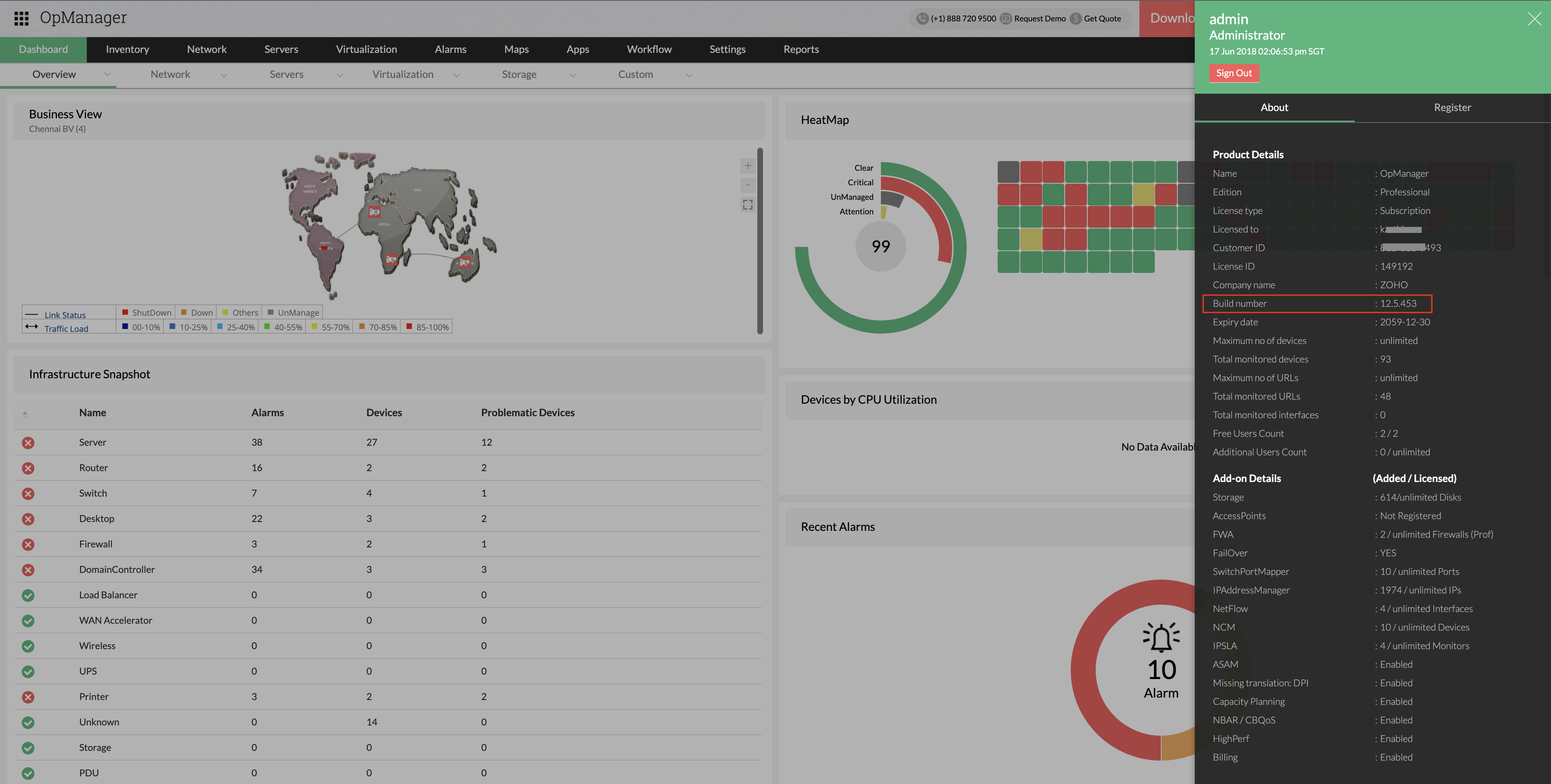
How can I find the build number of OpManager?
- In the Web Client click the "About" link on top right of the page.
- Search for the 'Build Number' among the product details listed.
- Check the following image guide to locate the build number.

Need help ?
Want help with upgrading OpManager to the latest version? Contact OpManager Support
Know what's coming up next with OpManager,
click here for the product road map.