Download Service Pack for Release 18
This service pack will enable customers already using Applications Manager (build #8010 & above) or APM Plugin (build #11010 & above) to upgrade to our latest version (Build 180405, released on July 2, 2026). Get to know more about the latest features, enhancements, and issues fixed in the release notes.
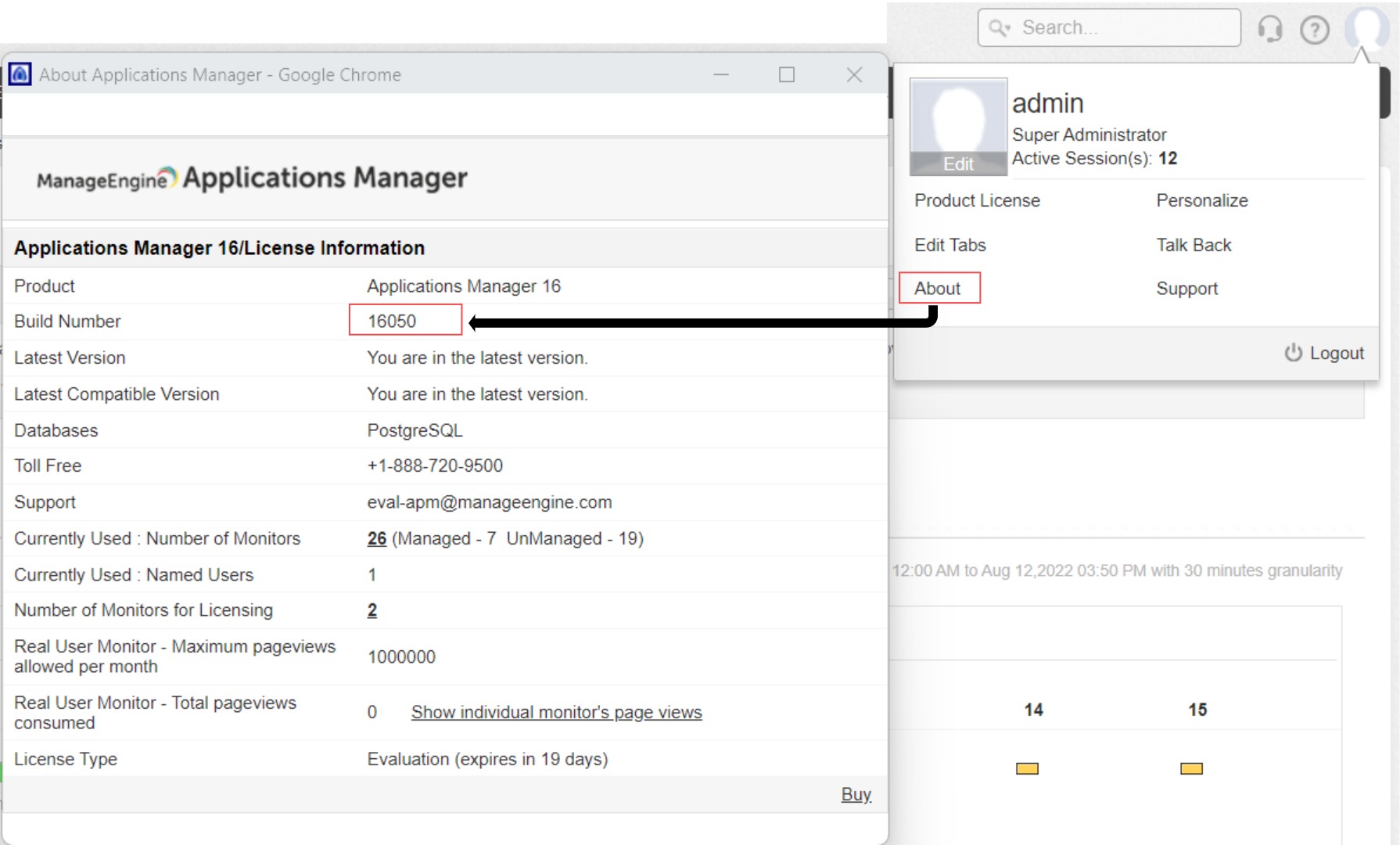
If you are new to Applications Manager, you can directly download the Full Build. [How can I find my build number?]
| Who should upgrade? | Steps | Troubleshooting | Upgrade path to the latest build |
|---|---|---|
| Customers using Build No. 170000 and above | Upgrade Guide | - Download Service Pack 18.0 and upgrade to build #180405 |
| Customers using Build No. 15000 to 16990 | Upgrade Guide | - Download Service Pack 17.0 and move to build #170010 - Download Service Pack 18.0 and upgrade to build #180405 |
| Customers using Build No. 11040 to 14980 | Upgrade Guide | - Download Service Pack 15.0 and move to build #15007 - Download Service Pack 17.0 and move to build #170010 - Download Service Pack 18.0 and upgrade to build #180405 |
| Customers using Build No. 10031 to 11030 | Upgrade Guide | - Download Service Pack 11.0 and move to build #11040 - Download Service Pack 15.0 and move to build #15007 - Download Service Pack 17.0 and move to build #170010 - Download Service Pack 18.0 and upgrade to build #180405 |
| Customers using Build No. 8010 to 10030 | Upgrade Guide | - Download Service Pack 10.0 and move to build #10031 - Download Service Pack 11.0 and move to build #11040 - Download Service Pack 15.0 and move to build #15007 - Download Service Pack 17.0 and move to build #170010 - Download Service Pack 18.0 and upgrade to build #180405 |
Note: It is recommended to use the SHA256 checksums to verify the integrity of the packages you download.
| Service pack | Release Date | SHA 256 value |
|---|---|---|
| Service Pack 18.0 (Build 180405) | July 2, 2026 | 3c0dd12fc0188fa8813051171c565c0b5e96b18b3007cf3231c080790b7f21f5 Click to copy the SHA256 value |
| Service Pack 17.0 (Build 170010) | July 21, 2025 | 81f25656f6098b6a3e6007fb682fbaf7e8177ddb67205d0e6b42ff42a3d638d8 Click to copy the SHA256 value |
| Service Pack 15.0 (Build 15007) | December 15, 2022 | 073cd83f283f071448da83f4ec8f10f67934cfc78f12c0f6f511bbb3aab8cced Click to copy the SHA256 value |
| Service Pack 11.0 (Build 11040) | December 28, 2012 | 335b067fb6046e46e94c1158e8745a8ba157f996a0295e449f321f0a66130c5e Click to copy the SHA256 value |
| Service Pack 10.0 (Build 10031) | August 17, 2011 | b15872e015d6948eb069a34a25d6b1e4d8bd9681776a890789e25e6de7fc78f5 Click to copy the SHA256 value |
If you are using a build earlier than 8010, contact appmanager-support@manageengine.com to install the service pack.
- In the web client, click the "Hello [admin]" link in the top right corner of the page.
- Click on the "About" menu item.
- In the "License Information" section, you can find the build Number.
- Check the image guide to locate the build number.
- For Applications Manager Standalone:
- Shut down Applications Manager as you normally do.
- Via administrator command prompt, execute the shutdownApplicationsManager.bat -force command (shutdownApplicationsManager.sh -force for Linux) from the 'Applications Manager Home' folder.
- As a best practice, take a complete backup of the 'Applications Manager Home' directory. SQL backend users should connect to SQL Management Studio & backup the AMDB database as well. Click here to know how to backup SQL database.
- To roll back to the old version, rename the existing 'Applications Manager Home' directory and restore the complete backup copy of this directory. SQL backend users should connect to SQL Management Studio & restore the AMDB database backup as well. Click here to know how to restore the SQL database backup.
- Run the updateManager.bat script (updateManager.sh -c for Linux) under the 'Applications Manager Home/bin' folder, which invokes the Update Manager tool.
- Browse and select the Service pack file (.ppm) saved on your computer.
- Click Install to initiate the upgrade process.
- Once you see the "Installed" message on your screen, click Finish to complete the installation.
- Start Applications Manager Server.
- For Applications Manager Plugin (Installed as a plugin under OpManager):
- Please make sure that your service pack is compatible with your current OpManager version by checking this link.
- Shut down OpManager as you normally do.
- Via administrator command prompt, execute the shutdownApplicationsManager.bat -force command (shutdownApplicationsManager.sh -force for Linux) from the 'Applications Manager Home' folder.
- As a best practice, take a complete backup of 'OpManager Home' directory. Click here to know more about the OpManager upgrade process.
- SQL backend users should connect to SQL Management Studio & backup the AMDB database as well. Click here to know how to backup SQL database.
- From the administrator command prompt, run the updateManager.bat script (updateManager.sh -c for Linux) under the 'Applications Manager Home/bin' folder, which invokes the Update Manager tool.
- Browse and select the Service pack file (.ppm) saved on your computer.
- Click Install to initiate the upgrade process.
- Once you see the "Installed" message on your screen, click Finish to complete the installation.
- Start OpManager Server.
Note:
- < Applications Manager Home > refers to the directory in which you have installed the Applications Manager product. This directory location is specified by you when you install the product.
- For Enterprise edition setup, follow the same steps in all Applications Manager instances (you can upgrade the Admin node first, followed by the Managed nodes).
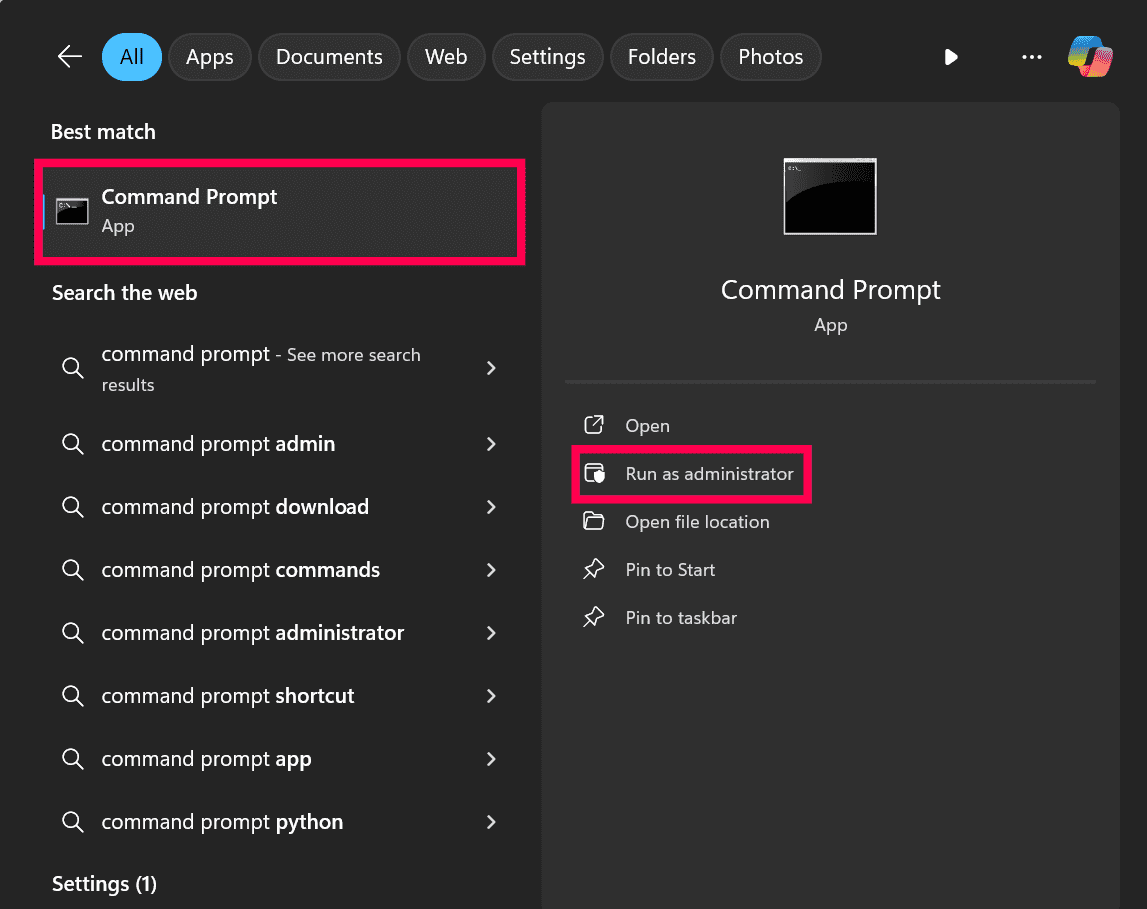
- Start command prompt as an administrator [cmd > right click --> run as administrator]. Click here to see the screenshot.
Need Help?
Want help with upgrading to the latest version of Applications Manager? Please email us at appmanager-support@manageengine.com
Request 30-day Evaluation License for Add-ons
If you would like to evaluate our add-ons, please fill in the form and send it to us. Request for Add-ons Evaluation License here.
This form is only for users who have a Registered License and want to try out any add-on before they make a purchase. Evaluation users already have all 'add-ons' turned on by default. Free edition users who want to evaluate and then make a purchase can also submit their requests here.
End of Support - Product Support Life Cycle Information
We recommend that users switch to the latest version of Applications Manager. Check out our Product Support Life Cycle Information page to know which older versions of Applications Manager we no longer provide support for.