
Table of Contents
Any Webmaster knows how irritating it feels to be notified at 2 AM that their website is not accessible. Home pages being too slow or irate users who are unable to complete their web transactions are detrimental to business. What Webmasters need are website management tools that help them monitor critical parameters of their websites and help ease their day-to-day activities. In this paper you can find out what you need to look for in a website monitoring tool.
Web Page Availability
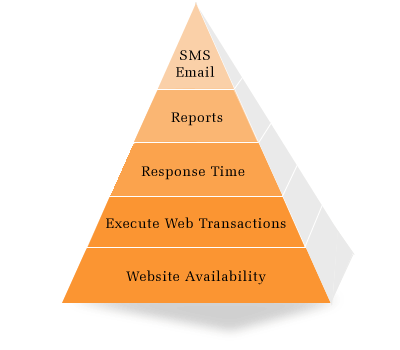
The basic need for every Webmaster is to ensure that their website is up and running. Downtimes could result in lost customers and eventually lost revenues. Webmasters need tools that will alarm them in real time when their websites are down. The ability to check for the presence of specific keywords in web pages would also add to their comfort level.
Web Page Response Time
Slow web pages tend to drive users to your competitors. As far as many are concerned, their Internet experience is the 'world wide wait'. Therefore if your website is not responsive enough, you are going to lose potential customers. With Web 2.0 web applications driving the next wave of user expectations, in terms of web page responsiveness, website administrators cannot compromise with slow web pages.
Web Page Correctness
Are your pages rendered completely? You need to monitor whether your web pages show the full content. Some web pages may be accessing data from a database. If the database connectivity is lost, the content may not get fully rendered. This could be easily monitored if you are able to check the percentage change in page size every time the web page is requested. There is an additional benefit if the percentage change is regularly monitored: Webmasters are warned when important web pages are modified by internal or external factors.
Ability to Simulate Transactions
Many website administrators would love to do a trial run of their shopping cart every hour. This would help ensure that customers can buy their products online anytime. What you need in this case is a tool that can record a web transaction and then replay the same at regular intervals of time. With this automation you are not only going to see a productivity boost but also higher availability for the most critical part of your website.
Monitor Custom Elements
Many websites have unique elements that only their Webmaster can monitor using some custom scripts. Ability to integrate these custom scripts into the same monitoring tool would help monitor the enterprise website completely
Monitor Trends
Being a Webmaster, you need to proactively monitor your websites and also be informed of degrading performances, as and when they occur. You need to know how your website is performing over a period of time. This will help you decide whether you need to have better infrastructure in place and take other proactive actions.
ManageEngine® Applications Manager can monitor your websites and alarm you via email when they are down or when they become slow. It can also simulate web transactions on a periodic basis. Supplemented by its ability to help take corrective actions, like restarting a web server, it makes life easier for Webmasters. The pay-as-you-grow pricing model, allows you to use the Free Edition to monitor up to 5 websites for free with all the other benefits of the Professional Edition. Visit www.appmanager.com
Conclusion
As a Webmaster you need to have the website management tools to monitor your websites. You need to ensure that all sections of your website function properly. Supplemented by the ability to see a trend in degrading performance, you should be able to take proactive steps and ensure your users have a great experience when they visit your website.
For more details on ManageEngine Applications Manager visit manageengine.com/appmanager. For comments on this article contact appmanager-support@manageengine.com
