
ManageEngine Endpoint Central is a Web-based application for desktop administration and management. This application enables administrators to manage computers effectively, from a central point. It comprises features like Software Deployment, Patch Management, Service-pack Installation, Asset Management, Remote Control, Configurations, System Tools, Active Directory Reports and User Logon Reports.
Endpoint Central supports the managing of computers in a distributed setup like branch or remote offices (WAN) and for mobile users, for example sales persons who are constantly on the move.
This document on WAN architecture will explain the following,
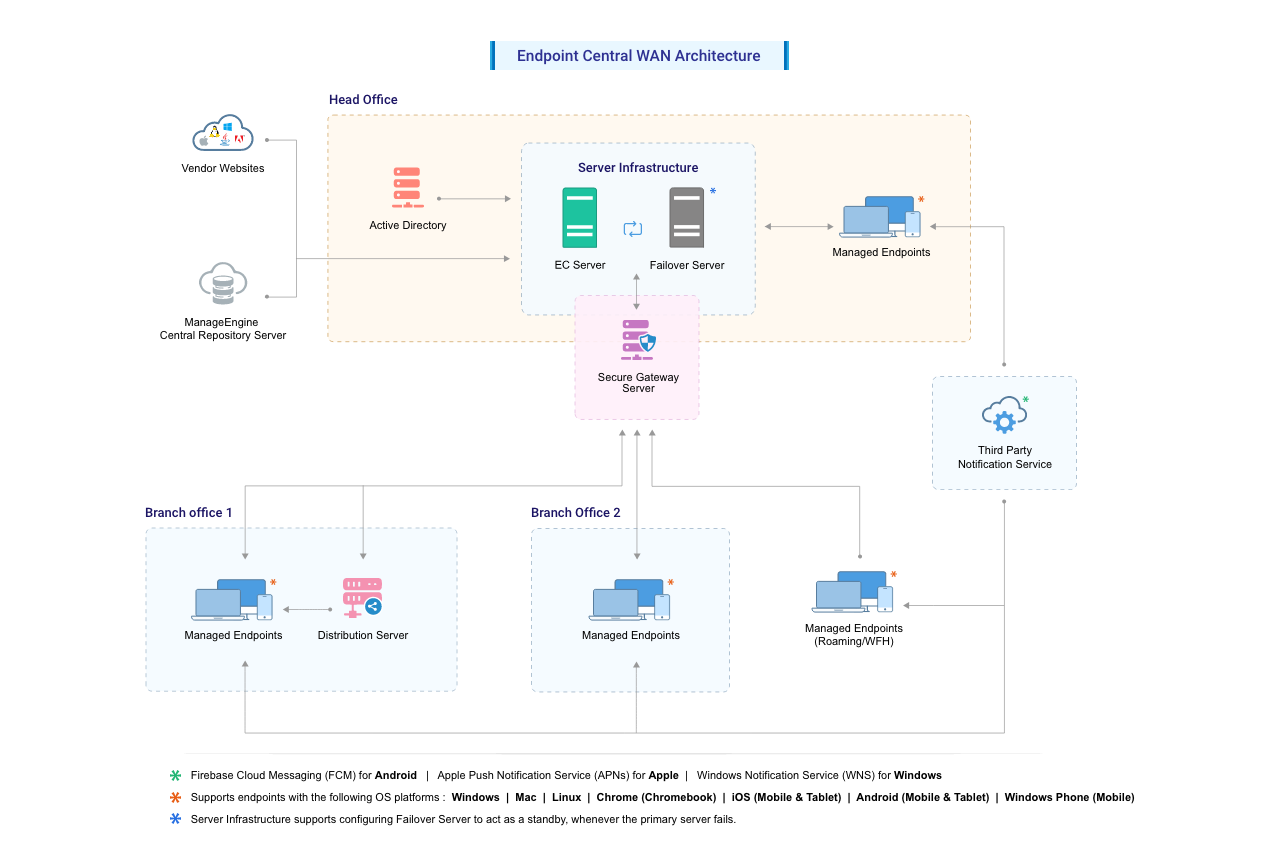
Figure 1: WAN Architecture of Endpoint Central
The WAN architecture of Endpoint Central comprises the following components
This section includes detailed information about the components of the Endpoint Central architecture. Refer to Figure 1: WAN Architecture of Endpoint Central.
Server
Endpoint Central Server has to be installed in your LAN (say, the head office) and has to be configured as an EDGE device. This means that the designated port (default being 8020 and is configurable) should be accessible through the Internet. You need to adopt necessary security standards to harden the OS where the Endpoint Central Server is installed. Agents from all the remote locations report to this Endpoint Central Server.
The Server acts as a container to store the configuration details and, upon request, provide the instructions to the agents. It is advised to keep the Endpoint Central server always running to carry out the day-to-day Desktop Management activities.
Distribution Server
Endpoint Central Distribution Server is light-weight software that is installed in one of the computers in the Branch Offices. This agent will communicate with the Endpoint Central Server to pull the information for all the computers in that branch. The agents that reside in the branch office computers will contact the Distribution Server to get the information available to them and process the requests.
Agent
The Endpoint Central agent is a lightweight software application that is installed in computers which are managed using Endpoint Central. This agent helps to complete various tasks that are initiated in the Endpoint Central server. For example, if you want to change the wallpaper in the computers in a branch office, you can make the required settings for this task in the Endpoint Central server. The agent replicates these settings and ensures that the task is completed effectively.
Agents can be installed either manually or using a logon script in all the branch-office computers that are being managed using Endpoint Central. This task is a one-time task. Upgradation of agents is done automatically. Endpoint Central offers two options to help administrators manage computers across a WAN. The option that you choose depends on the number of computers you are going to manage at your remote office. The options available, enable you to use either of the following:
Web Console
The Web console of Endpoint Central provides a central point from where an administrator can manage all the tasks that are related to desktop management. This console can be accessed from anywhere. For example, it can be accessed through a LAN, WAN and from home using the Internet or a VPN. Separate client installations are not required to access the Web console.
Third-party notification service
Third-party notification services are platforms that provide notification and messaging capabilities on behalf of other applications or services. In the context of Endpoint Central, they serve as intermediaries between the server and the recipients (end users) when push notifications need to be sent out. The third-party notification services used by Endpoint Central are
Note: The ports mentioned under 'Server' must be enabled at all times irrespective of your license edition. Refer the ports required for specific modules and enable them as per your requirement.
Note:Ports 135,139 and 445 should also be kept open and inbound on both agent and server (and distribution server, if applicable) for pushing agent installation.
The advantages of using the WAN architecture of Endpoint Central include the following:
To secure the WAN network managed by Endpoint Central follow the below recommendations: