Chapter 3: Three real-world IT scenarios
3.1 IT help desk
A KMS revolutionizes IT help desk operations by enabling swift and efficient resolutions to common and complex issues. For instance, if an employee needs assistance with resetting their system credentials, they can access a self-service portal, find a step-by-step guide, and resolve the issue independently—eliminating the need to wait for IT help desk support. This approach minimizes downtime and empowers employees to address issues quickly on their own.
In the following sections, we’ll explore how a KMS transforms an IT help desk, using real-world examples like VPN troubleshooting and large-scale incidents to illustrate its impact.
Use case 1: VPN connection issues
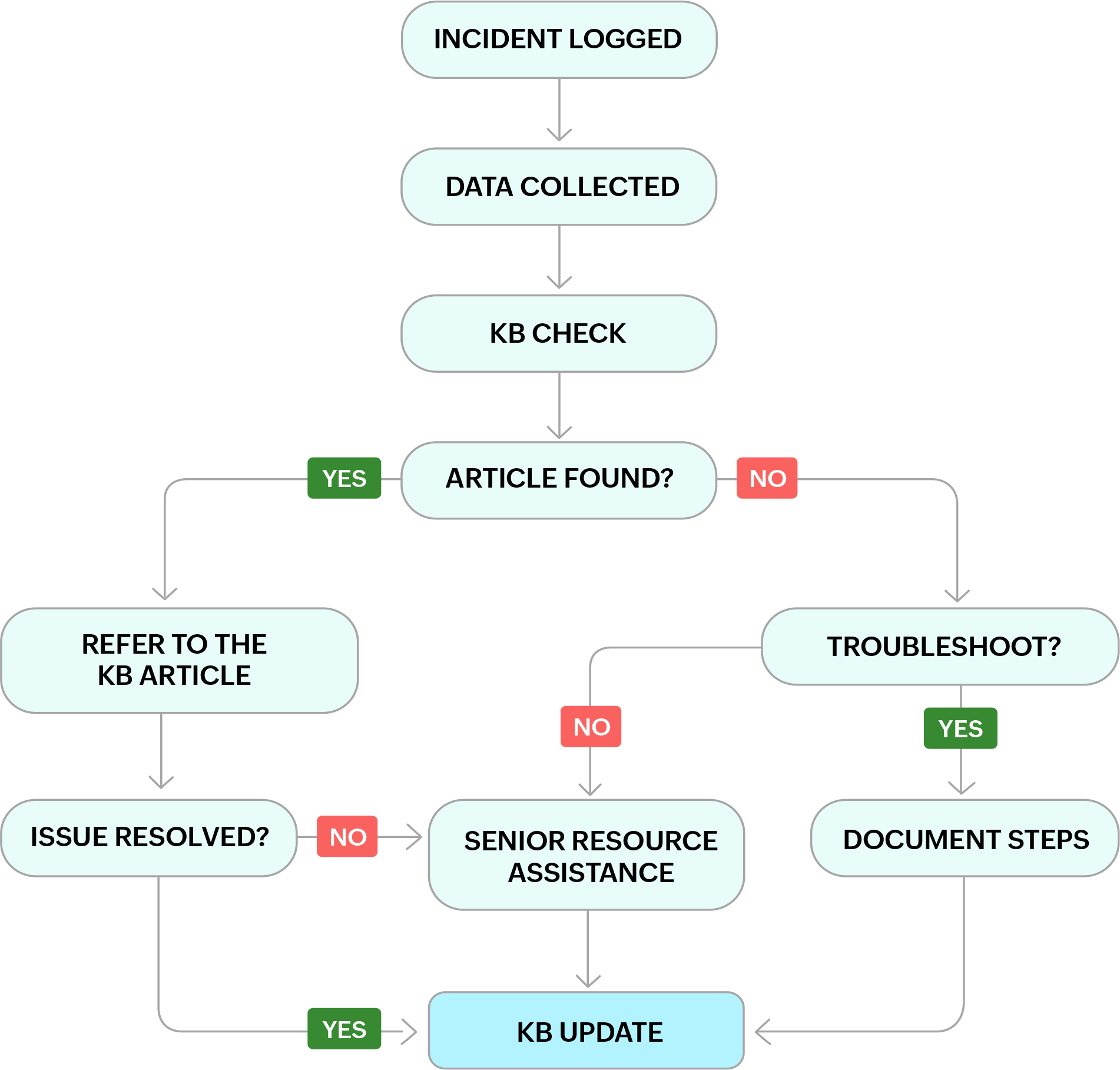
We'll discuss in detail the process that takes place when an incident is logged.
| Steps | Details |
|---|---|
|
Incident logged |
The user reports being unable to connect to the company's VPN via email, chat, call, or ticket submission. |
|
Data collected |
The help desk technician gathers the following information
|
|
KB check |
The technician searches the KB for articles related to "VPN connection issues" and the specific VPN software used. |
|
Article available? |
Yes: The technician finds a relevant KB article titled "Troubleshooting connectivity problems with [VPN Software]". The article outlines troubleshooting steps such as:
No: The technician starts troubleshooting:
|
|
KB update |
Once resolved, the technician documents the solution in a new KB article: Title: "Troubleshooting specific error message with [VPN Software]" Description: Explains the symptoms and potential causes of the specific error message. Solution steps: Provides step-by-step instructions based on the troubleshooting process. Tags: "VPN connection", "[Error Message]", "[VPN Software]". |
|
KPI: Number of articles contributed |
The technician increases their documented solutions count by contributing to the KB with the new article. |
Use case 2: Blue screen incident
Think about the Microsoft Windows blue screen incident in 2024 and the associated CrowdStrike outage—many employees across organizations found themselves without clear guidance on how to resolve the issue. Addressing such widespread technical problems on an individual basis would be highly inefficient and time-consuming for any technical support team. Therefore, a more streamlined approach is necessary to ensure a quick and effective resolution.
At Zoho, we took a more proactive and efficient approach to deal with the blue screen incident. A detailed workaround document was swiftly created and uploaded to our KB. This document provided clear, step-by-step instructions on how to resolve the issue. For instance, in this specific case, the document included guidance on booting into Windows Safe Mode, navigating to the appropriate directory, and relocating the problematic file, as illustrated in the screenshot below.
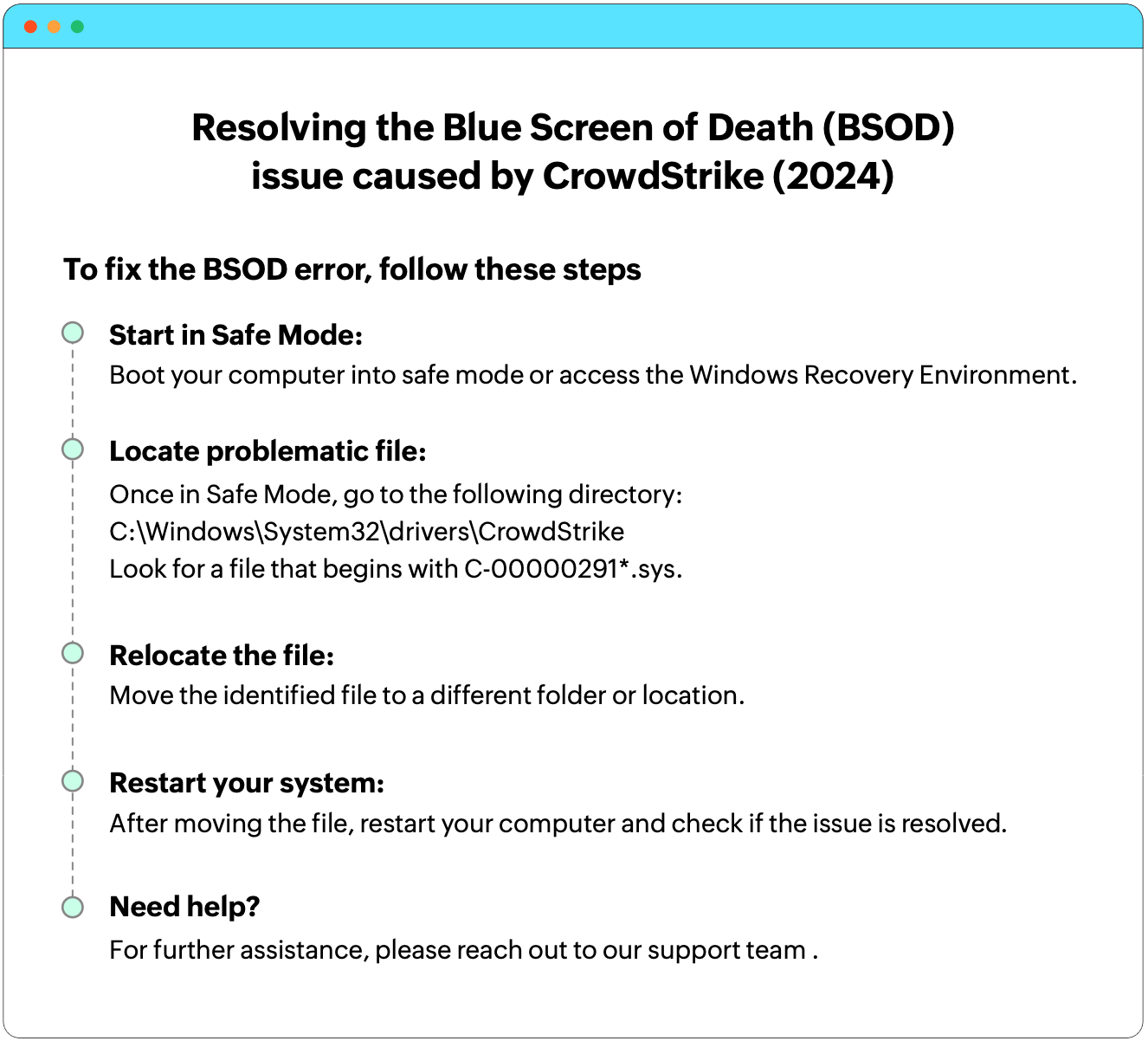
To ensure that this solution reached everyone affected by the issue, we distributed a link to the KB document to all employees experiencing the problem. This allowed them to follow the steps independently and resolve the issue on their own.
For those who found that the issue persisted even after following the outlined steps, additional support was promptly provided by our system admin team. By prioritizing these more complex cases, our team was able to focus on resolving the most critical issues without delay.
3.2 Human resources KMS
Let's say that an employee needs information on the company’s vacation policy. She sends an email to HR and waits for a response. Now, picture her experience with an HR KMS in place. Instead of waiting for a response, she logs into a well-organized portal and finds the vacation policy on her own.
For HR professionals, the KMS reduces the time spent answering repetitive questions or searching for documents. It also helps with policy creation by allowing HR representatives to reference policies from other locations or corporate guidelines, eliminating the need for back-and-forth emails.
Use case 1: Employee onboarding
How we handle onboarding pretty much sets the stage for a new hire’s time with us. Consider a new employee, John, starting his first day at a company. He is enthusiastic yet overwhelmed by the volume of information and paperwork provided to him. A few weeks later, John discovers that he has misplaced the documents containing crucial information about company policies and benefits. This leads to frustration and a sense of disconnection from his new workplace as he spends hours searching for the answers he needs.
Now, imagine John’s onboarding experience through a KM platform. On his first day, John receives access to an intuitive portal where all onboarding information is centrally organized and easily accessible. He can find everything he needs, from company policies to benefits, right at his fingertips. Months down the line, he can still retrieve any necessary information without difficulty.
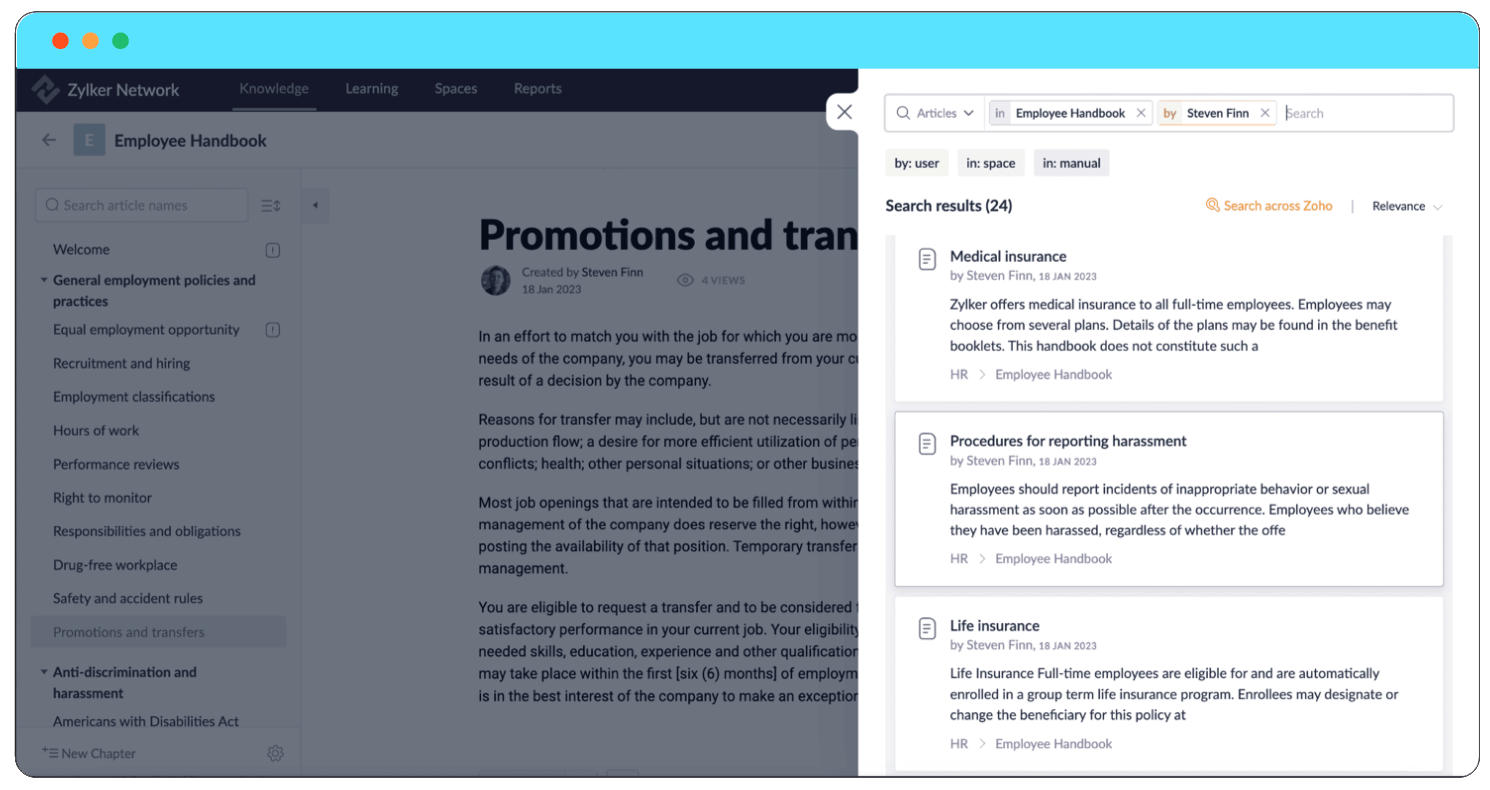
Let's say that John wants to learn about the employee handbook; appropriate tags and a search feature make it easy to find the right information. The search tool lets them use filters to narrow down results, so they can locate what they need. They can search for specific keywords within certain manuals or spaces and apply filters to search by user, manual, or space.
Similarly, if a new employee is looking for details on medical insurance, reporting incidents, or life insurance, they can easily find these topics by searching within the employee handbook and using the filters to refine their results. This way, they can access and understand important company policies.
For HR professionals, updating onboarding materials becomes significantly more efficient. Instead of reissuing documents, they can simply update the portal with the latest information, saving time and ensuring all employees have access to the most current data. Introducing new hires like John to the KMS from day one also familiarizes them with the platform, which they will use for future HR and organizational knowledge needs. This aligns with the growing demand for self-service HR tools, especially in the era of remote work.
3.3 KB at ManageEngine
Our KB system serves both in-house technicians and customers' technical teams, providing a centralized repository for guides, common issues, and major incident documentation.
Self-service portal
To keep the system from getting overwhelmed with basic queries like setting up a printer or logging into a laptop, our self-service portal offers a smart solution. Users logging in are greeted with three options: report an issue, request a service, or view solutions.
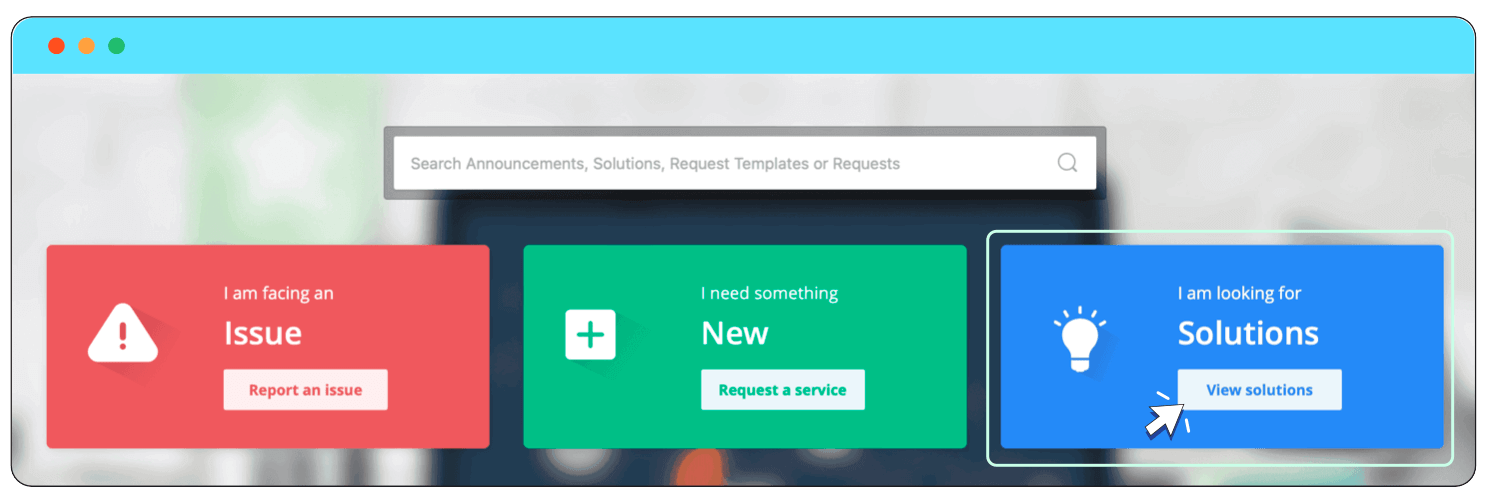
By clicking View solutions, they can find articles covering common problems, each tagged with relevant keywords like "printer issue" or "VPN setup." This way, when someone types in a keyword, the right solutions pop up automatically, guiding users to resolve their issues without needing to create new tickets.
Organization is key in our KB; solutions are meticulously categorized by topics and subtopics. For instance, printer-related issues are categorized under "Printer," with subtopics such as device type and printer brand (e.g., Mac, Windows, HP, Canon).
Search functionality
Users can search for articles using specific keywords, which the system scans across spaces, manuals, articles, and even attached documents. For example, if someone searches for "marketing," the system pulls all relevant content across the KB. This ensures users find the right information without sifting through irrelevant sections manually.
Additionally, the search function identifies articles and manuals that mention the keyword, providing targeted information, and even searches within documents attached to articles, ensuring that users can find relevant content within supplementary files as well.
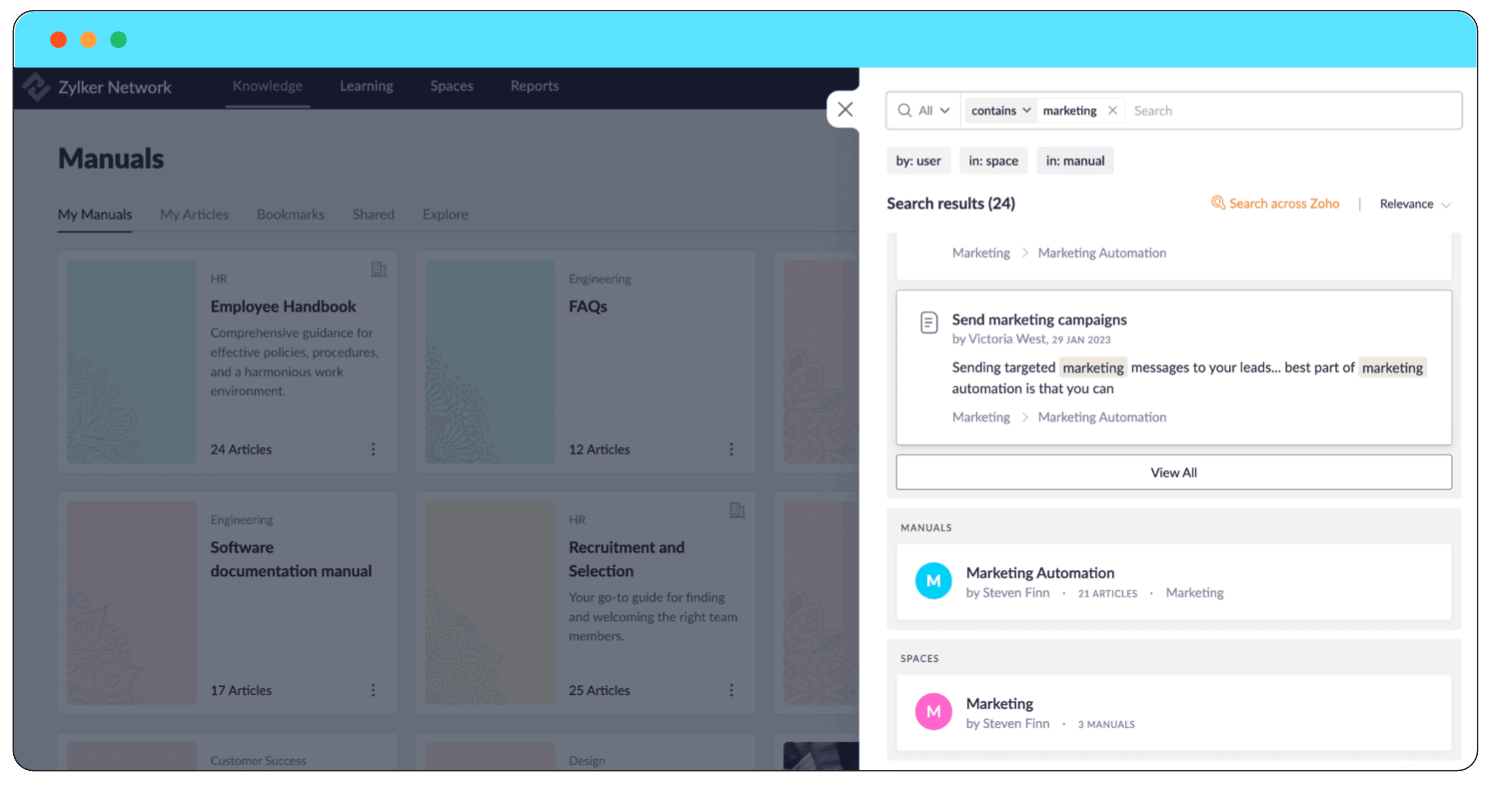
The image shows how the search results display various instances of the keyword, allowing the user to navigate to the most relevant content.
Our knowledge system also caters to the needs of specific teams. For instance, the hardware team doesn't need to wade through network-related solutions. This targeted visibility keeps the KB clean and efficient.
Senior technicians are essential in maintaining the KB. They create solution articles, assign topics and subtopics, and set review and expiry dates to ensure the information stays accurate and relevant. Review dates allow managers to confirm the content’s accuracy, while expiry dates help manage temporary solutions, like connecting to a secondary Wi-Fi network during an outage. Once the issue is resolved, these temporary articles are archived, keeping the KB up-to-date.
Internal comments can be added for more complex solutions to provide additional context. Our customizable solution templates ensure consistency across all entries. Once a technician resolves an issue, they save the solution and submit it for approval. After approval, the solution is added to the KB, continuously enriching the repository.
Our KB primarily stores solutions for common issues like cache problems or connectivity issues, reducing the need for users to seek direct help from system administrators. This process streamlines issue resolution, lowers ticket volume, and equips both internal teams and customers' teams with the resources to resolve technical problems efficiently.