Chapter 2: Mastering knowledge flow: ManageEngine's KM framework
Implementing a KM initiative is much like cultivating a garden. You begin by learning the theory—studying frameworks and best practices—just as you’d read about soil types and planting methods. This initial phase is risk-free and allows you to build a solid foundation. Then, you observe successful organizations, akin to visiting other gardens for inspiration. Reading case studies or consulting with experts provides valuable insights without direct risk.
The real work begins when you cultivate your own garden. Planting seeds and nurturing them—like implementing a KMS—requires hands-on effort, patience, and adaptability. Similarly, implementing a KMS involves identifying knowledge needs, fostering a sharing culture, and deploying the right tools. This phase requires ongoing effort to maintain and address challenges, like resistance to change or technological issues. A KM initiative benefits from a well-defined framework, much like how a garden thrives with careful planning and attention to detail.
A structured approach is needed to ensure all aspects of knowledge are systematically addressed to effectively manage and utilize organizational knowledge. Let’s delve into the key elements of this framework.
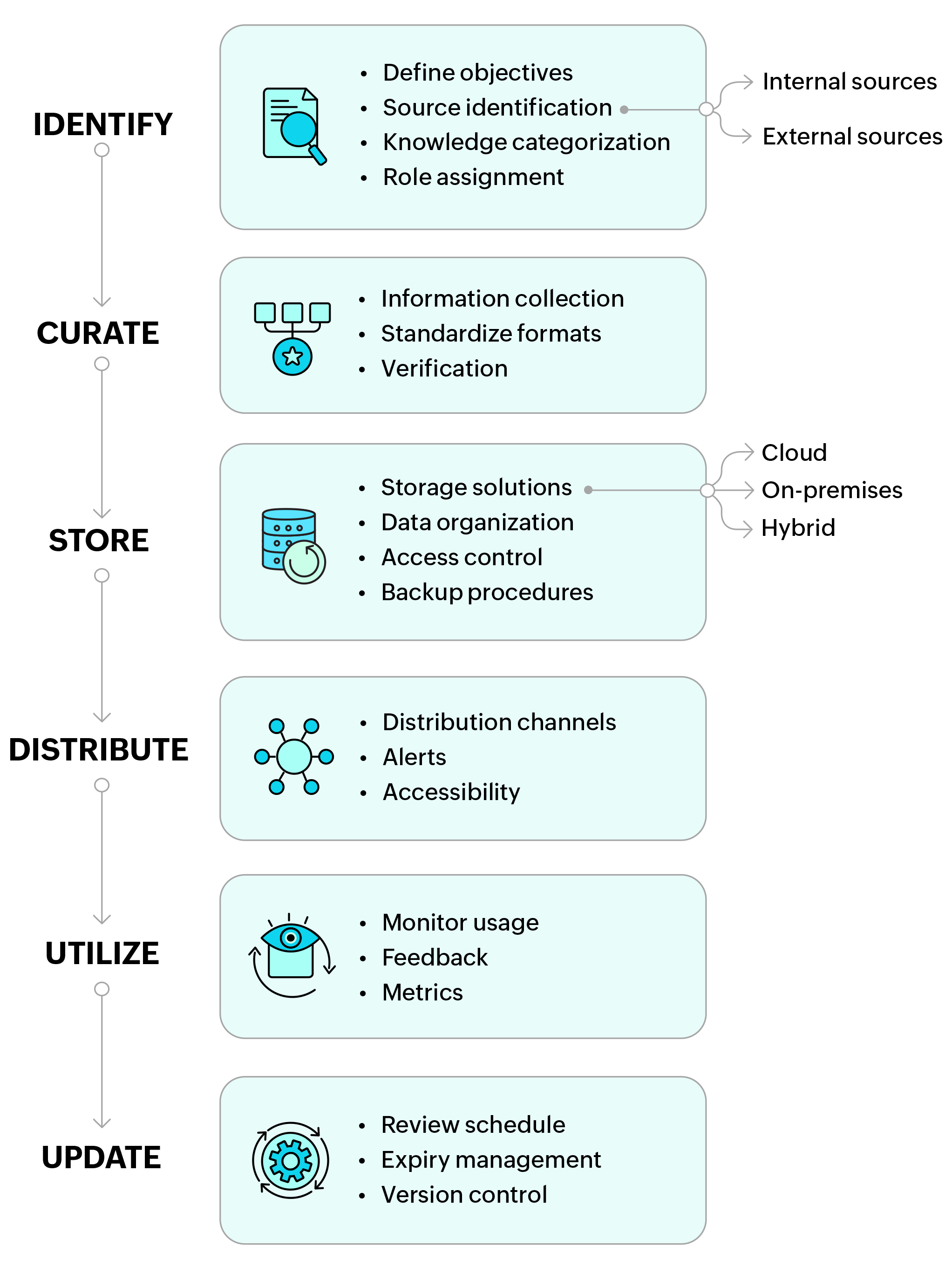
1. Identify
Define objectives
Establishing your KM objectives and goals form the crucial phase in the KM process. This stage involves articulating what your organization aims to achieve through KM and establishing clear, measurable objectives to steer your efforts.
Ensure your goals are Specific, Measurable, Achievable, Relevant, and Time-bound (SMART). For example, a SMART goal could be to enhance customer support response time by 30% within the next quarter by implementing a new KMS that centralizes support resources and improves access to information.
Knowledge gap identification
During daily operations, issues such as network changes, firewall adjustments, or VLAN modifications were initially handled without sufficient documentation, leading to potential service disruptions. After identifying these gaps, it became clear that documenting such critical procedures was essential to prevent future errors. For instance, a technician might unknowingly make a change during working hours, causing service downtime. Recognizing this gap, the procedure was documented, and steps were put in place to ensure such changes were only made during off-hours.
Knowledge sources
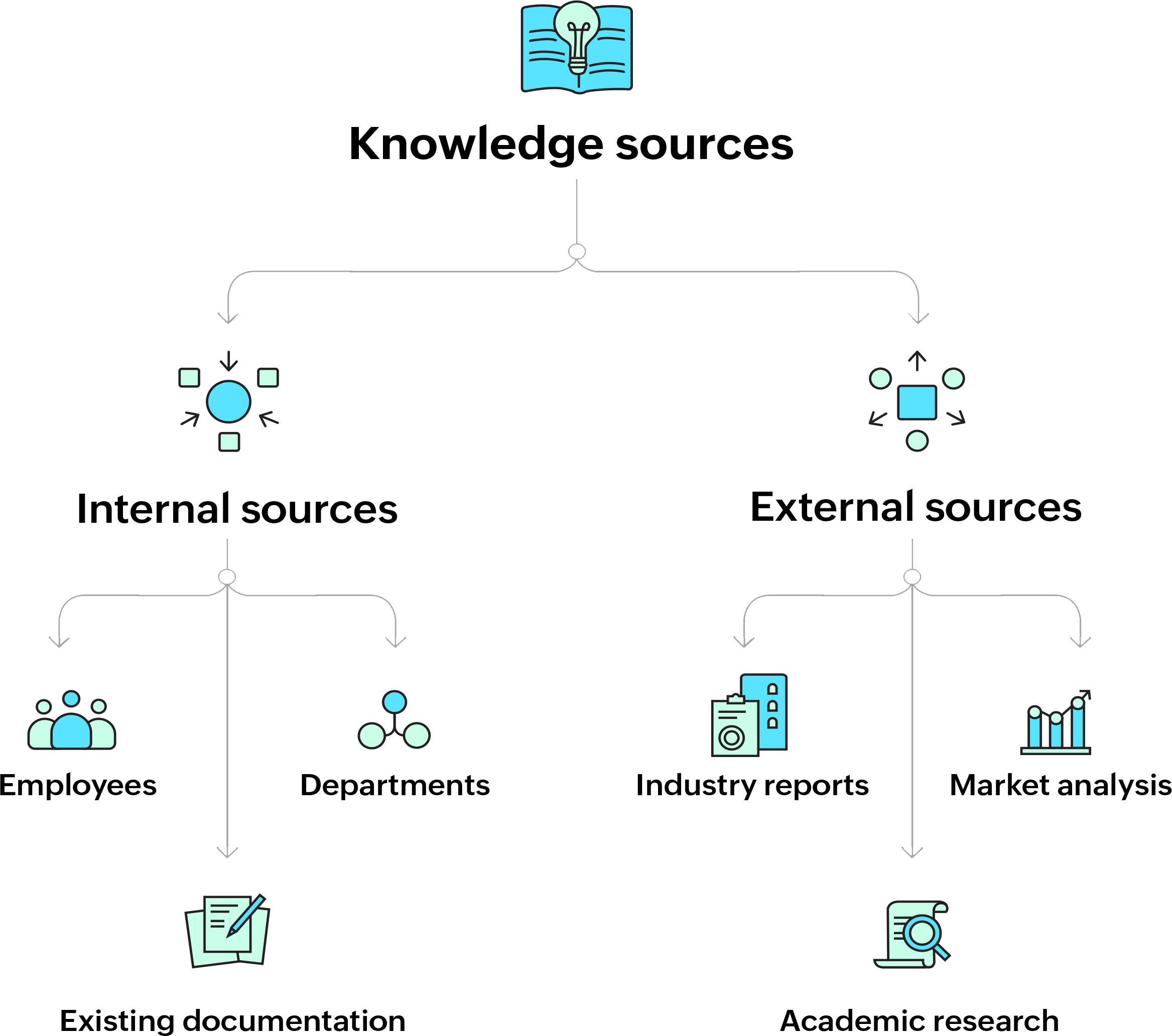
Internal sources
Identify, compile, and assess internal data to gain a comprehensive understanding of the organization. This includes knowledge held by employees, departments, and existing documentation such as runbooks, incident logs, and troubleshooting guides.
- Tap into the knowledge held by employees at various levels of the organization. This includes their experiences, expertise, and the tacit knowledge they have gained over time. For instance, a senior IT administrator might have developed unique troubleshooting techniques that are not documented anywhere.
- Each department within the organization is likely to have specialized knowledge relevant to its functions. For example, the HR department might have detailed knowledge of compliance requirements, while the IT department holds critical operational knowledge.
Review and consolidate existing documentation, such as process manuals, standard operating procedures (SOPs), runbooks, and incident logs. This existing KB can be refined and expanded to form a comprehensive KMS.
External sources
Incorporate external knowledge sources like industry reports, academic research, market analysis, and best practices from similar organizations.
- Gather insights from industry reports that provide data and trends relevant to the organization’s operations. These reports might include market research, competitive analysis, or technological advancements.
- Leverage academic research to gain in-depth knowledge of theories, models, and best practices that can be applied to the organization’s operations. This can be particularly useful in fields such as IT, where academic research often drives innovation.
- Conduct market analysis to understand external factors such as customer needs, competitor strategies, and regulatory changes. This knowledge can be critical for strategic planning and decision-making. Tap into the knowledge held by employees at various levels of the organization. This includes their experiences, expertise, and the tacit knowledge they have gained over time. For instance, a senior IT administrator might have developed unique troubleshooting techniques that are not documented anywhere
Categorize knowledge
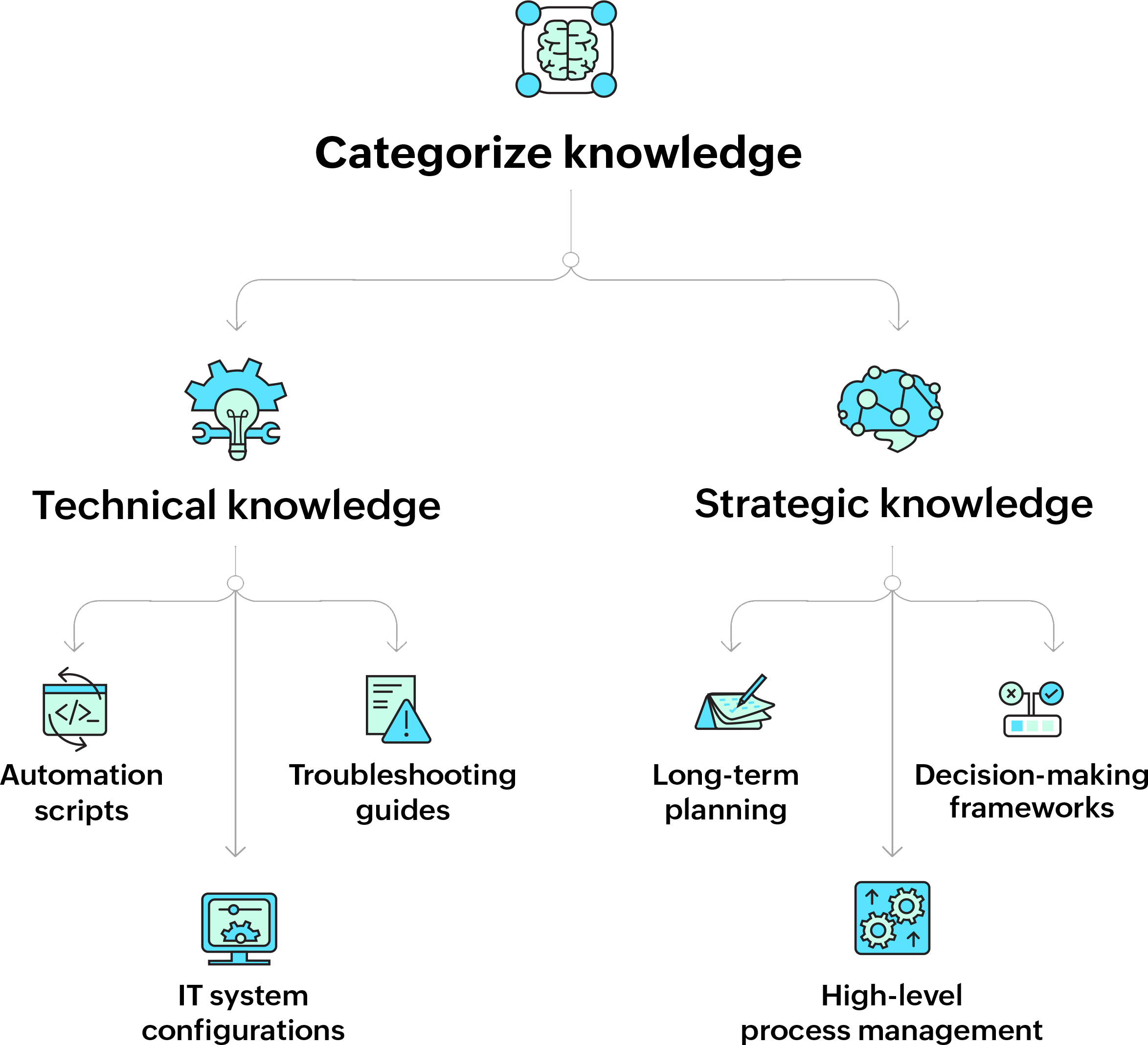
Technical knowledge
This includes detailed, operational information like IT system configurations, software documentation, and technical procedures. For example, IT departments might categorize knowledge related to network security, server management, and software deployment.
- Document specific operational processes that are crucial for daily functions. For instance, a detailed runbook outlining the step-by-step procedure for recovering from a server crash, including command-line instructions and contact information for escalation, would fall under this category.
- Create detailed troubleshooting guides for common issues. For instance, a guide that explains how to diagnose and fix network connectivity issues, including flowcharts for decision-making, would be essential for the IT team.
- Store and document scripts that are used for automating routine tasks. For example, a script that automates the backup process should include explanations of each step and parameters used, ensuring that any sysadmin can understand and modify it if needed.
Strategic knowledge
This refers to high-level insights that inform the organization’s long-term goals and decision-making. For instance, strategic knowledge could include market analysis, business strategy documents, and competitive intelligence reports.
- Capture strategic knowledge that supports long-term planning and decision-making. This might include documents on capacity management, such as predicting future server requirements based on projected company growth.
- Develop decision-making frameworks at the strategic level. For instance, a risk assessment framework that helps prioritize IT investments based on potential impact and likelihood of failure.
- Document high-level management processes that are critical to the organization’s strategy, such as mergers and acquisitions (M&A) procedures or the implementation of new technologies across departments.
Assign roles
| Roles | Responsibilities |
|---|---|
|
Knowledge user |
|
|
Subject matter expert (SME) |
|
|
Knowledge manager |
|
|
Knowledge analyst |
|
2. Curate
Systematically collect, organize, standardize, and verify knowledge to ensure that it is accurate, consistent, and usable across the organization.
Collect information
Collect knowledge from the daily operations of the organization. This includes capturing details of routine tasks, incident resolutions, and project completions. For instance, after resolving a complex network issue, document the exact steps, screenshots, and logs to create a detailed case study
Systematically document incidents, including what happened, how it was resolved, and any lessons learned. These incident reports should be detailed and include both technical and nontechnical perspectives. An example of this is a DDoS attack report which includes the technical response, communication strategy, and insights gained.
Capture the tacit knowledge of senior employees through interviews, workshops, or shadowing. For example, a senior IT administrator might have unique knowledge of legacy systems that is essential for future maintenance.
Standardize formats
Develop standardized templates for documenting different knowledge. For example, a runbook template might include sections for problem description, prerequisites, step-by-step instructions, validation checks, and escalation paths.
Sample template:
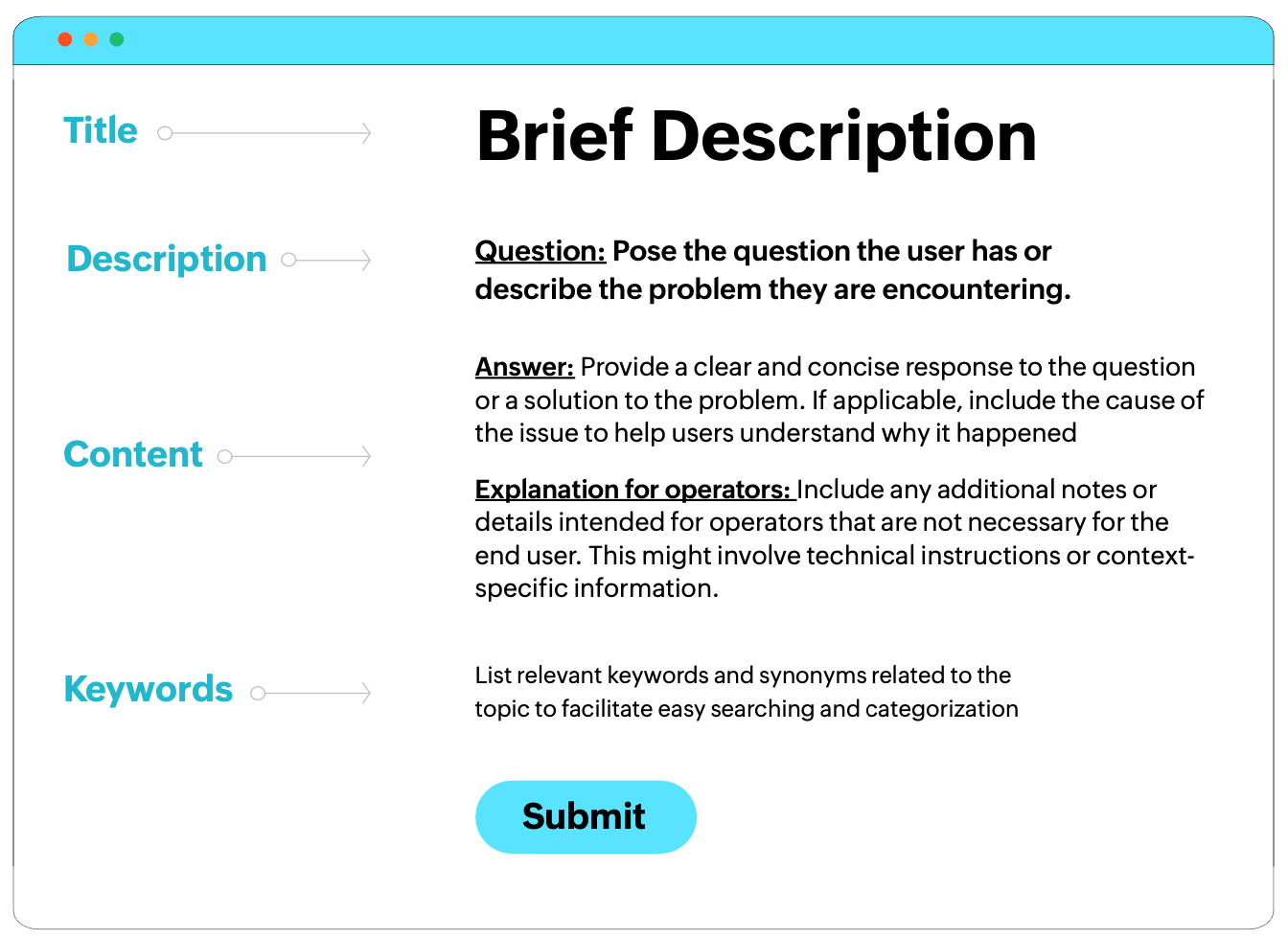
Completed template example:
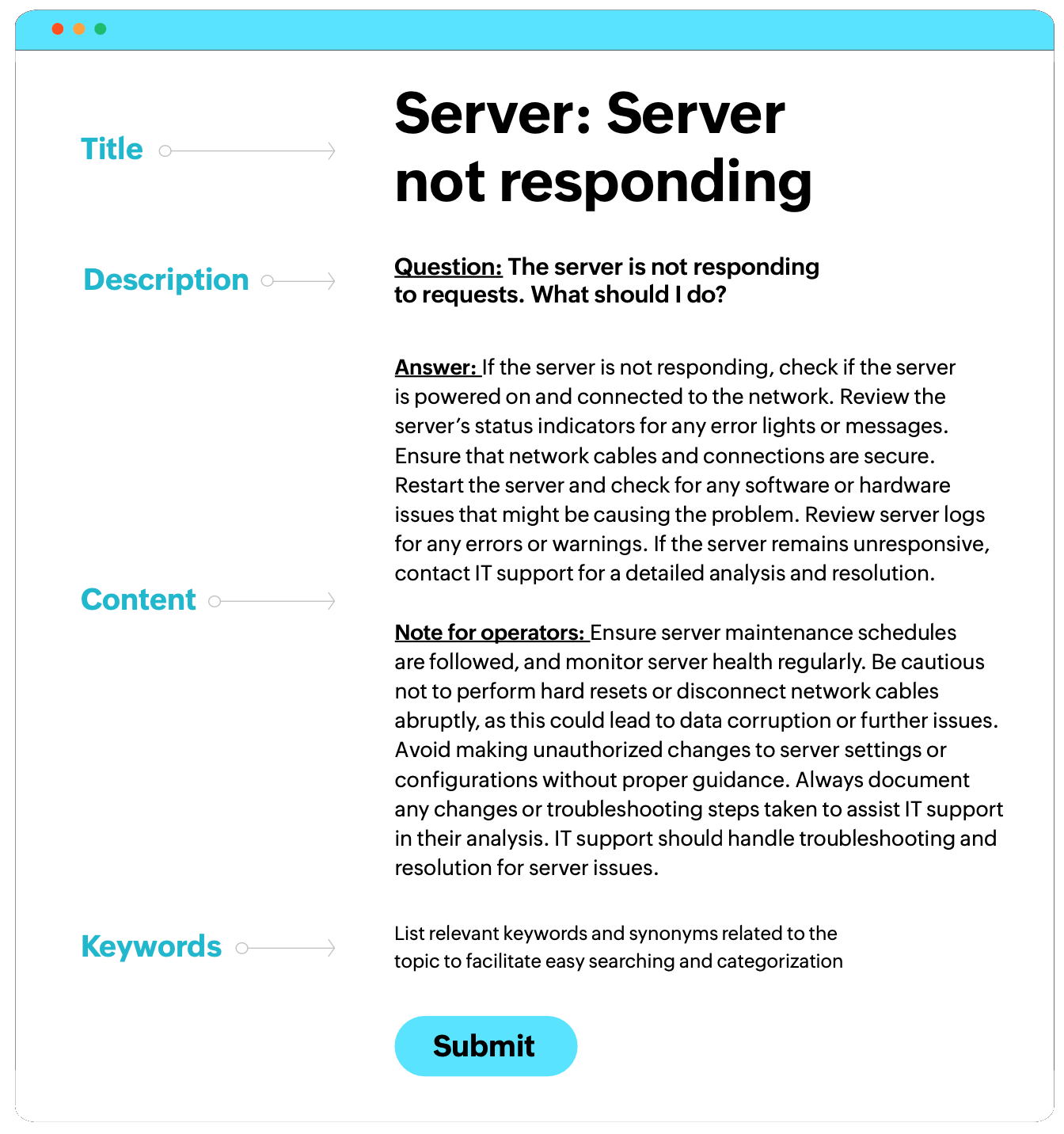
Ensure that all documentation follows a consistent format, style, and terminology. Using the same terms and formatting across all troubleshooting guides helps reduce confusion and errors. This consistency makes it easier for employees to understand and follow the documents
Create and enforce documentation guidelines that detail how information should be recorded, formatted, and reviewed. These guidelines should be clear and easy to follow, ensuring that all contributors produce high-quality documentation.
Verification
Implement a thorough review process where senior personnel or subject matter experts (SMEs) verify the accuracy and completeness of documentation. This may involve peer reviews, pilot testing, and approval workflows. For example, a server deployment guide should be reviewed by senior engineers and tested in a controlled setting before publication.
Ensure documented procedures work as intended by conducting validation tests in a controlled environment. For instance, test a backup recovery procedure in a sandbox environment to verify it functions properly without data loss.
Set up an approval workflow where documents are signed off by designated approvers. This process should include checks for technical accuracy, clarity, and alignment with organizational standards before final publication.
3. Store
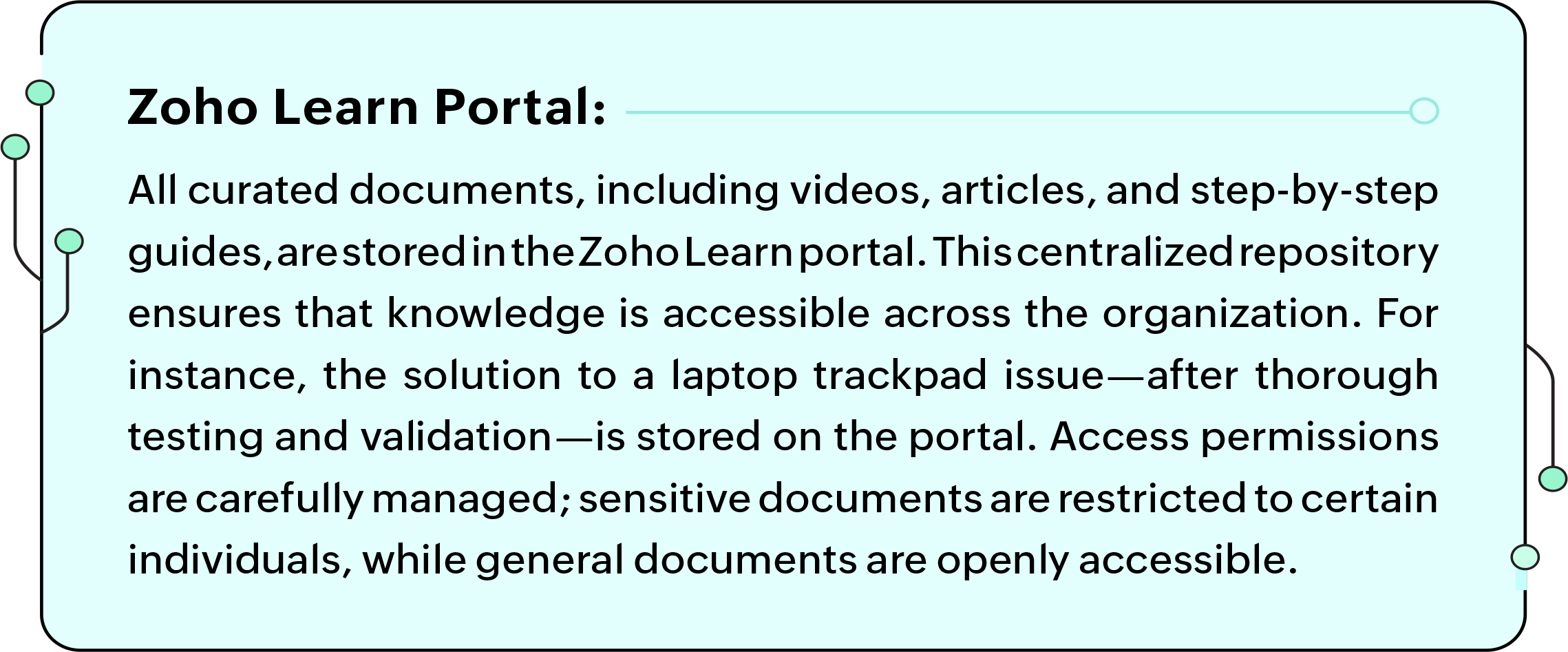
Securely store curated knowledge in a manner that ensures it is organized, easily accessible to authorized users, and protected against loss or unauthorized access.
| Storage | Description | Example |
|---|---|---|
|
Cloud storage |
|
Storing operational guidelines in a cloud-based system like Zoho WorkDrive allows employees to access them from anywhere. |
|
On-premises storage |
|
Sensitive European user data may need to be stored within EU borders to comply with GDPR. |
|
Hybrid storage |
|
Storing sysadmin passwords and server configurations on encrypted on-premises servers with cloud backups. |
|
Cross-location storage |
|
The "Overview of password policies for data centers" document varies by location (e.g., Saudi Arabia vs. the US) and is updated accordingly. Knowledge related to US servers is also stored in Europe for redundancy. This practice proved crucial during the 2015 Chennai floods at Zoho, where preemptive cross-location storage helped avoid major issues. |
So, you’ve stored knowledge across multiple locations. That is a step toward ensuring data redundancy and resilience. But how do you ensure that this knowledge is readable and accessible when needed? Here's where organization becomes key.
Organize data
- Implement a structured approach to organizing knowledge by using tagging, categorization, and indexing. Example: Categorizing documents by departments (e.g., IT, HR) and tagging with relevant keywords (e.g., troubleshooting, compliance).
- Organize knowledge into hierarchical structures that mirror organizational workflows. For instance, within an IT KB, documents are organized by category (Servers, Networking, Security) and subcategory (Linux Servers, Windows Servers).
Access control
Implement role-based access control (RBAC) to ensure that only authorized personnel can access sensitive knowledge. By assigning specific permissions to different roles, we can ensure that only the right people can see and use sensitive information. For example, senior IT admins may access network configurations, while junior technicians handle general troubleshooting guides.
Use encryption to safeguard sensitive information, both when stored and transmitted. This ensures that even if a breach occurs, unauthorized parties cannot access the data. For instance, encrypting critical server backups before cloud storage keeps them secure.
Use audit trails to monitor and log access to sensitive knowledge, helping detect and address unauthorized or suspicious activity.
RACI matrix
A RACI matrix helps determine which roles need to perform which tasks. The assignment for each role's tasks will follow these designations: R: Responsible; A: Accountable; C: Consulted; I: Informed
| Task | Knowledge user | Subject matter expert | Knowledge manager | Knowledge analyst |
|---|---|---|---|---|
|
Identify requirements |
R |
A |
||
|
Create and compile |
R |
A |
C |
|
|
Verify and approve |
I |
A |
R |
|
|
Access and utilize |
R |
A |
||
|
Maintenance |
C |
A/R |
R |
Backup procedures
Automate regular backups—such as daily incremental and weekly full backups—to prevent data loss. Store backups in multiple physical locations or cloud locations for disaster recovery.
Test and validate recovery procedures regularly, for example by conducting quarterly tests where random files are deleted and restored.
Storage methods
Use digital repositories as the primary method for storing most types of knowledge. These repositories should support secure storage, easy retrieval, and integration with other KM tools.
For highly sensitive information or legal records, use physical storage solutions such as secure vaults or locked cabinets. This ensures that these documents are protected from cyber threats and unauthorized digital access. For instance, storing physical copies of contracts and compliance certifications in a secure on-premises vault while maintaining encrypted digital copies ensures both security and accessibility.
4. Distribute
Ensure that the curated and stored knowledge is effectively distributed across the organization so that it reaches the relevant stakeholders promptly and securely.
Distribution channels
Use internal knowledge portals as the primary channel for distributing knowledge across the organization. These portals should be user-friendly, searchable, and accessible to all employees. Add email notifications to inform employees of new or updated knowledge. These notifications should include direct links and summaries of changes. For instance, when a new procedure version is published, an email can be sent with an overview and link to the updated document.
Use automated alerts to notify employees of critical updates or new knowledge that requires immediate attention. These alerts can be triggered by specific events or changes in the KB. For example, IT staff might receive an alert when a new security protocol is published, making it mandatory for them to review and implement it immediately.
Set up critical update alerts that notify employees of essential changes impacting their work through multiple channels, like email, SMS, and the knowledge portal. For instance, when a new company-wide policy is introduced, all employees should receive an alert through their preferred communication channel, with a link to the full policy document.
Integrate knowledge bots with the organization’s ticketing system or other operational tools to provide real-time knowledge suggestions. These bots can automatically recommend relevant documents or procedures based on the context of the issue being handled. These bots can recommend relevant documents or procedures based on the issue context.
We leverage Zia, our AI-powered chatbot, for this purpose. It integrates with our systems to provide contextual knowledge recommendations, automating the process of finding relevant information and improving ticket resolution time. For instance, if a user reports a software crash, Zia can instantly suggest troubleshooting steps or guide the technician to the appropriate knowledge article.
Tools we use to maintain a KB
- Internal collaboration platform: This tool helps teams collaborate and share knowledge, functioning like a private social network for employees. For example, if a team is working on a new software feature, they can create a group to discuss progress, share relevant documents, and keep everyone updated in one place. When someone finds a useful troubleshooting tip, they can post it in the group, ensuring that all team members have access to the information.
- Training and learning management tool: This platform is used to create training courses and tutorials. When a new employee joins, they can take a course covering company policies, IT security guidelines, and how to use internal tools. Managers can track who has completed the courses, ensuring everyone stays up to date.
- Document creation and collaboration tool: Our go-to for creating and editing documents. If the IT team is updating a procedure on how to reset passwords, they can collaborate on the document in real time, leaving comments and suggestions until the final version is ready. Once completed, the document can be easily shared across the company.
- In-house cloud storage solution: This secure cloud storage stores all documents, files, and knowledge resources. For example, the marketing team might use it to store campaign assets like images, videos, and reports. Team members can collaborate on the same files without worrying about version control, ensuring quick access and reduced delays in workflow.
- Knowledge management module for IT support: This tool helps create, manage, and distribute knowledge articles for IT support teams. For instance, if a support technician resolves an issue related to software installation errors, they can document the steps to resolve the error in a knowledge article. These articles are stored in a central repository, allowing other technicians to quickly reference the solution when similar issues arise. It also enhances self-service, as users can access the KB to troubleshoot common software installation problems themselves.
Accessibility
New employees need to be systematically introduced to the organization’s KMS during onboarding. They must receive emails with links to the IT help desk portal and KMS, ensuring access to essential documents and resources. This should include training on how to access and use the knowledge portal, as well as an overview of the most critical documents they need to be aware of. For example, new IT staff might receive a detailed onboarding session that includes a walkthrough of the knowledge portal, how to access troubleshooting guides, and the importance of regularly checking for updates. Also, onboarding emails might include links to password policies or sysadmin procedures.
Knowledge distribution is also emphasized within teams. When a critical incident occurs, sharing the solution with all team members is essential. This is achieved through team meetings, knowledge transfer sessions, and verifying that all members have read relevant documents. Shift managers play a vital role in notifying their teams about important updates, ensuring comprehensive knowledge transfer—and preventing silos.
Send regular reminders to all employees about the importance of accessing and using the KB. These reminders can be in the form of periodic emails, portal announcements, or team meetings. For instance, sending a quarterly reminder email that highlights new documents added to the KB encourages employees to stay informed and utilize the available resources.
5. Utilize
Knowledge gains its true power when it’s applied, turning stored information into actionable insights. Promote and encourage the active use of stored knowledge across the organization.
Monitor usage
Track access logs to see who uses which documents and how often. For instance, frequent use of an IT troubleshooting guide suggests it is either useful and easily accessible or users are being incorrectly directed toward it. Determining which is which is a must, so regular feedback on the KB needs to be sought out.
Generate usage reports on document views, downloads, and time spent, helping identify areas where the KB is underutilized, which may prompt targeted training.
Analyze user behavior to identify popular search terms or frequently visited documents, helping improve content organization.
Feedback collection
Use surveys and polls to gather user insights on KB usability. For example, after a new procedure is deployed, a survey can assess document clarity.
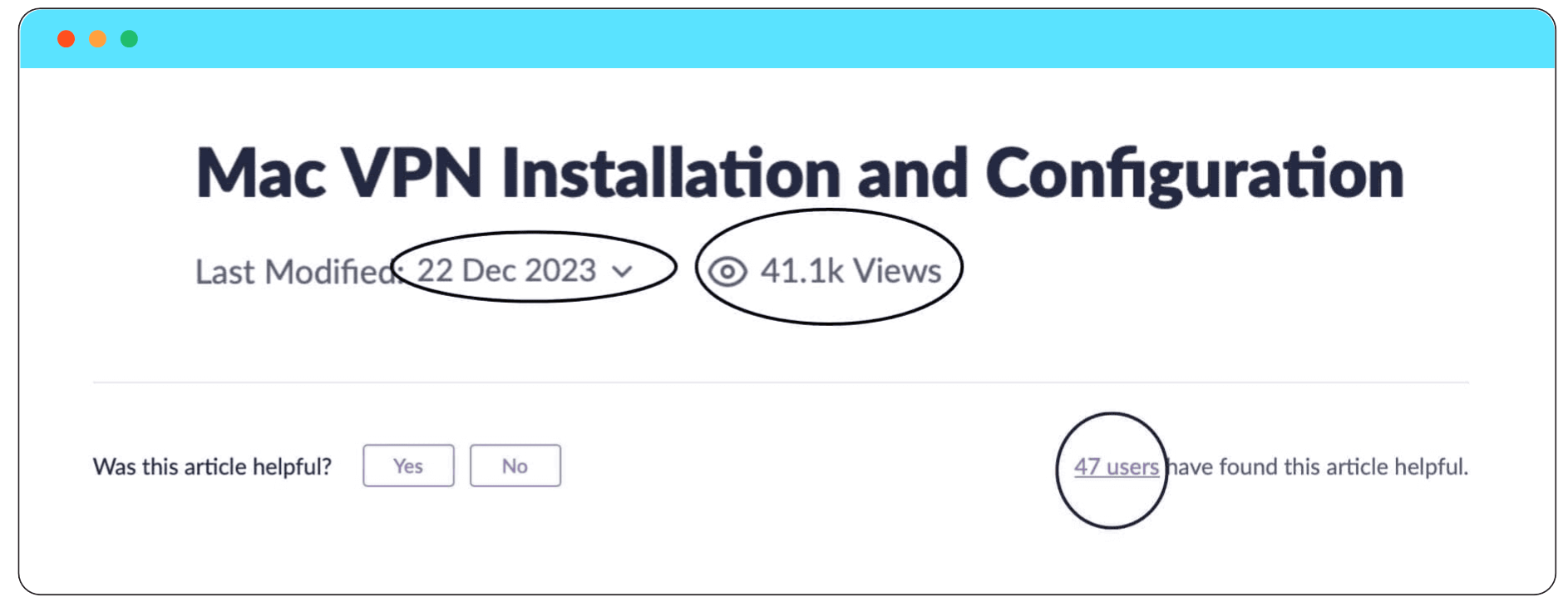
You can boost user engagement by adding features that track article views and gather feedback. For instance, a prompt like "Was this article helpful?" with "Yes" or "No" options can offer immediate insights. Displaying how many users found the article helpful, similar to the example in the screenshot, helps measure content effectiveness. Additionally, showing when the article was last updated builds trust and ensures the content remains current.
Provide direct input channels, like feedback forms, where users can suggest improvements. For example, users might request additional examples or clarifications, which can be incorporated in future updates.
Track usage analytics like time spent on documents, access frequency, and search paths. If analytics show that users frequently abandon searches, it may indicate a need to improve search functionality or document organization.
At Zoho, technicians use runbooks during critical operations to ensure all steps are followed and to minimize human error. For example, if a technician opens a port and previously caused a disruption, they are prompted to review the runbook, which now includes a warning about the past issue. This ensures caution and consistency, and is part of a plan to integrate a knowledge bot that offers relevant ticket resolutions and suggestions.
In sysadmin tasks, automation helps streamline processes, such as installing applications and granting access for new laptops via a script. However, some laptops were issued without running the script. To address this, a mandatory script execution log was introduced, allowing the team to track whether the process was followed, ensuring consistency and quick identification of any deviations.
Metrics
| Metric | Context |
|---|---|
|
Resolution time |
Analyze how knowledge utilization affects incident resolution times by comparing metrics before and after implementing a KM system to measure its effectiveness. |
|
Number of times an article is used |
|
|
Number of approved articles |
|
|
Number of incidents resolved with a particular knowledge article |
|
|
User satisfaction rate |
|
|
Average time taken to find materials |
|
|
Number of times the KB was accessed |
|
|
KB contributions categorized by roles |
|
|
Errors reported by staff or detected at audit |
|
|
Number of support tickets created before and after the KB article |
|
6. Update
To keep the KB up-to-date and pertinent, it’s important to refresh the content consistently.
Review schedule
Set a regular review schedule, like quarterly updates for technical documents, to reflect changes in procedures or technology. For example, technical documentation might be reviewed quarterly to incorporate any updates.
Expiry management
Implement expiration dates for documents like temporary policies or project-specific guides to prevent the use of outdated information.
Version control
Track changes with version history and archive older versions. Introduce an archiving process for outdated knowledge that still holds historical value. For example, previous versions of safety protocols that have been replaced can be archived, allowing employees to reference them if needed for historical context or audit purposes.
Continuous improvement
Continuously update documents based on new insights. Additionally, senior employees and mentors must ensure that knowledge is appropriately transferred to the right individuals before leaving.