- HOME
- AI-Powered Analytics
- AI-powered decision-making: How AI and automation are democratizing strategic IT decisions
AI-powered decision-making: How AI and automation are democratizing strategic IT decisions
- Last Updated: October 8, 2026
- 627 Views
- 8 Min Read

Traditional decision-making approaches often burden IT teams by relying on strategies that are filled with guesswork, inaccurate predictions, and inadvertent delays due to reliance on senior executives. By the time decisions are implemented, risks escalate, and preventable issues such as SLA violations, downtime, and patch failures are already unfolding.
The solution lies in leveraging AI-powered decision-making. By deriving key insights, instantly finding root causes, and providing data-backed remediation strategies, AI equips everyone in your IT team with the necessary steps to make proactive and precise decisions.
If you are:
Spending hours ideating strategies based on your metrics and KPIs
Scanning report after report to find a root cause
Relying on analysts and experts to run predictions and advanced analyses
You need to implement AI-powered decision-making in your IT workflows. Let's see how you can do that in six practical ways.
How are AI capabilities democratizing data-driven, enterprise IT decision-making
AI in analytics isn’t just for automating report creation—it’s the equalizer that empowers every role in your IT team to move fast from reactive guesswork to confident, insight-backed decisions.
Here are the five AI capabilities that power this shift:
Decision intelligence: AI periodically auto-analyzes your IT data to uncover hidden inefficiencies and anomalies, and recommends actionable remediation strategies to address them. This enables IT teams to save time monitoring dashboards and KPIs to identify high-impact issues.
Conversational intelligence: With AI assistants, anyone can ask questions in plain language to break down complex data into insights that guide faster, more confident decisions.
Automated root cause analysis: AI pinpoints the top drivers behind KPI shifts, helping teams move from problem detection to preventive action without hours of manual digging.
Automated AI-driven insights: Detailed reports are valuable, but they bury busy teams in numbers. AI summarizes them into powerful narratives highlighting trends, correlations, and anomalies for faster decision-making across the board.
No-code prediction and forecasting: With no-code ML, anyone can build models to predict SLA breaches, patch failures, or asset usage without relying on data scientists—enabling IT teams to anticipate issues and act early, instead of reacting after the damage is done.
Orchestrating IT workflows with agentic AI: With MCP server support, AI can turn real-time IT insights into triggers that launch workflows across your IT systems and apps automatically—ensuring decisions are executed without delays.
6 practical applications of AI-powered decision-making in enterprise IT
Here are six practical ways to implement these AI capabilities in your IT workflows and bring AI-driven decision-making into everyday IT operations.
1. Identifying bottlenecks across IT processes with an AI-powered decision intelligence engine
In IT environments, bottlenecks rarely reveal themselves at a glance. They are buried inside hundreds of incidents, monitoring logs, and performance metrics. Traditionally, spotting these issues means manually sifting through data, creating reports, and analyzing patterns.
Now, with AI-powered decision intelligence, you can analyze your entire IT landscape, identify hidden bottlenecks across systems, and get contextual data-driven recommendations for remediation in seconds.
For example, here's how Analytics Plus' AI-powered decision intelligence engine, Spotlight, discovers inefficiencies in ITSM processes.
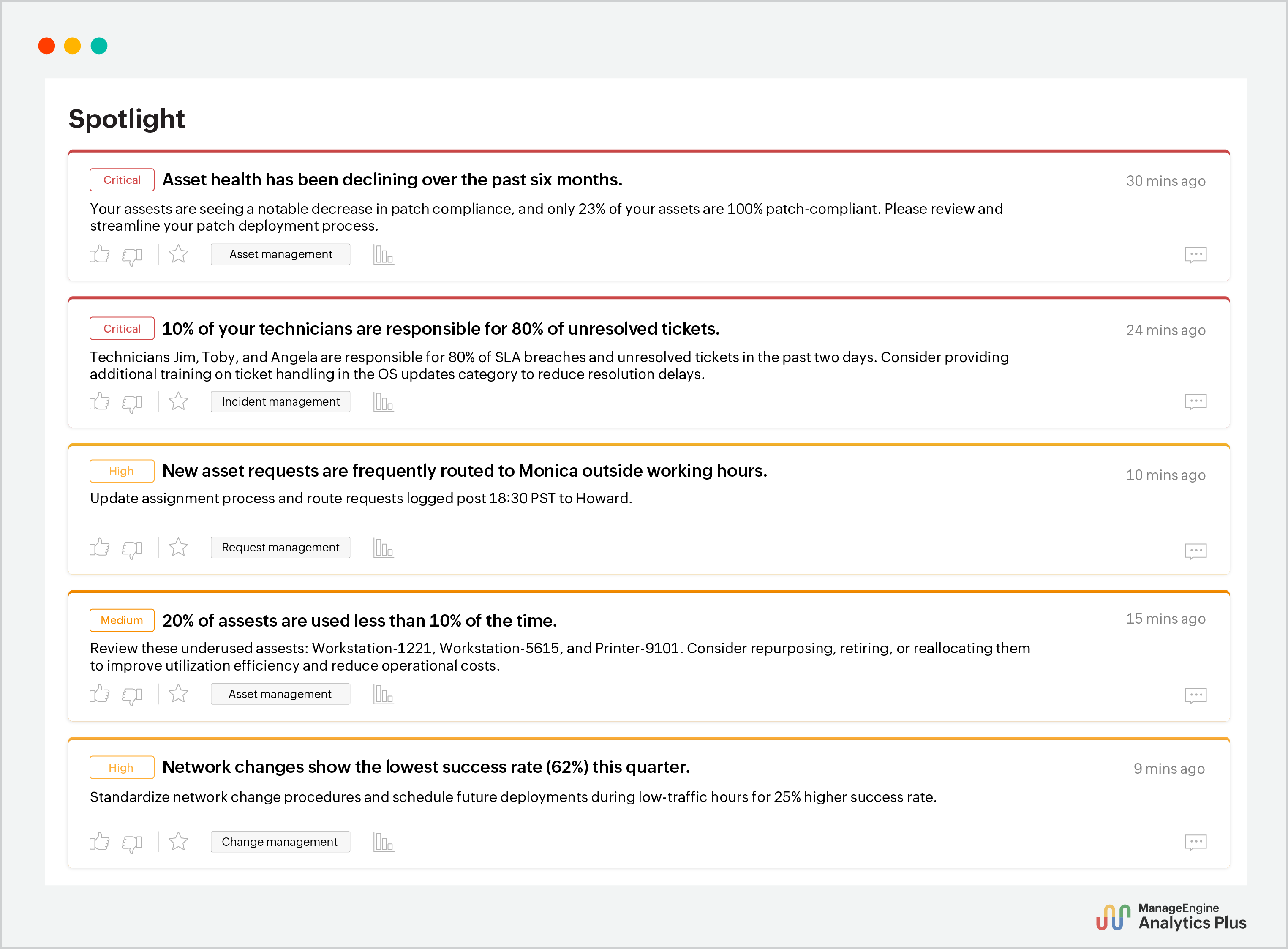
By continually analyzing the entire ITSM landscape across incidents, changes, assets, and more, Spotlight detects inefficiencies the moment they emerge—issues that otherwise need dozens of reports and hours of analysis to uncover.
Beyond detection, it pairs every finding with a contextual and actionable remediation strategy and dynamically assigns priority based on its criticality—transforming data into actionable decisions and reducing the decision cycle from hours to minutes.
2. Fixing SLA violations faster with automated root cause analysis
In your IT environment where many factors can contribute to the deviation in KPIs, finding their root cause can be tedious.
Making the decisions to solve any sudden deviation in KPI metrics is time-sensitive—yet most of the time is spent finding the root cause, leaving teams scrambling to implement prevention strategies. However, with AI-powered root cause analysis, you get top drivers behind trends in seconds, giving your IT team the precious time to prevent critical issues.
Here's how Analytics Plus' AI analyst, Ask Zia, automates the root cause analysis of SLA violations.
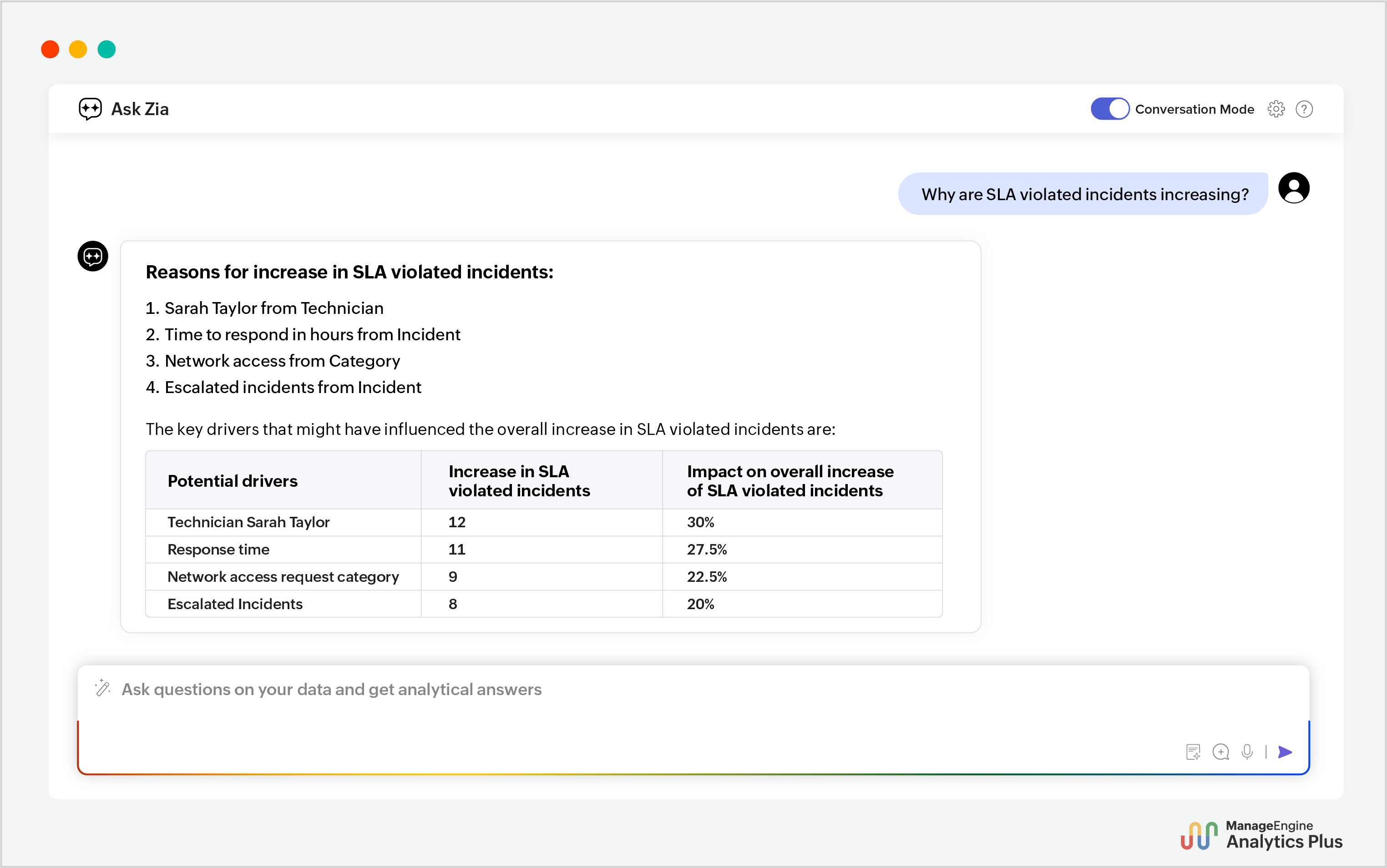
Most AI solutions stop here and leave you to translate these insights into decisions to fix the inefficiencies. Zia also offers actionable remediation strategies to address each of these key drivers.
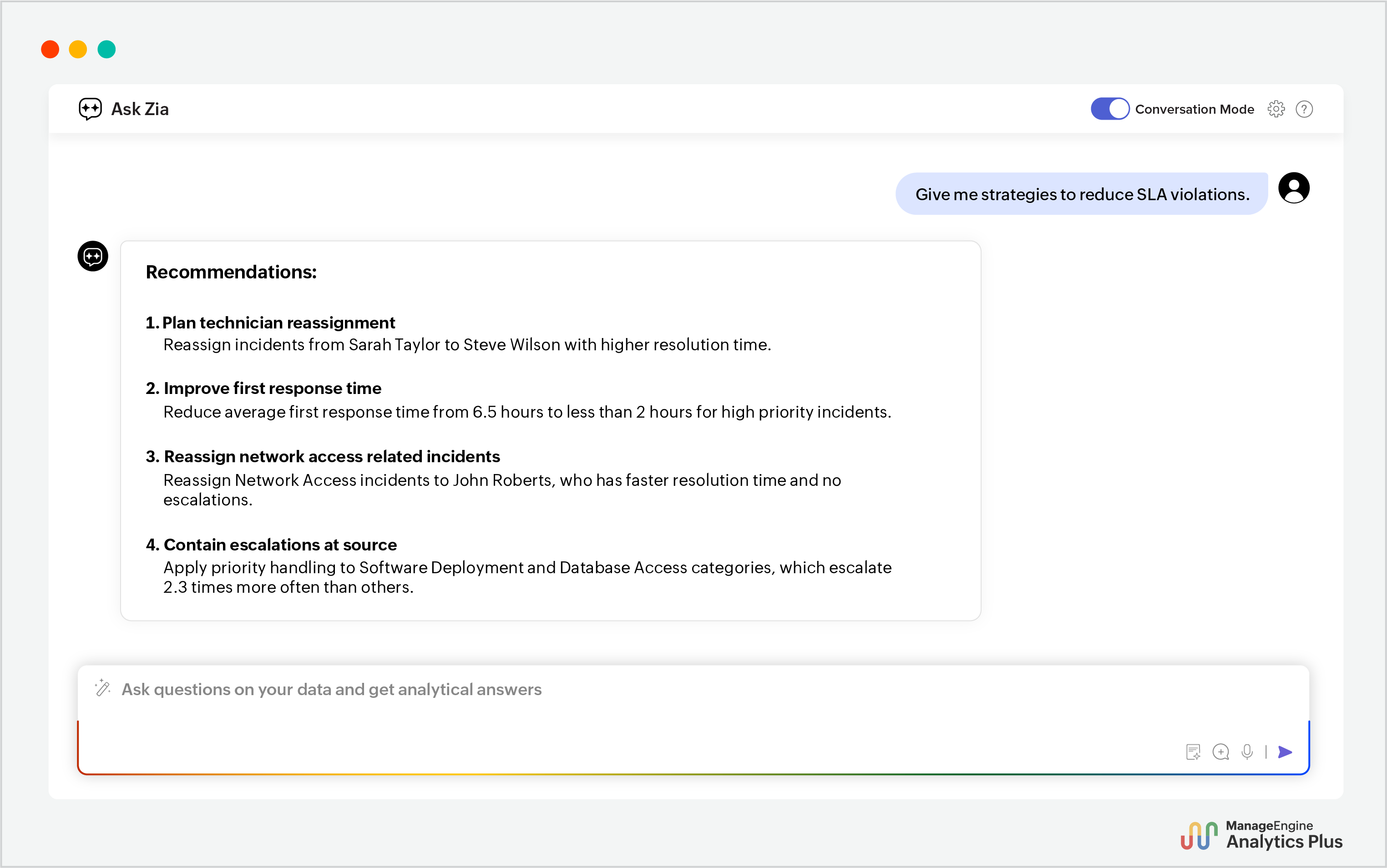
These recommendations provide a clear path forward—which technicians the incidents needs to be reassigned to and which categories need focus to reduce escalations, ultimately addressing the root causes behind SLA violation spikes.
Instead of losing hours hunting for causes, IT managers can make confident, timely decisions that prevent further SLA violations and protect service quality.
3. Streamlining patch deployment strategies using conversational AI
Manually digging through patch deployment stats delays critical decisions on compliance, security, and rollout success.
With powerful conversational AI assistants, you can break down patch deployment data instantly and uncover key insights by simply asking questions.
Here's how endpoint management and security teams can leverage Ask Zia to expedite and improve patch deployment strategies.
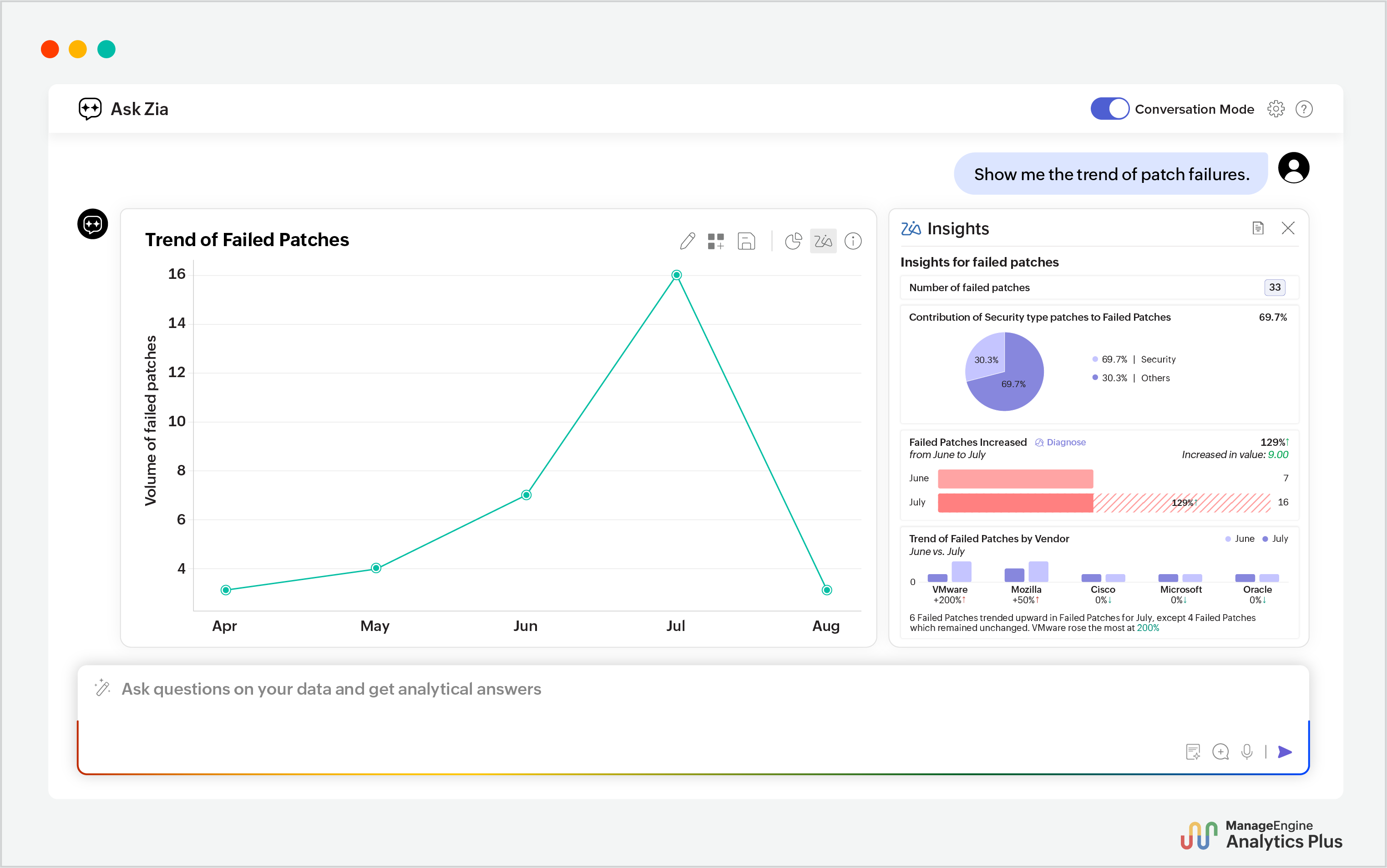
Ask Zia goes beyond insight generation. It delivers visual and narrative insights that instantly highlight the spike in failed patches, the categories driving it, and which vendors show the greatest influence.
These insights reveal where patching strategies are breaking down and where attention is needed. This helps IT teams quickly prioritize fixes and improve patch deployment plans.
4. Predicting downtime accurately with no-code ML models
Application downtime is one of the most disruptive events in IT operations. Yet, monitoring tools only alert after the performance has already degraded—forcing teams into reactive firefighting instead of proactive decision-making. And when traditional prediction methods require a team of data scientists, weeks of model training, and specialized ML skills, further delays are encountered.
With no-code ML, these barriers disappear—enabling IT teams to predict downtime accurately and plan timely preventive actions to avoid it.
Unlike generic forecasting, which often projects a future value based solely on past trends, no-code ML models adapt to your organization's unique IT environment. No-code ML models also consider how various real-time factors interact and change over time and factor in complex patterns.
For example, here's an analysis created using the no-code ML engine of Analytics Plus.
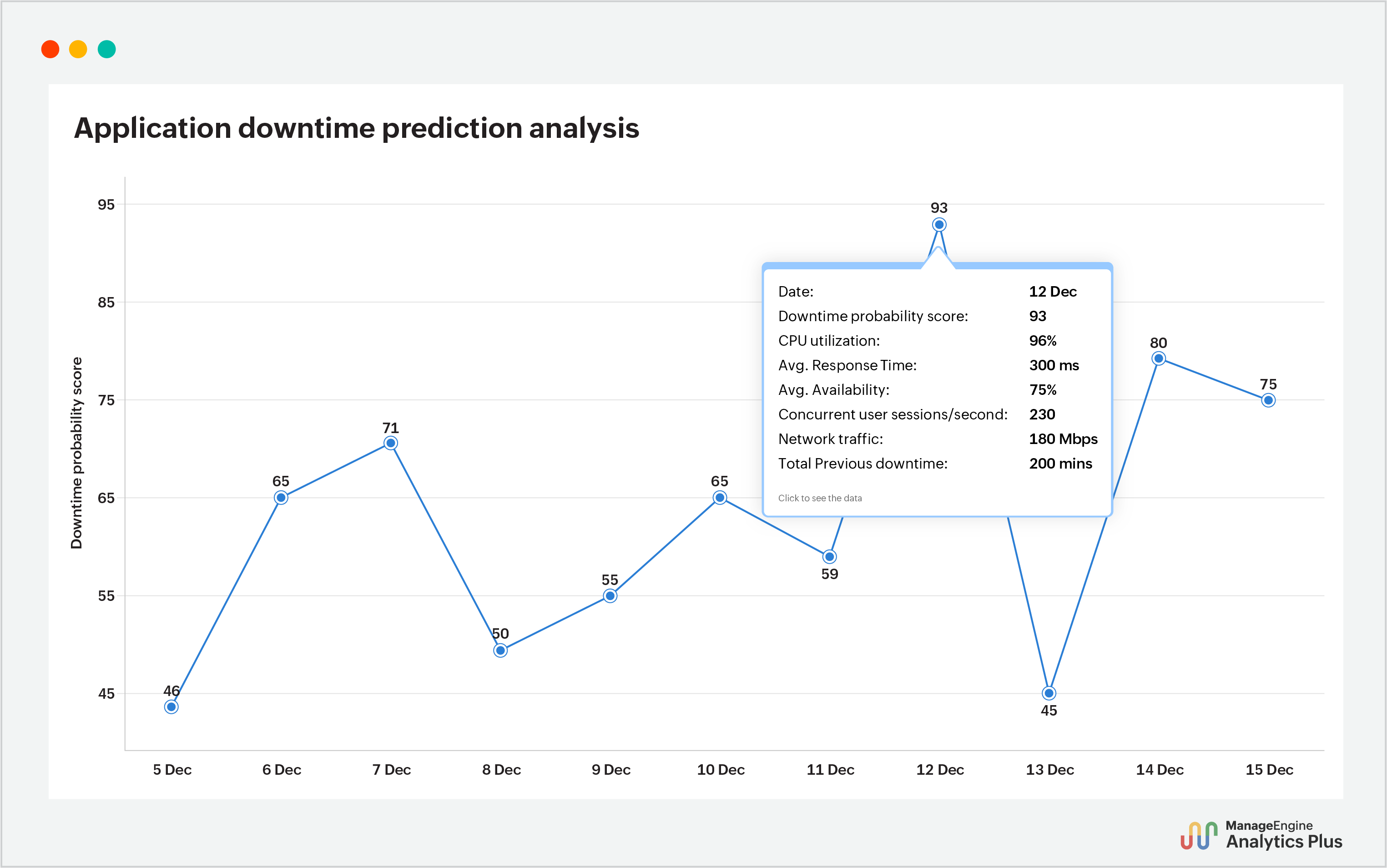
This analysis shows how a custom ML model can predict a dynamic downtime probability score with great accuracy based on multiple factors like response time, availability, CPU usage, previous downtime history, and more.
By having these high-risk dates in hand, ITOps teams gain the foresight to decide proactively and plan targeted preventive actions—such as rerouting workloads, scheduling maintenance, or allocating backup resources before users are impacted.
With the what-if analysis functionality that comes along with the no-code ML builder, you can also simulate scenarios like decreasing the workload or scaling memory capacity to understand which factors would affect the downtime risk. This foresight helps ITOps teams to decide on which strategy best reduces the probability of downtime.
5. Implementing proactive cloud capacity planning with multi-variate forecasting
Cloud capacity planning is a balancing act: provision too much and costs spiral, and with too little you risk performance degradation. That's why IT teams rely on forecasting to guide these high-stakes decisions.
But traditional uni-variate forecasting can mislead these decisions by only accounting for past trends and overlooking key interdependencies. It is not suitable for the constantly evolving demands and complexity of today's IT environments.
Multi-variate forecasting changes that. Instead of relying solely on historic utilization trends, it factors in a wide range of metrics from across your IT environment. For example, when forecasting server utilization, you can incorporate CPU usage, seasonal demand spikes, and other relevant operational signals to gain accurate, context-rich forecasts.
This gives IT leaders the confidence to rightsize resources in a proactive, cost-efficient manner, ensuring resilience to changing demands.
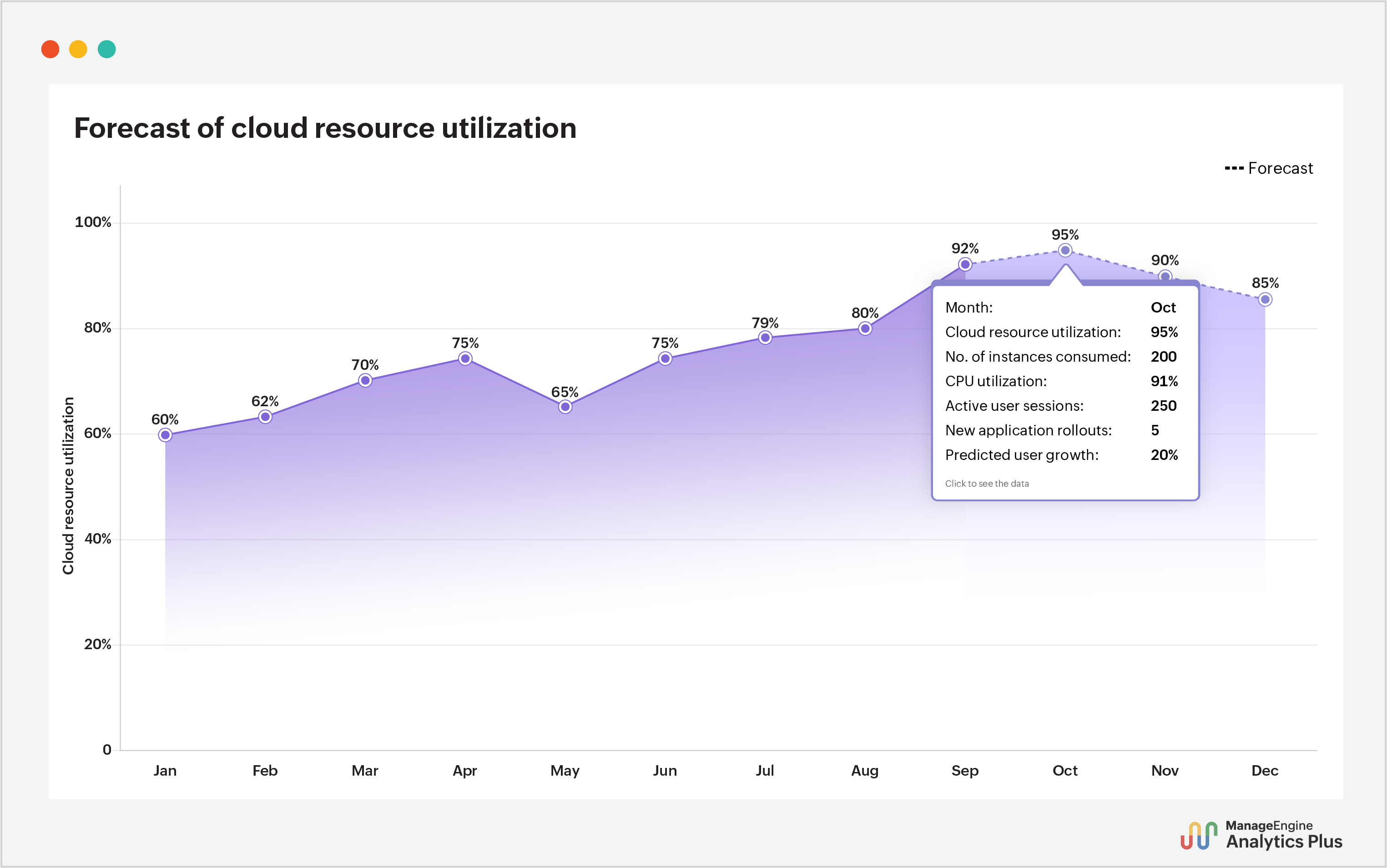
In this visualization, you can see that the utilization spikes to 95% in October. This peak wasn’t surfaced by looking at the historical utilization trend alone—the model combined influencing workload metrics and future resource consumption, reflecting how the demand actually behaves in a complex IT environment.
With AI-powered predictive analytics in hand, IT teams can thus confidently implement accurate capacity planning to avoid both downtime and costly over-provisioning.
6. Orchestrating agentic AI workflow for automating software procurement decisions
With AI capabilities evolving from generative to agentic, you can now orchestrate workflows across your IT ecosystem. This orchestration capability means the role AI in decision-making is not only helping you decide what to do, but is also handling how and when.
Let's consider the case of software procurement. IT leaders walk a tightrope to ensure every purchase reflects real organizational demand or it risks draining the IT budget. Routine, comprehensive audits are thereby vital to track where software is underutilized across departments, its associated costs, and where the real demand lies to make an informed decision.
By leveraging unified analytics augmented with workflow orchestration, IT leaders can instantly get real-time insights into department-wise software utilization and demand trends—eliminating the need for manual and time-consuming audits. They can also turn these insights into immediate action by automating strategies like reallocation of unused licenses and raising cancellation requests ahead of renewal.
Let's look at this agentic AI workflow in action.
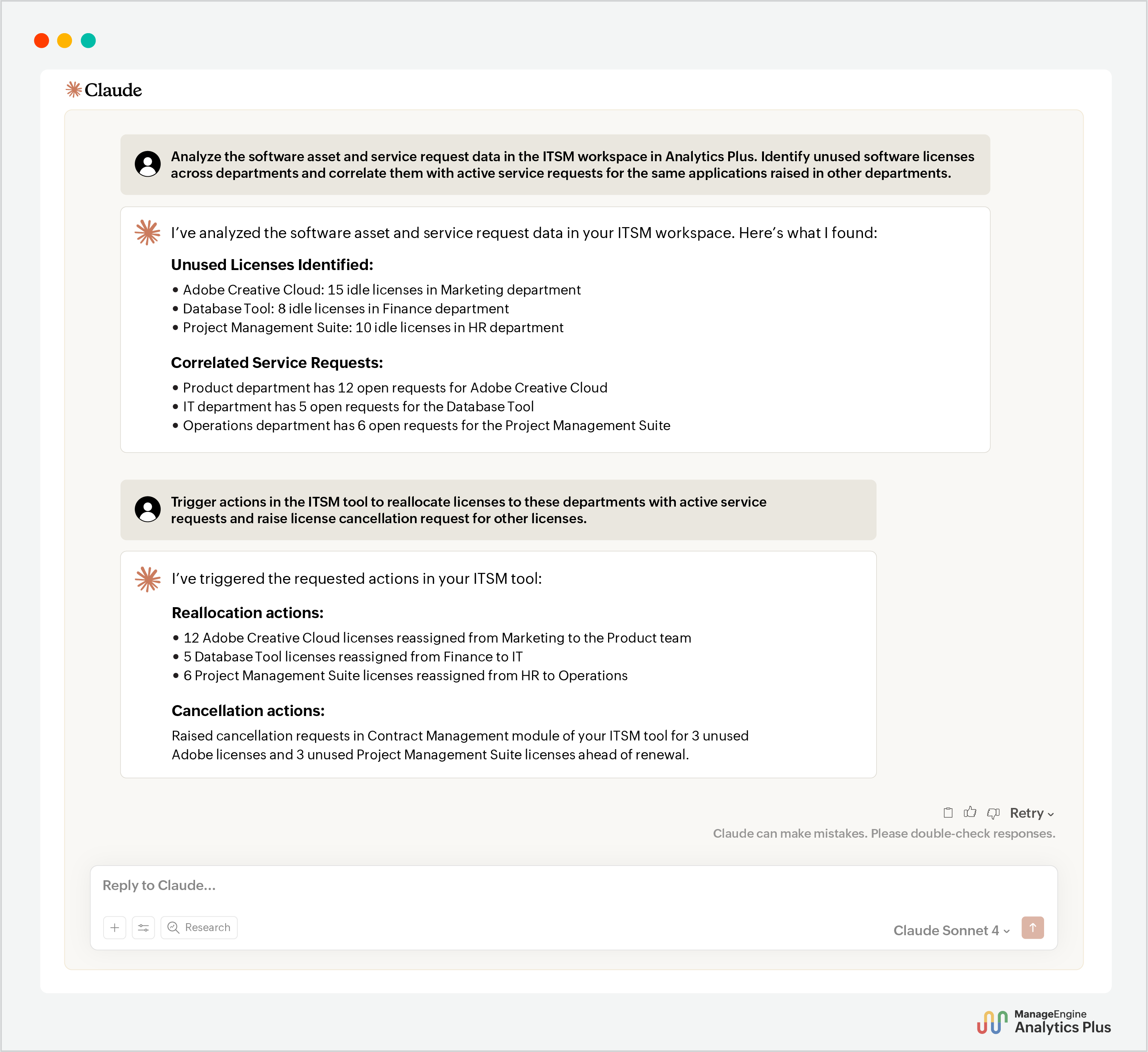
This workflow makes software purchasing decisions efficient and straightforward by showing exactly where licenses are underused and where demand exists. IT leaders no longer have to juggle scattered data or continue renewing underutilized licenses and can confidently implement intelligent procurement strategies.
Start automating decision-making with AI
In IT environments, speed and clarity in decision-making can make the difference between preventing a crisis and reacting to one. By leveraging AI-driven decision- making, every person in your IT organization—from frontline technicians to CIOs—can move from data overload to clear, actionable insights in minutes to implement smarter, faster data-driven decisions.
The analyses included in this blog are created using ManageEngine Analytics Plus—a powerful AI-powered IT analytics and decision intelligence platform. Try these AI capabilities today with a free 14-day trial. Need to see what's in it first? Book a personalized demo.
FAQs
1. Which tool is best for AI-powered decision-making?
The right solution depends on factors such as use cases, AI capabilities, and the level of automation required. An AI-powered analytics and decision intelligence platform such as ManageEngine Analytics Plus enables AI-driven decision-making by consolidating fragmented IT data, generating AI-driven insights, automating root cause analysis, recommending data-driven remediation strategies, and orchestrating agentic AI workflows.
2. What are the applications of AI-powered decision-making across industries?
AI-powered decision-making helps organizations improve planning, identify risks, optimize resources, and respond faster to changing conditions across industries:
Healthcare: Map patient care journey, predict staffing requirements, and uncover operational cost drains.
Manufacturing: Predict equipment downtime, uncover inventory imbalances, and flag risks across suppy-chain operations.
Retail: Flag friction points in the customer journey, classify customers based on churn probability, and predict demand based on market trends.
BFSI: Detect potential fraud and risks, assess credit and customer profiles, and optimize regulatory and compliance decisions.
3. Which decision intelligence platforms perform root cause analysis?
With AI-powered analytics and decision intelligence platforms like Analytics Plus, you can automate root cause analysis by simply conversing with an in-built analytics assistant. It correlates relevant metrics, pinpoints possible causes, and suggests actionable strategies to address them.