- HOME
- AI-Powered Analytics
- Agentic AI comes to Analytics Plus: Orchestrate IT operations effortlessly
Agentic AI comes to Analytics Plus: Orchestrate IT operations effortlessly
- Last Updated: December 23, 2025
- 686 Views
- 5 Min Read

Imagine a world where you can simply ask, Why are SLA violations high? and find the root cause, get contextual suggestions to fix the problem, and trigger corrective actions—automatically, and in seconds.
With agentic AI, you can achieve all this and more. It brings powerful, real-time IT intelligence into your IT workflows—from creating dashboards and recommending remediation steps to triggering preventive actions autonomously.
Introducing agentic AI in Analytics Plus
Analytics Plus already enables IT leaders like you to uncover insights from data and make proactive decisions with GenAI. Now, it enables you to orchestrate workflows across the IT landscape through agentic AI.
Ask Zia 2.0 and support for Model Context Protocol (MCP) are two exciting updates at the heart of this evolution.
Ask Zia 2.0: Your intelligent IT analyst
Powered by Zoho LLM, Ask Zia 2.0 delivers a deeper understanding of IT data with contextual reasoning, root-cause analysis, and intelligent remediation suggestions. It doesn’t just surface insights—it helps you act on them. And because Zia can be embedded across your IT stack, it delivers context-aware insights tailored to your environment in real time.
MCP: Orchestrating agentic AI workflows across your IT ecosystem
With native MCP server support, Analytics Plus now becomes a part of your agentic AI ecosystem. Real-time IT metrics turn into triggers for automated workflows. Instead of just analyzing KPIs or diagnosing issues, Analytics Plus can launch preventive actions like sending smart alerts, escalating incidents, or rebalancing loads.
This marks the transformative shift from GenAI to agentic AI—where Analytics Plus not only helps you understand your IT environment, but also automates remediation and workflow orchestration across your IT landscape.
Why enterprises need agentic AI for IT operations
Let’s explore four scenarios where agentic AI can solve real-world IT challenges.
1. Root cause analysis and remediation of application downtime
Your IT team notices a steady increase in downtime over the past month. Instead of manually digging through data scattered across multiple tools, you can simply ask Zia:
Why did outages happen last month?
Now, with Ask Zia 2.0, root cause analysis becomes conversational, contextual, and actionable.
See Zia's intelligent root cause analysis in action:
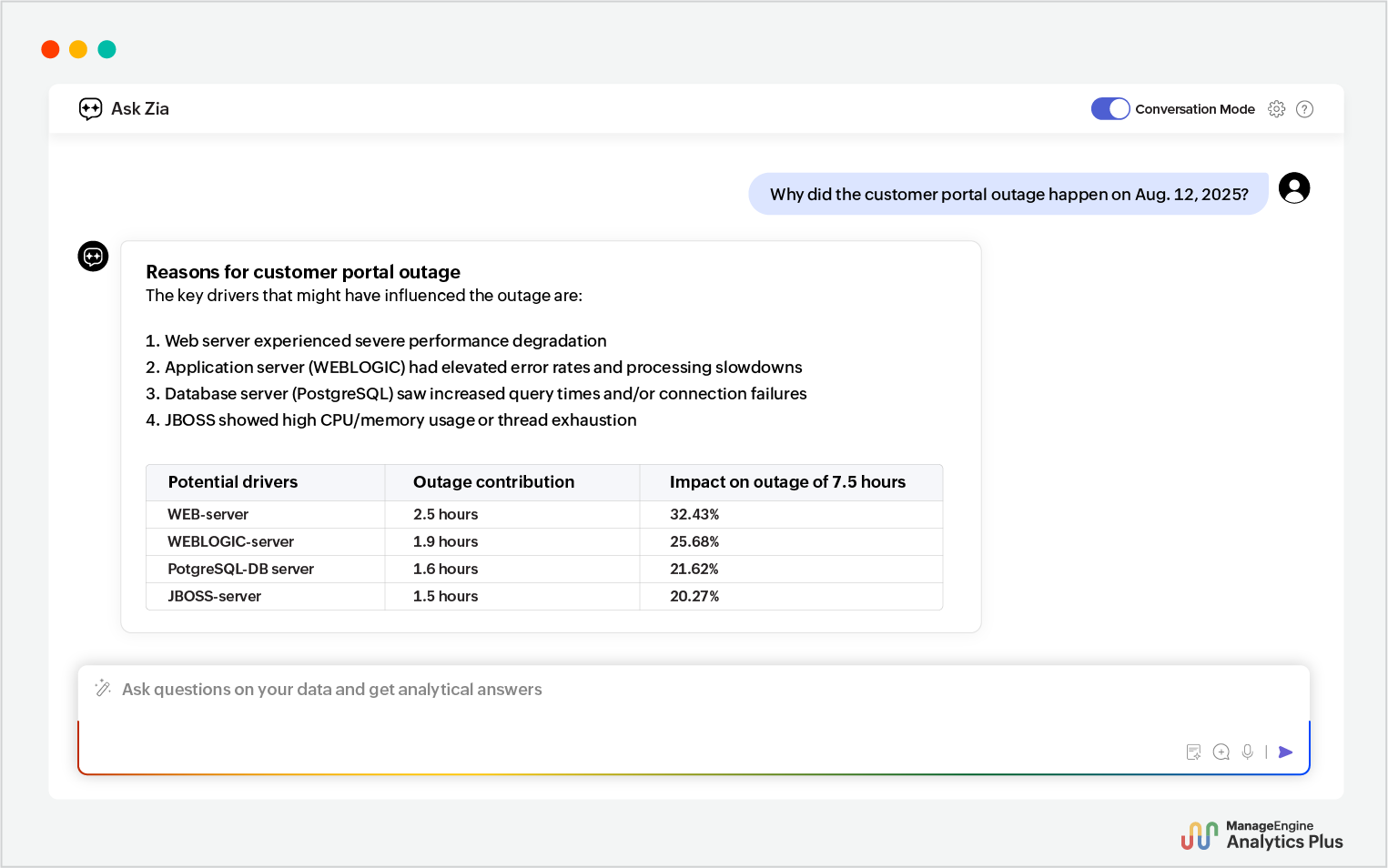
Ask Zia 2.0 digs through your ITOps data and lists the top key drivers of the downtime.
It leverages its LLM-powered reasoning to understand the context and pinpoint the servers contributed to the outage and their relative impact.
However, it doesn’t just stop at identifying the issue. Using its data-driven reasoning engine, it offers real-time remediation strategies.
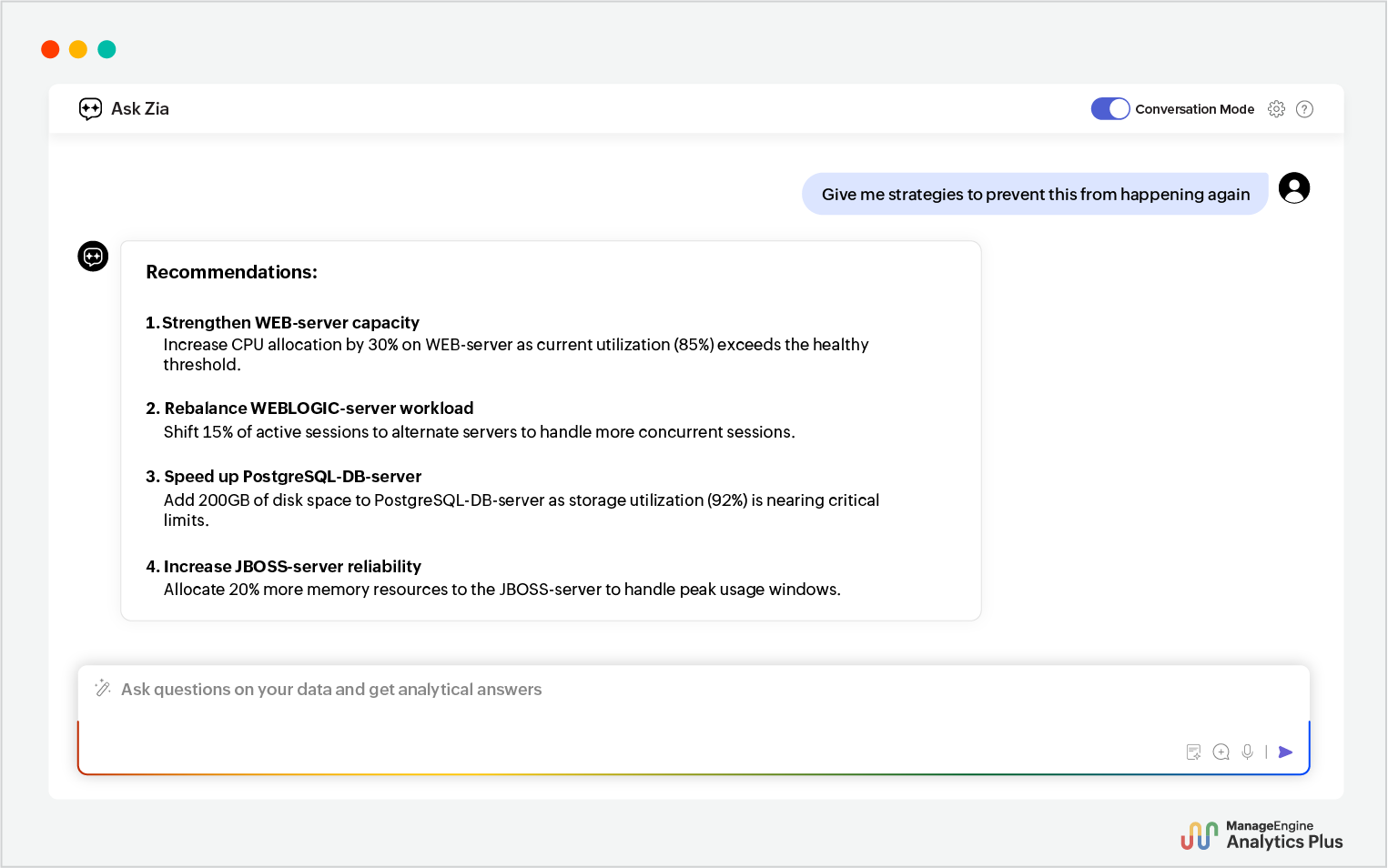
These suggestions aren't just vague steps. They're actionable and contextual—based on your unique IT environment with highly specific and quantified recommendations to reduce decision making time and make confident remedial actions for anyone in your ITOps team.
This is how Ask Zia 2.0 becomes your intelligent IT analyst, helping you detect patterns early and act fast through simple conversations.
2. Assessing infrastructure scaling and ROI to avoid overspending
Infrastructure investments like adding more servers are often made with the assumption that more capacity means better performance and higher revenue. But without visibility into how revenue and ROI are evolving as you scale your infrastructure, you risk over-provisioning and wasting resources.
With Ask Zia 2.0, you don’t need to manually correlate infrastructure spending and revenue across multiple departments and projects. You can simply ask:
What was the total infrastructure spending last year?
Compare infrastructure spending and ROI.
Here's how Zia automates this infrastructure spending analysis:
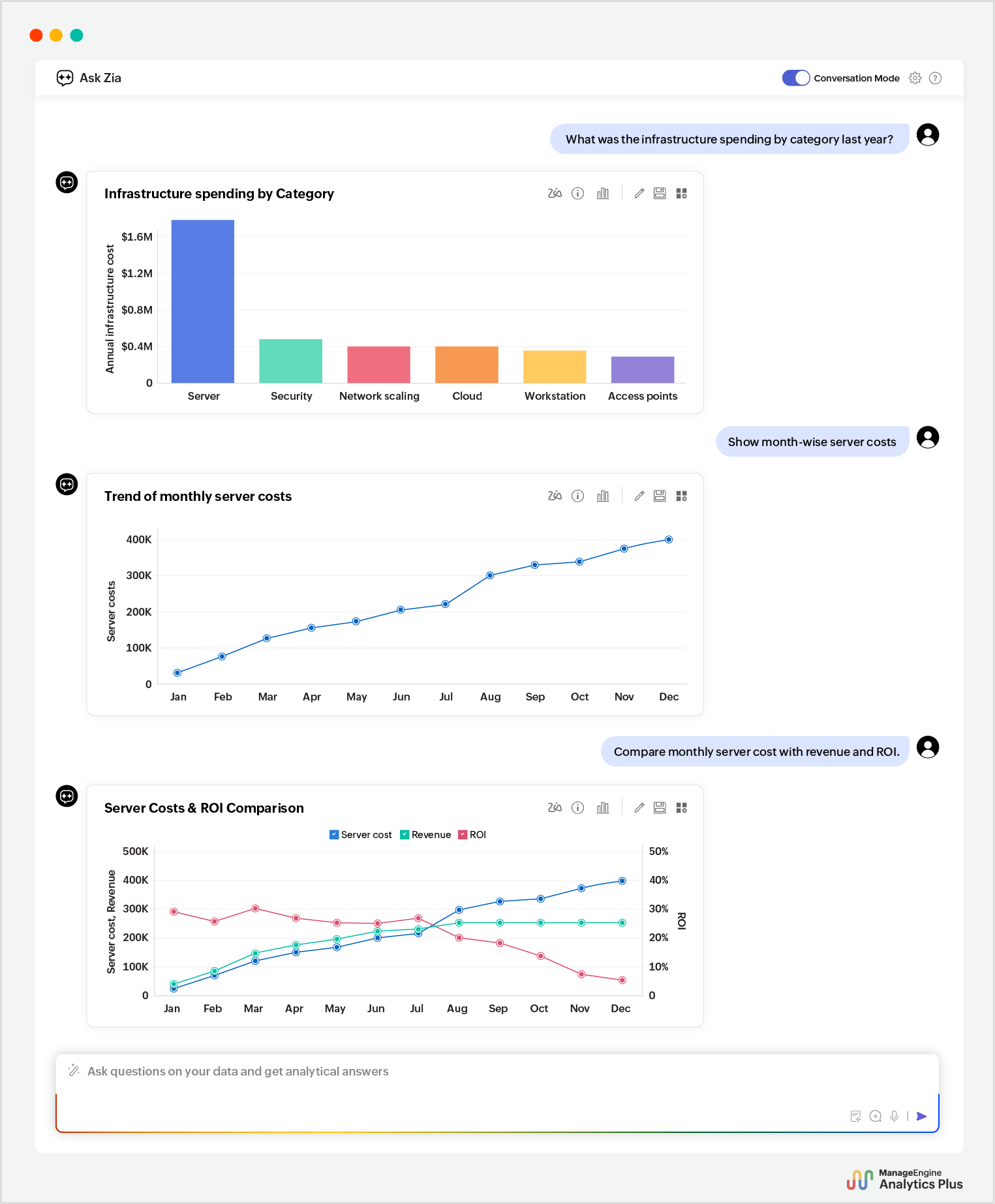
With Ask Zia 2.0, you can link infrastructure growth directly to ROI, identify the saturation point where infrastructure scaling starts yielding negative ROI, and ensure IT budgets are spent where they deliver the most value. This functionality can be extended across the IT landscape, effortlessly bridging disconnected IT functions and finding correlations, helping IT teams improve overall efficiency and meet outcomes effectively.
3. Improved incident reassignments with agentic AI workflows
In most IT service environments, incident reassignments are reactive and tedious, often based on static rules and thresholds. To improve your service desk's performance, overall compliance, and end user satisfaction, you need dynamic reassignments that allow service desk managers to identify possible problem areas and reassign tickets effortlessly.
With agentic AI, Analytics Plus allows you to orchestrate your incident reassignment workflows seamlessly. By integrating with the LLM of your choice, Analytics Plus delivers contextual IT intelligence, allowing IT leaders and service desk managers to transform real-time metrics, like SLA violations and technician load factor, into actionable triggers like ticket reassignments.
In this case, you can quickly identify incidents close to SLA breaches, understand technician performance and availability, and automatically trigger reassignment in your ITSM platform.
Here's how this agentic AI workflow works in real time:
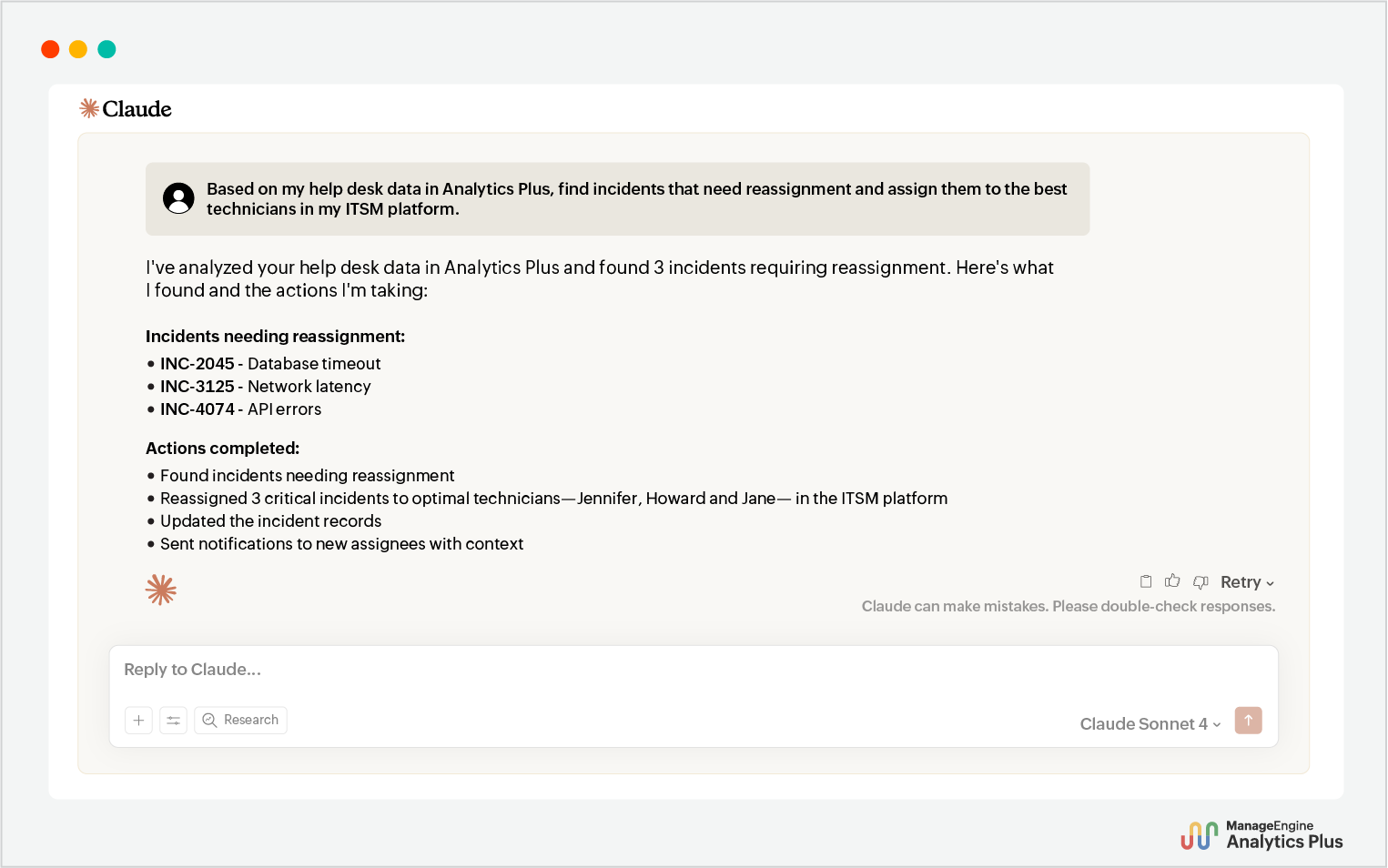
Analytics Plus, therefore, allows IT management to make real-time IT intelligence an integral part of workflow orchestrations. The outcome? Faster resolutions, better SLA compliance, and happier end users—all without human intervention.
4. Proactive change impact detection to prevent disruptions
Traditionally, assessing the impact of changes means jumping across tools, identifying key factors and creating many reports from scratch—a time-consuming, manual and often ineffective process.
Analytics Plus simplifies this by unifying ITSM records and infrastructure telemetry into a single, enriched dataset—filled with key KPI metrics, baselines, and historical context. This cross-domain intelligence enables IT leaders to orchestrate impact analysis workflows in a single, unified interface.
With agentic AI workflows, you can now automatically:
Analyze the impact of change across assets and users.
Find upcoming changes with similar impact and trigger preventive actions.
Improve the success of change rollouts and avoid disruptions in the future.
Here's this agentic AI-powered change impact prevention workflow in action:
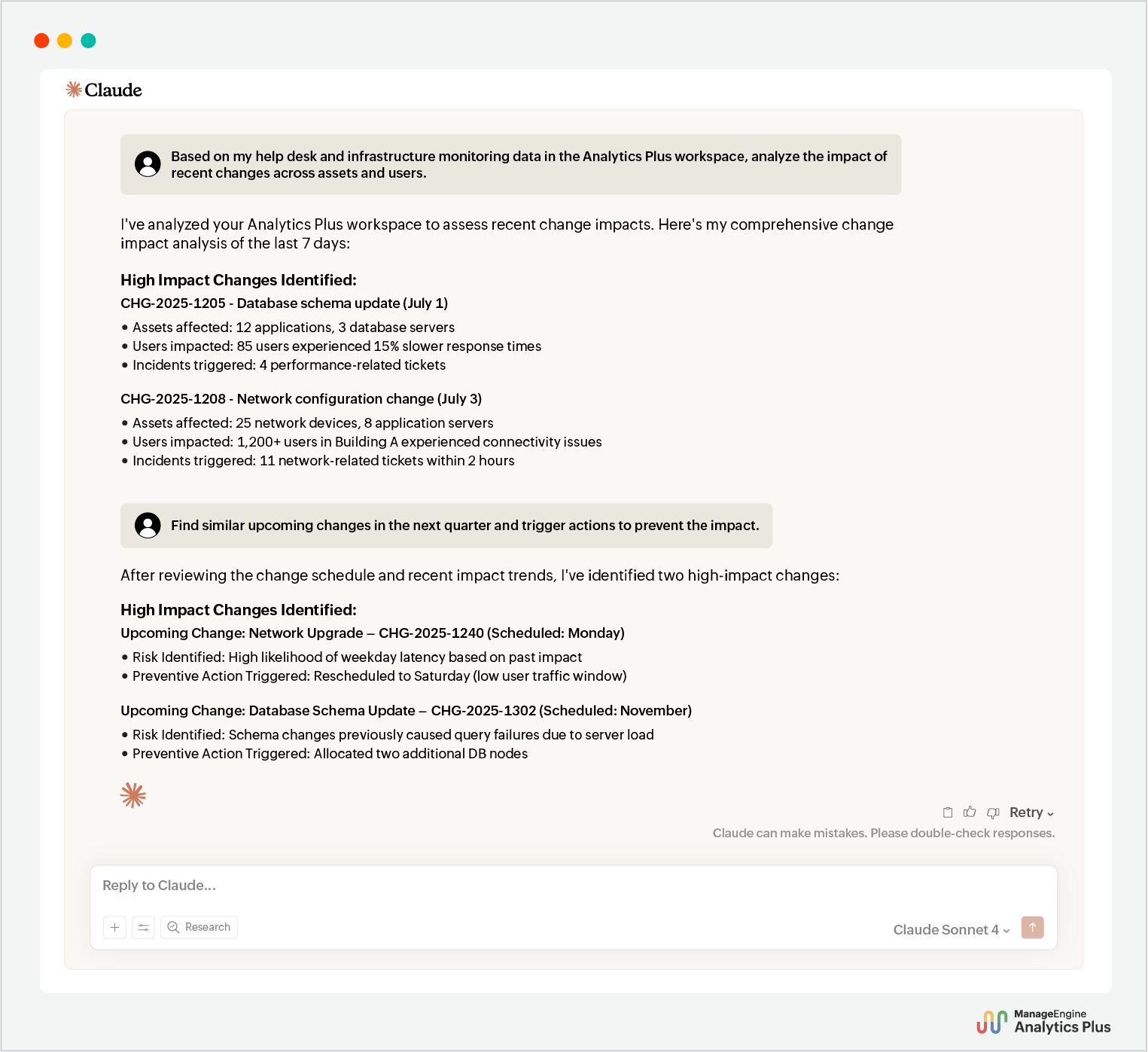
With this agentic AI workflow, Analytics Plus enables IT teams to proactively identify impacts of the change based on past rollouts and orchestrate preventive actions like rescheduling, resource allocation, and user impact mitigation automatically before changes go live. This prevents disruption of IT operations and builds a smarter, more resilient change management process.
Beyond orchestrating workflows, you can accelerate your everyday analytics tasks with Ask Zia 2.0. From building dashboards and generating custom formulas to scheduling and sharing reports, these tasks can now be automated in seconds—just by asking.
The next leap: Building native IT analytics agents
You've seen how agentic AI in Analytics Plus is changing autonomous data-to-action workflow for IT operations—but this is just the beginning.
We are building toward a future where you can create your own AI-powered analytics agents natively within Analytics Plus—agents that can coordinate with specialized agents of ITSM, observability, and cybersecurity systems. Together, they will bring context-aware decision-making across the IT stack, eliminate bottlenecks, and ensure your IT operations stay ahead of disruptions.