

- Free Edition
- Quick links
- Active Directory management
- Active Directory reporting
- Active Directory delegation
- Active Directory permissions management and reporting
- Active Directory automation
- Governance, risk, and compliance
- Microsoft 365 management and reporting
- Microsoft 365 management and reporting
- Microsoft 365 management
- Microsoft 365 reports
- Microsoft 365 user management
- Microsoft 365 user provisioning
- Microsoft 365 license managementn
- Microsoft 365 license reports
- Microsoft 365 group reports
- Dynamic distribution group creation
- Dynamic distribution group reports
- Exchange management and reporting
- Active Directory integrations
- Popular products
Eliminate manual AD management bottlenecks with comprehensive automation that handles user provisioning, cleanup, and compliance automatically.
What is Active Directory automation?
Active Directory (AD) automation refers to the use of software solutions and scripting to automatically perform routine, repetitive, and critical tasks within AD. Instead of manually creating user accounts, modifying group memberships, or cleaning up stale objects, automation tools execute these processes based on predefined rules, schedules, or triggers. This not only significantly reduces the manual workload on IT administrators but also enhances consistency, improves security, and ensures compliance across the entire AD environment. Effective AD automation transforms reactive AD management into a proactive and efficient operation.
Streamline your Active Directory operations with powerful automation
Managing AD can be a complex, time-consuming, and error-prone process, especially in large and dynamic environments. Manual execution of repetitive tasks like user provisioning, group management, and cleanup can lead to inefficiencies, security vulnerabilities, and compliance gaps.
ManageEngine ADManager Plus is a comprehensive AD automation tool designed to transform your AD management. It empowers IT administrators to automate AD tasks, significantly boosting operational efficiency, enhancing security, and ensuring compliance with ease. Move beyond tedious manual processes and embrace automated AD management to free up valuable IT resources and reduce the potential for human error. Modern enterprises recognize that AD automation is fundamental to maintaining competitive IT operations.
Why Active Directory automation is essential for your business?
Implementing AD automation is no longer a luxury for modern enterprises—it's a necessity. Here's why:
- Boost operational efficiency: Automate routine and repetitive AD tasks, freeing your IT staff to focus on strategic initiatives rather than mundane operations.
- Enhance security posture: Ensure timely deprovisioning of inactive accounts, enforce strong password policies, and automate security-critical changes to minimize vulnerabilities and unauthorized access.
- Ensure compliance: Consistently apply security policies, automate auditing, and maintain an accurate AD environment, crucial for meeting regulatory compliance requirements like the GDPR, HIPAA, and SOX.
- Reduce human error: Eliminate manual mistakes in critical AD operations, ensuring data integrity and preventing costly outages or security breaches.
- Cost savings: Lower operational costs associated with manual management by optimizing IT resource allocation and reducing the need for extensive manual oversight.
Key automation capabilities of ADManager Plus
ADManager Plus is recognized among the leading AD automation tools for its robust and user-friendly capabilities, allowing you to automate AD tasks without complex scripting.

Automate Active Directory user creation and provisioning
Efficient user life cycle management is paramount. ADManager Plus simplifies and accelerates the entire process:
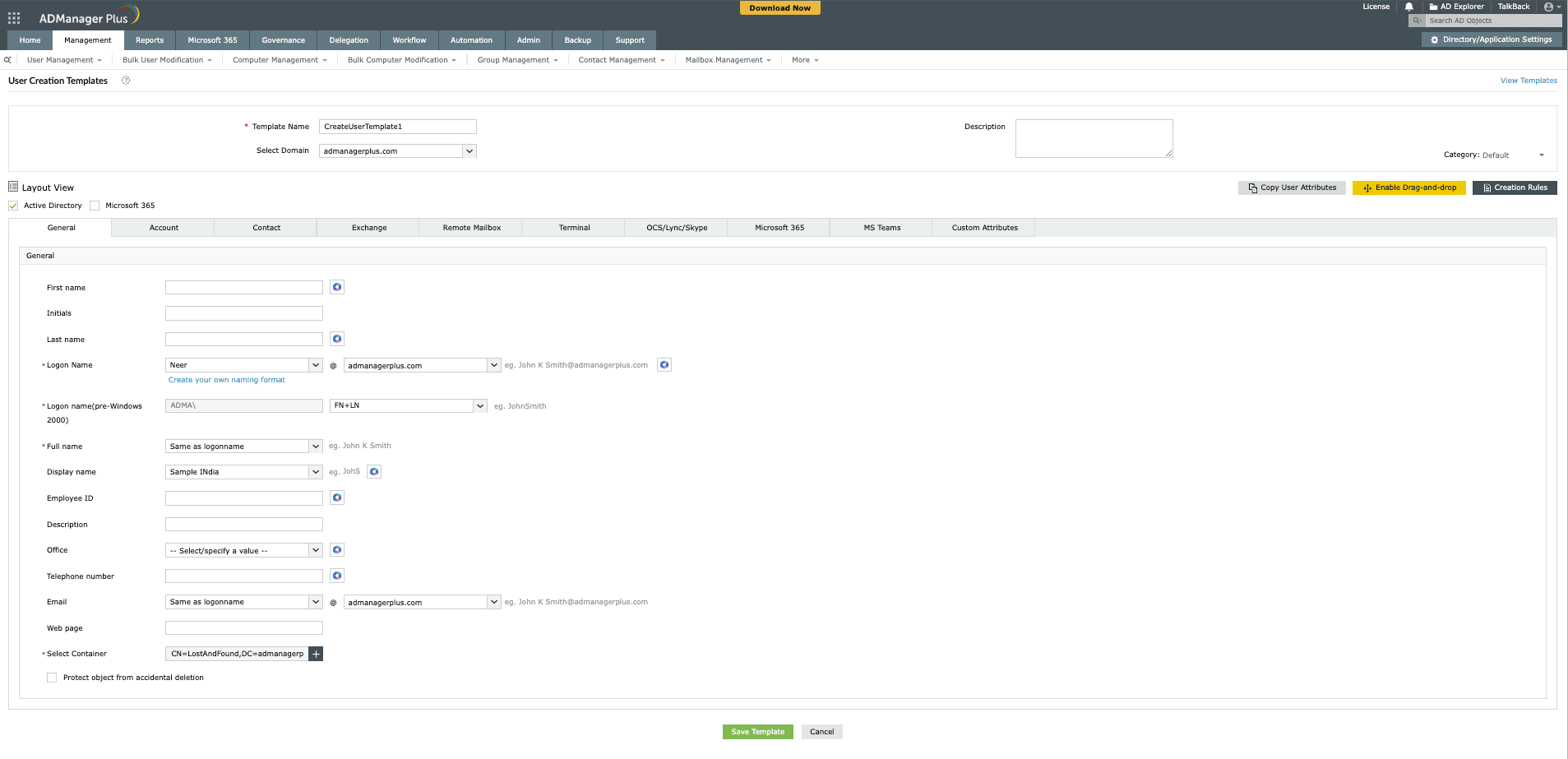
- Template-controlled provisioning: Standardize user creation with predefined templates that include all necessary attributes, ensuring consistency across your organization. This is crucial for seamless AD account creation automation.
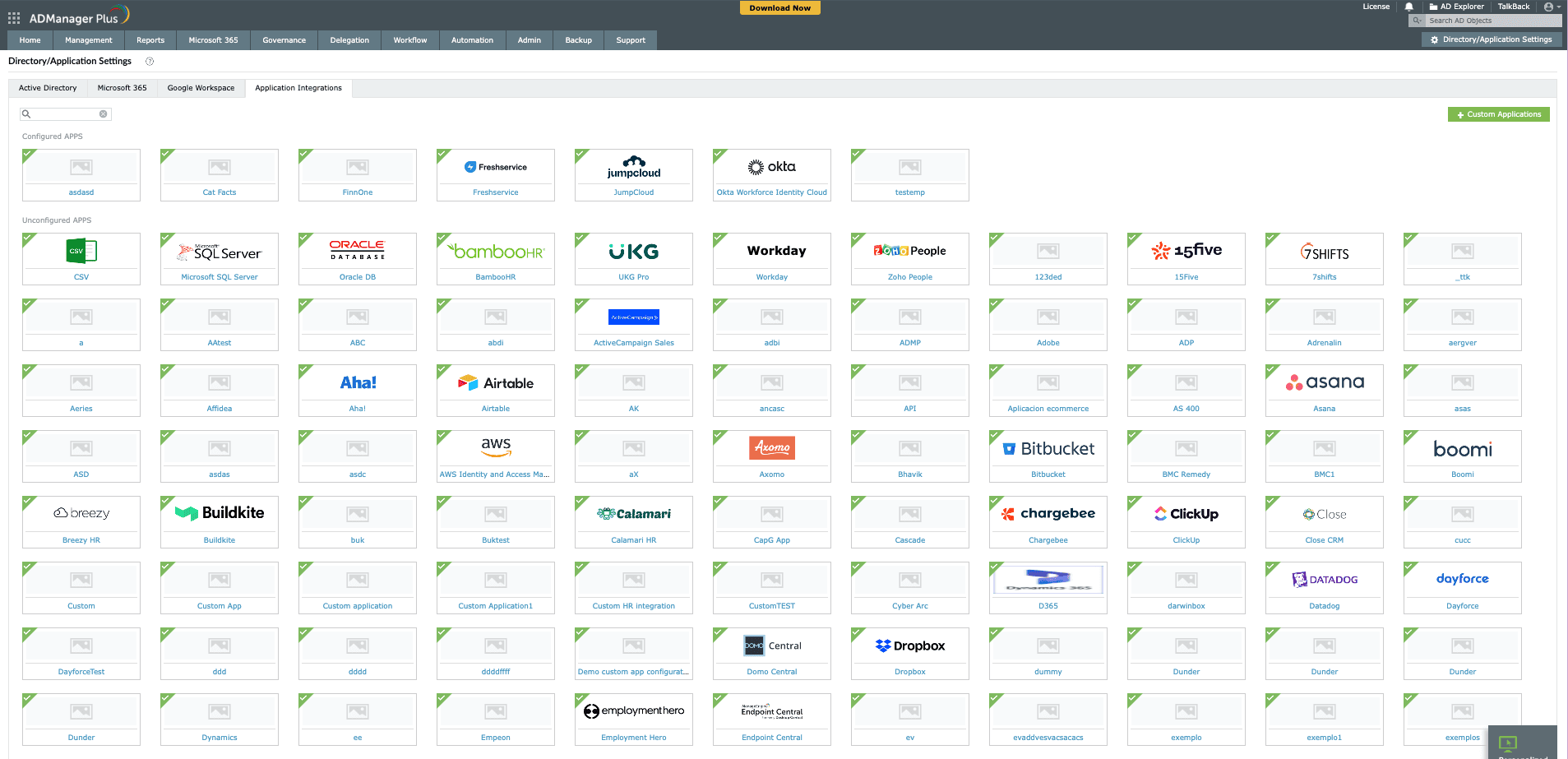
- Seamless HRMS and database integration: Directly integrate ADManager Plus with popular human resource management systems (HRMS) such as Zoho People, UKG Pro, BambooHR, and Workday, as well as external databases. This allows for complete automation of user provisioning and deprovisioning based on HR data, making it effortless to automate AD account creation.
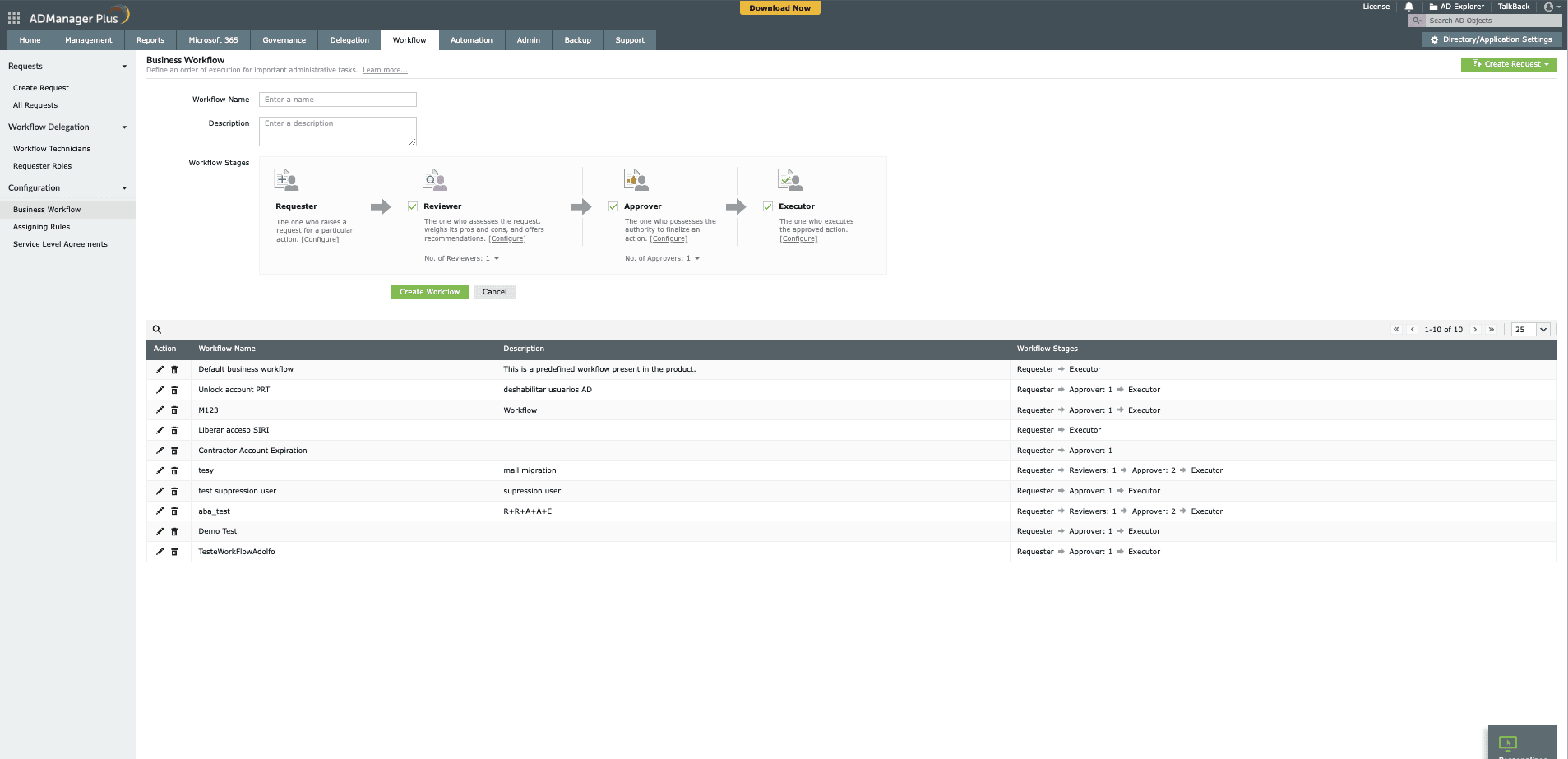
- Approval workflows: Implement a multi-level review and approval process for all automated tasks, ensuring controlled automation even for critical operations.
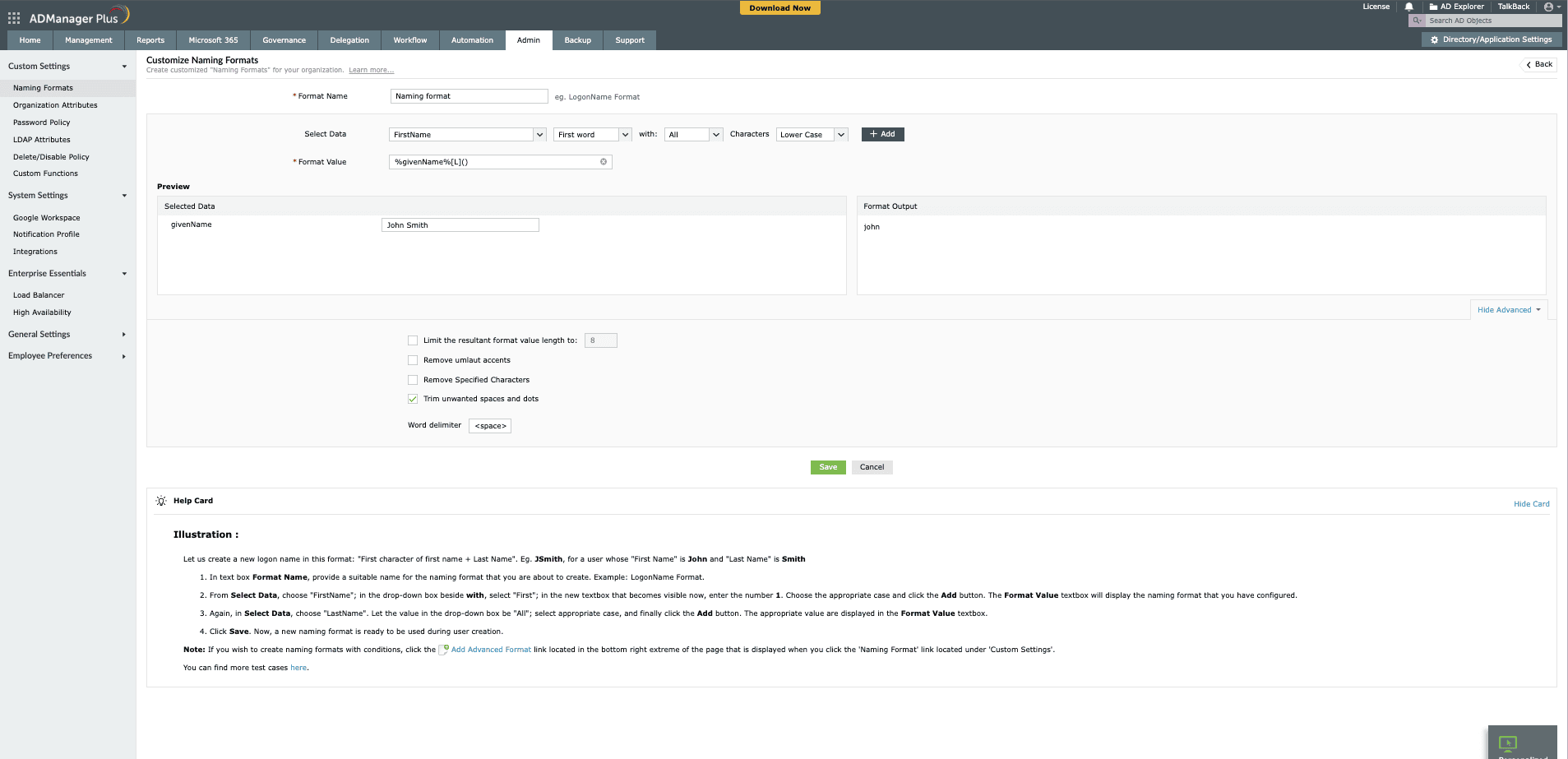
- Reactive naming formats: Define flexible naming conventions that automatically adjust based on available user data, ensuring consistent and accurate user account names.


Automated Active Directory management for other objects
Beyond user accounts, ADManager Plus extends its automation capabilities to other vital AD objects:
- Computer management: Automate the movement and modification of computer accounts within your directory.
- Group management: Efficiently automate the creation, modification, deletion, and membership updates for security and distribution groups.
- Contact modification: Streamline updates to contact objects within AD.
Active Directory cleanup automation
AD automation for cleanup and maintenance is vital for security and performance:
- Inactive account management: Automatically identify, disable, or delete dormant user accounts, reducing potential security risks and clutter.
- Locked-out user resolution: Quickly identify and unlock user accounts, minimizing user downtime and help desk calls.
- Password expiration management: Automate notifications and facilitate password resets for users with soon-to-expire passwords.
Prebuilt actions and scenarios
Unlike solutions that require extensive knowledge of AD automation scripts (like PowerShell), ADManager Plus offers a library of prepackaged actions and scenarios. This eliminates the need for manual scripting and allows you to:
- Sequence follow-up tasks: Create workflows that execute a series of actions in a defined order, ensuring comprehensive task completion.
- Automate predefined AD tasks: Leverage ready-to-use automations for common AD operations, saving development time and effort.
Orchestration for streamlined identity life cycle management
Transform complex, multi-step AD processes with ADManager Plus' powerful orchestration capabilities:
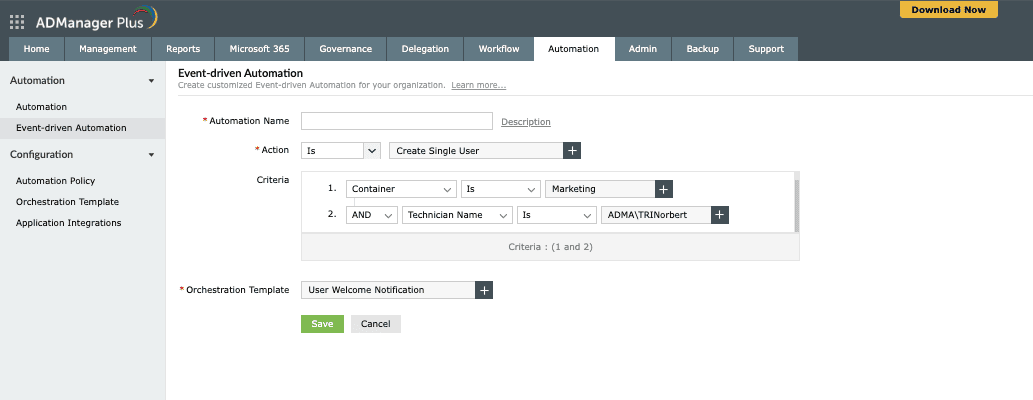
- Event-driven automation: Create event-driven automations that are triggered by specific actions and can perform a sequence of actions. Unlike scheduled automations that run at predetermined times, orchestration responds dynamically to events like user creation, modification, or deletion.
- Drag-and-drop orchestration templates: Build sophisticated workflows without scripting using visual orchestration templates. Orchestration templates define the flow of actions and can be constructed using drag-and-drop actions, making them accessible to administrators of all technical levels.
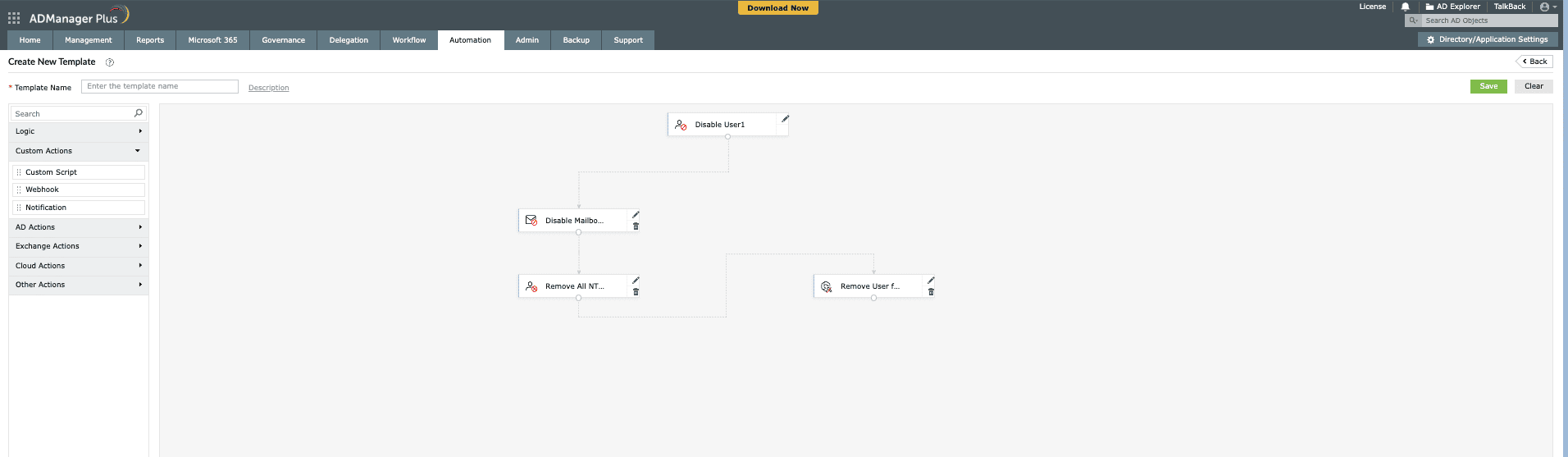
- Sequential task execution with customizable delays: Specify a sequence of tasks to be executed and customize the time delay between tasks and the order of execution via orchestration templates. This ensures proper task dependencies are maintained and systems have time to process changes.


Workflow-driven automation and alerts
Maintain complete control over your automation processes:
- Controlled automation: Define who reviews and approves automated processes, giving you oversight, especially during critical changes.
- Real-time alerts: Configure alerts to notify relevant stakeholders about the execution status of any task, ensuring transparency and accountability.
Why ADManager Plus is the ultimate Active Directory automation platform
While other solutions offer some basic automation capabilities, ADManager Plus stands out as a specialized, comprehensive, and user-friendly platform built specifically for AD, Microsoft 365, and Exchange management. It provides comprehensive AD automation built specifically for enterprise environments. ADManager Plus offers:
- Ease of use: A graphical interface that eliminates the need for complex scripting, making automation accessible to administrators of all skill levels.
- Unified management: A single console for managing and reporting on AD, Microsoft 365, and Exchange environments, simplifying your IT operations.
- End-to-end automation: Capabilities that cover the entire life cycle of AD objects, from creation and modification to cleanup and deprovisioning.
Common use cases for Active Directory automation
ADManager Plus’s automation features cater to a wide range of real-world scenarios:
- Employee onboarding and offboarding: Fully automate AD user creation and deprovisioning, including mailbox creation, group membership, and home folder setup.
- Security policy enforcement: Automatically manage security group memberships and ensure consistent security configurations across your AD.
- Regular AD maintenance: Schedule automated cleanup tasks for inactive users, stale computer accounts, and empty groups to keep your directory clean and efficient.
Get started with ADManager Plus: Your go-to Active Directory automation solution
Revolutionize your AD management and experience unparalleled efficiency, security, and compliance. ADManager Plus provides the robust AD automation capabilities you need to take control of your environment.
Ready to see the power of AD automation firsthand?
Unlock the full potential of your AD with automated AD management from ADManager Plus.
Featured links
Other features
Bulk User Management
Fire a shotgun-shell of AD User Management Tasks in a Single Shot. Also use csv files to manage users. Effect bulk changes in the Active Directory, including configuring Exchange attributes.
Active Directory Delegation
Unload some of your workload without losing your hold. Secure & non-invasive helpdesk delegation and management from ADManager Plus! Delegate powers for technician on specific tasks in specific OUs.
Active Directory Cleanup
Get rid of the inactive, obsolete and unwanted objects in your Active Directory to make it more secure and efficient...assisted by ADManager Plus's AD Cleanup capabilities.
Active Directory Logon Reports
Monitor logon activities of Active Directory users on your AD environment. Filter out Inactive Users. Reporting on hourly level. Generate reports for true last logon time & recently logged on users.
Microsoft Exchange Management
Create and manage Exchange mailboxes and configure mailbox rights using ADManager Plus's Exchange Management system. Now with support for Microsoft Exchange 2010!!
Active Directory Automation
A complete automation of AD critical tasks such as user provisioning, inactive-user clean up etc. Also lets you sequence and execute follow-up tasks and blends with workflow to offer a brilliant controlled-automation.
Need Features? Tell Us
If you want to see additional features implemented in ADManager Plus, we would love to hear. Click here to continue


