Error: Server Not Operational
Last updated on:Issue description
When using ADManager Plus, you may encounter the following error:
Server Not Operational
This issue prevents ADManager Plus from retrieving or modifying AD objects, impacting user management and automation tasks.
Possible causes
- Network restrictions: Required network ports for communication with the domain controller are blocked.
- DNS configuration issues: DNS settings on the ADManager Plus server are misconfigured.
- Permission issues: The service account used in ADManager Plus lacks the necessary permissions.
- Connectivity issues: There are connectivity issues between ADManager Plus and the domain controller in a DMZ environment.
Prerequisites
- Ensure you have administrator access to check domain controller status.
- Verify that the ADManager Plus server has network access to the domain controller.
Resolution
Step 1: Check network connectivity
- From the ADManager Plus server, test connectivity to the domain controller using:
- Test-NetConnection -ComputerName <DomainControllerFQDN> -Port 389
- Ensure the following ports are open between ADManager Plus and the domain
controller:
- LDAP: 389 (TCP)
- LDAPS: 636 (TCP) (if using SSL)
- Global Catalog: 3268 (TCP)/3269 (TCP for SSL)
- Kerberos Authentication: 88 (TCP/UDP)
- SMB: 445 (TCP)
- If any ports are blocked, allow them through your firewall.
Step 2: Use DMZ Port Analyzer to diagnose issues (if in a DMZ)
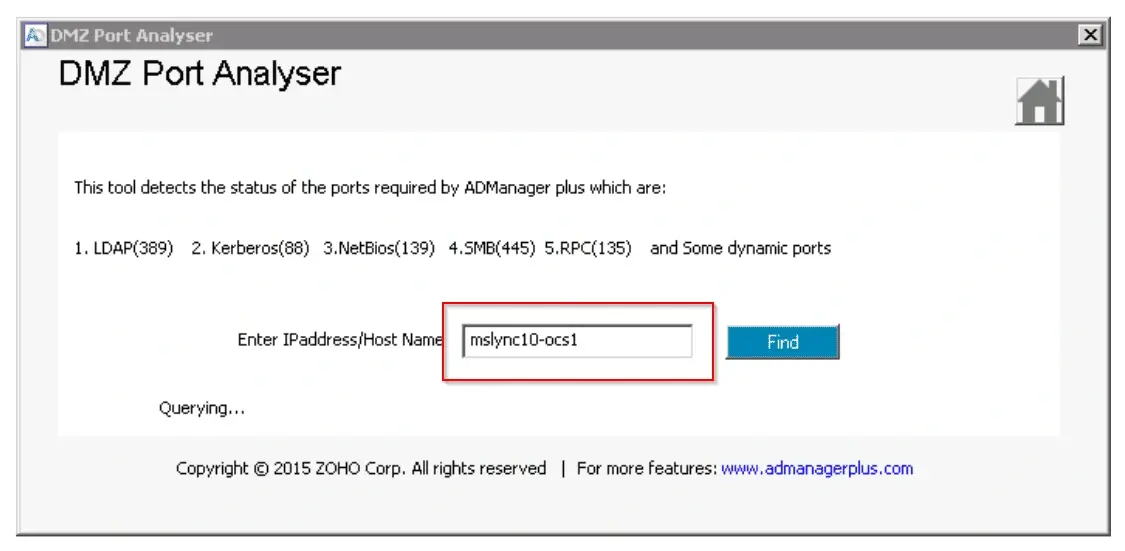
- Download the DMZ Port Analyzer and launch the application.
- Enter the hostname or IP address of the domain controller.
- The second screen will display the status of ports specific to ADManager Plus.
- Review the list of required ports and confirm they are open for proper ADManager Plus functionality.
- If ports are blocked, update your firewall settings accordingly.
Tips
- Prefer LDAPS (636) over LDAP (389) to ensure encrypted communication.
- Restrict access to necessary services and avoid exposing them publicly.
- Grant only the minimum permissions required for a service's account.
- Regularly review authentication and access logs for anomalies.
- Keep the mail server, OS, and related services updated to patch vulnerabilities.
- Validate any configuration changes in a test environment before applying them in production.
How to reach support
If the issue persists, contact our support team here.