- Related solutions
- Product resources
- Related Products
- Log360 (On-Premise | Cloud) Comprehensive SIEM and UEBA
- ADManager Plus Active Directory Management & Reporting
- ADAudit Plus Real-time Active Directory Auditing and UBA
- ADSelfService Plus Identity security with MFA, SSO, and SSPR
- DataSecurity Plus File server auditing & data discovery
- Exchange Reporter Plus Exchange Server Auditing & Reporting
- EventLog Analyzer Real-time Log Analysis & Reporting
- M365 Manager Plus Microsoft 365 Management & Reporting Tool
- RecoveryManager Plus Enterprise backup and recovery tool
- SharePoint Manager Plus SharePoint Reporting and Auditing
- AD360 Integrated Identity & Access Management
- AD Free Tools Active Directory FREE Tools
Cloud-based log management is the practice of collecting, normalizing, and analyzing log data from an organization's entire IT environment using a cloud-hosted platform. It serves the same operational purpose as on-premises log management but differs architecturally in how it handles scaling, storage, access, and security content delivery.
The architectural distinction matters because cloud adoption changes the log management problem itself. An organization running workloads across AWS, Azure, and on-premises infrastructure, with SaaS applications like Microsoft 365 and Salesforce generating their own audit trails, faces a fundamentally different challenge than one operating a single data center. Log sources are fragmented across providers. Each uses a different format and delivery mechanism. The attack surface spans cloud boundaries. The compliance scope expands to cover multiple data residency regions and cloud-specific regulatory frameworks such as FedRAMP, the CSA Cloud Controls Matrix (CCM), and ISO/IEC 27017.
Under the shared responsibility model that governs cloud security, the cloud provider secures the infrastructure while the customer secures its data, identities, and configurations. Cloud-based log management takes that customer-side responsibility and operationalizes it, collecting the evidence, detecting the threats, and demonstrating compliance. Organizations adopting log management from the cloud gain continuous monitoring without infrastructure overhead.
Why cloud-based log management is necessary
A mid-market environment with 1,000–5,000 endpoints typically generates 10,000–25,000 events per second under normal conditions. During an active incident, that volume increases three to five times. Managing this at scale requires a platform that scales ingestion automatically, normalizes disparate formats into a unified schema, applies detection logic in real time, and retains data for regulatory mandates without requiring hardware provisioning cycles.
ManageEngine's cloud-based log management tool
Log360 Cloud is ManageEngine's unified security platform that has cloud-based log management capabilities. It aggregates logs with its built-in parsers for over 700 sources, correlates them in near-real time, applies ML-based UEBA for detecting anomalies, and includes native SOAR and compliance reporting on a unified platform with a single license.
For CISOs and security teams evaluating how a cloud SIEM platform fits their architecture or comparing cloud logging solutions, ManageEngine Log360 Cloud is the best option . The sections below detail each component: what it does, why it exists specifically in a cloud context, and how Log360 Cloud implements it.
See Log360 Cloud in action: operational within days, over 700 prebuilt integrations, and built-in parsers.
Components of a cloud-based log management tool
Multi-source log collection
Both on-premises and cloud-based log management platforms collect from the same source types: cloud providers (AWS, Azure, GCP, etc.), SaaS applications (Microsoft 365, Salesforce, etc.), on-premises servers, firewalls, endpoints, and databases. The source coverage itself is not what differentiates them. The operational model is.
With on-premises log management, cloud and SaaS logs must traverse the internet to reach the organization's data center. That introduces network configuration overhead (firewall rules, proxy configurations, or VPN tunnels to allow inbound cloud API traffic), storage provisioning that must account for increasing cloud log volumes, and manual parser updates deployed through maintenance windows. As the cloud footprint grows, the on-premises infrastructure must scale to match it, requiring procurement cycles and capacity planning.
A cloud-based log management tool eliminates that operational overhead. Cloud and SaaS logs are ingested natively within cloud infrastructure without being routing through the organization's data center. Storage scales automatically with the volume. Parser updates for new and modified log formats are pushed to all customers continuously.
On-premises log management tools typically collect from a known, stable set of sources within a single network perimeter. Cloud-based log management tools face a different challenge: Sources are distributed across multiple cloud providers, SaaS platforms, and on-premises infrastructure, each with its own transport mechanism (API polling, webhooks, agent-based forwarding, syslog, etc.) and its own log format.
The collection component must connect to all of these natively. Natively means vendor-maintained integrations with prebuilt parsers that handle format parsing, field extraction, and schema updates automatically. When a cloud-based log management tool has limited native integrations, it delays deployment by weeks and creates an ongoing maintenance burden whenever an upstream provider modifies its log format.
Log360 Cloud ships over 700 native integrations, including:
- Cloud platforms: AWS (CloudTrail, VPC Flow Logs, Simple Storage Service access logs, GuardDuty, and Security Hub), Azure (activity logs, sign-in logs, audit logs, network security groups, and Key Vault), and GCP (Cloud Audit Logs, and VPC Flow Logs)
- SaaS applications: Microsoft 365 (Exchange Online, SharePoint, OneDrive, Teams, and Entra ID), Salesforce, Okta, and Google Workspace
- On-premises infrastructure: Windows event logs (agent-based), syslog (Linux/Unix), firewalls (from Cisco Adaptive Security Appliance, Palo Alto Networks, Fortinet, Check Point Software, SonicWall, and Sophos), routers, switches, VPNs, DNS, and DHCP
- Databases: SQL Server, Oracle Database, MySQL, PostgreSQL, and IBM Db2
- Security tools: CrowdStrike software, SentinelOne software, Carbon Black, Qualys software, Nessus, Rapid7 software, and STIX/TAXII feeds
- Custom applications: REST API connectors for any application emitting structured logs
Log360 Cloud supports both agent-based and agentless collection methods. New integrations are pushed to all customers continuously. Parser maintenance is handled entirely on the platform side. Additionally, the solution also has a custom log parser that will auto-parse and normalize custom application log formats.
A cross-environment normalization engine
This component separates cloud-based log management from simple log aggregation.
Logs from different cloud providers and on-premises systems use incompatible schemas. AWS CloudTrail records events with eventSource and sourceIPAddress. Azure activity logs use operationName and caller. Microsoft 365 unified audit logs follow a different JSON structure. Salesforce batches event logs as CSVs on a 72-hour delay.
These native platforms store data from all of their sources, but without normalization, they can't query across or correlate sources. An analyst or compliance officer investigating a compromised identity across AWS, Entra ID, and on-premises Active Directory (AD) would need separate queries in separate consoles with separate field names.
The normalization engine of a cloud-based log management tool translates every log entry into a unified schema at ingestion: The source IP, destination, username, action type, timestamp, and severity are mapped to standardized field names. Log enrichment adds contextual data (like the geolocation, threat intelligence matches, and asset criticality) to the normalized events before indexing.
Log360 Cloud normalizes logs automatically through prebuilt parsers included with each of its 700+ integrations. When upstream vendors modify their logging schemas, updated parsers are pushed without manual intervention.
Secured cloud log storage
This is the component most organizations scrutinize during evaluations.
Entrusting security log data to a cloud vendor raises specific questions: How is the data encrypted, who can access it, where is it physically stored, and what happens if the vendor is compromised? A Zero Trust approach to cloud log storage requires verifiable controls at every layer. With compliance requirements mandating that organizations store and access sensitive data within their boundaries, storing logs in the cloud requires enterprises to verify the vendor's compliance certificates, multi-tenancy, and retention policy customization.
Log360 Cloud's platform security
- Data encryption in transit and at rest using industry-standard protocols, with log data never held in plaintext.
- Logical data isolation per customer, with no tenant able to access or view another tenant's data.
- Role-based access controls (RBACs) with multi-factor authentication (MFA).
- Data residency selection across the United States, the European Union, and additional regions for sovereignty compliance.
- SOC 2 compliance of the platform itself, verifiable through audit reports.
- Tamper protection ensuring logs cannot be modified or deleted by local administrators, preserving forensic integrity.
The 2-category storage model: Search Storage and Archival Storage
Log360 Cloud separates log data into two performance-optimized storage types.
- Search Storage (hot): Indexed logs are optimized for high-speed, real-time searching, alerting, correlation, and reporting. Active threat detection, incident investigation, and SOC operations run in this tier. Queries return logs in seconds.
- Archival Storage (cold): This is cost-effective long-term storage for older log data retained to meet regulatory and internal compliance mandates. Its pricing is significantly lower than Search Storage's. Archived logs can be retrieved and re-indexed using the Reload Archive Logs feature when needed for investigations or audits.
- Three times free Archival Storage inclusion: Every Log360 Cloud license includes three times the purchased Search Storage as free Archival Storage; 50GB of Search Storage automatically includes 150GB of Archival Storage at no additional cost. Organizations requiring retention beyond the included allocation can purchase additional Archival Storage at $0.25 per gigabyte per year.
Storage tiering with the data pipeline manager
Not all logs carry equal security or compliance value. Log360 Cloud's data pipeline manager creates up to 20 custom storage tiers. Each tier defines which log sources route into it (by the log type, source, severity level, or host IP), the search retention period, and the archival retention period.
Example: PCI DSS compliance configuration
| Tier | Log sources | Search Storage (hot) | Archival Storage (cold) | Cost strategy |
|---|---|---|---|---|
| PCI DSS security | Firewalls, AD, and server security logs (Critical, Error, and Warning severities) | 90 days | 1 year | Filtering: excludes Info and Debug logs, reducing the search volume by 60% |
| Compliance auditing | Database audits, transaction logs, and failed login attempts | 30 days | 7 years | A retention split: a short search period and a long archival period for PCI DSS Requirement 10 |
| Debug and operational | Web server access events, load balancers, and informational OS events | 7 days | 30 days | Purging quickly: the highest-volume, lowest-value logs exiting fast |
| Default | Any unclassified logs | 30 days | 90 days | A catch-all with moderate retention |
The outcome
Security teams retain 90 days of immediately searchable, high-value data for threat hunting. Compliance mandates (like the PCI DSS Requirement 10.7 for one-year audit trail retention, HIPAA § 164.312(b) for six-year audit controls, SOX Section 802 for seven-year record retention, and GDPR Article 30 for processing records) are met with long-term archiving at cold storage pricing. Additionally, gigabytes of verbose debug logs are purged within days rather than consuming Search Storage capacity.
A centralized search and investigation console
On-premises SIEM investigation from outside the network requires VPN connectivity. A cloud-based log management platform removes that constraint. The console is browser-based and accessible from any location.
Log360 Cloud's search console enables SQL-based queries across all connected sources and time ranges, with wildcard, Boolean, and logical operators. Saved searches support reuse during incident response. Results export to CSVs and PDFs for audit documentation. Interactive dashboards provide real-time views by the severity, source, and event category, with prebuilt dashboards for a security overview, the compliance posture, AD activity, and cloud security. Custom dashboards accommodate organization-specific monitoring. IT administrators and SOC analysts use the same console for both operational troubleshooting and security investigation.
Real-time cross-cloud threat detection
In a cloud and hybrid environment, a compromised credential can traverse AWS, Entra ID, Microsoft 365, and on-premises AD within minutes. The detection engine must evaluate events across all of these simultaneously.
Correlation connects events from different sources into attack narratives. Thirty failed VPN logins from one source IP, followed by a successful authentication attempt in Entra ID, followed by a new inbox rule in Exchange Online—this is a single attack chain: brute force, credential compromise, and mailbox persistence. No individual source observes the full sequence.
Log360 Cloud ships over 2,000 prebuilt detection rules mapped to specific MITRE ATT&CK® tactics and techniques: credential access (via T1078 and T1110), execution (via T1059), persistence (via T1053), lateral movement (via T1021), exfiltration (via T1048), and more. This detection logic includes correlation-based rules as well as ML-based behavior deviation detections. Rules can be fine-tuned and activated from day one.
Behavioral analytics (UEBA)
UEBA addresses the detection gap for anomaly patterns that correlation rules cannot cover. Insider threats, compromised accounts exhibiting subtle behavioral changes, and anomalous access patterns do not match predefined rules. Log360 Cloud's native UEBA module constructs ML-based baselines for each user and entity over 14–21 days (including login times, data volumes, application access, geographic locations, and peer group behavior). Deviations increase the entity's risk score for analyst review. UEBA operates on the same normalized data as correlation, with no separate pipeline or license.
Automated cross-platform incident response (native SOAR)
Cloud incidents move faster than manual responses. An attacker using stolen credentials can access AWS resources, modify Entra ID permissions, and exfiltrate data from SharePoint within the time it takes an analyst to read an alert.
Log360 Cloud's native SOAR (built on Zoho Qntrl Circuit) makes investigation more accurate through data enrichment, performs incident containment, and automates repetitive IT operations or compliance management activities. It includes:
- Over 60 prebuilt playbooks for compromised accounts, malware, policy violations, exfiltration, phishing, and more.
- A visual drag-and-drop playbook builder for the easy customization of existing playbooks and the creation of new ones.
- Custom automation via Python and Deluge scripting, for DevOps.
- Built-in response actions: Disable AD accounts, isolate endpoints, block IPs, execute scripts, disable USB, etc..
- Integrations with ServiceDesk Plus, Zendesk, Jira, ServiceNow, and webhooks for centralized incident management.
- MCP server support for multi-product agentic workflows.
A single playbook can disable an account in on-premises AD, revoke sessions in Entra ID, block the source IP at the firewall, and create an incident ticket. The response spans cloud and on-premises environments simultaneously.
SOAR is included in Log360 Cloud natively, with no per-execution pricing. This distinction matters when you're evaluating cloud-based log management platforms against adjacent categories like XDR, where response automation is often bundled differently.
A compliance and multi-region audit module
Cloud adoption expands your compliance scope. Data processing across multiple regions introduces data sovereignty requirements. SaaS applications create additional audit trail obligations. Cloud-specific regulatory frameworks apply alongside existing industry standards.
Log360 Cloud ships with prebuilt audit report templates for over 100 compliance frameworks across 31 regions, including the following:
- US: PCI DSS v4.0 (Requirement 10), HIPAA (§ 164.312(b)), SOX (Section 802), FISMA, GLBA, NIST SP 800-53, CMMC 2.0, FedRAMP, 23 NYCRR 500, SEC Cyber Rules, etc.
- EU and United Kingdom: GDPR (Article 30), DPA 2018 (UK), ENS (Spain), etc.
- India: CERT-In, RBI CSF, SEBI CSCRF, IRDAI Cyber security guidelines, etc.
- Asia-Pacific region: MAS TRM Guidelines (Singapore), PDPA (Thailand and Malaysia), APRA CPS 234 (Australia), K-ISMS (South Korea), etc.
- International: ISO/IEC 27001, ISO/IEC 27017 (cloud security), ISO/IEC 27018 (cloud privacy), ISO/IEC 27701, SOC 1, SOC 2, COBIT 2019, HITRUST CSF, CSA CCM, Swift CSCF, CIS Benchmarks, etc.
Compliance dashboards provide continuous posture visibility, replacing periodic audit preparation with real-time monitoring. Auditors and compliance officers access the same reports the security team uses for operations.
AI-powered, cloud-based log analysis
AI-driven analysis is no longer just a differentiator for cloud-based log management tools. It has become a baseline requirement. The volume and complexity of security data that modern environments produce has exceeded what manual analysis can handle effectively.
Without AI, this interpretation step is entirely manual: reading raw log entries across multiple sources, identifying which systems and accounts were affected, mapping the behavior to known attack techniques in the MITRE ATT&CK framework, and formulating a response plan. Given 5–15 minutes per alert and 50–100 alerts per day, manual triage consumes the majority of a SOC team's capacity. Detection improves, but the investigation speed remains the bottleneck.
AI-powered log analysis closes this gap by automating the interpretation and investigation steps that previously depended on analyst availability and expertise. It makes investigation faster, more consistent, and accessible to analysts at every experience level.
Log360 Cloud is an AI-native solution that adopts AI at the operational layer and not as a bolted-on feature. The solution provides AI augmentation, assistance, autonomy, and speed for SOCs. Zia, Log360 Cloud's AI, provides:
- Plain-language event summaries that translate complex, multi-source security events into structured descriptions any stakeholder (like a SOC analyst, IT administrator, or CISO) can review without reading raw log entries.
- Automatic MITRE ATT&CK mapping to identify which specific techniques and tactics the detected behavior aligns with, eliminating the manual cross-referencing step.
- Remediation guidance, suggesting specific response actions based on the threat type, affected assets, and organizational context.
- A guided investigation agent that auto-investigates alerts from end to end and provides auto-stitched incident timelines, insights into alert events, potential remediation steps, and more.
- An assistant a native chatbot that enables you to invoke prebuilt or custom agents for detection, investigation, and remediation. It also enables you to conduct threat hunting through NLP.
The operational effect
Alert triage that previously required 10–15 minutes of analyst effort per alert drops to seconds of reviewing a structured summary and acting on a recommendation. For a SOC processing 80 alerts per day, that represents approximately 10–12 hours of analyst capacity returned to investigation, threat hunting, and proactive security work.
Cloud delivery ensures the underlying AI models are updated continuously as threat patterns evolve, without manual upgrade cycles or maintenance windows.
Experience Log360 Cloud in your environment
Connect Log360 Cloud to your first log sources in minutes with over 700 native integrations and start detecting threats from day one.
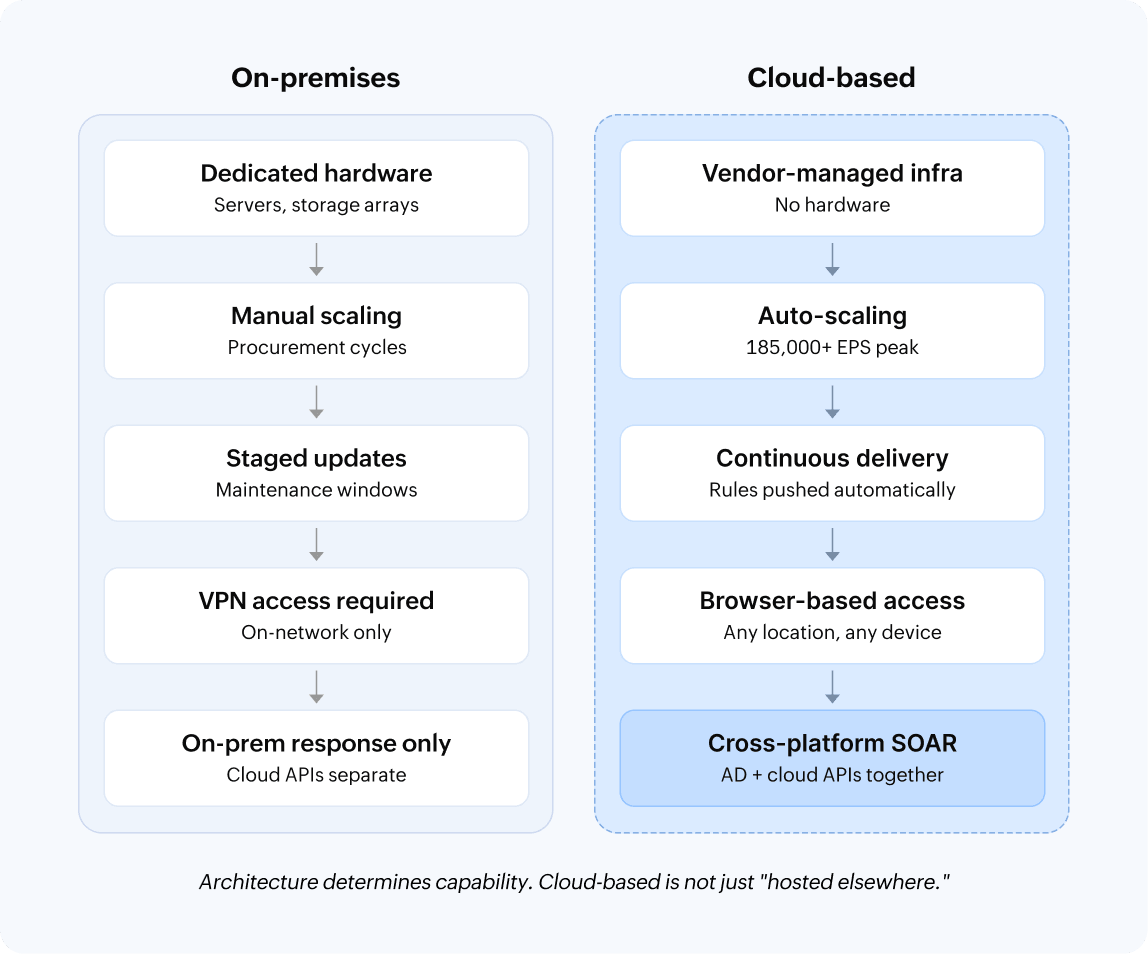
How cloud-based log management differs from on-premises log management
| Dimension | On-premises | Cloud-based (Log360 Cloud) |
|---|---|---|
| Infrastructure | Dedicated servers and storage arrays | Vendor-managed with auto-scaling |
| Deployment | 3–6 months | Operational within days |
| Scaling | Capacity provisioned ahead of need | Automatic with a peak of over 185,000 EPS |
| Detection updates | Manual download, staging, and maintenance windows | Continuous delivery—automatic |
| Access | VPN or in-network access required | Browser-based from any location |
| Storage security | The organization's responsibility | Encrypted, isolated, SOC-2-compliant, tamper-protected |
| Compliance scope | Single-region | Multi-region with over 100 frameworks across 31 regions |
| Cost model | Up-front CapEx plus ongoing OpEx | A component-based subscription—no per-event charges |
| SOAR execution | On-premises actions only | Cross-platform: AD and cloud APIs in 1 playbook |
For the detailed comparison:
What differentiates Log360 Cloud?
- A unified platform: SIEM, UEBA, SOAR, CASB, and DLP capabilities are included in a single license—no multi-vendor integration required. It's positioned alongside XDR platforms in breadth but with deeper log management and compliance coverage.
- Component-based pricing: It's licensed by log source modules—no per-event charges and no per-gigabyte penalties. See pricing | Estimate costs
- Support for over 100 compliance frameworks across 31 regions: It comes with 942 reports and 26,702 control mappings, not generic log exports.
- Three times free Archival Storage: Every license includes three times the Search Storage as free Archival Storage, with custom tiering through the Data Pipeline Manager.
- Continuous security content delivery: Detection rules, parsers, and compliance templates are pushed automatically.
- MSSP-native multi-tenancy: Get per-client isolation, separate dashboards, and per-tenant licensing.
What to look for in a cloud log management tool
The following eight criteria are the most important for evaluating cloud log management platforms. Each one addresses gaps that surface in real evaluations and maps to a decision that affects the deployment in the long term.
- Integration breadth: Over 500 native integrations is the baseline. Log360 Cloud ships over 700.
- Normalization quality: You need single-query, single-schema searching across all sources. Custom field mapping per source represents ongoing engineering debt.
- Platform security: It should have encryption, data isolation, RBACs, MFA, SOC 2 compliance, data residency selection, and Zero Trust storage controls.
- Search performance: Security investigations often require searching months of historical data for a single indicator of compromise (IOC), such as an IP address, user account, or file hash. Evaluate whether the platform can return results across months of logs in seconds rather than minutes.
- Detection content: Look for prebuilt rules mapped to MITRE ATT&CK techniques (T1078, T1110, T1059, etc.). Log360 Cloud delivers over 2,000 continuously.
- SIEM integration depth: Stand-alone cloud logging services handle collection and searching only. If logs feed correlation, UEBA, and automated incident response, those capabilities should be native.
- Compliance coverage: Reports should be mapped to specific controls (the PCI DSS Requirement 10.2.1, HIPAA § 164.312(b), CIS Benchmarks, etc.), with multi-region support.
- Pricing model: Per-event and per-gigabyte models result in cost spikes during incidents. Component-based pricing charges by the capability. Estimate costs
Start managing cloud logs in days, not months
Over 700 sources, over 2,000 detection rules, secured cloud storage with three times free Archival Storage, and native SOAR—all in one license
FAQ
Cloud log management involves collecting, normalizing, storing, and analyzing log data using a cloud-hosted platform. It addresses the same requirements as on-premises log management (collection, searching, alerting, and compliance) while eliminating hardware procurement, capacity planning, and infrastructure maintenance. Under the shared responsibility model, cloud log management operationalizes the customer's obligation to monitor data, detect threats, and demonstrate compliance across cloud environments.
Identify your log sources across cloud, SaaS, and on-premises environments. Select a platform with native integrations for those sources. Connect to them using a guided setup or agents. Configure storage tiers and retention policies aligned with compliance mandates. Enable detection rules and alerting. Platforms with over 700 native integrations (like Log360 Cloud) produce the first security insights within days.
For real-time threat detection combining correlation, behavioral analytics, and automated incident response, the platform must integrate log management with SIEM capabilities natively. Log360 Cloud combines over 700 source integrations, over 2,000 MITRE-ATT&CK-mapped detection rules, ML-based UEBA, and native SOAR in one license. Other platforms to evaluate include Splunk Cloud Platform (mature ecosystem), Sumo Logic (cloud-native analytics), and Elastic Cloud (flexible detection engineering). The best cloud log management platform depends on your SOC size, budget, and architectural preference.
Per-event pricing (like Datadog's) scales with the log volume and spikes during incidents. Per-gigabyte pricing (like Splunk Cloud Platform's) penalizes verbose sources. Component-based pricing (like Log360 Cloud's) charges by the capability module with no per-event charges. Log360 Cloud's two-tier storage model (Search Storage and Archival Storage with three times free Archival Storage inclusion) further optimizes costs by routing high-volume, low-value logs to the shorter retention tier.
Reputable platforms encrypt data in transit and at rest, enforce logical data isolation between tenants, implement RBACs with MFA, and maintain SOC 2 compliance. Log360 Cloud additionally offers data residency selection, tamper-proof log storage, and overwriting policies that prioritize critical logs when storage limits are reached.
This is the primary deployment scenario. Log360 Cloud collects logs from AWS, Azure, GCP, Microsoft 365, Salesforce, Okta, and on-premises infrastructure. The differentiator is the normalization quality: whether the platform translates provider-specific log formats into a unified schema for cross-environment searching, correlation, and behavioral analysis. Without normalization, the result is parallel logging across providers, effectively logging cloud activity on separate dashboards rather than facilitating unified multi-cloud log management.