- Free Edition
- Quick Links
- Exchange Mailbox Reports
- Mailbox Size Reports
- Mailbox Properties Reports
- Mailbox Status Reports
- Mailbox Permission Reports
- Mailbox Content Reports
- Mailbox Logon by Users
- Inactive Mailboxes Reports
- Mailbox Enabled Users
- Office 365 Mailbox Reports
- Room Mailbox Reports
- Shared Mailbox Reports
- Exchange Mailbox Permissions
- Shared Mailbox Permissions
- Calendar Permission Reports
- Export Mailbox Permissions Reports
- Export Mailbox Size Reports
- Export Exchange Mailbox Reports
- Export Public Folder Lists
- Exchange Server Monitoring
- Client Access Server Health
- Exchange Server Monitoring Tool
- Exchange Server Monitoring Reports
- Exchange Service Health Monitoring
- DAG Monitoring Reports
- Connectivity Monitoring Reports
- Mail Flow Health Monitoring
- Exchange Database Monitoring
- Storage Monitoring Reports
- Email Queue Monitoring
- Replication Health Monitoring
- Exchange Audit Reports
- Exchange Server Auditing
- Exchange Server Auditing and Alerting
- Exchange Server Compliance Reporting
- Exchange Audit and Compliance Tool
- Exchange Admin Audit Logging
- Non-Owner Mailbox
Logon Reports - Mailbox Permission Changes Reports
- Mailbox Property Changes Reports
- Exchange Database Changes Reports
- Server Configuration Changes Reports
- Exchange Mailbox Audit Logging
- Exchange Traffic Reports
- Exchange Office 365 Reports
- Other Reports
- Mailbox Content Search
- Skype for Business server reporting
- Outlook Web Access Reports
- ActiveSync Reports
- Mailbox and Public Store Reports
- Distribution Lists Report
- Server Storage Tracking Reports
- Public Folder Reports
- Public Folder Content Report
- Email Non-Delivery Reports
- Retention Policy Reports
- Email Non Delivery Reports
- Exchange Migration
- Resources
- Related Products
- ADManager Plus Active Directory Management & Reporting
- ADAudit Plus Hybrid AD, cloud, and file auditing and security
- ADSelfService Plus Identity security with MFA, SSO, and SSPR
- EventLog Analyzer Real-time Log Analysis & Reporting
- M365 Manager Plus Microsoft 365 Management & Reporting Tool
- SharePoint Manager Plus SharePoint Reporting and Auditing
- DataSecurity Plus File server auditing & data discovery
- RecoveryManager Plus Enterprise backup and recovery tool
- AD360 Integrated Identity & Access Management
- Log360 Comprehensive SIEM and UEBA
- AD Free Tool Active Directory Free Tool
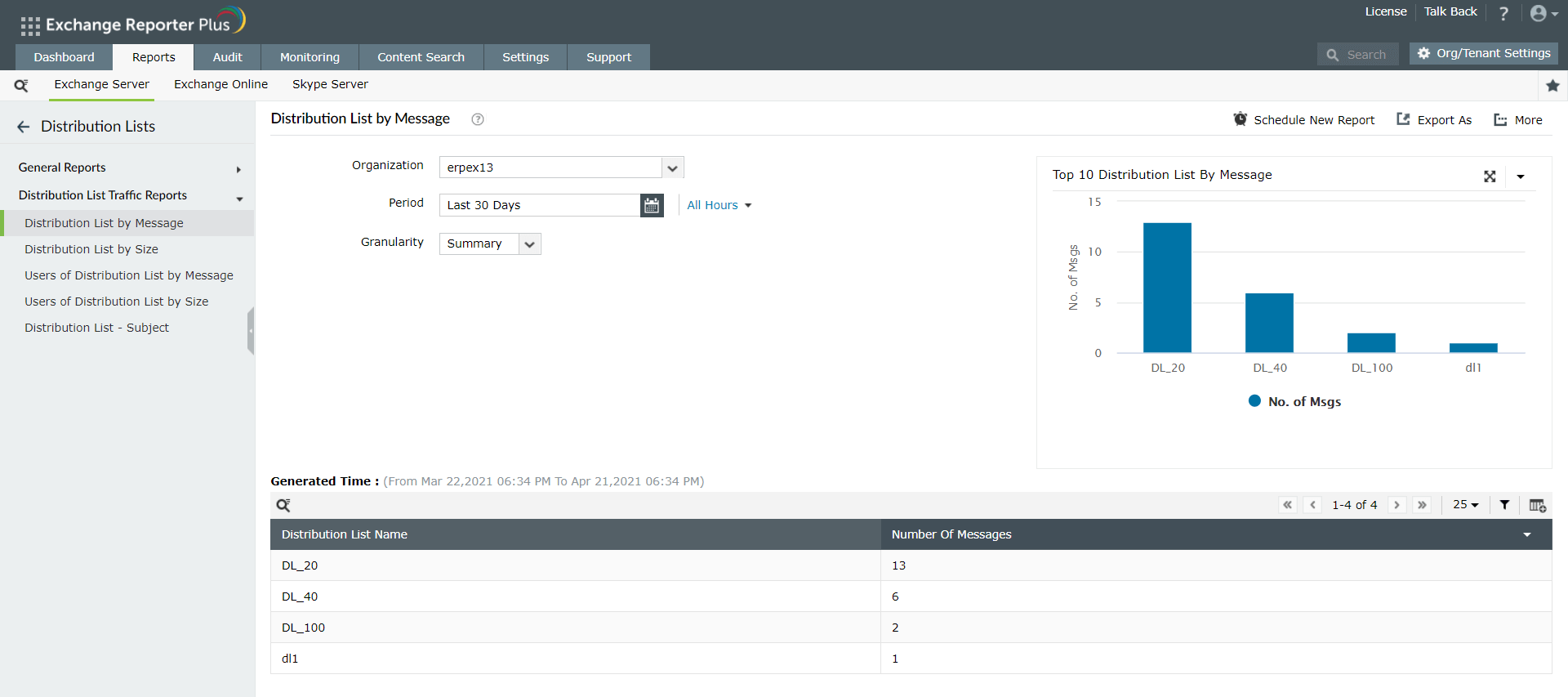
In Exchange Server, tracking email traffic can be a challenge, and even more difficult is organizing traffic, i.e., public folder-wise or distribution list-wise. Exchange Reporter Plus helps you get distribution list traffic instantly with its predefined reports. It offers five comprehensive reports to track Exchange Server distribution list traffic:
- Distribution List by Message: Shows the traffic per distribution list based on the total number of messages sent and received by that particular list.
- Distribution List by Size: Shows the traffic per distribution list based on the total size of messages sent and received by a particular list.
- Users of Distribution List by Message: Displays the total number of messages sent and received by a user in a distribution list.
- Users of Distribution List by Size: Displays the total size of messages sent and received by a user in a distribution list.
- Distribution List - Subject: Shows the traffic per distribution list based on the subject of every email sent or received by the list.
Report on and audit Exchange Online using Exchange Reporter Plus.
How to generate Distribution List Traffic Reports in Exchange Reporter Plus
- Go to the Reports tab.
- Navigate to Exchange Server → Distribution Lists → Distribution Lists Traffic Reports.
- Choose the required report and select the Organization for which you would like to generate a report.
- Enter the Period for report generation.
Why you should monitor distribution list traffic
Using the information provided by the Distribution List Traffic Reports, you can plan server expansion or load balancing in servers where the distribution lists reside. Identifying busy distribution lists and tracking other traffic statistics help you better judge which free server a busy distribution list should be moved to.
You can filter out the traffic summary for any specified time and get hourly traffic rates. You can also check the distribution list traffic summary for specified intervals, making analysis of unusual traffic spikes easy.
Some viruses, especially spam malware or Trojans, obtain a user's Global Address List and send a barrage of emails to every email address in it. Therefore, it's a good practice to monitor the number of emails a user sends to a distribution list to look for potential attacks.
Frequently asked questions
As an Exchange admin, it is critical to track the Exchange traffic of emails that are sent and received by the users in your organization. This can seem like a complicated task given the number of emails that travel in an organization. But with Exchange Reporter Plus' extensive reports on email traffic, you can now easily keep an eye on Exchange traffic. These reports provide traffic lists that display all the emails sent and received by users.
Are you looking for an SIEM solution that can help you defend against cyberattacks?
Try out Log360 now!