- Free Edition
- Quick Links
- Exchange Mailbox Reports
- Mailbox Size Reports
- Mailbox Properties Reports
- Mailbox Status Reports
- Mailbox Permission Reports
- Mailbox Content Reports
- Mailbox Logon by Users
- Inactive Mailboxes Reports
- Mailbox Enabled Users
- Office 365 Mailbox Reports
- Room Mailbox Reports
- Shared Mailbox Reports
- Exchange Mailbox Permissions
- Shared Mailbox Permissions
- Calendar Permission Reports
- Export Mailbox Permissions Reports
- Export Mailbox Size Reports
- Export Exchange Mailbox Reports
- Export Public Folder Lists
- Exchange Server Monitoring
- Client Access Server Health
- Exchange Server Monitoring Tool
- Exchange Server Monitoring Reports
- Exchange Service Health Monitoring
- DAG Monitoring Reports
- Connectivity Monitoring Reports
- Mail Flow Health Monitoring
- Exchange Database Monitoring
- Storage Monitoring Reports
- Email Queue Monitoring
- Replication Health Monitoring
- Exchange Audit Reports
- Exchange Server Auditing
- Exchange Server Auditing and Alerting
- Exchange Server Compliance Reporting
- Exchange Audit and Compliance Tool
- Exchange Admin Audit Logging
- Non-Owner Mailbox
Logon Reports - Mailbox Permission Changes Reports
- Mailbox Property Changes Reports
- Exchange Database Changes Reports
- Server Configuration Changes Reports
- Exchange Mailbox Audit Logging
- Exchange Traffic Reports
- Exchange Office 365 Reports
- Other Reports
- Mailbox Content Search
- Skype for Business server reporting
- Outlook Web Access Reports
- ActiveSync Reports
- Mailbox and Public Store Reports
- Distribution Lists Report
- Server Storage Tracking Reports
- Public Folder Reports
- Public Folder Content Report
- Email Non-Delivery Reports
- Retention Policy Reports
- Email Non Delivery Reports
- Exchange Migration
- Resources
- Related Products
- ADManager Plus Active Directory Management & Reporting
- ADAudit Plus Hybrid AD, cloud, and file auditing and security
- ADSelfService Plus Identity security with MFA, SSO, and SSPR
- EventLog Analyzer Real-time Log Analysis & Reporting
- M365 Manager Plus Microsoft 365 Management & Reporting Tool
- SharePoint Manager Plus SharePoint Reporting and Auditing
- DataSecurity Plus File server auditing & data discovery
- RecoveryManager Plus Enterprise backup and recovery tool
- AD360 Integrated Identity & Access Management
- Log360 Comprehensive SIEM and UEBA
- AD Free Tool Active Directory Free Tool
Most Exchange admins learn about retention policy gaps the hard way—usually when the legal team comes knocking asking for emails from someone who left six months ago, and you discover their mailbox never had a retention policy assigned.
The thing about retention policies is that setting them up is the easy part. The tricky bit is making sure they're actually applied to everyone who needs them and catching the mailboxes that somehow got missed. New hires, department transfers, temporary accounts, there are plenty of ways for users to end up without proper policy coverage.
These reports from Exchange Reporter Plus let you see your complete retention landscape: What policies you have running, how many mailboxes each one covers, which users are assigned to what policies, the specific details of each policy setup, and the mailboxes that are sitting there without any protection.
- Retention policies in effect
- Mailboxes covered by each policy
- Users assigned to each policy
- Details of each policy setup
- Mailboxes without any retention policy
Retention policies
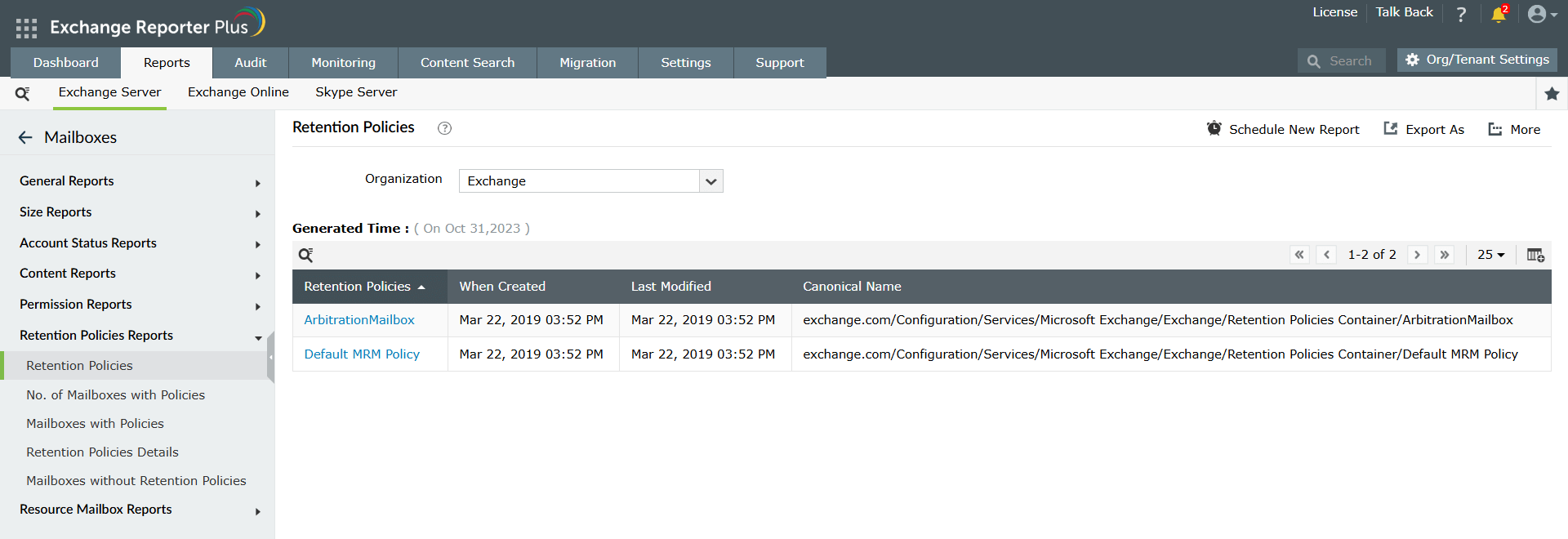
This report provides an overview of all retention policies applied within your Exchange environment. It displays details such as the creation date, the last modification date, and the canonical name of each retention policy. This report helps you track the life cycle of retention policies, ensuring that policies are up to date. By reviewing this report, you can make informed decisions about policy modifications.
No. of mailboxes with policies
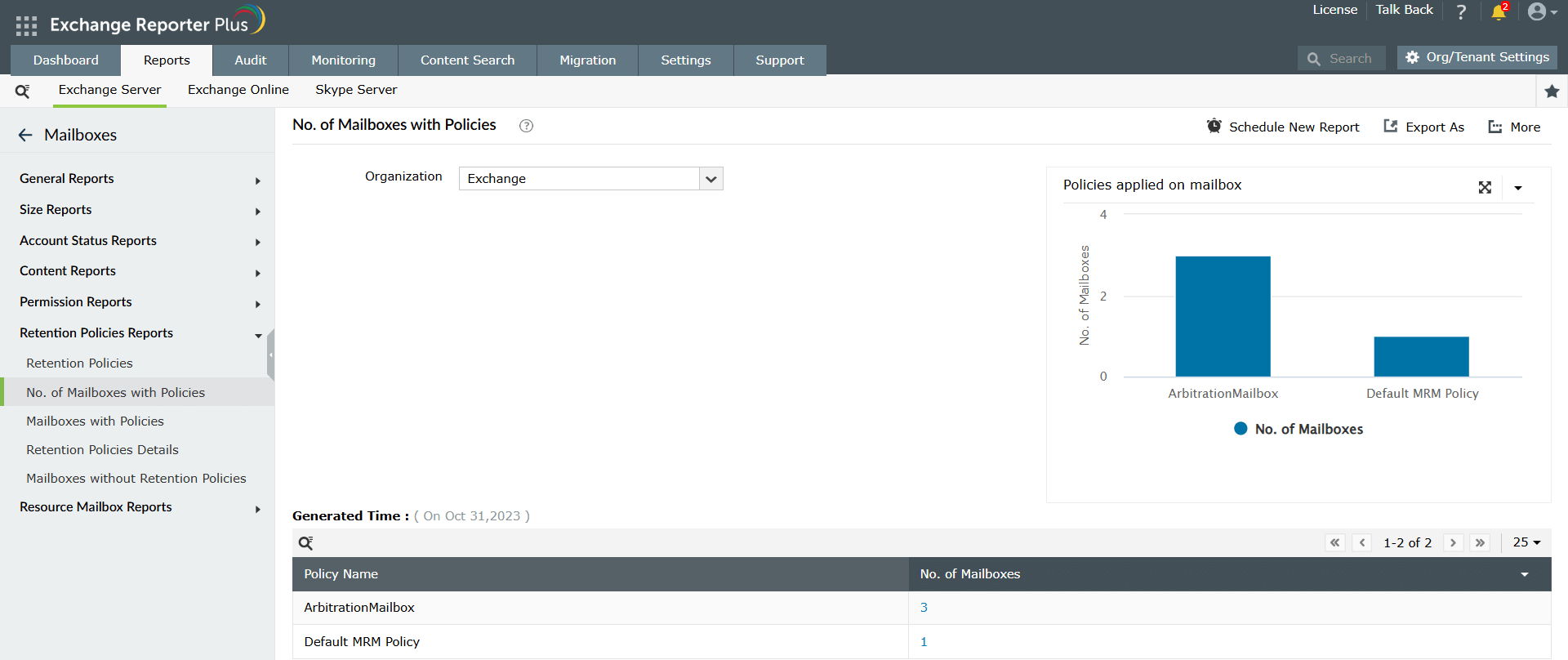
This report provides an overview of how many mailboxes are associated with each retention policy. It displays the policy name alongside the number of mailboxes that fall under each retention policy. Additionally, a bar graph visually represents this data, making it easy to compare the distribution of mailboxes across different policies. This report helps you ensure that retention policies have been properly applied across the various mailboxes in your organization.
Mailboxes with policies
This report lists all mailboxes that have that particular retention policy applied. This provides administrators with a clear view of which mailboxes are governed by a specific policy, making it easier to ensure compliance with retention guidelines across the organization.

Retention policies details
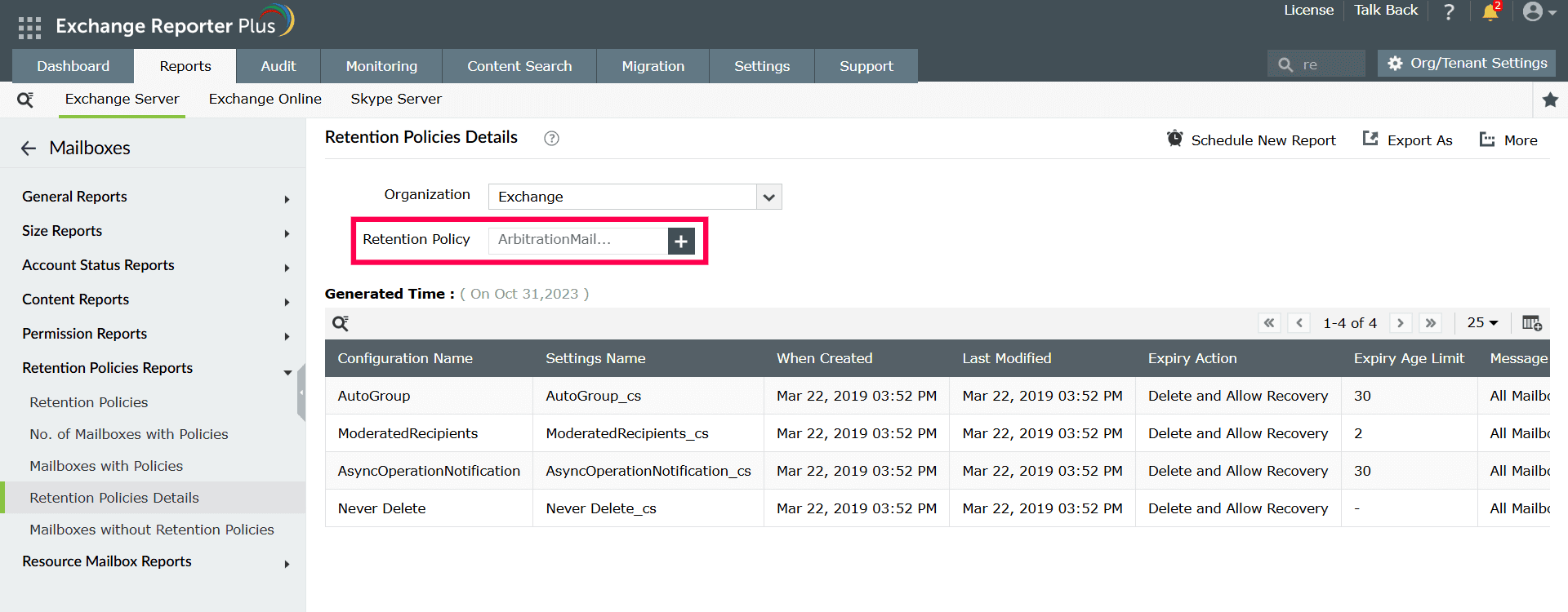
This report provides a detailed list of all configuration names under that retention policy, including details such as the setting name, creation date, last modification date, expiry action, and expiry age limit. This report gives administrators a comprehensive view of the configuration settings within each policy, making it easier to ensure that retention guidelines are properly implemented.
Mailboxes without retention policies
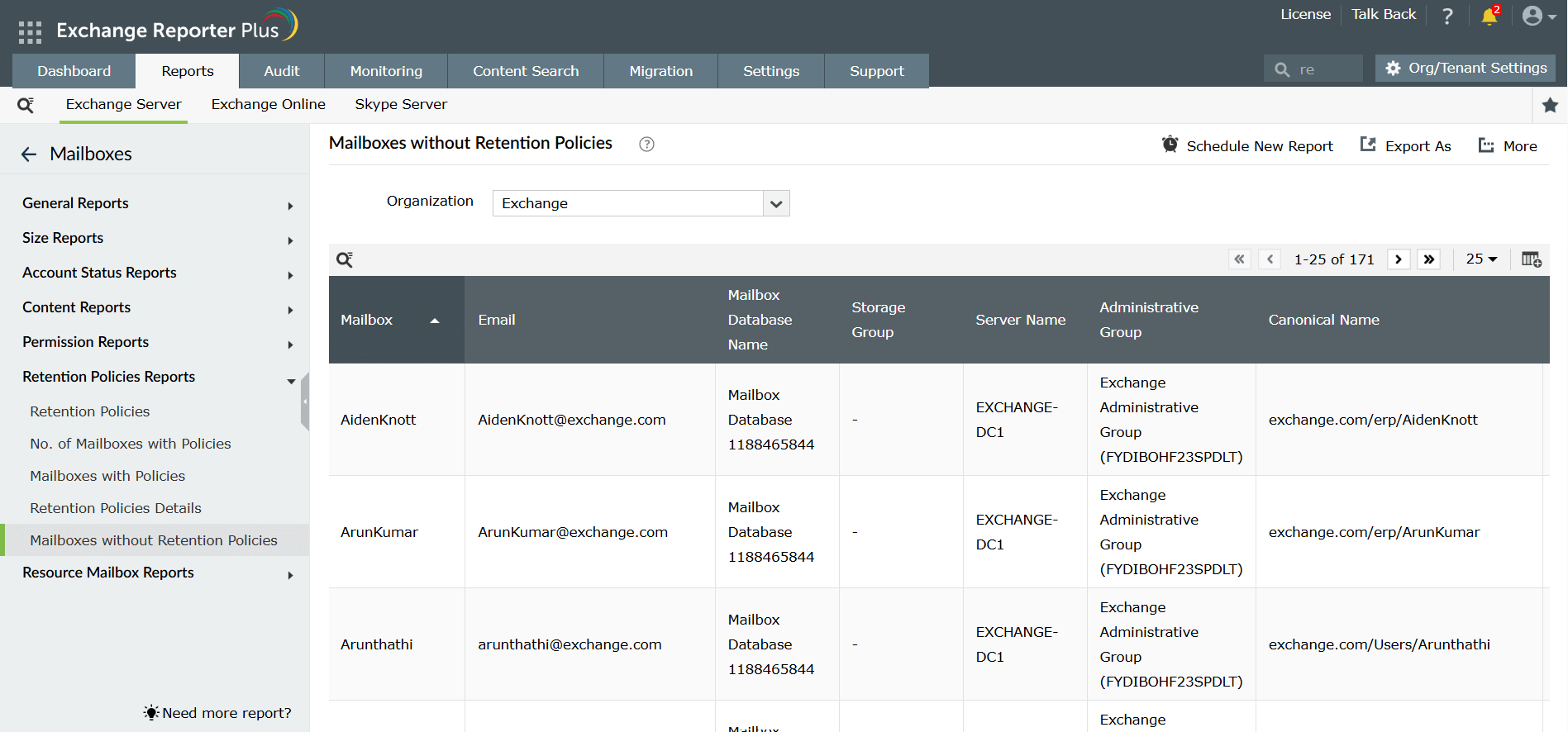
This report lists all mailboxes that do not have any retention policies applied. It provides details such as the mailbox name, associated email ID, mailbox database name, and the server on which the mailbox is located. This report helps instantly identify those mailboxes that are not governed by retention policies, allowing you to take necessary actions to apply appropriate policies and ensure compliance.
Explore Exchange Reporter Plus' other reports
Mailbox properties reports
Get detailed information about mailbox configurations such as mailbox types, features enabled, quota limits, versions, and other attributes to help you understand mailbox characteristics across your Exchange environment.
Learn moreInactive mailboxes reports
Gather information on mailboxes that have not been accessed or used for a specified period, giving visibility into mailbox activity levels within your Exchange environment.
Learn moreFrequently asked questions
You can use the No. of mailboxes with policies report to get an overview of how many mailboxes are associated with each retention policy. This report shows the number of mailboxes under each policy and includes a visual bar graph for easy comparison, helping you track the application of retention policies across your organization.
Yes, Exchange Reporter allows you to export the retention policy reports in a variety of formats that can be emailed or shown directly to the auditing team.
The mailboxes with policies report lets you view all mailboxes associated with a specific retention policy. By selecting a retention policy, this report lists the mailboxes under that policy, helping you ensure that the correct policies are applied to the appropriate mailboxes.
Use the mailboxes without retention policies report to identify mailboxes that do not have retention policies applied. This report lists all such mailboxes along with details such as the mailbox name, associated email ID, and mailbox database, helping you quickly pinpoint and apply the appropriate retention policies to those mailboxes.
The retention policies details report allows you to select a specific retention policy and view detailed information about its configuration. This includes the setting name, creation date, last modification date, expiry action, and expiry age limit. Reviewing this report ensures that the retention policies are configured correctly according to organizational guidelines.