 Free Edition
In this article:
This article helps you configure a syslog server to forward audit logs of all backup, recovery, and configuration actions performed in RecoveryManager Plus. The system logging protocol (syslog) is a standard protocol used to collect system and application logs and transmit them to a centralized server.
With this feature, administrators can integrate RecoveryManager Plus with a syslog log management solution to ensure critical audit logs are collected, analyzed, and retained securely for compliance, security auditing, and incident response.
RecoveryManager Plus can forward backup, recovery, and configuration audit logs from AD, Entra ID, Microsoft 365, on-premises Exchange, Google Workspace, and Zoho WorkDrive backup and recovery operations.
Toggle this switch to activate or deactivate log forwarding to a syslog server.
Customize the structure of syslog messages sent from RecoveryManager Plus.
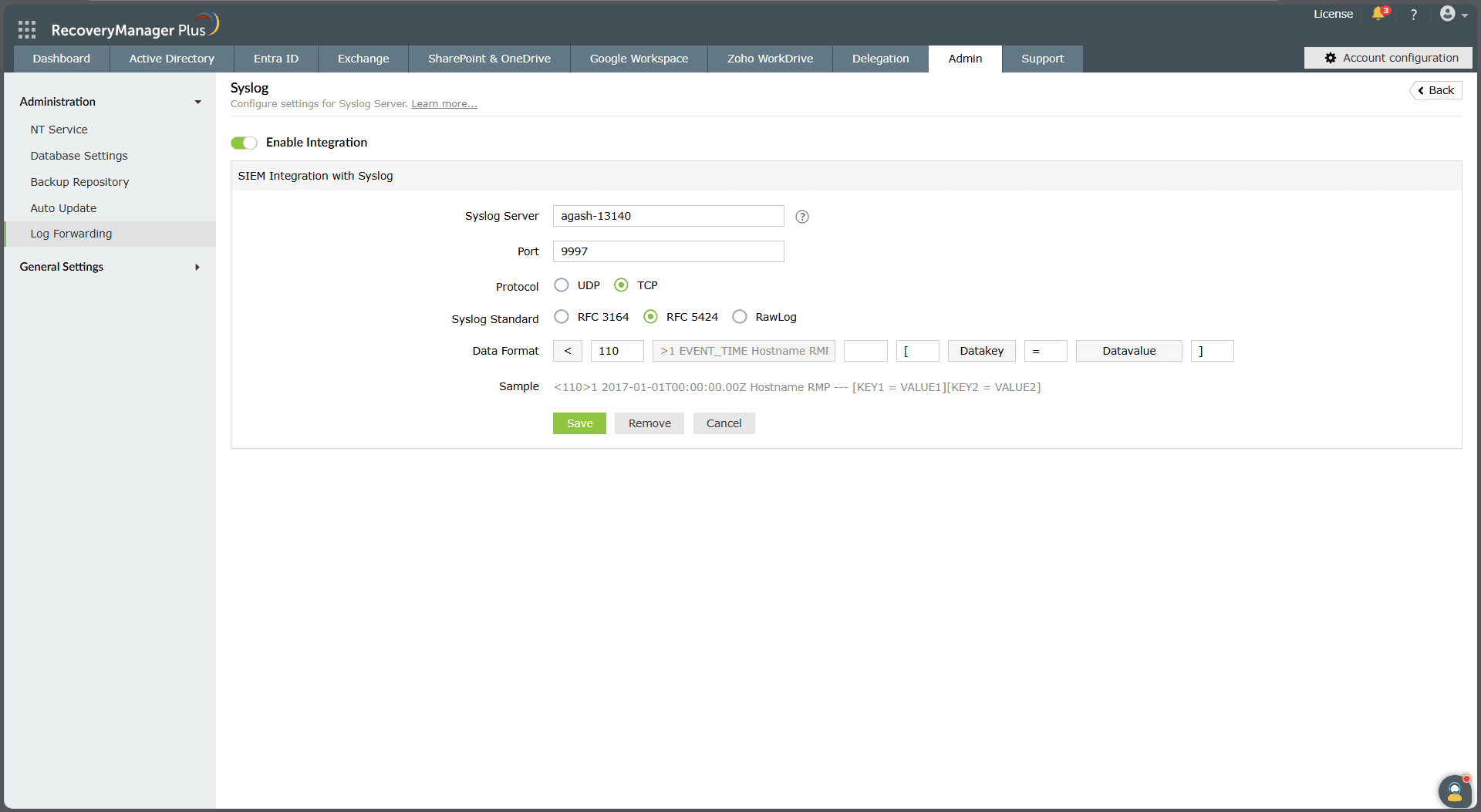
Figure 1. Integrating a syslog server to forward audit logs in RecoveryManager Plus.
Toggle this switch to activate or deactivate log forwarding to a syslog server.
Customize the structure of syslog messages sent from RecoveryManager Plus.
This section outlines the rules and recommendations for configuring syslog message parameters, including the server name, port, protocol, standards, and priority numbers.
The Port field specifies the network port where the syslog server accepts incoming logs. The valid range for the port number is 0-65535.
A priority number (PRI) is an integer ranging from 0 to 191 that is included in the syslog header. It combines two components:
The priority number is calculated using the following formula:
Priority number = (facility × 8) + severity
Facility codes
| Code | Description |
| 0 | Kernel messages |
| 1 | User-level messages |
| 2 | Mail system |
| 3 | System daemons |
| 4 | Security/authorization messages |
| 5 | Messages generated internally by syslog |
| 6 | Line printer subsystem |
| 7 | Network news subsystem |
| 8 | UUCP subsystem |
| 9 | Clock daemon |
| 10 | Security/authorization messages |
| 11 | FTP daemon |
| 12 | NTP subsystem |
| 13 | Log audit |
| 14 | Log alert |
Severity levels
| Code | Description |
| 0 | Emergency: The system is unusable |
| 1 | Alert: Immediate action is required |
| 2 | Critical: Critical conditions |
| 3 | Error: Error conditions |
| 4 | Warning: Warning conditions |
| 5 | Notice: Normal but significant events |
| 6 | Informational: General information |
| 7 | Debug: Debugging messages |
For example, if the facility is 13 (log audit) and the severity is 6 (informational), then the PRI is (13 × 8) + 6 = 110.
Choose a protocol based on your organization's requirements:
This defines the structure of the message:
The data format defines the structure of the message body forwarded by RecoveryManager Plus.
RFC 3164
<PRI><Timestamp><Hostname> - [Key1=Value1][Key2=Value2]
RFC 5424
<PRI><Version><Timestamp><Hostname> - [Key1=Value1][Key2=Value2]
Last updated on: 10-11-2025
Fill this form, and we'll contact you rightaway.
Our technical support team will get in touch with you at the earliest."

