
- Cloud Protection
- Compliance
- Data Leak Prevention
- Data Risk Assessment
- File Analysis
- File Audit
- Threat Glossary
Secure web gateway
Key takeaways
- A secure web gateway (SWG) is a security control deployed between users and the internet, inspecting inbound and outbound web traffic before it reaches its destination.
- As organizations become more distributed and SaaS-dependent, an SWG gives IT administrators visibility into and control over web activity across users, devices, and locations.
- Core SWG components include URL filtering, malware detection, application control, and data loss prevention (DLP).
- Unlike a traditional firewall, an SWG inspects web traffic at the application layer, enabling granular control over users' web activity.
- SWGs are available in three primary deployment models: cloud-delivered, on-premises, and hybrid.
- Successful SWG deployment starts with defining acceptable use policies, enabling SSL/TLS inspection where appropriate, and integrating DLP controls to secure sensitive data.
What is a secure web gateway
A secure web gateway (SWG) is a network security solution that acts as a protective layer between users and the internet. Instead of allowing devices to access the web directly without inspection, the SWG intercepts all traffic and inspects it in both directions.
For outbound traffic, it evaluates every web request against corporate cloud security policies—allowing, limiting, or blocking unauthorized, risky, and non-business sites.
For inbound traffic, it inspects the incoming web response to detect and block malware and other threats before they reach the user's device.
An effective SWG reduces the organization's attack surface while providing greater visibility into user web activity.
Why do organizations need a secure web gateway?
Modern organizations no longer operate under traditional network parameters. Distributed systems are now the norm, SaaS platforms house business data, and the web has shifted from a supporting tool into the centerpiece of daily operations. Hence, organizations without a dedicated cloud governance solution face massive exposure. Over the same web channels used for everyday work, employees can inadvertently download malware, leak sensitive data through unapproved apps, or trigger compliance violations.
Deploying a Secure Web Gateway (SWG) eliminates these blind spots by giving IT administrators the visibility and control to:
- Enforce acceptable use policies: Control employees access to only business-relevant and secure websites, reducing exposure to high-risk and non-business content and unauthorized IT applications.
- Block web-based threats: Inspect web traffic to identify and stop malware, ransomware, malicious payloads, phishing attacks, and other internet-borne threats before they reach a user's device.
- Prevent sensitive data leaks: Inspect outbound web traffic for sensitive content such as customer records, financial data, and PII, and block unauthorized transfers before they result in a breach.
- Extend protection to remote and hybrid workers: Eliminate the security gaps created by off-network employees, and enforce the same policies regardless of whether a user connects from corporate network, home, or public locations.
- Optimize bandwidth and productivity: Restrict access to non-work-related traffic such as video streaming and gaming, it preserves network performance for business-critical applications.
- Meet regulatory compliance requirements: Provide the policy enforcement and audit logs needed to demonstrate control over internet data movement for frameworks such as the GDPR, HIPAA, and PCI DSS.
Secure web gateway features
A secure web gateway combines several inspection and enforcement capabilities that work together to inspect, filter, and control web traffic. The features present in an SWG determine the depth of protection it provides. While capabilities vary, most modern SWGs include the following:
- URL filtering: Every web request is checked against a database of categorized web addresses, reputation services, and known-malicious sites. Categories such as GenAI, social media, or file-sharing can be blocked, limited, or allowed based on your organization's acceptable use policy.
- Malware scanning: Downloads and web content are scanned in real time for malicious code, infected files, and other known exploit signatures before they reach the endpoint.
- Application control: Governs what users can do within allowed web application. It enforces policies such as restricting file uploads to personal cloud storage, limiting social media activity, or blocking access to unsanctioned SaaS tools.
- Data loss prevention (DLP): Outbound web traffic is inspected for sensitive content such as PII, ePHI, and financial records. If sensitive data is detected, the SWG can block, encrypt, quarantine, or alert administrators based on organizational policies.
SWG vs firewall
Although secure web gateways and next-generation firewalls (NGFWs) both inspect traffic well beyond simple port and IP filtering, they're anchored to different things — an NGFW protects a network boundary, while a secure web gateway follows the user wherever they connect from. The table below breaks down where the two overlap and where they diverge.
| Capability | Secure web gateway | Next Generation Firewall |
|---|---|---|
| Primary focus | Web traffic, user activity, and cloud applications | Network perimeter plus application-layer traffic and identity context |
| Traffic inspection | Application-layer inspection of HTTP/HTTPS traffic, web content, and cloud app traffic | Deep packet inspection with application identification and control |
| Cloud Data loss prevention | Inline content inspection and policy enforcement to detect and block sensitive content, such as PII and financial data, across web applications | Content inspection and policy enforcement via a licensed DLP module to detect and block sensitive content, such as PII and financial data, across network traffic spanning web, email, and file transfer protocols |
| URL / content filtering | Real-time, category- and reputation-based filtering of websites, enforced consistently regardless of user location | Category-based URL filtering, usually via a licensed subscription |
| Threat protection | Performs inline malware scanning, sandboxing, and TLS inspection to catch threats before they reach the endpoint | Integrated IPS, sandboxing, and SSL/TLS decryption applied to traffic crossing the network perimeter |
| Cloud app control | Granular control over in-app actions, such as blocking uploads or link sharing within a specific app. | App-level allow/block only; not action-level within an app |
| Shadow IT | Uncovers previously unknown SaaS app usage and risk-scores it, typically via CASB integration | Detects only apps matching known signatures; no risk-scoring for unsanctioned or unrecognized usage |
| Deployment model | Often cloud-native within SSE/SASE architecture | Historically appliance-based, tied to a network perimeter |
How does a secure web gateway work
Every web request made within an organization follows a structured path through the SWG before it interacts with the public internet, inspecting both outbound requests and inbound responses.
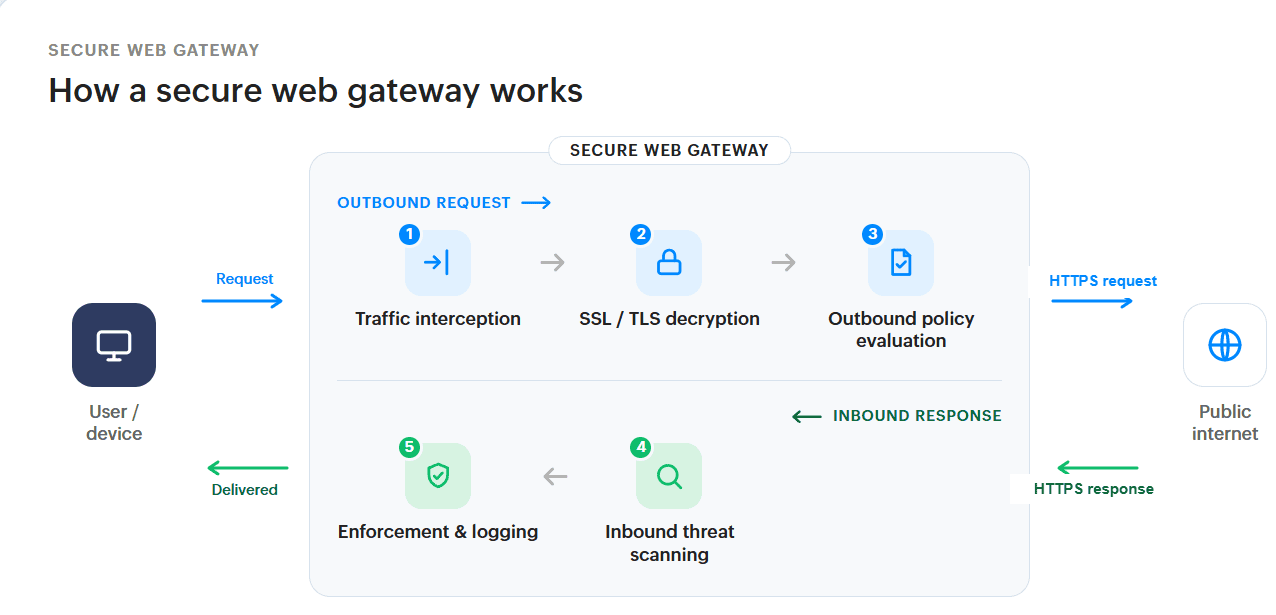
- 1. Traffic interception: When a user visits a website, accesses a cloud application, or downloads a file, the SWG intercepts the web request before it leaves the network.
- 2. SSL/TLS inspection and decryption: The SWG decrypts HTTPS traffic via a secure proxy connection to inspect its content. Without this step, threats hidden inside encrypted payloads pass through undetected.
- 3. Outbound policy evaluation and enforcement: The decrypted request is validated against corporate security policies. Based on this evaluation, access to unauthorized URLs, unapproved in-app actions is blocked, and any sensitive data transfers that violate DLP rules is stopped. This ensures data loss and policy violations are prevented before traffic ever leaves the network.
- 4. Inbound threat scanning: Once the request is permitted, the SWG fetches the corresponding response, such as webpages, files, or application data, from the destination and scans it in real time to block malicious code, infected files, and exploit signatures.
- 5. Enforcement and logging: Once the content passes inspection, clean traffic is re-encrypted and delivered. If a threat of policy violation is detected, the SWG drops the connection, terminates the session, displays a block page, and logs the event for IT teams to review.
Types of secure web gateway deployment
Organizations can deploy a secure web gateway in different environments depending on their network infrastructure, compliance requirements, and workforce distribution. The three primary deployment models are cloud-delivered, on-premises, and hybrid.
- Cloud-delivered SWG: This cloud-delivered model processes web traffic through a cloud-based security platform, removing the need to backhaul remote traffic to a physical office. It ensures consistent security policies for users are enforced regardless of where the user connects from. Works best for distributed organizations with a high proportion of remote or hybrid employees, multiple branch offices, or cloud-first environments that need secure, direct-to-internet access without network latency.
- On-premises SWG: This model uses physical hardware or local virtual appliances installed within the corporate data center. It intercepts and inspects internet-bound traffic at the local network perimeter, giving IT administrators full visibility and control over data handling and log storage. Works best for centralized organizations or heavily regulated industries such as banking or healthcare that require greater physical control over their hardware and data.
- Hybrid SWG: This approach combines on-premises appliances at headquarters with cloud gateways for branch offices and remote users, processing traffic locally where possible and extending protection everywhere else. It works best for large enterprises that have corporate headquarters and a distributed network of branch offices or remote workers.
Best practices for deploying a secure web gateway
A secure web gateway is only as effective as the policies behind it and the consistency with which it is maintained. To maximize its effectiveness, organizations should establish well-defined security policies, continuously monitor web activity, and keep security controls up to date. Here are a few practices to implement:
- Begin by defining acceptable use policies: Establish clear policies that specify which websites, applications, and content categories are permitted, restricted, or blocked before configuring your SWG. Undocumented policies are difficult to audit and harder to enforce consistently.
- Enable SSL/TLS inspection from the outset: Deploying it during initial rollout avoids leaving gaps where encrypted threats can slip through unnoticed, and prevents disruptive reconfiguration later.
- Apply the principle of least privilege to web access: Users should have access only to the web resources their role requires. Unrestricted access increases the attack surface and makes policy violations harder to detect.
- Integrate with your DLP controls: An SWG with data loss prevention integration monitors outbound traffic for sensitive data, such as credit card numbers, PII, and Intellectual property, and blocks transfers that violate DLP policies. Without this, data exfiltration goes unchecked.
- Review logs and reports regularly: SWG logs capture a detailed record of web activity across your organization. Regular review surfaces policy violations, unusual access patterns, and early indicators of compromise.
- Keep threat intelligence feeds current: URL category databases, threat intelligence feeds, and malware signature libraries must be updated continuously to remain effective. Verify that your vendor provides regular, automated updates.
Regulate cloud app usage with DataSecurity Plus
DataSecurity Plus is a unified data visibility and security solution that helps organizations monitor, govern, and secure cloud application usage across their network. Here are a few ways DataSecurity Plus can help you regulate cloud app usage:
- Minimize your attack surface by blocking high-risk, non-business, low-reputation, and proxy/anonymization apps and domains.
- Uncover shadow IT by identifying previously unknown SaaS apps and domains, and assess their relevance.
- Govern cloud app usage by creating allow and block lists for web applications and enforcing granular in-app controls such as blocking uploads or link sharing within specific apps.
- Monitor the usage of GenAI applications across your network, and flag unsanctioned or outside business-hours activity for review.
- Audit prompts submitted to GenAI applications, gaining visibility into user inputs to tools like ChatGPT and Gemini.
Frequently asked questions
1.How does a secure web gateway fit in the broader SSE?
A secure web gateway is one of the core components of a Security Service Edge (SSE) architecture. While SSE provides a unified, cloud-delivered security framework, the SWG specifically focuses on securing internet-bound traffic by inspecting web requests, blocking threats, and enforcing acceptable use and data protection policies.. It works alongside:
- Cloud Access Security Broker (CASB): Extends security visibility and controls to sanctioned corporate SaaS applications such as Microsoft 365, Google Workspace, or Salesforce, monitoring SaaS usage, enforcing data policies, detecting shadow IT, and more.
- Zero Trust Network Access (ZTNA): Replaces the traditional VPN, verifying user identity and device posture before granting access to internal private applications.
Together, these components ensure all enterprise traffic pathways are centrally monitored and secured under a single policy engine.
2.How does a secure web gateway differ from a traditional proxy?
While both a traditional proxy server and a secure web gateway act as an intermediary between an internal user and the internet, their depth of security, inspection capabilities, and overall purpose are entirely different.
| Capability | Traditional proxy | Secure web gateway (SWG) |
|---|---|---|
| Primary purpose | Traffic routing, IP masking, and content caching | Real-time threat prevention and data leak protection |
| Encrypted traffic | Passes HTTPS traffic through without inspection | Decrypts SSL/TLS to inspect encrypted web traffic for hidden threats |
| Threat prevention | Static domain blacklists | Dynamic sandboxing, heuristics, and real-time malware engines |
| Data protection | No outbound inspection | DLP monitors and blocks unauthorized data exfiltration |
| Application control | Blocks or allows entire domains | Enforces rules on specific actions within a cloud app e.g., allow access to Google Drive but block uploads |
3.What are the challenges in deploying a secure web gateway?
Deploying an SWG successfully requires requires careful planning to balance security, user experience, and operational complexity. Common challenges include:
- Balancing privacy and visibility: SSL/TLS decryption is essential for inspecting hidden threats, but it can conflict with data privacy compliance if sensitive financial or healthcare traffic is intercepted without proper controls.
- Traffic redirection: Ensuring that all endpoint devices, including remote and unmanaged assets, consistently route traffic through the gateway without authentication gaps requires careful configuration.
- Architecture bottlenecks: Legacy network architectures can have performance bottlenecks if remote traffic must be backhauled to an on-premises gateway rather than being processed at a cloud edge node.
4.How does a secure web gateway impact network performance?
An SWG introduces latency by routing web traffic through an additional inspection checkpoint. When network bottlenecks occur, they typically manifest in the following ways:
- Latency from deep inspection: SSL/TLS decryption, sandboxing, and real-time malware scanning add processing overhead that can slow web page load times for end users.
- Backhaul bottlenecks: Forcing remote or branch office traffic to route back to a physical on-premises gateway creates a traffic choke point that degrades connection speeds.
- Throughput drops on high-bandwidth applications: Heavy, continuous traffic such as video conferencing or large file transfers can saturate processing capacity if every packet undergoes deep content filtering.