

- Home
- Scalability
- When to scale your Log360 deployment
When to scale your Log360 deployment
On this page:
- Introduction
- Indicators of when to scale
- Core scaling strategies
- Conclusion and next steps
Introduction
As your organization grows, so does your security data. A Log360 deployment that was perfectly sized during the initial setup may eventually require expansion to handle:
- Increased log volume
- Addition data sources
- Geographic expansion
- Demand for intensive search and advanced analysis
Log360's scalable and multi-tier architecture is designed for this growth, allowing you to scale your environment strategically and without disruption.
This guide will help you identify the key indicators that signal a need to scale and provide you with the strategies to expand your Log360 deployment effectively.
This document covers:
- Identifying performance issues and operational triggers for scaling.
- Core scaling strategies, including horizontal and role-based scaling.
Please ensure you have gone through Log360's scalable architecture guide to understand the components and functioning in-depth.
Indicators of when to scale
Scaling is not just about planning for future growth, it's also about responding to the current state of your environment. You should consider scaling your deployment based on two types of indicators: performance issues and operational triggers. Scaling proactively ensures business growth never outruns SIEM capability - avoiding downtime and emergency fixes. Review these triggers periodically based on your enterprise requirements.
Performance bottlenecks
Below are the indicators that tell you that your Log360 deployment is reaching its capacity for current infrastructure and it's time to scale:
- Slow search and report generation: If queries are taking longer than usual to complete, it often indicates that the indexer cluster or the log processors handling the search engine role are under heavy load.
- High resource utilization: Consistently high CPU or RAM usage on your Log Processor nodes is a clear sign that the servers are struggling to keep up with the processing workload.
- Log ingestion delays: If you notice a growing lag between when an event occurs and when it appears in search results, your processing engine or the log queue engine may be backlogged.
- Service status issues: Log360 provides real-time health indicators that can be monitored. Frequent "Needs Attention" or "Critical" health statuses for your log processors signal underlying performance or configuration issues that may be resolved by scaling.
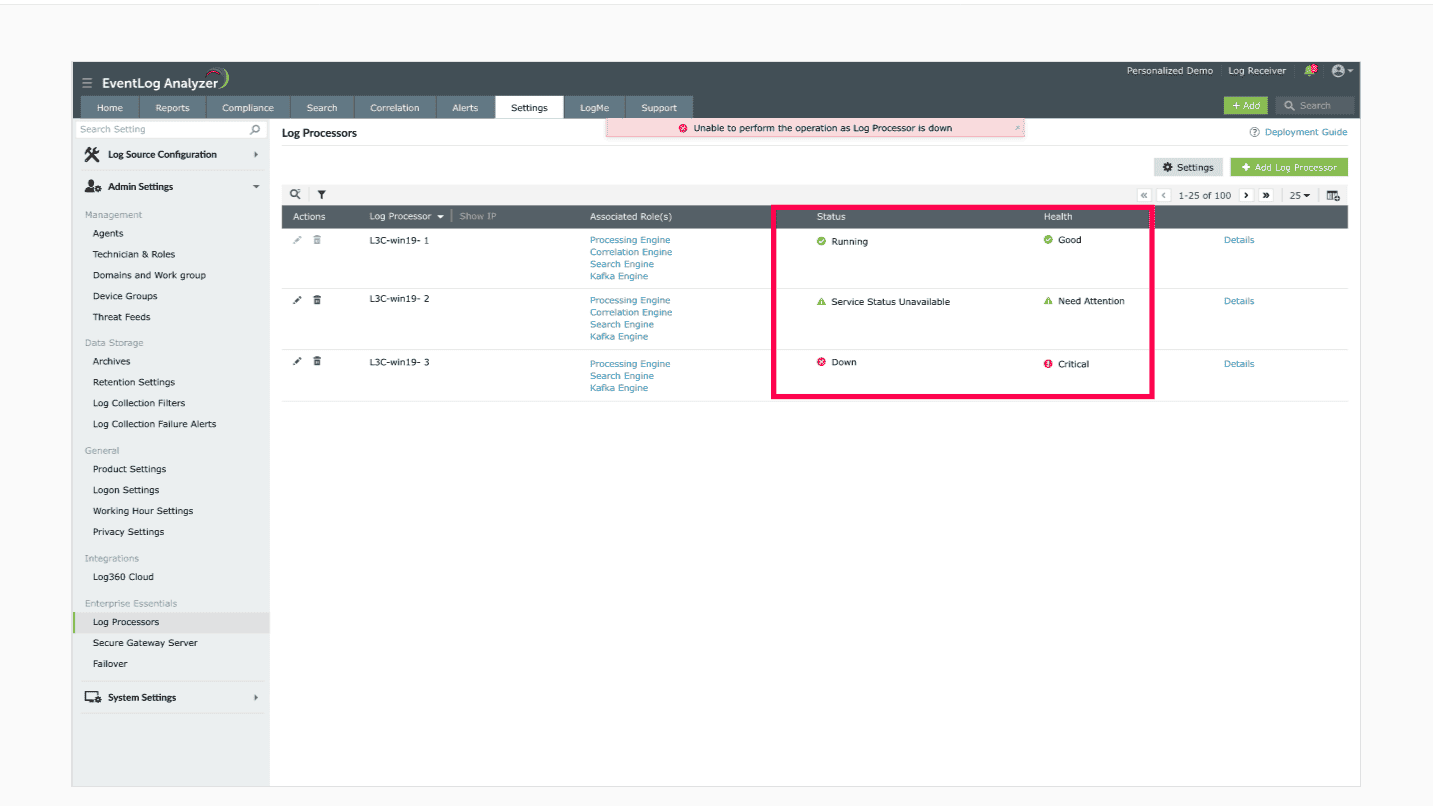
To check your Log360 deployment for performance issues, refer to this help document.
Operational triggers
These are business or operational changes that will predictably increase the load on your system.
- Onboarding new or high-volume log sources: Adding a new firewall cluster, a core business application, or a cloud environment will significantly increase your EPS and daily data volume.
- Geographic expansions: When you expand your enterprise to a different location, deploying agents to a new branch office or data center requires scaling your collection and processing capabilities.
- Increasing user base: Adding more security analysts to your team will increase the number of concurrent searches and the overall load on the system.
- Enabling resource-intensive capabilities: Activating resource-intensive capabilities like correlation rules or increase in complex search queries on a system not initially sized for them will require additional resources.
Core scaling strategies
Log360's architecture provides two primary strategies for scaling your deployment. These can be used independently or together for maximum flexibility.
Horizontal scaling: Adding log processor nodes
This is the most fundamental method for increasing the capacity of your Log360 deployment.
- What is it?
Horizontal scaling involves adding more log processor servers to your existing cluster.
- When to use it?
This is the go-to strategy for addressing overall increases in log volume and processing load.
- In multi-site deployments, the Access Gateway Cluster acts as a reverse proxy in DMZ, receiving logs from agents and routing securely to processors. This ensures secure transmission and load balancing.
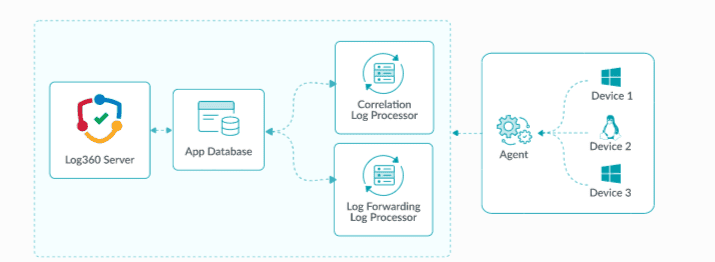
For step-by-step instructions on adding a new Log Processor to your cluster, please refer to the configuring log processors section in the help document.
Role-based scaling: Specializing your nodes with multi-tier architecture
For more targeted performance tuning, you can dedicate specific log processor nodes to handle specific, resource-intensive tasks. When performance bottlenecks affect one function, not the whole system. Role-based scaling lets you dedicate nodes for specific tasks.
- What is it?
Instead of having every processor do everything, you assign a specific role (e.g., Search engine or Correlation engine) to a dedicated node.
- How it works?
By isolating a demanding task, you ensure that it has dedicated CPU and RAM resources, preventing it from impacting other critical functions like log ingestion and parsing. For example, a complex, long-running user search will only impact the dedicated search engine node, not the entire processor cluster.
- When to use it?
- When you identify issues related to a specific function (e.g., slow searches).
- In very large environments where you want to create dedicated node for different operations.
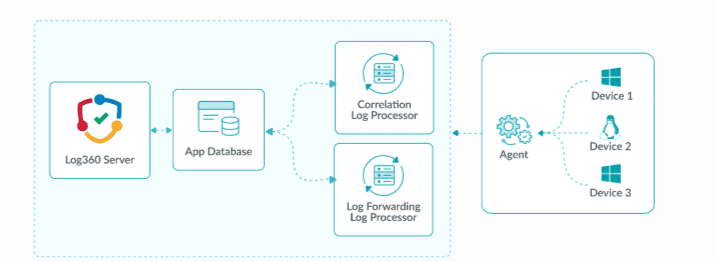
Available roles for specialization:
Default roles:
- Processing Engine: Enriches parsed logs and by default handles log forwarding, alerts, and archiving.
- Log Queue Engine: Manages event flow between components and prevents data loss.
- Correlation Engine: Evaluates events against security rules.
- Search Engine: Indexes data, stores it in Elasticsearch, and handles user queries.
Optional specialized roles / Custom roles: These functions can be decoupled from the Processing Engine and run on dedicated nodes for greater flexibility and performance:
- Alerts: Generates notifications from general alerts and correlation alerts.
- Log Forwarding: Sends logs to external tools or destinations for analysis or storage.
- Log Archive: Stores logs based on retention policies.
Once configured as standalone custom roles, these functions are no longer handled by the Processing Engine.
Conclusion and next steps
Scaling your Log360 deployment is a strategic process that allows your security operations to grow with your business. By monitoring your system's health, identifying performance triggers, and applying the right scaling strategy, whether it's adding more nodes or specializing existing ones, you can ensure your Log360 environment remains fast, resilient, and effective.
Next steps
- Proceed to the Capacity planning manual to understand how to size the different components of Log360 according to your enterprise requirements.
- Refer to the Plan a scalable deployment guide to understand the deployment process
- For any configuration steps, refer to the help document.

