Performance metrics of an IPAM monitor
View detailed performance metrics for your IP address management (IPAM) monitor and track IP and DNS details. Learn how to add an IPAM monitor, set thresholds, and get alerts when the configured values exceed the thresholds.
To view the performance metrics of an IPAM monitor:
- Log in to your OpManager Nexus account.
- Navigate to Network > IPAM > Subnets. Then, click the required monitor to view the Summary tab (Fig. 1).
Summary
|
Parameter |
Description |
|
Availability |
Shows the availability of the IPAM monitor as a percentage; clicking the number displays the Availability Summary Report |
|
Subnet Size |
Shows the number of IP addresses present in the subnet |
|
IP Availability Status |
Shows the details of IP availability as percentages, segmented by the following sections:
|
|
DNS Status |
Shows the DNS statuses as percentages, segmented by the following sections:
|
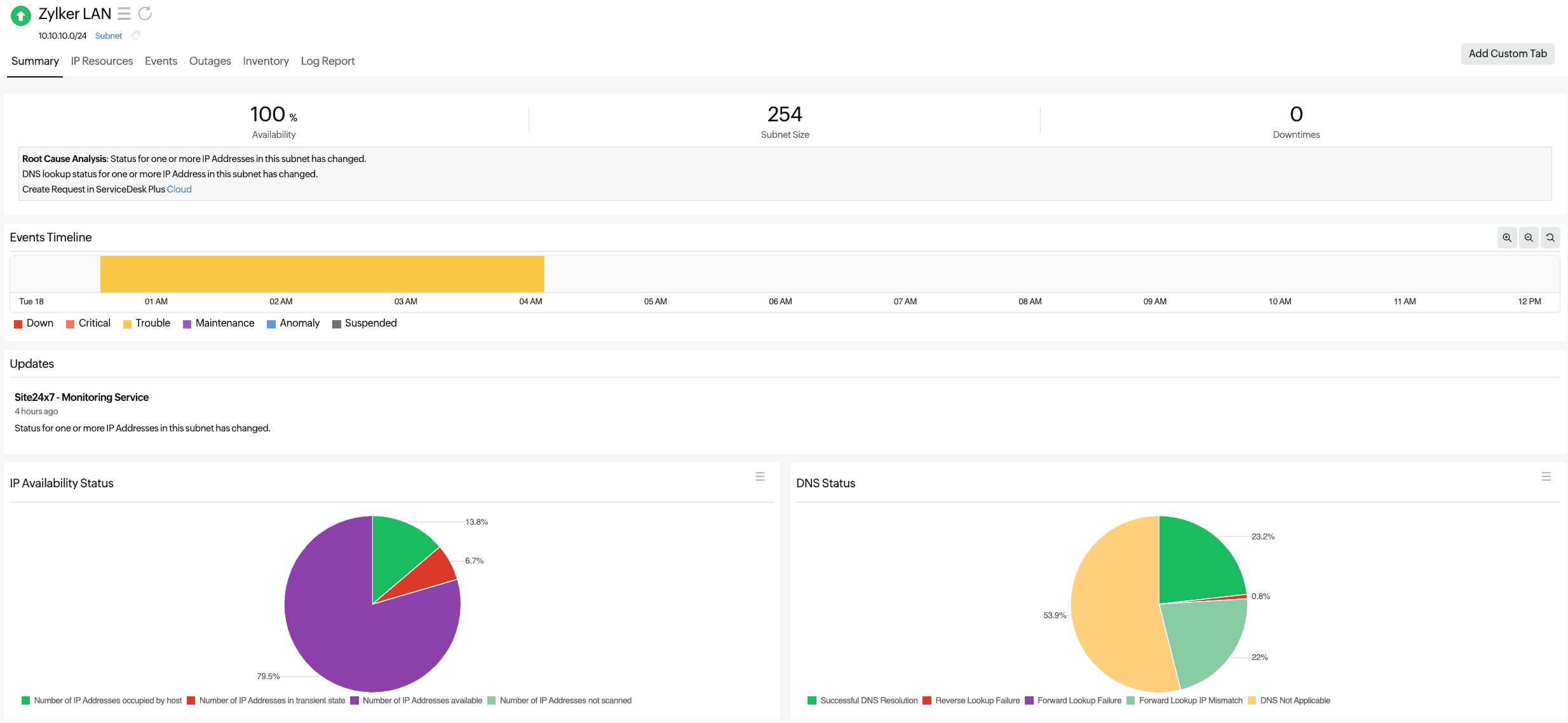
Figure 1. Performance metrics of an IPAM monitor.
Related articles
-
On this page
- Summary