Monitor Virtual Infrastructure
OpManager Nexus gives you a thorough understanding of the functioning of your virtual infrastructure.
- VMware ESX/ESXi | VMware vCenter | VMware vCenter Sessions | VMware VM | VMware Datastore | VMware Snapshot | VMware Cluster
- VMware VDI: Horizon
- VMware NSX-T Manager | VMware NSX-T Gateways | VMware NSX-T nodes
- Hyper-V monitor
- Nutanix Cluster | Nutanix Host | Nutanix VM | Nutanix Storage Container | Nutanix Prism Central
- Xenserver Host | Xenserver VM
Monitor all your backup server environments in one place and receive timely alerts on your job statuses, failures, completion updates, and critical events, helping you maintain data integrity while avoiding data loss.
Virtualization monitoring
Since VMware resources reside behind a firewall, you need to install On-Premise Poller in that intranet network to monitor them. On-Premise Poller acts as the location where the VMware resources are monitored.
First, you can add VMware vCenter monitors, from which you can discover and automatically add the associated ESX/ESXi hosts for monitoring. From the added ESX/ESXi hosts, you can add child resources like VMware VMs, datastores, and their associated snapshots.
Similarly, you can monitor your Nutanix Clusters and the associated hypervisors and VMs to obtain performance insights into your Nutanix environment. Thus, you can discover and monitor your entire virtual infrastructure and track its performance at varied intervals.
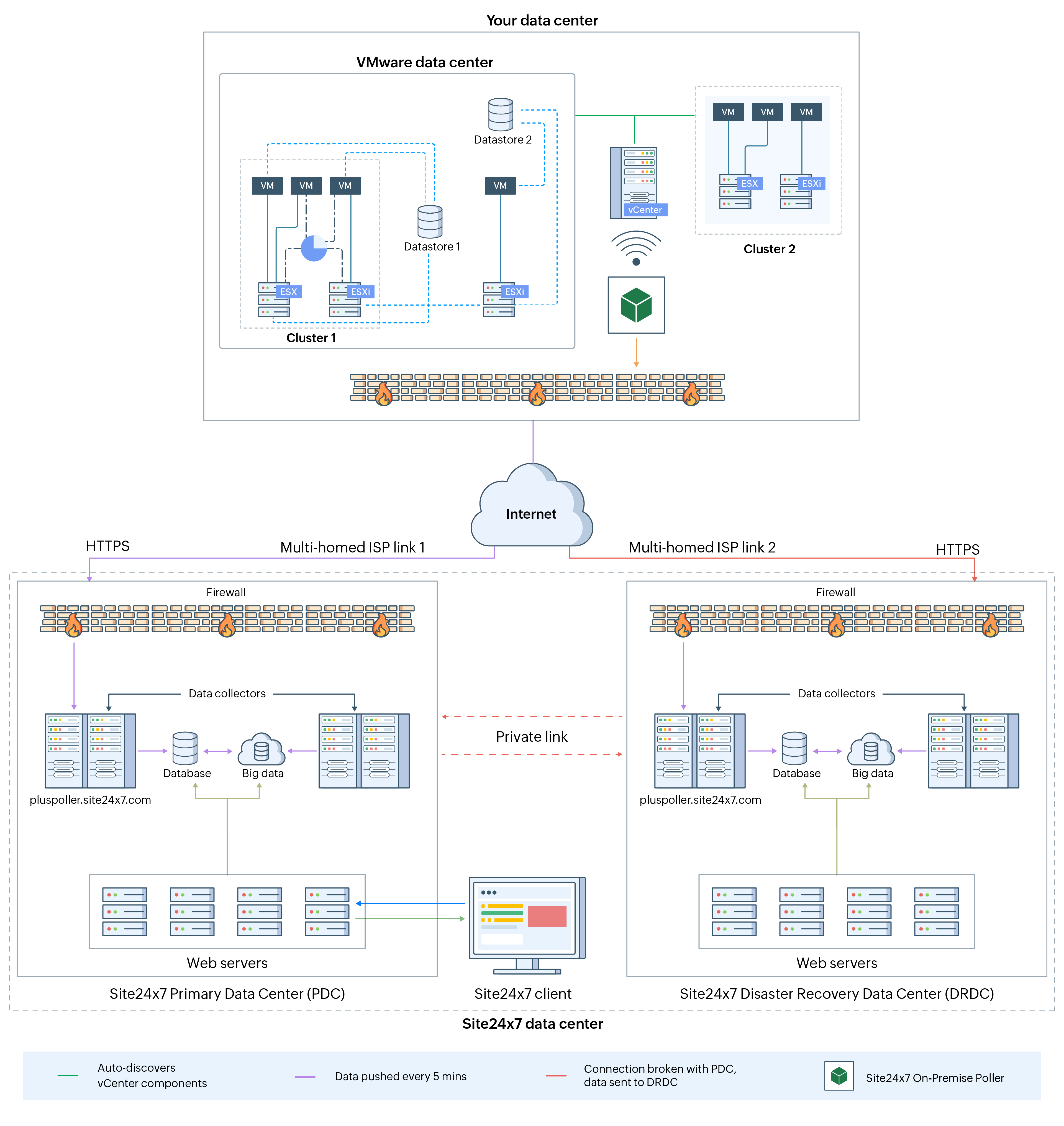
Virtualization monitoring architecture
Monitoring mechanism
| Resource | Monitored using |
|---|---|
| VMware and Nutanix | On-Premise Poller |
| Hyper-V | OpManager Nexus Server Monitoring Agent |
You can assess the capacity of the entire infrastructure, isolate unhealthy hypervisors, take corrective action, allocate resources to each VM based on availability, and optimize resource use accordingly, all using the data shown in our intuitive graphs and reports.
Now get started by adding a VMware vCenter monitor.