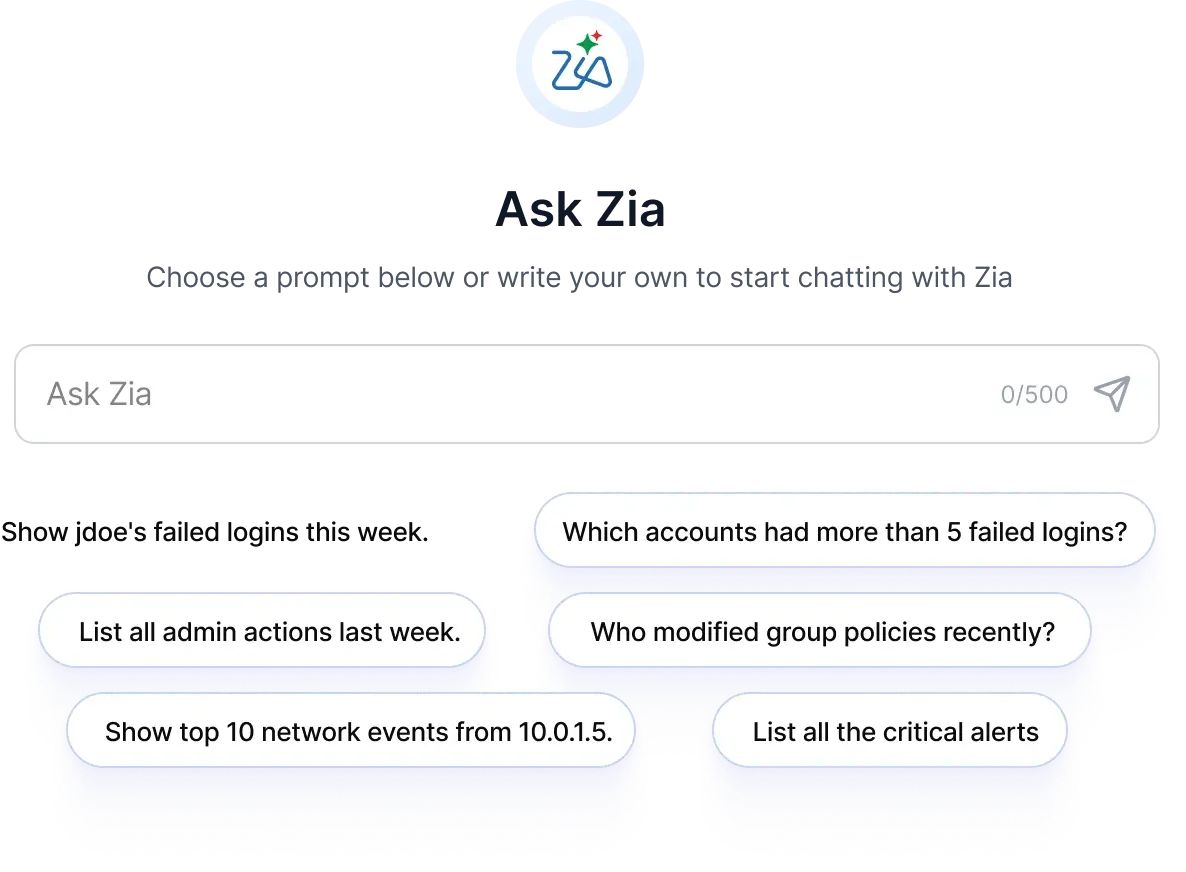
Instead of writing complex search queries or navigating through dashboards, you can simply describe what you are looking for. Ask Zia handles the rest.
Ask Zia converts your input into structured search queries, fetches relevant data from your logs and alerts, and presents the results in seconds. It works from anywhere inside the Log360 console.
Prompt examples:
"Show top 5 users with failed logons"
"Show critical alerts in the past 1 hour"
"Show me recent storage tier actions by my technicians"
Prebuilt security agents or build your own
Zia Agent Studio brings AI agents into your security operations. Beyond simple automations, you can build task specific agents that can reason through multi-step investigations, pull data from multiple products, and present actionable findings.
Ready to run from day one
A growing library of agents built for common security workflows. Deploy in clicks from the Zia Agent Store.
User Activity Review Agent
Complete user activity records for audits and investigations. Compiles every logon, file access, system touch, and triggered alert for a specified user into a single deletable summary. Built for pre-termination reviews, compliance audits, and active investigations.
Trigger via Ask Zia:"Analyze activity for [username] over the last 7 days"
Alert Correlation Agent
Connects alerts into a possible attack chain. Reviews alerts across a time window, finds shared entities: hosts, users, IPs, and sequences them into a probable attack chain with MITRE ATT&CK stage labels. Surfaces connections that look unrelated on the surface.
Trigger via Ask Zia:"Analyze top entities and attack chain for the last 24 hours"
Build your own
Need something specific to your environment? Describe what you need in plain language and Zia Agent Studio generates the agent for you. Or build from scratch: define the purpose, choose tools and data sources, upload your knowledge base, set guardrails, and deploy. Once live, your custom agents are callable from Ask Zia just like the prebuilt ones.
Step 1
Describe what you need
Type what the agent should do in plain language. Zia interprets your intent and generates the agent structure, purpose, and initial configuration automatically.
Step 2
Choose your LLM
Select the model that fits the task — Zoho's own models or leading third-party LLMs. Different agents can run on different models depending on the complexity of the job.
Step 3
Connect your tools and data
Give the agent access to what it needs — just select the prebuilt API tools you require from the Zoho and ManageEngine ecosystems , or external API tools. Agents only use what you authorize.
Step 4
Upload a knowledge base
Add SOC SOPs, internal runbooks, compliance policies, or any reference material. The agent draws on this context when reasoning through tasks.
Step 5
Set guardrails and deploy
Define what the agent can and cannot do. Restrict actions, and control scope before going live. Once deployed, the agent is available in Log360 Cloud.
Your SIEM, open to every AI tool
You can access Log360 from the AI tools your team already works in. Zoho MCP Server lets you connect Log360 Cloud to AI clients such as Claude, Copilot, Cursor, and others using the Model Context Protocol (MCP). This enables AI agents and users to interact with Log360 capabilities (search, incident management, and more) via natural language through their preferred AI tools.
You are not locked into one interface. If your team prefers working in VS Code, or your threat hunters use Claude for investigation workflows, Log360 works where they work.
Set up your MCP server in a few clicks from the Zoho MCP console, select the tools you need, and start interacting with Log360 Cloud.
A product preview showing Log360 connected to an external AI tool through MCP for natural language security operations.
Run agents with confidence
Agents in production need oversight. Every session is scoped, logged, and traceable.
Scoped access
Agents only access the data and tools you explicitly authorize. Nothing runs outside the boundaries you set.
Full audit trail
Every session is recorded with a complete trace: queries made, tools called, actions taken. Ready for compliance reviews without extra effort.
Guardrails, always on
Define what the agent should always do and what it shouldn't ever do. In a SOC environment where agents touch sensitive logs and alerts, those boundaries hold, regardless of how a session unfolds.
Resources
Datasheet
Zia for Log360
AI-powered insights, autonomous investigation, and custom agents built into your Log360 security operations.
Learn more
Web page
Alert Correlation Agent
Connects related alerts into a probable attack chain, mapped to MITRE ATT&CK with remediation steps.
Learn more
Web page
User Activity Review Agent
Compiles a user's logons, file access, and alerts into one defensible summary for audits.
Learn more
Get started with AI-powered security operations
Start with a free trial of Log360 Cloud and explore Zia, prebuilt security agents, and MCP integrations. Or talk to our team to see how AI agents fit into your security operations.