SIEM tools like ManageEngine Log360 correlate events from endpoints, servers, and identity systems to detect signs of lateral movement—such as multiple logon attempts, access to multiple machines, or the use of administrative tools like PsExec. Log360 maps these behaviors against frameworks like MITRE ATT&CK to expose advanced threat paths early.
On this page
Did you know that, in the first quarter of 2025, organizations faced an average of 1,925 weekly cyberattacks with a 47% increase compared to the same period in 2024? This underscores the urgent need for enhanced security strategies that provide real-time visibility, rapid threat response, and proactive defense across IT environments.
Key security challenges in IT landscape
The following are the key challenges in the current IT landscape, especially from a security, operations, and transformation standpoint:
- Increasing cybersecurity threats: Sophisticated ransomware, phishing, and insider threats are on the rise as attackers exploit hybrid work models and attack surfaces expand. Managing security across endpoints, cloud workloads, and legacy systems simultaneously has become increasingly complex.
- Managing hybrid and multi-cloud environment: With organizations operating across on-premises and cloud environments, inconsistent security policies and limited visibility pose major challenges. Integrating monitoring tools across diverse platforms adds to the complexity.
- Alert fatigue and limited threat context: IT and security operations center (SOC) teams are overwhelmed by high alert volumes, struggling to distinguish real threats from noise. The absence of correlation and context further delays effective incident response.
- Skill shortage and talent gaps: A shortage of skilled cybersecurity professionals leaves existing teams under-resourced and overburdened. Continuous upskilling is essential to keep pace with evolving threats and technologies.
Key security gaps in IT landscape
The following are key security gaps in IT infrastructure that leave organizations vulnerable to cyber threats and compliance risks.
| Security gaps | Associated risks and challenges |
|---|---|
| Gaps in visibility due to siloed systems |
|
| Weak identity and access control |
|
| Insufficient real-time threat detection |
|
| Poor patch and vulnerability management |
|
| Unprotected data in transit and at rest |
|
| Lack of incident response readiness |
|
| Gaps in compliance and audit readiness |
|
| Cloud security misconfigurations |
|
Key log sources to be monitored in your IT environment
The log sources that a security information and event management (SIEM) system retrieves from the IT sector are as follows:
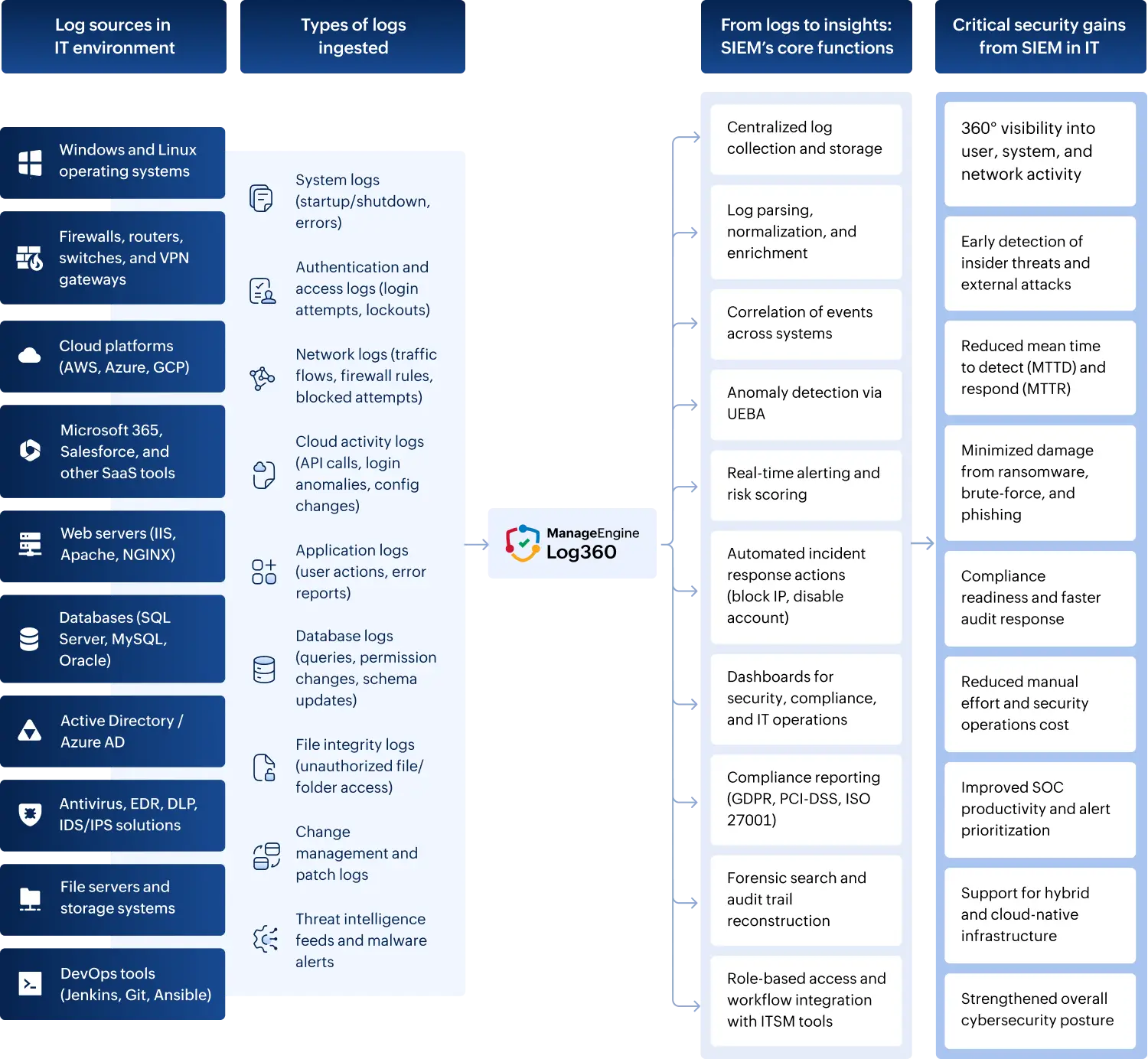
1. Operating systems
- Track login attempts, policy modifications, system-level events, and process creation activities in Windows event logs.
- Track authentication events, kernel alerts, and configuration changes in Linux/Unix syslogs.
2. Active Directory and identity systems
- Track user login/logout events, group membership changes, account lockouts, and GPO modifications in Active Directory (AD) logs.
- Track cloud identity activities, risky sign-ins, and conditional access events in logs for Entra ID (formerly Azure AD).
3. Network devices
- Track connection attempts, port scans, and policy enforcement logs on firewalls.
- Track routing table changes, interface up/down status, and unauthorized access attempts on routers and switches.
- Track remote access logs, session durations, and geolocation anomalies on VPN gateways.
4. Cloud platforms
- Track API calls, login activities, and misconfiguration alerts using AWS CloudTrail and GuardDuty logs.
- Track user access, collaboration events, and conditional access policies in Microsoft 365 and Entra ID logs.
- Track authentication attempts, file access, and user activity within Google Workspace.
5. Security devices and tools
- Track malware detection alerts, quarantine actions, and suspicious behavior flags from antivirus/EDR tools.
- Track policy violations and blocked data transfers from DLP system logs.
- Track exploit attempts, intrusion signatures, and suspicious patterns from IDS/IPS logs.
6. File servers and storage systems
- Track file read, write, and delete operations on sensitive folders using file access logs.
- Track critical system file modifications and unauthorized edits through file integrity monitoring (FIM) logs.
7. Applications and databases
- Track URL access, session IDs, and error responses from web server logs (IIS, Apache, NGINX).
- Track query executions, schema changes, and privilege escalations in database logs (SQL, Oracle, MySQL).
- Track authentication events, access control violations, and transaction anomalies in custom applications.
8. IT management and DevOps tools
- Track infrastructure changes and policy updates from configuration management tools like Puppet, Ansible, or Chef.
- Track deployment activity, build errors, and code rollback events in CI/CD pipelines like Jenkins and Git.
- Track patch deployment results, failed updates, and vulnerability detections in patch management logs.
9. Ticketing and workflow systems
- Track incident creation, resolution updates, and SLA compliance metrics in ITSM tools like ServiceNow and Jira.
- Track change approvals, rejections, and rollback actions in change management logs.
10. Compliance-relevant logs
- Track resource access events, user identities, and timestamps in audit logs.
- Track MFA attempts, SSO failures, and exception handling in authentication logs.
Addressing IT security gaps with a SIEM solution
The following is an in-depth mapping of how a SIEM solution addresses each major IT security gap, structured to clearly show how its capabilities directly fill those gaps.
| Security gap | How a SIEM solution helps in addressing the gaps |
|---|---|
| Incomplete visibility across systems |
|
| Weak identity and access control |
|
| Insufficient real-time threat detection |
|
| Poor patch and vulnerability management |
|
| Inadequate insider threat detection |
|
| Unprotected data in transit and at rest |
|
| Lack of incident response readiness |
|
| Gaps in compliance and audit readiness |
|
| Cloud security misconfigurations |
|
Key factors to consider when evaluating a SIEM solution for IT enterprises
The following are the questions that need to be considered before choosing a SIEM tool to deploy in an IT architecture.
1. Log coverage and visibility
- Does it support diverse log sources (servers, endpoints, network devices, cloud, databases, applications)?
- Can it monitor hybrid environments (a mixture of on-premises, cloud, and a remote workforce)?
- Does it offer real-time log collection, parsing, and normalization?
Log360 Insight:
Supports log ingestion from 750+ sources, including cloud services like AWS, Azure, Microsoft 365, and various endpoint devices.
2. Threat detection capabilities
- Are there prebuilt correlation rules for common attack vectors (brute force, privilege escalation, insider threats)?
- Does it support UEBA?
- Can it detect advanced persistent threats or stealthy behavior?
Log360 Insight:
Comes with built-in correlation rules and UEBA that learns baseline behavior to flag anomalies.
3. Automation and response
- Can it automate incident response (e.g., disable accounts, block IPs, execute scripts)?
- Does it support ticketing tool integration (like ServiceNow, Jira)?
- Is there an alert triage or prioritization mechanism?
Log360 Insight:
Offers automated responses, customizable workflows, and integration with ITSM tools for incident handling.
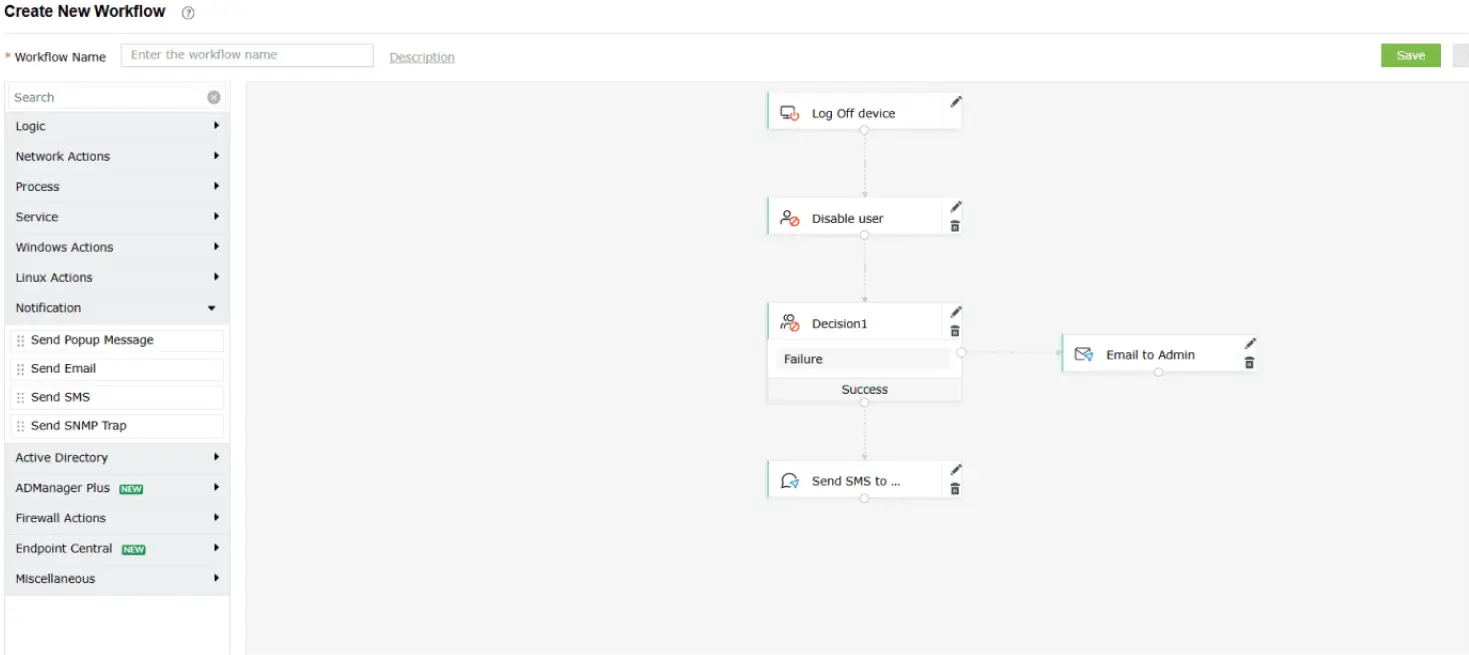
Log360 allows users to set up workflows and playbooks (see Fig. 2) to streamline incident response. It supports integrations with various third-party help desk and ticketing systems, enabling automated incident assignment based on predefined rules and continuous tracking of resolution status.
4. Dashboards and reporting
- Are dashboards customizable for different roles (e.g., CISO, SOC analyst, IT admin)?
- Does it offer prebuilt and custom reports?
- Can it generate compliance reports (e.g., for ISO 27001, HIPAA, the GDPR, or the PCI DSS)?
Log360 Insight:
Customizable dashboards, 1,000+ prebuilt reports, and regulatory compliance templates are included.
5. Security and data integrity
- Is log storage tamper-proof and encrypted?
- Are there access controls and audit trails for SIEM usage?
- Can it ensure data retention for regulatory periods?
Log360 Insight:
Offers secure log archiving, RBAC, and long-term retention options.
6. Cloud monitoring support
- Can it ingest and analyze logs from cloud platforms (AWS, Azure, GCP, and other SaaS apps)?
- Does it detect misconfigurations, access anomalies, and cloud-specific threats?
Log360 Insight:
Monitors cloud workloads, flags misconfigurations, and provides identity-aware analytics.
7. Integration and extensibility
- Can it integrate with third-party tools (e.g., firewall, EDR, NAC, CMDB)?
- Does it offer APIs or connectors for custom integrations?
Log360 Insight:
Provides REST APIs and integrates with threat intelligence platforms, antivirus tools, firewalls, and more.
8. Forensics and investigation
- Does it provide deep-dive log search and historical analysis?
- Is there support for event timeline reconstruction?
- Can analysts pivot across related events for root cause analysis?
Log360 Insight:
Features a powerful log search engine and graphical forensic timelines for quick investigations.
9. Cost and scalability
- Is it scalable to meet future data volume and user growth?
- Does the pricing scale with log volume, users, or data sources?
- Is it available as both on-premises and cloud models?
Log360 Insight:
Scalable for SMBs and large enterprises alike, with flexible deployment and modular licensing.
10. Ease of use and support
- How intuitive is the user interface for non-technical users?
- Is the support team responsive and knowledgeable?
- Are training, documentation, and onboarding resources available?
Log360 Insight:
Designed for ease of use with detailed documentation, support, and guided onboarding.
Role-based monitoring for IT stakeholders
Here's a breakdown of role-based monitoring for IT stakeholders and how it maps directly to SIEM features. This helps align security visibility and actions to each stakeholder’s responsibility, ensuring accountability, faster response, and improved operational efficiency.
1. The chief information officer (CIO) and chief information security officer (CISO):
Key responsibility: Governance, compliance, risk management, executive oversight
Mapped SIEM features:
- Executive dashboards: View high-level visual summaries of threats, system health, and compliance posture.
- Log360's interactive dashboard (see Fig. 3) provides real-time monitoring of security incidents, helping teams prioritize and respond to high-risk threats effectively.
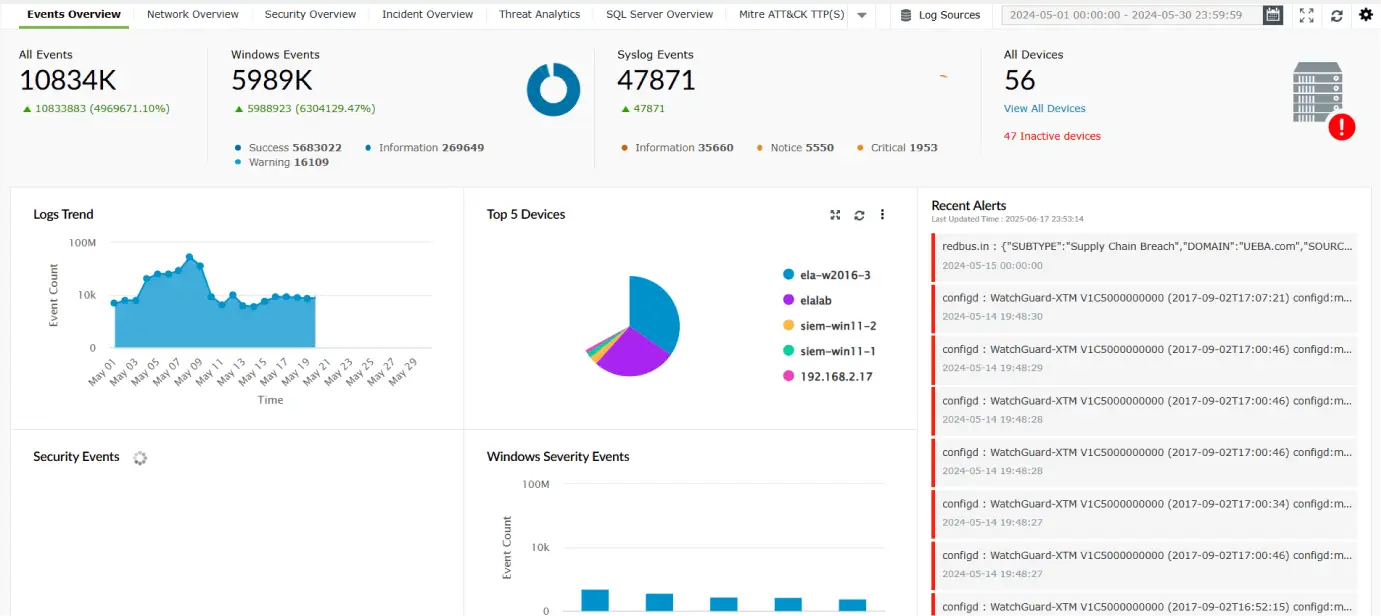
Figure 3: Dashboards in Log360.
- Log360's interactive dashboard (see Fig. 3) provides real-time monitoring of security incidents, helping teams prioritize and respond to high-risk threats effectively.
- Compliance reports: Generate prebuilt reports (e.g., for HIPAA, the GDPR, the PCI DSS, and more) for audit readiness.
- Risk scoring and UEBA insights: Identify risky users or systems based on behavior deviations.
- Log360’s UEBA module (see Fig. 4) leverages machine learning to identify unusual behavior patterns among users and entities within the network. It detects three types of anomalies: time-based, count-based, and pattern-based. An overall risk score is then assigned to each user and host based on the severity of these anomalies.
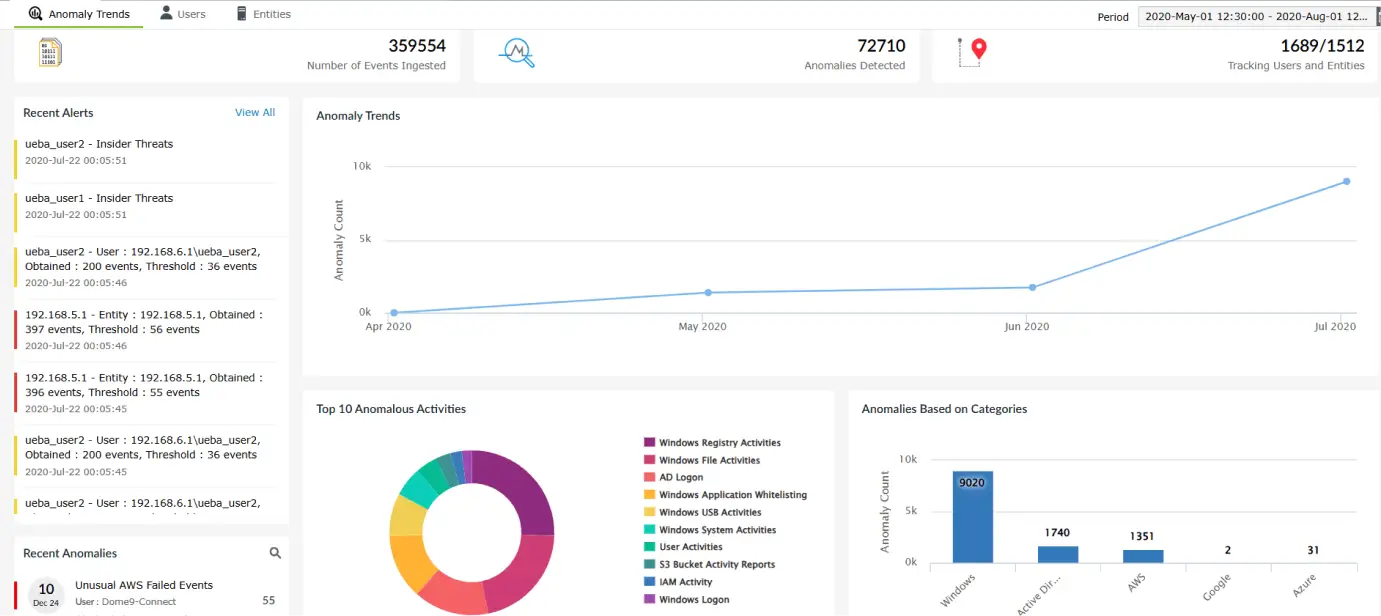
Figure 4: UEBA in Log360.
- Log360’s UEBA module (see Fig. 4) leverages machine learning to identify unusual behavior patterns among users and entities within the network. It detects three types of anomalies: time-based, count-based, and pattern-based. An overall risk score is then assigned to each user and host based on the severity of these anomalies.
- Alert trends and metrics: Strategic insights into threat trends and security KPIs.
2. SOC analyst or security engineer
Key responsibility: Real-time threat detection, investigation, and response
Mapped SIEM features:
- Real-time alerts and correlation rules: Identify attack patterns like brute-force, lateral movement, or privilege escalation.
- Threat intelligence integration: Detect known bad actors using IoC feeds.
- Log search and forensics: Deep-dive investigation using indexed logs, queries, and event trails.
- Incident response automation: Trigger alerts, scripts, or ticket creation automatically based on severity.
3. IT administrator or SysAdmin
Key responsibility: Day-to-day infrastructure management, server health, patching
Mapped SIEM features:
- Change auditing (AD, GPOs, file servers): Monitor user account creation, password changes, and group policy edits.
- File integrity monitoring (FIM): Detect unauthorized changes to critical files or configurations.
- System log monitoring: Track service restarts, logins, software installations, and registry changes.
- Custom alerts and thresholds: Set alerts for resource usage spikes, failed logons, or device additions.
4. Cloud/DevOps engineer
Key responsibility: Cloud infrastructure security, DevSecOps, CI/CD pipeline monitoring
Mapped SIEM features:
- Cloud activity monitoring: Track login anomalies, policy changes, and API calls in AWS and Azure.
- Misconfiguration detection: Alert on publicly exposed buckets or unusual IAM activity.
- Custom log ingestion: Monitor application logs, container logs, and CI/CD events through agent-based or syslog-based forwarding.
- Integration with DevOps tools: Enable audit and log forwarding from DevOps tools like Jenkins and Git.
5. Network administrator or infrastructure engineer
Key responsibility: Network device management, firewall monitoring, traffic control
Mapped SIEM features:
- Firewall and router log analysis: Detect port scans, DoS attempts, and unauthorized access.
- VPN and remote access monitoring: Track who connects from where, when, and how often.
- Correlation of network events: Link endpoint activity with unusual inbound/outbound traffic for complete threat context.
- Log360's correlation engine (see Fig. 5) connects seemingly unrelated events across the network to identify potential threats. It comes with a set of built-in correlation rules and also allows users to create custom rules tailored to their environment.
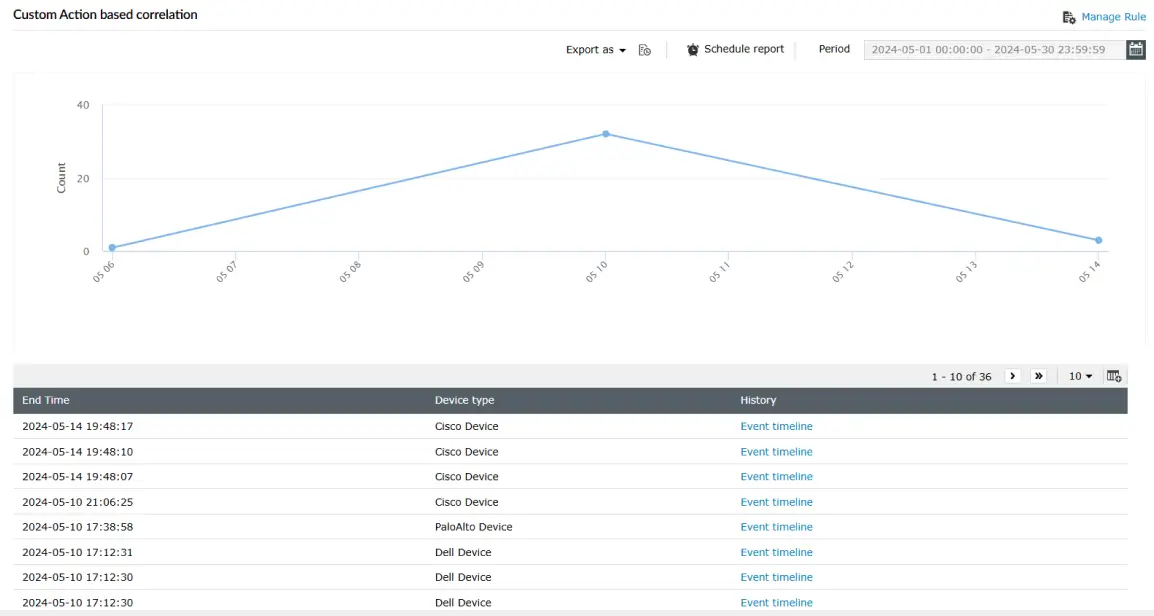
Figure 5: Correlation in Log360.
- Log360's correlation engine (see Fig. 5) connects seemingly unrelated events across the network to identify potential threats. It comes with a set of built-in correlation rules and also allows users to create custom rules tailored to their environment.
- Custom alerts on bandwidth abuse/Connection spikes: Early indicators of exfiltration or malicious behavior.
6. Compliance or audit team
Key responsibility: Regulatory compliance, audit log tracking, reporting
Mapped SIEM features:
- Audit trail logging: Generate immutable logs of all changes to systems, users, and configurations.
- Log360 generates essential compliance reports (see Fig. 6) needed by IT teams across the IT industry. These reports can be exported as PDFs or CSVs using both predefined and custom templates, making them ready for auditor review.
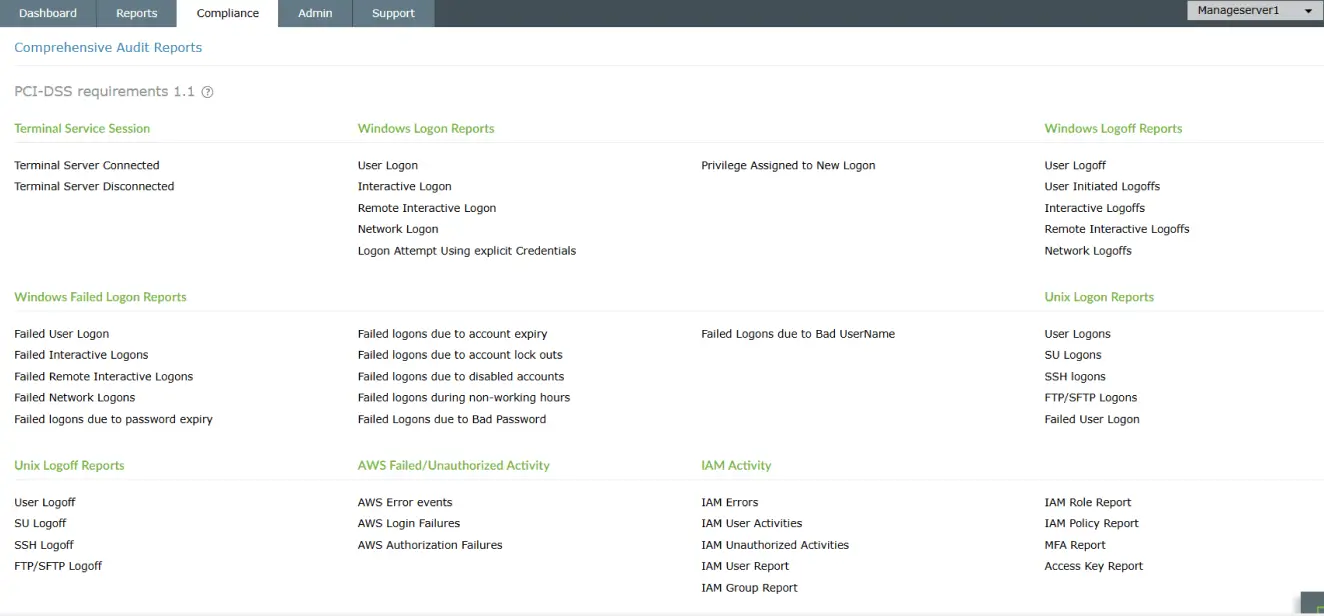
Figure 6: Compliance reports in Log360.
- Log360 generates essential compliance reports (see Fig. 6) needed by IT teams across the IT industry. These reports can be exported as PDFs or CSVs using both predefined and custom templates, making them ready for auditor review.
- Scheduled and on-demand reports: Automate recurring reports and deliver them via email or shared storage.
- Access and role-based controls: Ensure log visibility based on job roles to support least-privilege auditing.
- Log retention policies: Maintain logs securely for audit periods as per compliance requirements.
SIEM in action: SIEM use cases for the IT sector
The following are a few IT sector use cases and how SIEM helps.
| Use case | Scenario | How SIEM helps |
|---|---|---|
| Multiple failed login attempts on critical servers | A user tries logging into a domain controller repeatedly within a short time span. This is a potential brute-force attempt. |
|
| Sensitive file access by unauthorized user | A junior employee accesses sensitive HR or finance folders outside their role. |
|
| Privileged account misuse | An admin user accesses multiple high-privilege resources unusually after work hours. |
|
| Insider threat (bulk file deletion or downloads) | An employee downloads or deletes large volumes of files before resigning. |
|
| Access to cloud applications from suspicious IP | A user logs into Microsoft 365 from an IP address in a high-risk country. |
|
| Firewall or VPN anomalies | Firewall rules are changed without a change ticket or a VPN tunnel drops repeatedly. |
|
| Third-party application misuse | A rarely used third-party tool suddenly makes multiple system-level changes. |
|
Financial benefits of implementing SIEM in IT environment
The following are the financial benefits:
Leverage this evaluation sheet to make smarter evaluations
This includes precise, decision-making prompts that’s useful during vendor evaluation or board-level justification for choosing the right SIEM solution
How to make use of this metrics sheet?
- Score each SIEM solution against the metrics on a scale from 1 (poor) to 5 (excellent).
- Add relevant comments or observations in the last column.
- Use the total scores to compare and shortlist the right solution.
1. Reduces data breach costs
- Early threat detection: SIEM helps identify and contain security incidents quickly, reducing breach impact and recovery expenses.
- Minimized downtime: Faster incident response prevents extended service disruptions that could result in lost revenue and customer churn.
2. Cuts security operations costs
- Fewer manual processes: Automates log collection, alerting, and responses, reducing the need for large SOC teams.
- Consolidated toolset: Eliminates the need for multiple security products (log manager, FIM, UEBA), lowering overall licensing and maintenance costs.
3. Avoids regulatory fines
- Continuous compliance monitoring: Maintains audit trails and generates regulatory reports to prevent violations.
- Proactive risk management: Detects non-compliant behavior before it results in fines or legal consequences.
4. Optimizes resource utilization
- Better analyst productivity: Filters noise and prioritizes critical alerts so teams can focus on high-value tasks.
- Scalable infrastructure: Grows with the business, avoiding costs related to replacing or upgrading siloed tools.
5. Improves business continuity
- Prevents costly outages: Identifies threats before they impact core systems or customer-facing services.
- Protects brand and reputation: Reduces the financial fallout of a public breach or customer data exposure.
6. Delivers long-term ROI
- Lower total cost of ownership: A unified SIEM platform reduces ongoing integration, support, and training expenses.
- Quantifiable returns: Many enterprises achieve ROI in under 18 months through reduced incidents, fines, and operational overhead.
SIEM's role in meeting the regulatory requirements of IT sector
A SIEM solution plays a critical role in helping IT environments maintain compliance with various regulatory frameworks such as ISO 27001, SOX, the GDPR, and the PCI DSS. By continuously collecting, monitoring, and storing logs from across the infrastructure, a SIEM solution ensures complete visibility into user actions, system changes, and security events—a key requirement for most audits. It provides prebuilt and customizable compliance reports, making it easier to demonstrate adherence during regulatory reviews. Additionally, SIEM helps maintain immutable audit trails, ensuring that all access and changes to sensitive systems are recorded and retained securely.
Beyond logging, SIEM platforms like ManageEngine Log360 support real-time alerting and response to non-compliant behavior, such as unauthorized access, privilege misuse, or data leakage. This enables IT teams to take proactive steps to prevent violations before they escalate into reportable incidents. SIEM tools also enforce RBAC and log retention policies that align with specific compliance standards. Overall, SIEM bridges the gap between security operations and compliance mandates by offering a centralized, accountable, and auditable security monitoring system that satisfies both internal and external regulatory expectations.
Secure your critical data in your IT environment with Log360
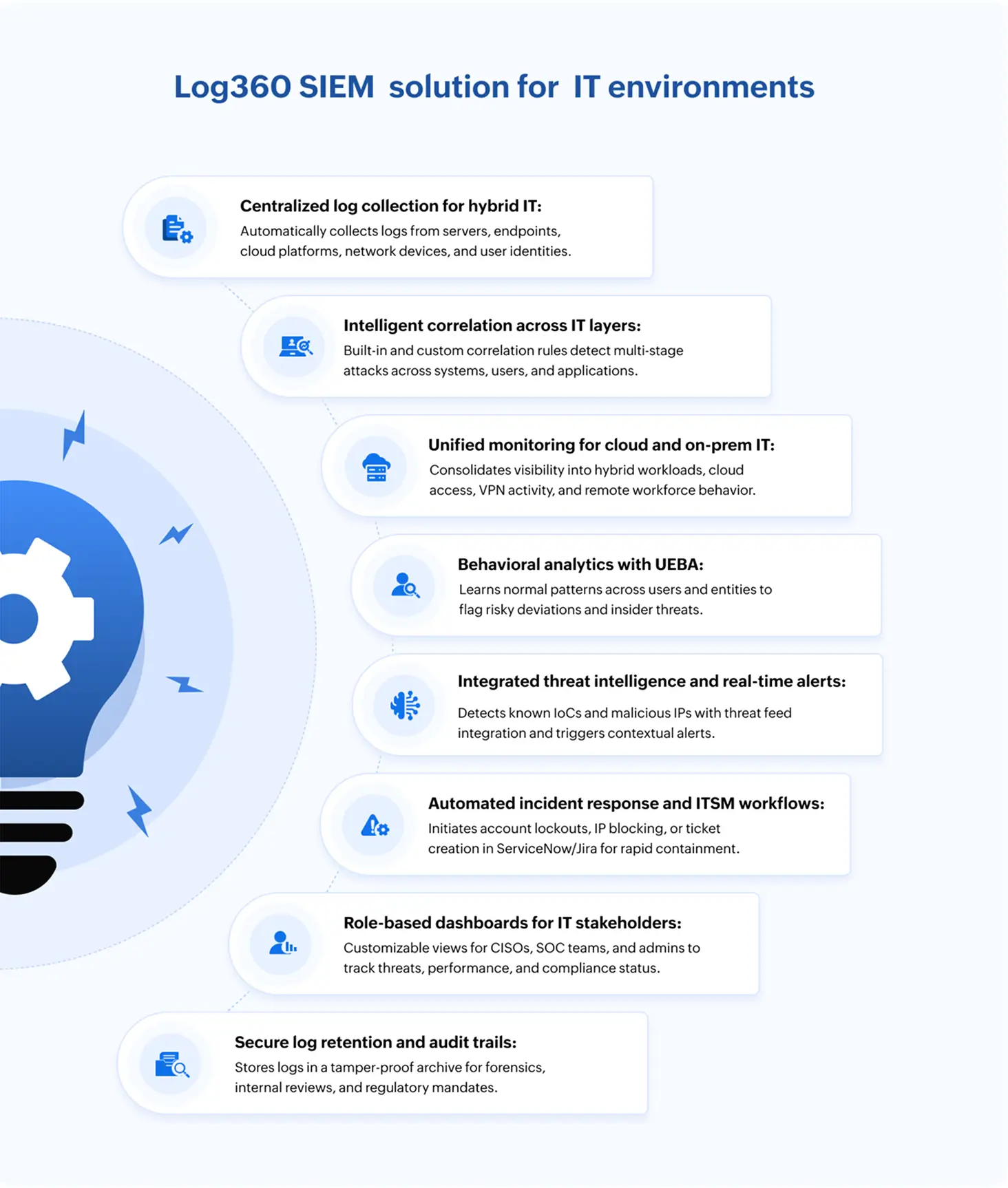
In today’s fast-moving IT landscape, threats don’t wait, and neither does Log360. It acts like a watchtower for your infrastructure, spotting suspicious activity across servers, endpoints, and the cloud the moment it happens. Whether it’s a rogue login, unusual data access, or a hidden malware trail, Log360 connects the dots and sounds the alarm before damage is done. It empowers IT teams to act fast, stay compliant, and focus on what truly matters: building a secure, resilient environment. With Log360, your security story shifts from reactive firefighting to proactive defense.
Request a personalized demo today and see how Log360 can enhance your IT cybersecurity strategy.
Frequently asked questions
Yes. Log360 can ingest logs from CI/CD tools like Jenkins and GitHub Actions, as well as container environments like Docker and Kubernetes. It helps IT teams track unauthorized script execution, privilege misuse, and configuration drift, ensuring secure software delivery pipelines.
Through its integration with Endpoint Central, Log360 can deploy patches.
Absolutely. Log360 uses correlation rules and threat intelligence to detect abnormal or high-risk execution of native binaries, commonly abused in fileless malware attacks. It flags suspicious PowerShell commands, encoded payloads, or use of PsExec from non-authorized accounts.
Log360 monitors VPN access logs, remote desktop sessions, and endpoint activity, helping IT teams detect anomalies such as logins from unusual geolocations, multiple device logins, or data exfiltration from remote endpoints. It also supports alerting on brute-force attempts and credential stuffing.
Log360 provides integrated incident timelines and event correlation, in addition to leveraging SOAR capabilities to trigger automated incident response actions. These capabilities combine to help IT teams quickly identify, triage, and respond to incidents. Integrations with ITSM tools (like ServiceDesk Plus or ServiceNow) further streamlines the response process by allowing incident ticket creation directly from alerts.
Yes. Log360 supports log ingestion from AWS, Azure, Microsoft 365, Google Workspace, and other cloud platforms. It detects cloud misconfigurations, suspicious login attempts, privilege escalations, and policy violations across multi-cloud and SaaS ecosystems. It also helps identify and ban unapproved applications (shadow IT).
By leveraging real-time correlation, anomaly detection, and threat intelligence, Log360 enables security and IT teams to identify threats within minutes. Its built-in incident workflows drastically reduce response times, allowing teams to contain and mitigate issues before they escalate.
The future of SIEM in IT is rapidly evolving to keep pace with the growing complexity of modern infrastructures. With hybrid environments becoming the norm, SIEM solutions are shifting toward broader visibility across on-premises, cloud, and edge systems. Real-time threat detection powered by AI and behavior analytics will be key to identifying sophisticated attacks. Future SIEM tools will integrate more deeply with identity, data, and access management platforms to provide context-aware insights. Automation will play a major role in speeding up incident response and reducing analyst fatigue from false positives. Compliance reporting will become more streamlined, with built-in templates for evolving regulatory requirements. Ultimately, SIEM solutions will transition from being a reactive tool to being a proactive security nerve center for IT ecosystems.