
Device Auto Allocation in Log360 | Overview
Last updated on:
In this page
What is device auto allocation?
Device auto allocation is the process of automatically assigning the discovered Windows devices from workgroups and domains, to collectors. In case of an agent-based collection, the allocation happens through agents where policies with defined rules and collector load will define device mapping to the appropriate agent. And in the case of agent-less log collection method, direct allocation of device(s) to the native or local collector takes place. - Device allocation in Log360 is governed by user-defined policies called Auto Allocation Policies that specify the criteria like domain names, OU (Organizational Unit) filters, workgroups, and device limits.
This auto allocation capability will help you streamline the onboarding of devices into a centralized monitoring system, reducing manual work and ensuring that every device in your organization's large network is monitored.
Key functionalities
- Device onboarding automation: Replaces manual device allocation by auto-assigning devices or scheduling runs, based on pre-defined policies. The allocation is performed either on the domain basis or workgroup.
- Granular control:
- With the help of multiple policies, define allocation rules based on workgroups, OUs, set device count limits, include OU filter for domains and more, per agent or collector.
- You can include or exclude OUs under specific domains depending upon your requirements.
- Each policy maps to an agent/local native collector.
- Load balancing: To ensure even distribution and prevent congestion, devices will be automatically assigned to collectors with the least load.
- Failsafe conditions: Clear status is notified in case the policies are not applicable or if a collector's device limits are reached.
If Auto Allocation is-
Disabled during execution: The device allocation stops immediately.
Enabled: The device allocation will start instantly and will be scheduled to run daily at 12 PM, thereafter.
1. Auto allocation
Process where the solution automatically assigns discovered Windows devices to collectors or agents based on predefined rules and configured criterion, eliminating the need for manual assignment.
2. Auto allocation policies
User-defined rules that decide how and where devices should be assigned based on criteria like domain, OU, or workgroup.
3. Collector or local native collector
A server or component that receives and processes logs from devices. In agent-less setups, the local native collector on the same machine handles the respective device's logs.
4. Agent
A specific software installed on a device with the purpose of collection and sending of log data to Log360. Used in agent-based auto allocation for more granular control.
Pre-requisites
Role-based access control
Only admins of the console can define, access, and modify the auto allocation policies.
Supported devices
Windows devices
Domain or workgroup pre-requisites
- Ensure that the devices must be discovered in the device discovery process before the allocation.
- The devices to be auto-allocated must belong to a recognized domain or workgroup.
- The said domain must also be configured in the product console with the available OUs for policy mapping.
- For domain-based policies, it must be ensured that the OU structure or hierarchy is synchronized properly.
Allocation flow
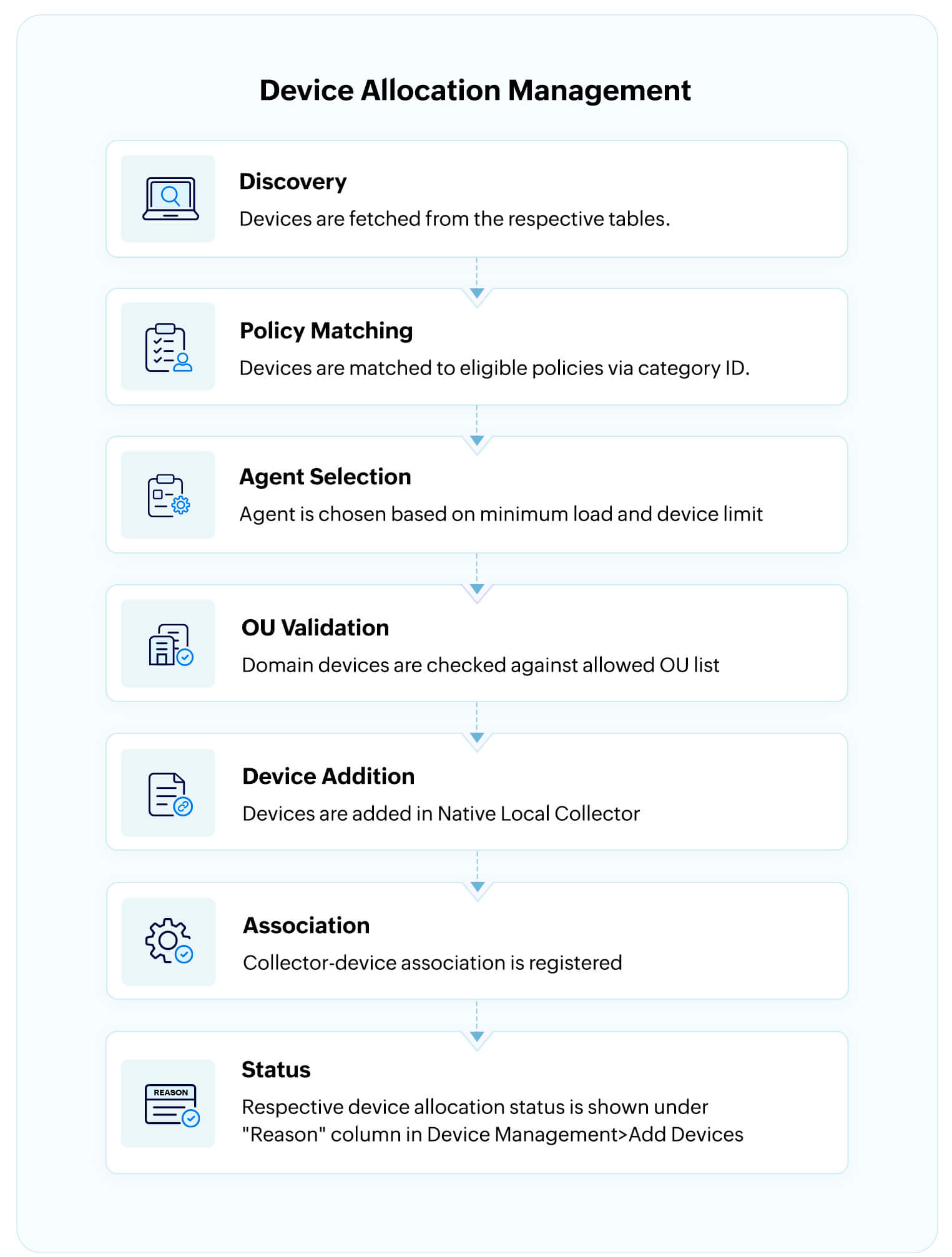
- In the case of an agent-less device collection, the "Agent selection" step is omitted in the workflow of device auto allocation and the "OU validation" step is carried out after which the device(s) will be automatically allocated to the native/local collector.
- Only one agent/collector can be mapped per policy.
- In case an agent is deleted, the agent is also dynamically removed from all the existing internal mappings during task execution.
Use cases
1. Dynamic scaling of SIEM infrastructure across business units
Use case
Regional divisions of a global company are operated with distributed agents handling logs from the different locations/business units.
With Device Auto Allocation
Devices can be routed automatically in each location or business unit to their respective local collector or agent with collector load-balancing and OU-based filters. This will also help divisional teams ensure that every endpoint is allocated promptly, efficient fault isolation, and region-specific threat visibility.
2. Zero touch onboarding for compliance-ready log collection
Use case
In large enterprises with thousands of endpoints across their AD domains and workgroups, there is a higher scope for human error when each and every device from all those endpoints is to be accounted for in the SIEM (Security Information and Event Management) solution for audit and compliance purposes like HIPAA, PCI-DSS, GDPR and more.
With Device Auto Allocation
The Auto Allocation feature ensures that as soon as a device is discovered, it is assigned to an agent/collector and that no device goes unmonitored. With this, human error is eliminated and onboarding is sped up, while ensuring complete audit trails right from Day 1.
Read also
This document elaborated the configuration, prerequisites, and functionality of the Device Auto Allocation feature in Log360. For related features and extended device management capabilities, refer to the articles below: