

How to change the MSSQL backend database details used by EventLog Analyzer
Last updated on:In this page
Objective
This article provides step-by-step instructions for updating the Microsoft SQL Server (MSSQL) backend database details used by EventLog Analyzer, such as:
- IP address of the database server.
- Port number.
- Database password.
Updating your MSSQL backend database details is typically required if the database server has been moved, reconfigured, or the credentials have changed.
Prerequisites
- Access to the EventLog Analyzer server as an administrator to execute bat files.
- Updated user credentials.
- EventLog Analyzer version 12420 and above.
Steps
- In the EventLog Analyzer server, open the command prompt as an administrator and set the location to <EventLog Analyzer Home>\tools.
- Execute the following command:
ChangeDBServer.bat --config
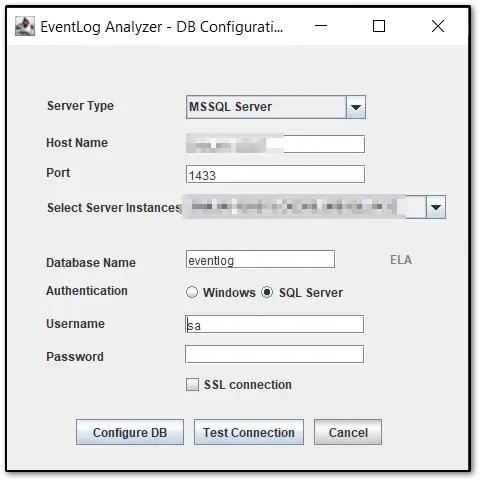
- Update the details in the prompt.
 Note:
Note:The Database Name and Username field values must match with the existing database configuration. You can verify this by checking the <EventLog Analyzer Home>\conf\database-params.conf file.
- Click Test Connections to test the connectivity, and click Configure DB to update the details.
Tips
- We recommend having a static IP address and fixed hostname to reduce downtime when updating the records.
- When updating user credentials in MSSQL, plan for downtime to update the credentials in EventLog Analyzer.

