


What is archive collected data (T1560)?
Archive Collected Data (T1560) is a MITRE ATT&CK technique that describes how adversaries compress and/or encrypt collected data prior to exfiltration. After gathering target data and staging it in a central location, attackers package it into archives to reduce transfer size, simplify the exfiltration process, and evade data loss prevention (DLP) controls that inspect file contents.
MITRE defines three sub-techniques:
- Archive via Utility: Using standard compression utilities like 7-Zip, WinRAR, zip, or tar to create archives. This is the most common method because these tools are widely available and produce password-protected archives that resist inspection.
- Archive via Library: Using programming language libraries (Python zipfile, .NET System.IO.Compression, Go archive/zip) to create archives programmatically within malware or scripts.
- Archive via Custom Method: Using custom or proprietary compression/encryption schemes within malware. This is harder to detect by tool signature but creates recognizable file signatures.
Archive creation is observed in over 80% of data theft incidents according to Mandiant's incident response data. Ransomware groups use it universally - Black Basta, LockBit, ALPHV/BlackCat, and Cl0p all archive data before exfiltration. The CrowdStrike 2025 Global Threat Report noted that encrypted archives are now the default pre-exfiltration technique because they defeat both network-based DLP and endpoint content inspection.
Key insight: Archive creation is one of the most reliably detectable pre-exfiltration activities because it involves executing known tools with identifiable command-line patterns on directories containing staged data. An archive tool running against a sensitive file share or a recently created staging directory is a high-confidence indicator of data theft in progress. The time between archive creation and exfiltration is typically minutes to hours making rapid detection critical.
Why attackers archive data before exfiltration
- Defeat DLP inspection: Password-protected 7-Zip and WinRAR archives use AES-256 encryption. DLP tools cannot inspect the contents of encrypted archives, allowing attackers to bypass content-matching policies that would otherwise block sensitive data transfer.
- Reduce transfer size: Compression ratios of 60-90% on document-heavy data sets mean terabytes of stolen data can be reduced to hundreds of gigabytes, enabling faster exfiltration over bandwidth-limited C2 channels.
- Simplify transfer: Instead of exfiltrating thousands of individual files (which creates thousands of individual network events), a single large archive simplifies the transfer and reduces the number of detectable network events.
- Chunk for reliability: Multi-part archives (split into fixed-size volumes) allow resumable transfers over unstable C2 connections. If one chunk fails, only that piece needs retransmission.
- Obfuscate content: Archive filenames can be innocuous (update.zip, backup.7z, report.rar) while containing exfiltrated data. This makes manual review of network transfers less effective.
Threat groups known to use T1560
| Threat group | Archive tool preference | Technique details |
|---|---|---|
| Black Basta | 7-Zip with password | Archives staged data into 500MB split volumes before upload to attacker infrastructure |
| Cl0p / TA505 | WinRAR | Creates password-protected RAR archives in temp directories, exfiltrates via MoveIT or custom tools |
| APT29 (Cozy Bear) | Custom compression | Uses bespoke tools that compress and encrypt data using XOR or AES before C2 transmission |
| FIN7 | 7-Zip | Archives POS data and financial records with AES encryption before exfiltration |
| LockBit | 7-Zip / WinRAR | Splits archives into chunks matching their C2 bandwidth capacity for reliable transfer |
How archive attacks work
Method 1: 7-Zip with AES encryption (T1560.001)
The most common method. Attackers use 7-Zip's command-line interface to create AES-256 encrypted archives with file header encryption enabled (flag: -mhe=on), which hides even the filenames from inspection.
7z.exe a -t7z -p"P@ssw0rd2026!" -mhe=on C:\ProgramData\update.7z C:\ProgramData\staging\* :: Split into 500MB volumes for chunked exfiltration: 7z.exe a -t7z -p"ExfilKey!" -mhe=on -v500m C:\ProgramData\backup.7z C:\ProgramData\staging\*
Detection signals
- Process: 7z.exe or 7za.exe (standalone version)
- Command-line contains: -p (password flag), -mhe=on (header encryption)
- Source path: staging directory, ProgramData, temp, or network share path
- Context: executed by non-standard account, after hours, on server with no archive history
Method 2: WinRAR with password protection (T1560.001)
rar.exe a -hp"Secret123" -r -v500m C:\Users\Public\reports.rar C:\ProgramData\staging\ :: -hp encrypts both content AND filenames (stronger than -p which encrypts content only)
Method 3: PowerShell compress-archive (T1560.001)
Compress-Archive -Path "C:\ProgramData\staging\*" -DestinationPath "C:\ProgramData\update.zip" -Force # Note: PowerShell Compress-Archive does NOT support encryption - often followed by separate encryption step
Method 4: Custom malware compression (T1560.003)
Advanced threat groups embed compression directly in their malware using programming libraries. The archive is created in memory or written directly, without spawning recognizable archive tool processes.
# Python-based example (used in various RATs): import zipfile, os with zipfile.ZipFile('C:\\ProgramData\\sys.dat', 'w', zipfile.ZIP_DEFLATED) as zf: for root, dirs, files in os.walk('C:\\ProgramData\\staging'): for f in files: zf.write(os.path.join(root, f))
Detect and investigate with Log360
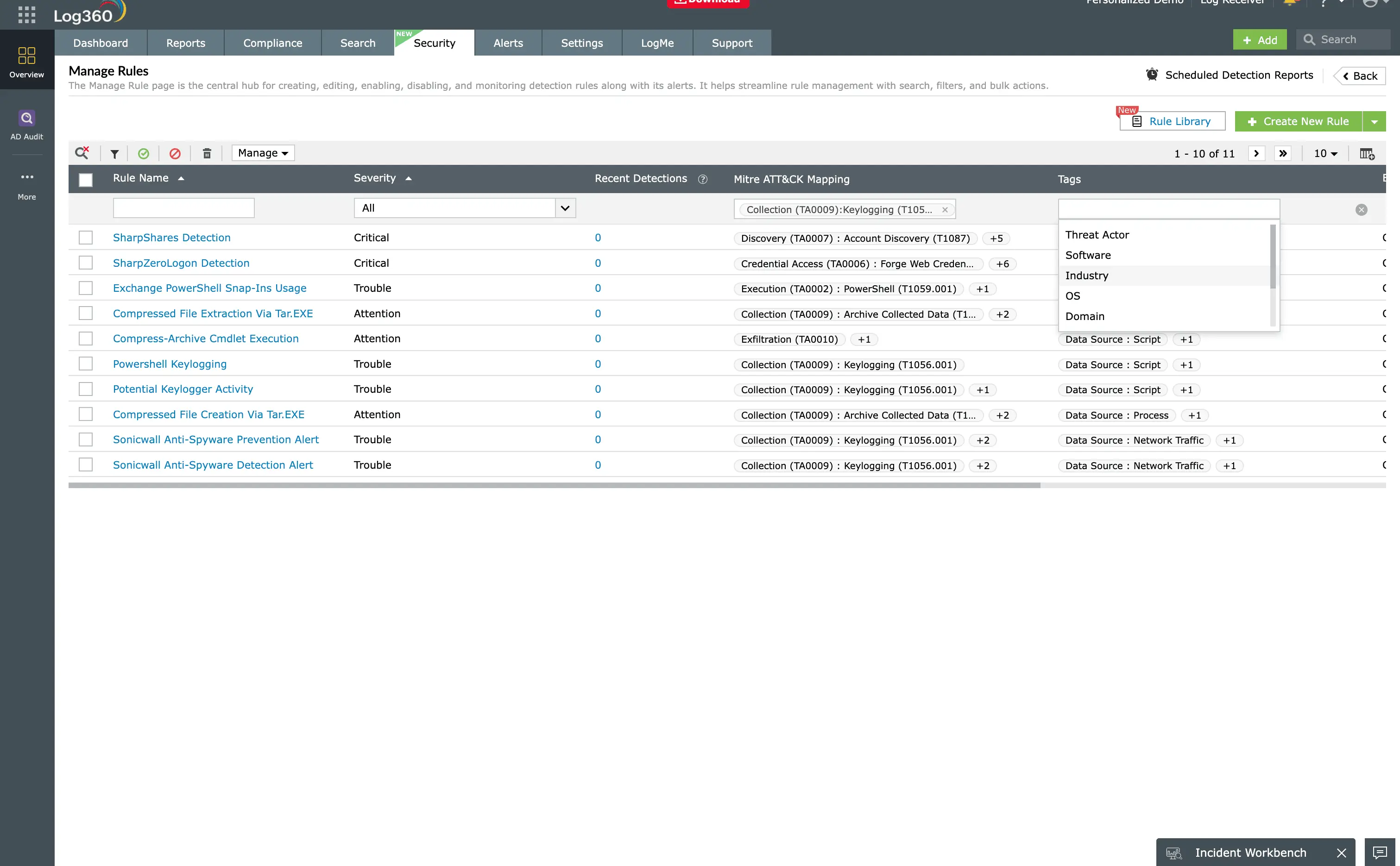
Log360's 7 prebuilt T1560 detection rules
| Rule name | Severity | Data source | What it detects |
|---|---|---|---|
| 7-Zip on sensitive file paths | High | Windows Security (4688) | 7z.exe or 7za.exe execution with source paths pointing to network shares or known sensitive directories |
| WinRAR with encryption flags | High | Windows Security (4688) | rar.exe or WinRAR.exe with -p or -hp flags (password-protected archive creation) |
| PowerShell Compress-Archive anomaly | Medium | PowerShell Script Block | Compress-Archive targeting non-standard directories or executed by accounts without archive history |
| tar/gzip on Windows systems | Medium | Windows Security (4688) | tar.exe or gzip execution on Windows (unusual for most environments) |
| Large archive in staging directory | High | Windows Security (4663) | Archive file (*.7z, *.rar, *.zip) created over 100MB in ProgramData, temp, or Public directories |
| Archive by first-time user | High | UEBA + Windows Security | Archive tool execution by an account that has never previously used compression tools |
| Sequential archive creation (chunked) | Critical | Windows Security (4688/4663) | Multiple split-volume archives (.001, .002) created in rapid succession indicating chunked exfiltration prep |
Investigation workflow
- Identify the archive and source - Determine which archive tool was used, what directory was archived, and where the archive was written. Check the process command-line for the full path and encryption flags.
- Assess sensitivity - Determine whether the source directory contains sensitive data. Cross-reference with known file share classifications and DLP labels.
- Check for staging - Look for prior data staging (T1074) activity. Was data from multiple sources consolidated into the directory that was archived?
- Check for exfiltration - Has the archive already been transferred? Look for outbound network events, cloud uploads, or file access by processes associated with known C2 tools.
- Determine archive size - Calculate the total archive size. This indicates the scale of potential data loss and helps with regulatory notification requirements.
- Contain - Quarantine the archive file, disable the compromised account, and block outbound transfers from the host. Preserve the archive as evidence for breach scope assessment.
Remediation and prevention
- Restrict archive tool execution - Use AppLocker or WDAC to limit 7z.exe, rar.exe, and WinRAR.exe execution to approved users and approved source directories. Block these tools on servers that have no legitimate compression need.
- Monitor command-line arguments - Configure process creation auditing to capture full command lines. Alert specifically on password flags (-p, -hp, -mhe=on) combined with sensitive source paths.
- Baseline archive behavior - Use Log360's UEBA to build baselines of which accounts normally create archives and from which directories. Any deviation should trigger investigation.
- Block split archives - Multi-volume archives (split into chunks) have no legitimate business purpose in most environments. Alert on any creation of split-volume archives.
- Script block logging - Enable PowerShell Script Block Logging to capture Compress-Archive usage and custom compression scripts that would not appear in process creation events.
- Restrict archive in staging paths - Configure file system monitoring rules that specifically flag archive file creation (*.7z, *.rar, *.zip, *.tar.gz) in known staging locations.
Need to explore ManageEngine Log360? Schedule a personalized demo
FAQ
What is archive collected data (T1560) in MITRE ATT&CK?
Archive collected data describes how adversaries compress and encrypt data before exfiltration to reduce size and bypass DLP. Sub-techniques cover archive utilities (7-Zip, WinRAR), programming libraries, and custom methods.
How does Log360 detect suspicious archive creation?
Log360 monitors process creation (Event ID 4688) for archive tool execution with suspicious parameters, file creation events for archives in staging locations, and UEBA behavioural baselines for first-time archive tool usage. Seven prebuilt rules provide coverage.
Why do attackers encrypt archives before exfiltration?
Encrypted archives defeat DLP content inspection, obscure filenames with header encryption, and appear innocuous during network transfer. AES-256 encryption in 7-Zip and WinRAR makes it impossible for security tools to inspect contents without the password.
What tools do attackers use for archiving?
7-Zip (7z.exe), WinRAR (rar.exe), PowerShell Compress-Archive, Windows tar, and custom malware with embedded compression libraries. 7-Zip and WinRAR are preferred for their encryption support.
How do I prevent malicious archive creation?
Restrict archive tools via application control, monitor command-line arguments for encryption flags, baseline which accounts normally create archives, block split-volume archives, and monitor staging paths for archive file creation.
Detect archive creation before exfiltration
Start your free 30-day trial of Log360 and activate 7 prebuilt Archive Collected Data detection rules. Catch encrypted archive creation in real time.
- What is archive collected data (T1560)?
- Why attackers archive data before exfiltration
- How archive attacks work
- Detect and investigate with Log360
- Remediation and prevention
- FAQ

