


What is execution (TA0002)?
Execution in the MITRE ATT&CK framework is the stage where adversaries run code inside your environment. If initial access gets them in, execution gives them leverage: they can launch scripts, invoke remote management interfaces, disable defenses, and stage follow-on objectives such as credential theft or persistence.
Defenders often lose visibility at this point because malicious execution is frequently disguised as legitimate administration. PowerShell, cmd.exe, WMI, and service creation are all valid tools in enterprise operations. The challenge is not detecting these tools; it is detecting adversarial use patterns without drowning analysts in noise.
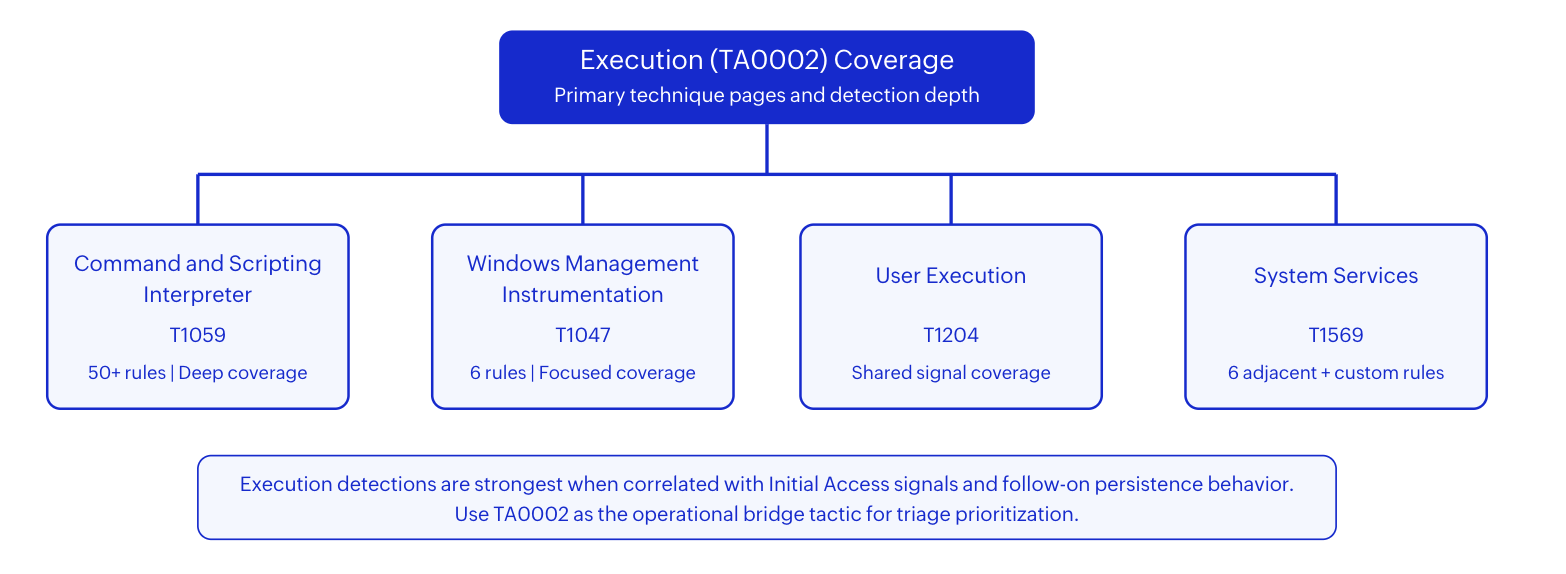
ManageEngine Log360 addresses that challenge by combining broad telemetry ingestion, behavior-aware correlation rules, and incident context enrichment. For TA0002 specifically, Log360 provides 461 mapped detections spanning script-driven execution, WMI-based abuse, service manipulation, and user-triggered payloads. This helps SOC teams prioritize the events that represent active attacker control instead of routine IT automation.
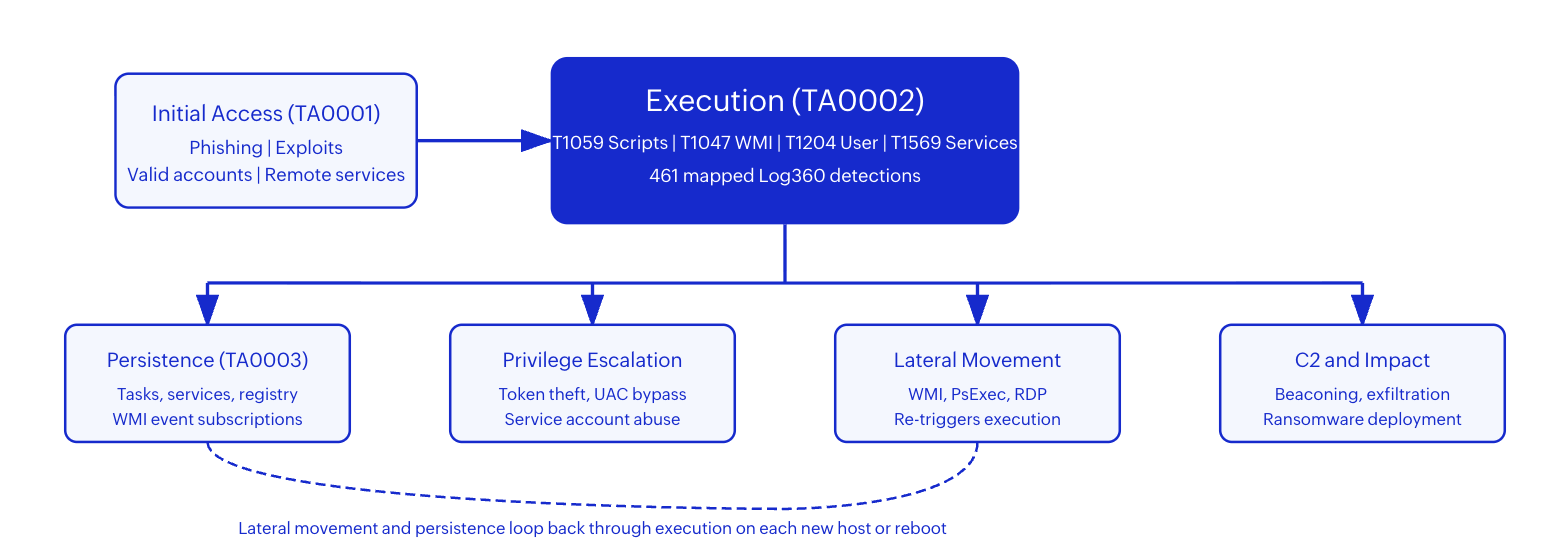
Key insight: Treat TA0002 as the tactical center of your detection strategy. Every minute saved at execution reduces the probability of lateral movement, persistence, and impact.
The execution threat landscape
Execution techniques appear in nearly every confirmed intrusion because adversaries must run code to achieve any objective. The CrowdStrike 2026 Global Threat Report found that 79% of intrusions were malware-free, relying on script interpreters, WMI, and service abuse rather than traditional executable payloads. This shift makes process-level telemetry and behavioral correlation the primary detection surface.
The Mandiant M-Trends 2026 report measured median dwell time at 10 days for organizations with mature execution detection. Organizations without process command-line auditing averaged 36 days, giving attackers time to install persistence, exfiltrate data, and prepare ransomware deployment. The difference is almost entirely attributable to visibility at the execution stage.
| Threat actor | Execution technique | Campaign impact |
|---|---|---|
| Volt Typhoon | WMI + cmd.exe living-off-the-land execution across critical infrastructure networks | Multi-year undetected access to US energy, water, and transportation systems |
| APT29 (Cozy Bear) | Encoded PowerShell download cradles and WMI event subscription persistence | Government and diplomatic espionage across NATO nations |
| Black Basta (2024) | PsExec service execution + Cobalt Strike PowerShell for ransomware staging | Enterprise-wide encryption within 72 hours of initial Qakbot delivery |
| Scattered Spider | User execution via social engineering, followed by PowerShell and WMI lateral movement | Cloud infrastructure takeover at telecom and hospitality targets |
| Wizard Spider | Service creation for TrickBot/BazarLoader execution, encoded PowerShell second-stage | Financial sector ransomware and banking credential theft |
These threat actors share a common pattern: they abuse legitimate Windows execution mechanisms because those mechanisms are trusted, present on every host, and difficult to block without disrupting IT operations. Detection must focus on behavioral anomalies rather than signature matching.
Techniques at a glance
| Technique | ID | Log360 coverage |
|---|---|---|
| Command and Scripting Interpreter | T1059 | Strong (50+ mapped rules) |
| Windows Management Instrumentation | T1047 | Focused (6 mapped rules) |
| User Execution | T1204 | Shared signal coverage |
| System Services | T1569 | Adjacent (6 built-in + custom) |
Detecting T1059: Command and Scripting Interpreter abuse
Attackers prefer script interpreters because they are already present, trusted by administrators, and capable of high-impact actions. In real incidents, initial payloads transition to PowerShell or command shell execution within minutes of initial access. The MITRE T1059 page documents 7 sub-techniques covering PowerShell, Windows Command Shell, Unix Shell, Python, VBScript, JavaScript, and network device CLI. APT29 and Wizard Spider both use encoded PowerShell download cradles as their primary second-stage delivery mechanism.
What to look for in logs:
EventID: 4688
NewProcessName: C:\Windows\System32\WindowsPowerShell\v1.0\powershell.exe
ParentProcessName: C:\Program Files\Microsoft Office\root\Office16\WINWORD.EXE
CommandLine: powershell.exe -NoP -W Hidden -Enc SQBFAFgAIAAoAE4AZQB3AC0ATwBi...
SubjectUserName: jsmith
SubjectDomainName: CORP
An Office application spawning PowerShell with a hidden window and encoded command line is a textbook initial execution indicator. The encoded payload typically contains a download cradle that fetches the attacker's second-stage tooling.
How Log360 detects this
Log360's real-time correlation engine monitors process creation events for script interpreter abuse patterns. The Suspicious Encoded PowerShell Command Line rule (Trouble severity) fires on Base64-encoded arguments, catching post-exploitation frameworks and download cradles. The Excel/Office Spawning Windows Script Host rule detects the Office-to-script chain shown above.
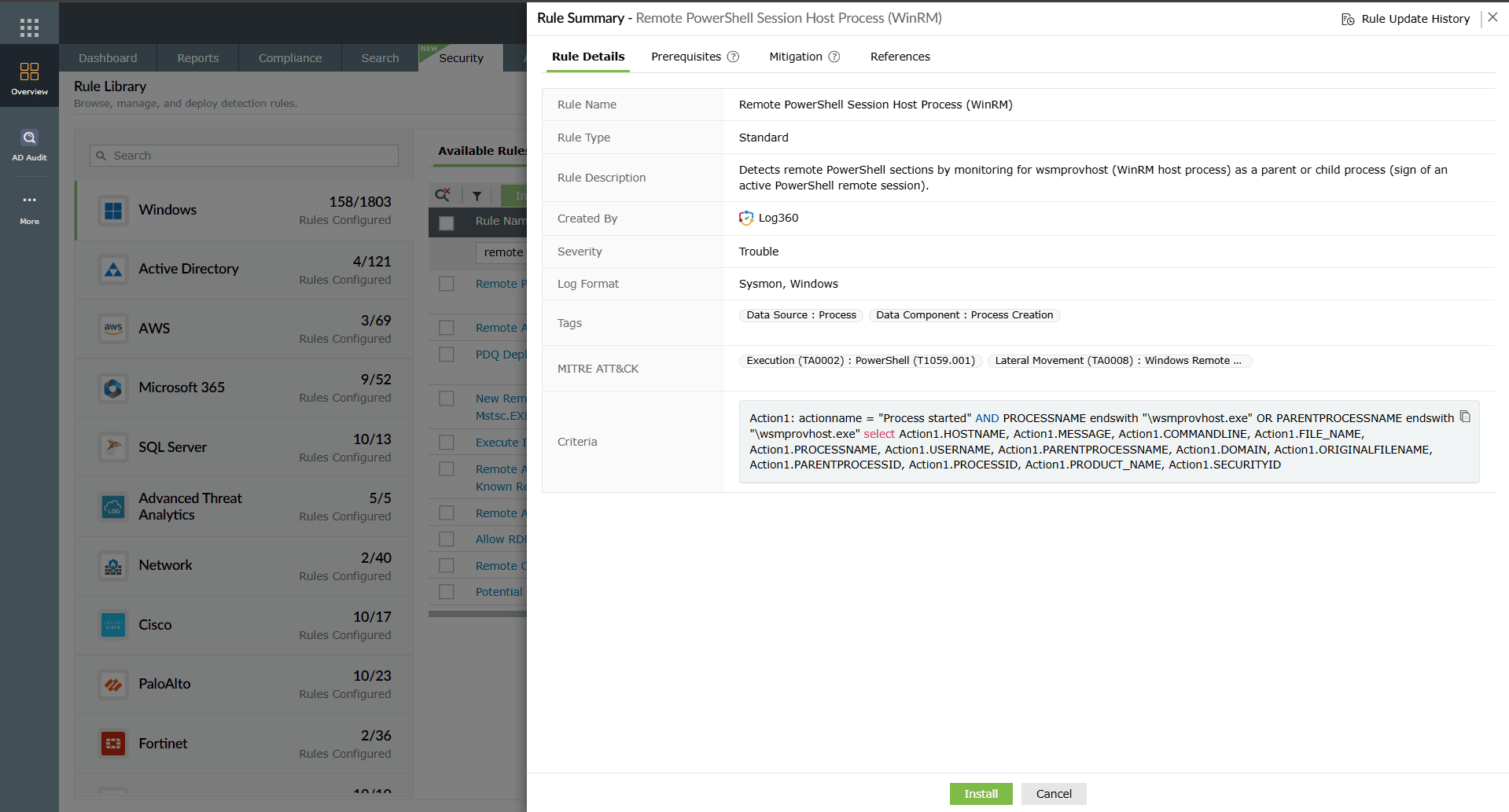
For lateral movement via scripts, the Remote PowerShell Session Host Process rule surfaces unauthorized remote script control. The Suspicious Script Execution From Temp Folder rule identifies execution from atypical paths where dropped payloads land. Combined, these provide layered coverage from initial script launch through lateral scripting.
Detecting T1047: Windows Management Instrumentation abuse
Windows Management Instrumentation is powerful, remote-capable, and deeply integrated with administration workflows, which also makes it useful for attackers. T1047 covers adversary abuse of WMI for process execution, remote command delivery, and stealth operations. Volt Typhoon used WMI for fileless lateral movement across US critical infrastructure, executing commands remotely without writing payloads to disk.
What to look for in logs:
EventID: 4688
NewProcessName: C:\Windows\System32\cmd.exe
ParentProcessName: C:\Windows\System32\wbem\wmiprvse.exe
CommandLine: cmd.exe /Q /c cd 1> \\127.0.0.1\ADMIN$\__1714830421 2>&1
SubjectUserName: admin-svc
SubjectDomainName: CORP
The \\127.0.0.1\ADMIN$\__[timestamp] pattern is the default Impacket wmiexec output redirection. The parent process wmiprvse.exe spawning cmd.exe confirms WMI-mediated remote execution.
How Log360 detects this
Log360 highlights suspicious process ancestry with the Suspicious parent spawning wmiprvse rule (Critical severity), which fires when wmiprvse.exe's parent is not the expected svchost.exe WMI service host. The Suspicious parent spawning wsmprovhost rule catches the WinRM-based WMI execution path.
For persistence-linked execution, the Script Event Consumer Spawning Process and WMI ActiveScriptEventConsumers Activity rules identify abuse of WMI event subscriptions that survive reboots. The HackTool - Wmiexec Default PowerShell Command rule targets the default output patterns generated by Impacket's wmiexec.py tool.
Detecting T1204: User Execution
User Execution (T1204) represents attacker success at social engineering: the user opens a lure, runs a file, or approves a malicious action. Scattered Spider's campaigns against hospitality and telecom targets relied entirely on convincing helpdesk staff to run malicious software during fake IT support calls. Unlike T1059 and T1047, this technique is detected through correlated surrounding behavior rather than a standalone technical signature.
What to look for in logs:
EventID: 4688
NewProcessName: C:\Users\jsmith\Downloads\Q4-Report-Final.exe
ParentProcessName: C:\Windows\explorer.exe
CommandLine: "C:\Users\jsmith\Downloads\Q4-Report-Final.exe"
SubjectUserName: jsmith
TokenElevationType: %%1936
A user launching an executable from the Downloads folder that immediately requests elevation is a common lure-to-execution pattern. The file masquerades as a business document but is actually an executable.
How Log360 detects this
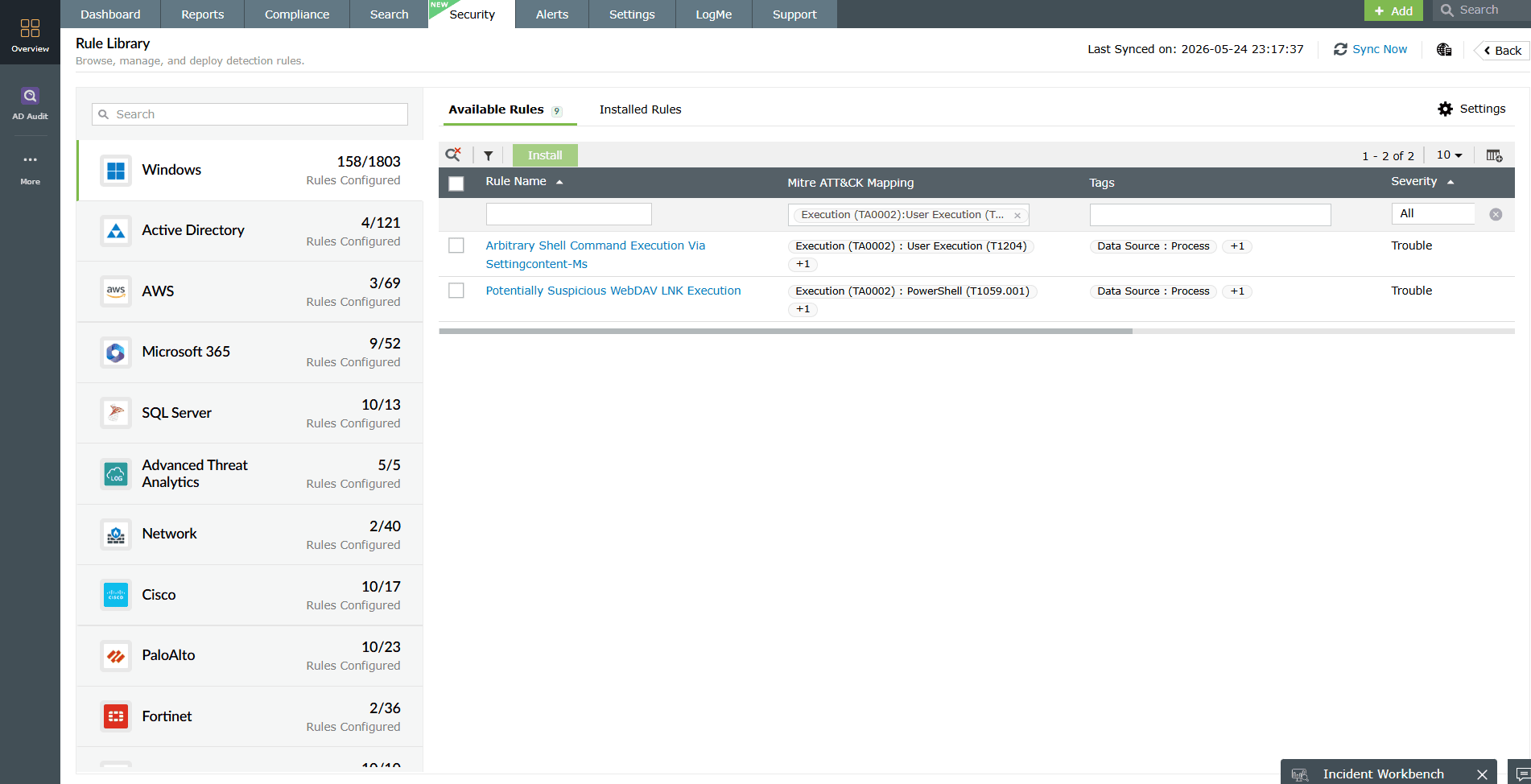
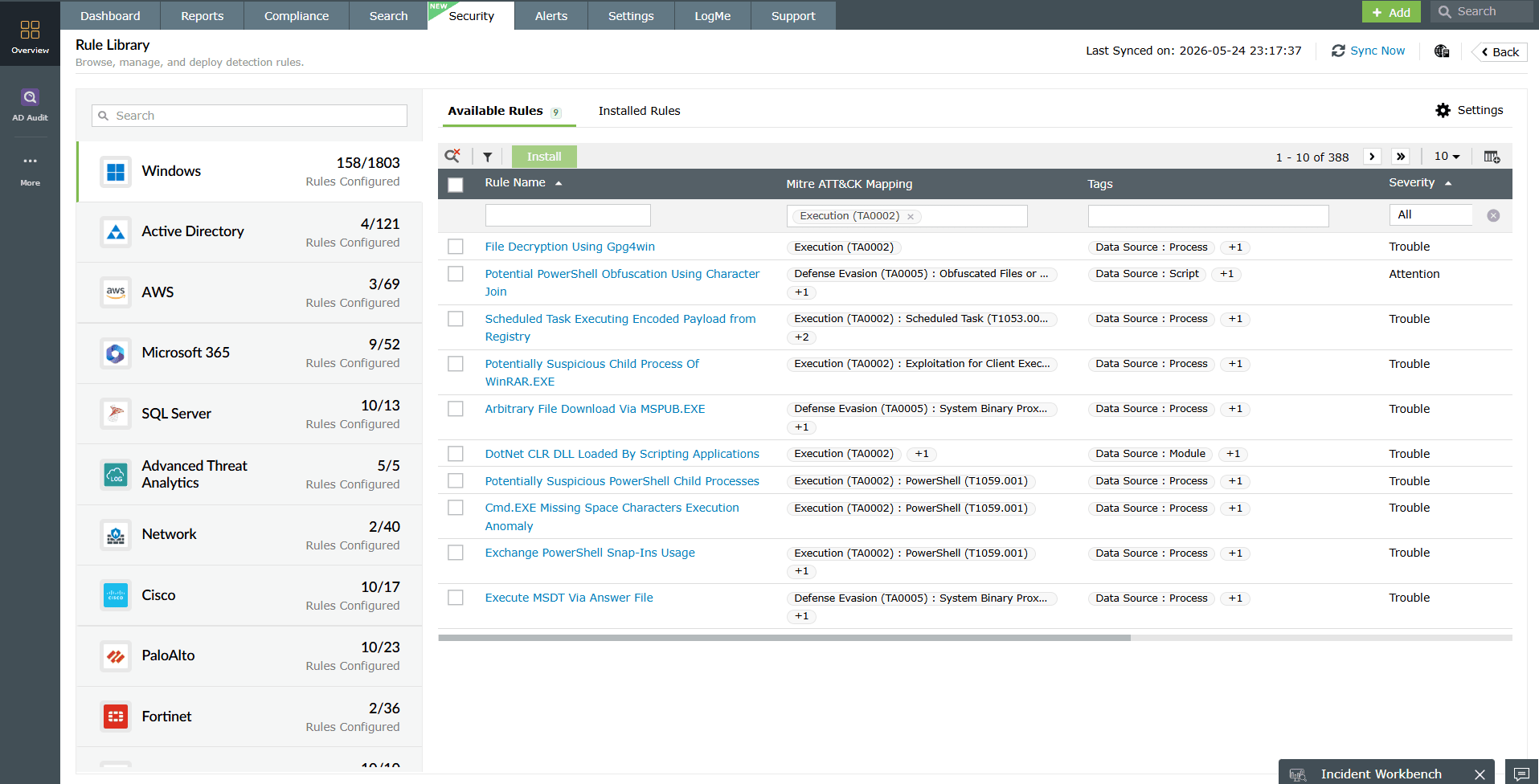
Since Log360 does not have an isolated T1204-only rule family, detection relies on chaining related signals: Office spawning script hosts, suspicious temporary-folder script launch, and known phishing execution artifacts. Cross-tactic context is essential, correlating with phishing detections (T1566) and the T1059 execution view.
Teams can strengthen T1204 coverage by deploying custom correlation logic for user-launched executables from download and archive extraction paths, then enriching with identity risk signals from Log360's UEBA module.
Detecting T1569: System Services abuse
System Services (T1569) describes adversary abuse of the Windows Service Control Manager to execute malicious code as SYSTEM. Attackers create services pointing to malicious binaries, start them to gain the highest local privileges, then optionally delete the service to reduce forensic evidence. PsExec, Cobalt Strike, and Metasploit all use this pattern for lateral movement. Black Basta ransomware created ephemeral services on domain-joined hosts via sc.exe to deploy ransomware payloads enterprise-wide within 4 hours of initial access.
What to look for in logs:
EventID: 7045
ServiceName: WindowsUpdateHelper
ImagePath: C:\Users\Public\Downloads\svc_update.exe
ServiceType: user mode service
StartType: auto start
AccountName: LocalSystem
A service named to mimic a legitimate Windows process, with a binary path in a user-writable directory, running as LocalSystem. The combination of a deceptive name and non-standard binary path is a strong malicious indicator.
How Log360 detects this
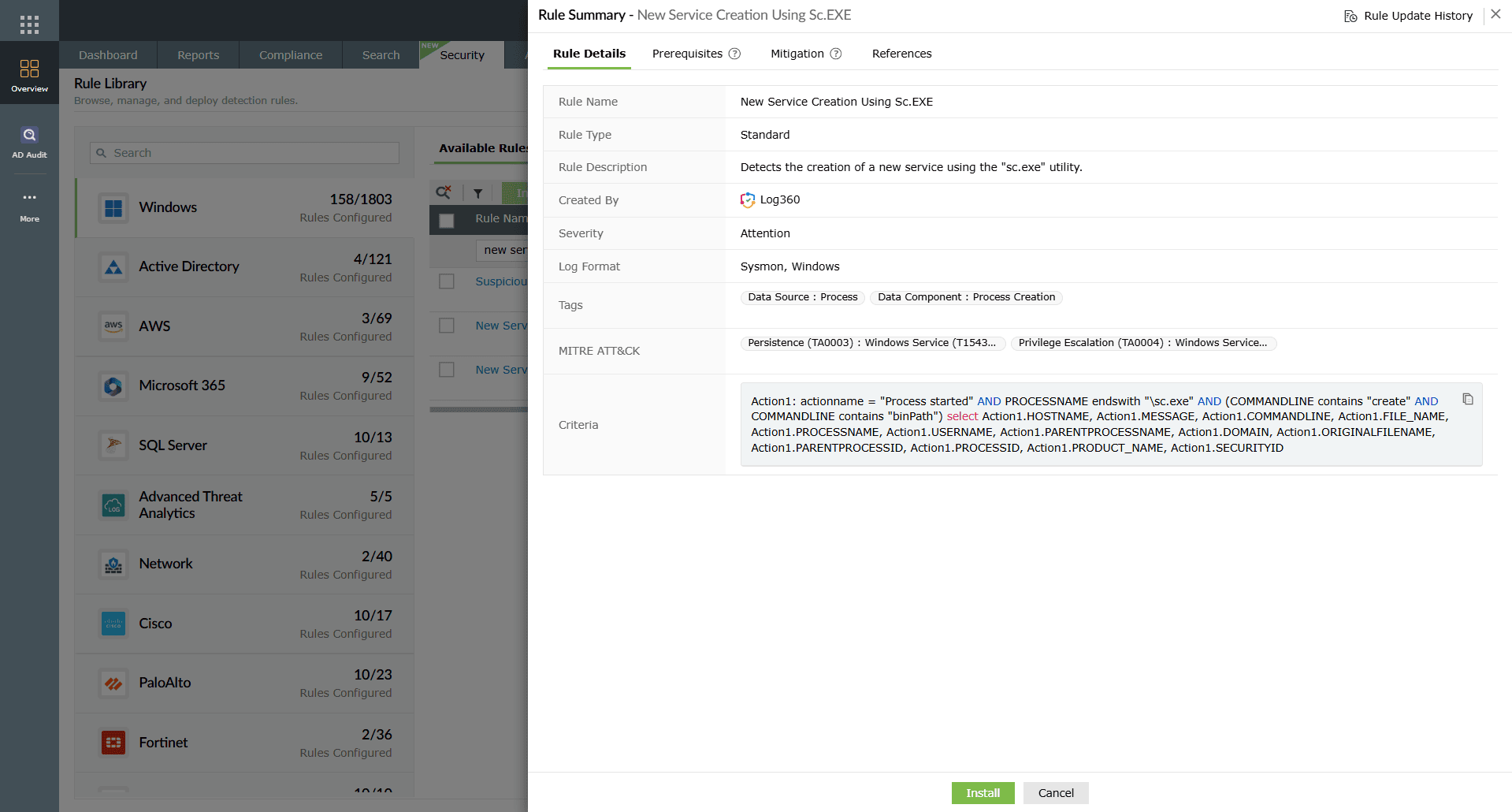
Log360 provides 6 adjacent built-in rules from the T1543 mapping that detect service abuse behaviors relevant to T1569. The Suspicious New Service Creation rule (Critical severity) fires when a service is installed with a binary path pointing to temp directories, user profiles, or network shares. The New Service Creation Using Sc.EXE rule catches command-line service creation. The New Kernel Driver Via Service Creation rule detects kernel-level service installations used for rootkit deployment.
For direct T1569 coverage, deploy custom correlations for service binary path tampering and rapid create-start-delete sequences.
Threat hunting beyond automated rules
Automated correlation rules catch known attack patterns. Threat hunting extends detection into the unknown by testing hypotheses against historical data. These three hunts target TA0002 behaviors that may evade rule-based detection.
Hunt 1: Unusual script interpreter parent chains
Hypothesis: Attackers use non-standard applications to launch script interpreters, bypassing rules that focus on known parent-child pairs like Office-to-PowerShell.
Search Log360 for any process creation event where the child is powershell.exe, cmd.exe, wscript.exe, or cscript.exe and the parent is not in your approved parent list (explorer.exe, svchost.exe, services.exe, Office processes, SCCM agent). Focus on parents that are unsigned, located in temp directories, or have names that mimic system utilities with slight misspellings.
Hunt 2: Service creation outside maintenance windows
Hypothesis: Legitimate service installations happen during deployments and patch windows. Services created outside those windows, especially at night or on weekends, indicate attacker activity.
Query System Event 7045 and Security Event 4697 for all service creation events in the last 30 days. Filter to events occurring outside documented maintenance windows. Cross-reference the creating account against your approved deployment accounts. Any service created by a non-deployment account outside business hours warrants investigation.
Hunt 3: Encoded command frequency analysis
Hypothesis: Legitimate administration rarely uses Base64-encoded PowerShell commands. A spike in encoded execution on hosts that previously had zero encoded commands indicates compromise.
Search for all Event 4688 entries containing -Enc, -EncodedCommand, or -e (with space) in the command line over the last 14 days. Establish a per-host baseline for encoded command frequency. Any host that jumps from 0 encoded commands to 5+ in a 24-hour window is likely compromised. Decode the commands and check for download cradles, Mimikatz invocations, or reconnaissance patterns.
Investigation workflow
Effective execution investigations begin with timeline reconstruction. Start from the first high-signal execution alert, then pivot into parent process, initiating identity, target host context, and network behavior. Log360 supports this workflow by correlating event streams across endpoints, identity systems, and cloud services.
Immediate triage (first 15 minutes)
- Validate process lineage: Open the alert and inspect the parent-child process chain. Does the parent-child relationship align with expected administration behavior for that host role? A domain controller running encoded PowerShell from wmiprvse.exe is high-confidence malicious. A workstation running it from an IDE may be a developer.
- Decode command content: For encoded commands, extract the decoded payload. Identify whether it contains download cradles (Invoke-WebRequest, Net.WebClient), credential-access tools (Mimikatz), reconnaissance (whoami, net group), or C2 beaconing patterns.
- Check account context: Review the SubjectUserName from the process creation event. Is this account supposed to be running scripts on this host? Check Log360's UEBA module for behavioral anomalies on this account.
Scope assessment (first 4 hours)
- Map adjacent tactics: Check the same host and user timeline for upstream initial access indicators (phishing delivery, credential compromise) and downstream persistence signals (scheduled tasks, services, registry modifications).
- Assess blast radius: Search for the same command-line pattern, the same account, or the same parent process anomaly across all monitored hosts. If the same encoded command appears on 5+ hosts within 30 minutes, confirm active lateral movement.
- Timeline reconstruction: Build a complete timeline from initial access through current activity. Identify the entry point, the execution chain, and what the attacker did after gaining execution.

Response and containment playbook
Immediate containment (first 30 minutes)
- Kill the malicious process tree: Terminate the identified malicious process and all child processes it spawned. Use the process ID from the alert to target the exact tree.
- Isolate the affected endpoint: Remove network access to prevent lateral movement. If the attacker has credentials, they can reach any host where those credentials are valid.
- Disable the compromised identity: If the execution was performed by a specific account, disable it in Active Directory, force sign-out of all sessions, and revoke any active tokens.
- Block recurring patterns: Add the malicious command hash or script pattern to endpoint controls to prevent re-execution if the attacker attempts the same technique on another host.
Remediation by attack vector
| Attack vector | Containment action | Long-term hardening |
|---|---|---|
| T1059 Script abuse | Block script hash, terminate interpreter | Enable Constrained Language Mode, enforce script signing, restrict PowerShell to approved admin hosts |
| T1047 WMI abuse | Kill wmiprvse child processes, remove WMI event subscriptions | Restrict remote WMI to approved jump hosts via firewall, limit WMI namespace ACLs |
| T1204 User execution | Quarantine the malicious file, block the download source | Deploy application allowlisting, block execution from Downloads/Temp directories |
| T1569 Service abuse | Stop and delete the malicious service, remove the binary | Restrict service creation to deployment accounts, monitor service binary integrity |
Log360 automated response
Configure Log360's SOAR framework to automate first-response actions for high-confidence TA0002 alerts:
| Response action | When it triggers | What it does |
|---|---|---|
| Disable account | Encoded PowerShell + credential access pattern on same host | Disables the executing account in Active Directory via ADAudit Plus integration |
| Isolate host | WMI lateral movement pattern detected on 3+ hosts | Triggers network isolation via endpoint management integration |
| Create P1 ticket | Any Critical-severity execution alert confirmed by cross-tactic correlation | Creates incident in ServiceDesk Plus with full alert context |
| Block source IP | Remote execution from external IP via WMI or PowerShell Remoting | Adds IP to perimeter firewall block list |
Hardening recommendations
| Control area | What to harden | Operational impact |
|---|---|---|
| PowerShell governance | Enable script block logging, deploy Constrained Language Mode on sensitive systems, enforce execution policy AllSigned for production servers. | Improves visibility and reduces script abuse pathways without blocking legitimate admin automation. |
| WMI access control | Limit remote WMI access to approved administration systems via Windows Firewall rules (block DCOM TCP 135 and WinRM TCP 5985/5986 from non-jump-hosts). Monitor event consumer creation. | Reduces remote stealth execution opportunities while preserving legitimate management workflows. |
| Service creation restrictions | Apply "Create a service" user right only to approved deployment accounts via Group Policy. Deploy application allowlisting for service binaries. Follow CIS Benchmark service hardening. | Blocks unauthorized service creation for execution or persistence. |
| User execution guardrails | Block executable launch from Downloads/Temp paths via Windows Defender Application Control. Tighten Office child-process permissions. | Lowers successful lure-to-execution conversion rates. |
| Process telemetry | Enable command-line process auditing via GPO on all endpoints. Deploy Sysmon for enriched process ancestry. | Provides the foundation data for all TA0002 detection rules to function effectively. |
| SOC workflow discipline | Correlate TA0002 alerts with TA0001 and TA0003 indicators as a standard triage policy. Never investigate execution alerts in isolation. | Cuts missed chained attacks and reduces mean dwell time. |
How TA0002 connects to other tactics
Execution does not stand alone. In mature detection programs, TA0002 is the bridge tactic that links entry to objective. If execution follows phishing, triage starts with mailbox and endpoint lineage. If execution follows credential abuse, triage starts with identity anomalies and remote access trails.
Upstream, Initial Access (TA0001) provides the ingress analysis that identifies how the attacker reached the execution stage. Downstream, Persistence (TA0003) covers the foothold mechanisms attackers install immediately after successful execution: scheduled tasks, auto-start registry keys, WMI event subscriptions, and service installations.
Lateral movement follows execution when the attacker uses the same techniques (WMI, PowerShell Remoting, PsExec) to reach additional hosts. The same detection rules that catch initial execution on Host A will detect the attacker's lateral execution on Host B, C, and D, provided telemetry is collected uniformly across all monitored endpoints.
Detection rules reference
Log360 provides 461 prebuilt detection rules mapped to Execution (TA0002) behavior, covering Windows, Linux, macOS, and cloud platforms. Key rule families include the encoded PowerShell detection set (T1059), WMI process ancestry and event consumer rules (T1047), and service creation anomaly rules (T1569/T1543). The rules described in the technique detection sections above represent the highest-priority detections for SOC activation. Explore the full rule library at the Log360 Detection Rules page.
Detect execution attacks in real-time with Log360
Map execution alerts to attacker intent with correlated telemetry, 461 prebuilt rules, and investigation workflows your SOC can execute under pressure.
Need to explore ManageEngine Log360? Schedule a personalized demo
FAQ
1. What is execution (TA0002) in MITRE ATT&CK?
Execution (TA0002) is the tactic where adversaries run malicious code after gaining initial access. It includes techniques like command and scripting interpreter abuse (T1059), WMI execution (T1047), user execution (T1204), and system services (T1569).
2. How many Log360 detections map to TA0002?
Log360 maps 461 detections to Execution-related behavior, with deep coverage for script-based execution patterns (50+ T1059 rules), focused WMI abuse detection (6 T1047 rules), and adjacent service creation rules (6 T1569/T1543 rules).
3. Which logs are required for strong execution detection?
Execution detection requires Windows Security Event 4688 with command-line auditing, PowerShell script block logging (Event 4104), Sysmon Events 1 and 19-21, WMI-Activity/Operational Events 5857-5861, and System Events 7045/7040. Forward all sources to Log360 through the Windows Event Log collection agent.
4. Does Log360 have a dedicated prebuilt rule set for T1204 User Execution?
Log360 detects T1204 primarily through shared execution and phishing indicators rather than a single isolated T1204-only rule family. Teams correlate user-triggered launch events with script execution detections and phishing detections for full T1204 coverage.
5. What is the fastest way to reduce false positives for TA0002 alerts?
Tune by context rather than disabling detections. Baseline normal administration scripts, track approved remote management hosts, whitelist known monitoring tools that trigger WMI rules, and prioritize alerts that chain from initial access indicators. The same triage discipline improves handoff into persistence detection.
6. How should SOC teams respond when an execution alert is confirmed?
Contain immediately: kill the malicious process tree, isolate affected endpoints, and disable compromised accounts. Then investigate adjacent tactics using Log360's timeline correlation to determine blast radius. Check for persistence mechanisms installed during the execution window. Use Log360's SOAR framework to automate containment for high-confidence alerts.
- What is Execution (TA0002)?
- The Execution threat landscape
- Techniques at a glance
- Detecting T1059 script abuse
- Detecting T1047 WMI execution
- Detecting T1204 user execution
- Detecting T1569 system services
- Threat hunting
- Investigation workflow
- Response playbook
- Hardening recommendations
- How TA0002 connects to other tactics
- Detection rules reference
- Related content
- FAQ

