


What is T1569 and why attackers abuse services
T1569 (System Services) describes adversary abuse of the Windows Service Control Manager (SCM) to execute malicious code. The SCM is the operating system component responsible for starting, stopping, and managing Windows services. Any process running with administrative privileges can create a new service that executes an arbitrary binary as the SYSTEM account.
Attackers abuse services for three reasons. First, services run as SYSTEM (the highest local privilege) unless explicitly configured otherwise. Second, the Service Control Manager is a legitimate system component, so service creation blends with normal administrative operations. Third, services provide both execution and persistence in a single action: a service created with auto-start enabled survives reboots without needing a separate persistence mechanism.
The CrowdStrike 2026 Global Threat Report identified service-based execution in 41% of post-exploitation scenarios where the attacker already had local admin credentials. Common tools include sc.exe, PsExec (which creates a service named PSEXESVC), Cobalt Strike's service execution module, and Metasploit's exploit/windows/smb/psexec.
Part of the Execution (TA0002) tactic in the MITRE ATT&CK framework. Overlaps with Persistence (TA0003) via T1543 (Create or Modify System Process).
Key facts about T1569
| Sub-techniques | T1569.001 (Launchctl), T1569.002 (Service Execution) |
|---|---|
| Tactic | Execution (TA0002) |
| Platforms | Windows (T1569.002), macOS (T1569.001) |
| Required privileges | Administrator or SYSTEM |
| Common tools | sc.exe, PsExec, Cobalt Strike, Metasploit psexec, net start |
| Log360 coverage | 6 adjacent built-in rules (T1543-mapped) + 4 custom recommendations |
| Key log sources | System Event 7045, Security Event 4697, Security Event 4688, Sysmon Event 1 |
| Detection difficulty | Moderate. Requires service telemetry and process creation auditing. |
| Related techniques | T1047, T1059, T1543 |
How service abuse works: Two execution patterns

Pattern 1: Execute-and-delete (ephemeral service)
The attacker creates a service pointing to a malicious binary, starts it to gain SYSTEM execution, then immediately deletes the service to remove forensic evidence. Tools like PsExec use this pattern by default: they upload a service binary, create and start a service, complete their task, then delete both the service and the binary. The entire lifecycle can complete in under 5 seconds.
This pattern leaves traces in System Event 7045 (service installation) and Security Event 4688 (process creation from services.exe). The key detection signal is a service with a binary path pointing to a temporary directory, user-writable location, or network share.
Pattern 2: Persistent service installation
The attacker creates a service with the start type set to AUTO_START (2) or BOOT_START (0). The malicious binary executes after every system reboot. This overlaps with T1543.003 (Windows Service) in the Persistence tactic. The attacker might also modify an existing legitimate service's binary path or DLL to hijack an already-trusted service identity.
Detection relies on identifying service creation from unexpected contexts (non-standard admin tools, unusual times, binary paths in non-standard directories) and service configuration changes that redirect execution to new binaries.
What service abuse looks like in logs:
System Event 7045 (New Service Installed)
EventID: 7045
ServiceName: WindowsUpdateHelper
ImagePath: C:\Users\Public\Downloads\svc_update.exe
ServiceType: user mode service
StartType: auto start
AccountName: LocalSystem
A service named to mimic a legitimate Windows process, with a binary path in a user-writable public directory, running as LocalSystem with auto-start. All three signals together indicate malicious service installation.
Security Event 4697 (Service Installed)
EventID: 7045
EventID: 4697
SubjectUserName: admin-svc
SubjectDomainName: CORP
ServiceName: PSEXESVC
ServiceFileName: %SystemRoot%\PSEXESVC.exe
ServiceType: 0x10
ServiceStartType: 3
Event 4697 adds the account context that 7045 lacks. Here, the PSEXESVC service (default PsExec) was installed by admin-svc. The start type 3 (demand start) confirms execute-and-delete pattern rather than persistence.
Security Event 4688 (Process Creation from services.exe)
EventID: 4688
NewProcessName: C:\Users\Public\Downloads\svc_update.exe
ParentProcessName: C:\Windows\System32\services.exe
TokenElevationType: %%1936
SubjectUserName: SYSTEM
When the SCM starts a service, services.exe becomes the parent process. Any binary launched from a non-standard path with services.exe as parent is a high-confidence indicator. The TokenElevationType %%1936 confirms full elevated privileges.
Sysmon Event 1 (PsExec service pattern)
EventID: 4688
EventID: 1
Image: C:\Windows\PSEXESVC.exe
ParentImage: C:\Windows\System32\services.exe
User: NT AUTHORITY\SYSTEM
CommandLine: C:\Windows\PSEXESVC.exe
Hashes: SHA256=a1b2c3d4...
Sysmon provides the process hash, enabling validation against known PsExec binaries. If the hash does not match the published Sysinternals version, the binary has been modified or a different tool is masquerading as PsExec.
Real-world attacks using T1569
| Year | Threat actor/campaign | Service abuse method | Impact |
|---|---|---|---|
| 2025 | Black Basta ransomware | Created services on domain-joined hosts via SMB and sc.exe to deploy ransomware payloads as SYSTEM. Used randomized 8-character service names. | Enterprise-wide encryption within 4 hours of initial access |
| 2024 | Wizard Spider (Conti successor) | Modified existing print spooler service DLL path to load their backdoor on boot. Service name remained unchanged. | Long-term persistent access to financial institutions |
| 2024 | Scattered Spider | PsExec service execution across virtualization infrastructure after social engineering initial access at telecommunications targets. | VMware infrastructure compromise and data exfiltration |
| 2023 | APT29 | Custom service created via WMI calling sc.exe remotely. Service binary was a signed legitimate application configured to sideload a malicious DLL. | Government network espionage across multiple ministries |
| 2023 | LockBit 3.0 affiliates | Rapid service create-start-delete pattern using Cobalt Strike's service execution. Completed in under 3 seconds per host. | Healthcare and manufacturing ransomware deployments |
How Log360 detects T1569
Adjacent built-in rules (T1543-mapped)
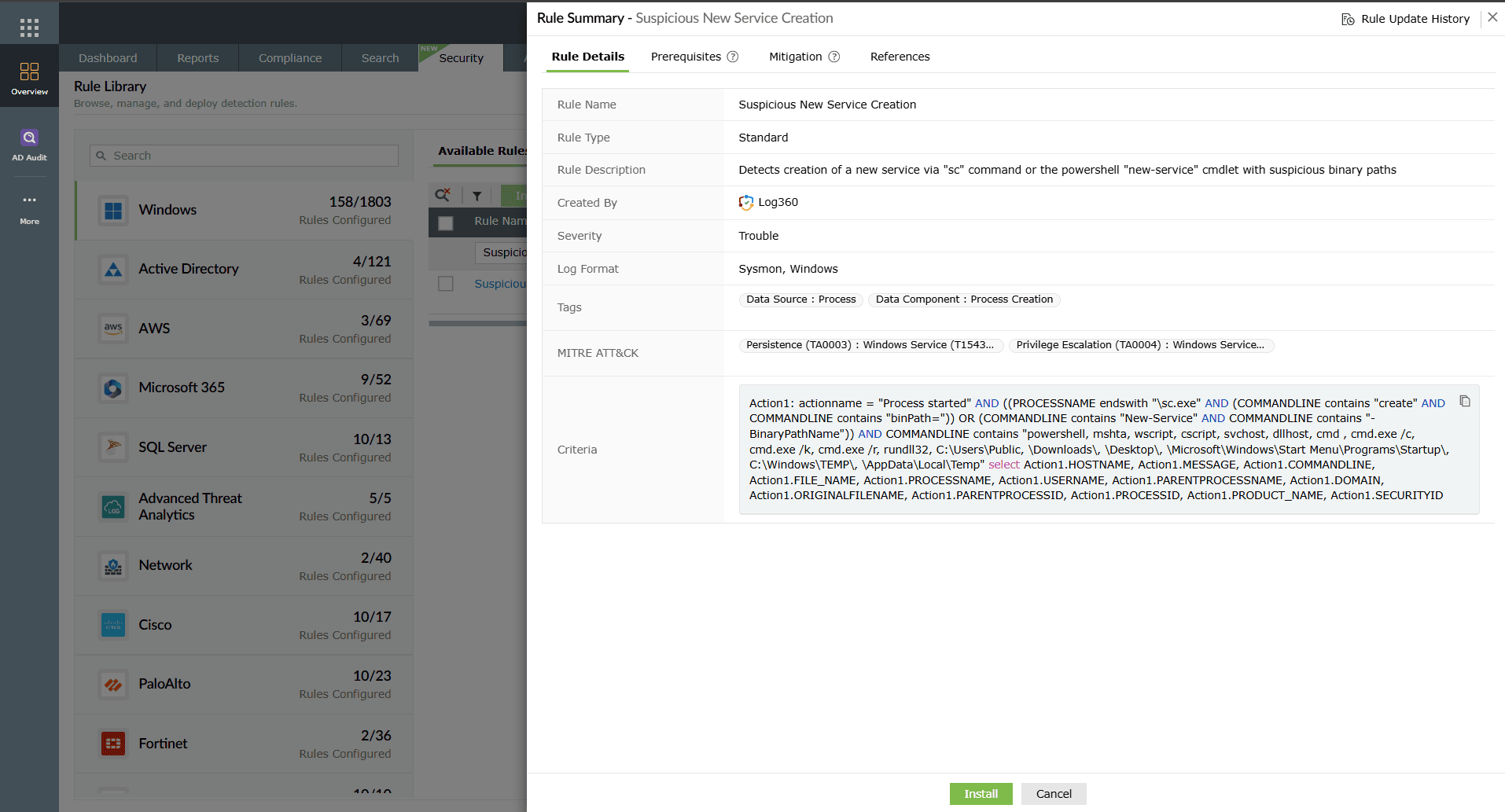
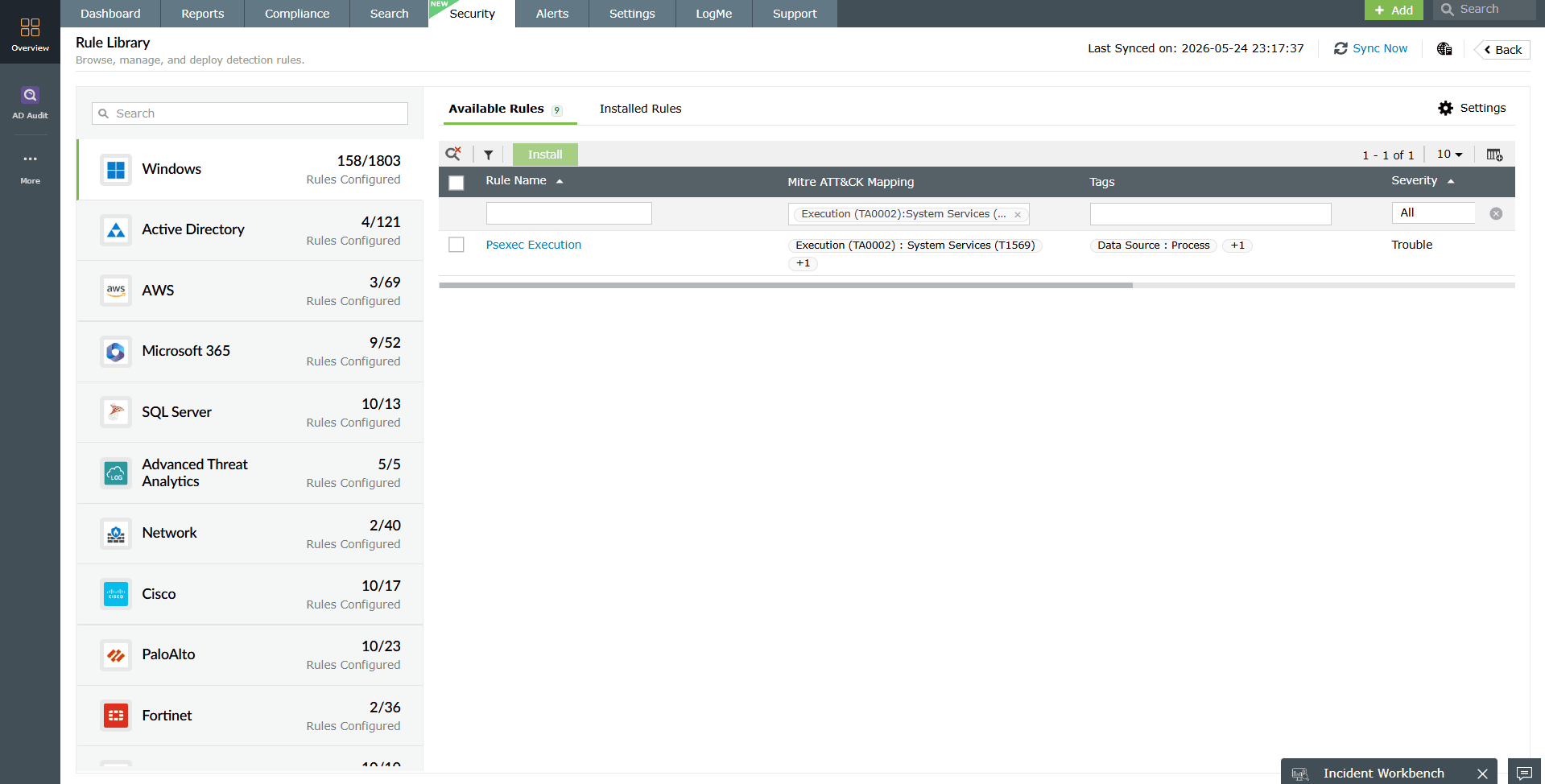
These 6 rules ship with Log360 and detect the underlying service abuse behaviors even though they are mapped under T1543 in the current rule taxonomy. Enable all of them for T1569 coverage.
| Rule name | What it detects | Severity |
|---|---|---|
| New Service Creation Using Sc.EXE | Any service creation through the sc.exe command-line tool. Fires on Event 4688 showing sc.exe with "create" arguments. | Trouble |
| Suspicious New Service Creation | Service installation with binary path pointing to temp directories, user profiles, or network shares. | Critical |
| New Kernel Driver Via Service Creation | Service of type kernel driver created. Attackers use kernel drivers for rootkit deployment and EDR evasion. | Critical |
| Suspicious Parent Process spawning services.exe | Services.exe launched by an unexpected parent (should only be spawned by wininit.exe). | Critical |
| Suspicious Parent Process spawning wininit.exe | Wininit.exe launched by an unexpected parent (should only be spawned by smss.exe). | Critical |
| Suspicious Parent Process spawning csrss.exe | Csrss.exe launched by an unexpected parent. Indicates process hollowing targeting session management. | Critical |
Recommended custom rule for T1569
Deploy these custom rules in the Log360 correlation engine to address T1569 patterns not covered by the built-in rule set.
| Custom rule | Trigger logic | Severity | Log sources required |
|---|---|---|---|
| Service Binary Path Tampering | Existing service ImagePath modified to point to a binary in a temp, user-writable, or network path. Correlates System Event 7040 (service config change) with path validation. | Critical | System 7040, Registry change events |
| Rapid Service Create-Start-Delete Sequence | New service created, started, and deleted within 60 seconds by the same user on the same host. This is the PsExec/Cobalt Strike ephemeral service pattern. | Critical | System 7045, 4688, sc.exe delete command in 4688 |
| Non-Admin Service Control Abuse | Service creation or modification from an account that is not in the approved admin group or from a workstation not in the jump host list. | Trouble | Security 4697, AD group membership data |
| Service Start Following Encoded Script | Encoded PowerShell or script execution (from T1059 rules) followed by service creation on the same host within 5 minutes. | Critical | 4688 with command line, 7045 |
Implementation guidance: Start with the Rapid Create-Start-Delete rule. It has the lowest false positive rate because legitimate software deployment tools (SCCM, Intune) do not typically delete services immediately after creation.
Investigation workflow
When a service-related alert fires, the analyst needs to determine: Was this a legitimate deployment? What did the service execute? Is it still present on the host? Did it spread to other systems?
- Validate the service creation context: Check Event 4697 for the account that created the service. Cross-reference this account against your approved admin roster. If the account is a standard user or a compromised service account, escalate immediately. Check the timestamp against maintenance windows and deployment schedules.
- Inspect the binary path: Examine the ImagePath from Event 7045. Legitimate services have binaries in C:\Windows\System32\, C:\Program Files\, or vendor-specific directories. Binaries in C:\Users\, C:\Temp\, C:\ProgramData\, or UNC paths (\\server\share\) are suspicious. If the binary still exists, collect its hash and check against threat intelligence feeds.
- Check service current status: Query whether the service still exists on the host. If it was deleted (ephemeral pattern), check how long it ran and what child processes it spawned while active. Use Event 4688 with services.exe as ParentProcessName to identify everything the service executed.
- Map lateral movement scope: Search for the same service name, same binary hash, or same creating account across all monitored hosts. PsExec and Cobalt Strike create services on every host they move to. The same ephemeral service pattern appearing on 5+ hosts within 30 minutes confirms active lateral movement. Use Log360's UEBA module to track the account's behavior timeline.
- Correlate with adjacent technique signals: Check the same host timeline for T1047 WMI alerts (attackers often use WMI to call sc.exe remotely), T1059 script execution (payload download before service creation), and persistence indicators (service set to auto-start).
Response playbook
Immediate containment
- Stop the malicious service: Use sc stop [ServiceName] or PowerShell Stop-Service to halt execution. If the binary is actively running as a C2 agent, network-isolate the host first to prevent the attacker from responding to your containment action.
- Delete the service entry: Remove the service with sc delete [ServiceName]. Verify removal by checking HKLM\SYSTEM\CurrentControlSet\Services\ for any residual registry keys.
- Remove the malicious binary: Delete or quarantine the binary pointed to by the service ImagePath. Collect a copy for forensic analysis before deletion.
- Disable the compromised account: The account shown in Event 4697 has been used for malicious service creation. Disable it in Active Directory, force sign-out of all sessions, and reset the password. Audit what other systems this account has access to.
Long-term remediation
- Restrict service creation privileges: Limit which accounts can create services using Group Policy. Apply the "Create a service" user right assignment only to approved service deployment accounts. Follow CIS Benchmark recommendations for Windows Server service hardening.
- Monitor service binary integrity: Deploy application allowlisting that blocks service binaries from executing if they are in non-standard directories or unsigned.
- Block PsExec and similar tools: Use Windows Defender Application Control or AppLocker rules to block known remote execution tools from creating services, unless explicitly needed for approved management workflows.
- Harden jump host architecture: Restrict sc.exe and service management tools to approved administrative workstations only. Block service creation commands from standard workstations at the endpoint security layer.
Automated response with Log360 SOAR
Configure automated workflows in Log360's SOAR framework:
- Suspicious New Service Creation alert: Automatically query the host for the service binary hash and submit to VirusTotal API. If malicious, isolate the host and disable the creating account.
- Rapid Create-Start-Delete alert: Block the source IP at the network perimeter (likely a lateral movement source) and create a ServiceDesk Plus P1 incident.
- Kernel driver service alert: Immediately isolate the host. Kernel-level service creation outside of driver installation windows is a rootkit deployment indicator.
Detection tuning guidance
| Tuning objective | Action | Outcome |
| Reduce SCCM/Intune noise | Whitelist the SCCM service account and the Intune management extension service name pattern in the New Service Creation rule. | Eliminates false positives from legitimate software deployment. |
| Suppress PsExec for approved admins | Create an exclusion for PSEXESVC creation from documented jump host IPs by accounts in the Tier-0 admin group. | Allows legitimate PsExec usage while alerting on unauthorized use. |
| Detect service binary path anomalies | Add a custom rule that flags any Event 7045 where ImagePath contains \Users\, \Temp\, \Downloads\, \AppData\, or UNC paths. | Catches malicious service binaries without requiring signature-based detection. |
| Time-based suppression | Suppress service creation alerts during documented patching windows (monthly Patch Tuesday, quarterly driver updates). | Reduces analyst fatigue during known high-volume service creation periods. |
| Kernel driver whitelisting | Maintain an approved kernel driver hash list. Only alert when the new kernel driver service binary hash is not in the approved list. | Eliminates false positives from legitimate driver installations. |
Log source requirements
T1569 detection requires these log sources forwarded to Log360:
- System Event Log (Event 7045, 7040): Event 7045 records every new service installation with service name, binary path, type, start type, and account. Event 7040 records service start type changes. Both are essential for detecting new malicious services and configuration tampering.
- Security Event Log (Event 4697, 4688): Event 4697 provides the user context for service installations (which account created the service). Event 4688 with command-line auditing captures sc.exe arguments and shows the parent-child relationship when services.exe starts the service binary.
- Sysmon (Event 1, 12, 13): Event 1 provides enriched process creation with hashes and full command lines. Events 12/13 capture registry modifications to the Services key, detecting service creation and modification that bypasses sc.exe (direct registry manipulation). Sysmon is strongly recommended for best coverage.
- Windows PowerShell logs: When attackers use New-Service or Set-Service cmdlets instead of sc.exe, PowerShell script block logging captures the full command. Pair with T1059 rules for script-based service creation detection.
Verify that command-line process auditing is enabled via GPO. Without it, Event 4688 shows process creation but not the arguments passed to sc.exe, rendering the detection incomplete. Forward all sources to Log360 through the Windows Event Log collection agent.
Need to explore ManageEngine Log360? Schedule a personalized demo
FAQ
1. Is every new service installation suspicious?
No. Windows creates services during software installation, driver updates, and system configuration changes. The suspicious indicators are: binary path in a user-writable directory, service name mimicking a legitimate service, creation outside of maintenance windows, or creation by an account that does not normally deploy software. Baseline your environment to distinguish signal from noise.
2. Why does this page use T1543 rules for T1569 detection?
T1569 (execution via services) and T1543 (persistence via services) share the same log sources, the same Windows events, and the same observable behaviors. The difference is intent: T1569 creates services to run code once, T1543 creates services for persistence. The same rules detect both patterns.
3. How do I detect PsExec usage specifically?
PsExec creates a service named PSEXESVC (or a custom name if the -r flag is used). The built-in Suspicious New Service Creation rule catches non-standard service names. For exact PsExec detection, create a custom rule matching Event 7045 where ServiceName equals "PSEXESVC" or where the binary hash matches the known Sysinternals PsExec binary.
4. What is the first custom rule to implement for T1569?
Start with the Rapid Service Create-Start-Delete Sequence rule. It targets the ephemeral execution pattern used by PsExec, Cobalt Strike, and Metasploit with the lowest false positive rate. Legitimate tools do not create and delete services within seconds.
5. Can service abuse be detected without Sysmon?
Yes. The core detection relies on System Event 7045 and Security Event 4697, both available from native Windows auditing. Sysmon adds registry monitoring for direct service registry manipulation and process hash data for binary validation. Deploy Sysmon for enriched context, but the adjacent built-in rules function without it.
6. How do I distinguish T1569 service execution from T1543 service persistence?
Check the service start type and lifecycle. Execution (T1569): service has demand-start type (3) and is deleted shortly after creation. Persistence (T1543): service has auto-start type (2) and remains installed across reboots. Both require the same investigation workflow but differ in response priority. Ephemeral services indicate active attacker presence requiring immediate containment.
- What is T1569
- Key facts
- How service abuse works
- What it looks like in logs
- Real-world attacks
- How Log360 detects T1569
- Investigation workflow
- Response playbook
- Detection tuning
- Log source requirements
- FAQ

