


What is T1047 and why attackers choose WMI?
T1047 (Windows Management Instrumentation) describes adversary abuse of WMI for process execution, remote command delivery, and stealth operations. WMI has been built into every Windows system since Windows 2000. It provides a COM-based interface for querying system data, managing configurations, and executing processes both locally and remotely over DCOM (port 135) or WinRM (port 5985/5986).
Attackers choose WMI for three reasons. First, it is present on every Windows host by default. Second, WMI invocations are trusted in enterprise environments because system administrators use them daily for patch deployment, inventory collection, and remote troubleshooting. Third, WMI execution is fileless: the attacker sends a WMI query that spawns a process on the target without writing a payload to disk. The CrowdStrike 2026 Global Threat Report found WMI-based lateral movement in 34% of interactive intrusions, up from 29% the previous year.
Part of the Execution (TA0002) tactic in the MITRE ATT&CK framework.
Key facts about T1047
| MITRE ID | T1047 |
|---|---|
| Tactic | Execution (TA0002) |
| Severity | Critical (ancestry-based rules), Trouble (eventing rules) |
| Platforms | Windows |
| Common tools | wmic.exe, Impacket wmiexec, PowerShell Invoke-WmiMethod, CIM cmdlets |
| Log360 coverage | 6 built-in correlation rules |
| Key log sources | Windows Security 4688, Sysmon Event 1, WMI-Activity/Operational 5857-5861 |
| Detection difficulty | Moderate. Requires process lineage and WMI event log collection. |
| Related techniques | T1059, T1569, T1546.003 (WMI Event Subscription) |
How the attack works: three WMI abuse patterns
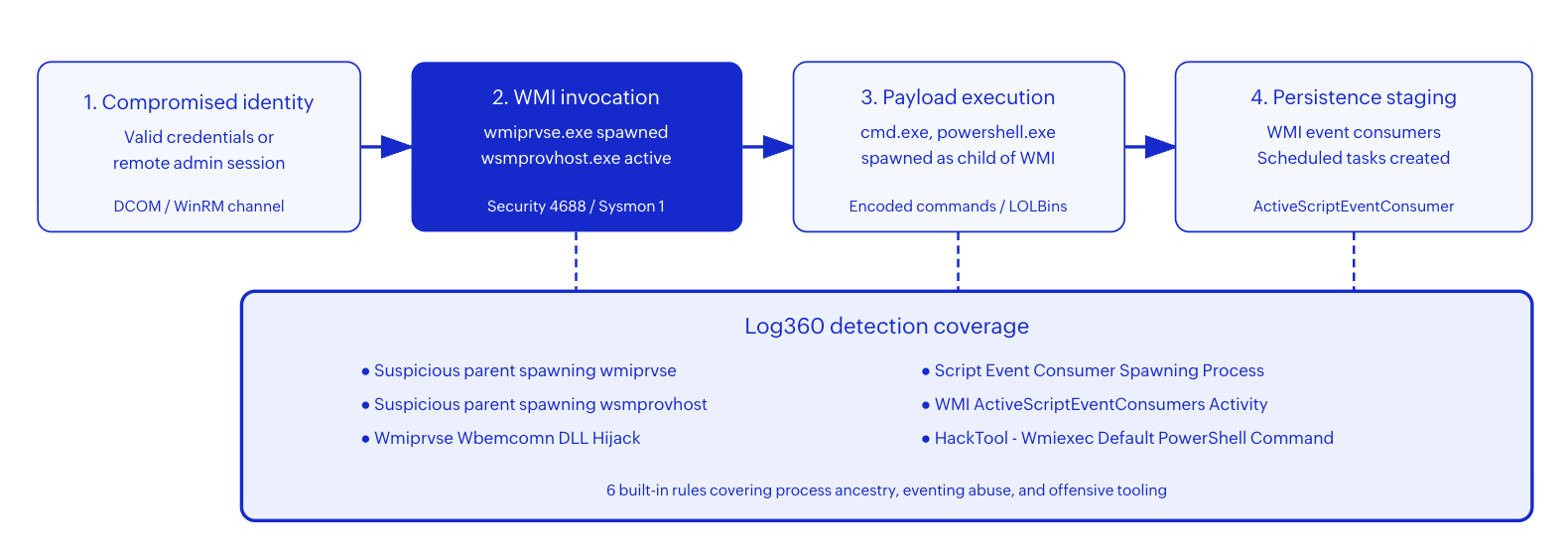
Pattern 1: Remote process execution via DCOM
The most common T1047 pattern. The attacker authenticates to a remote host using stolen credentials, then calls Win32_Process.Create() through the WMI DCOM interface. On the target, the WMI Provider Host (wmiprvse.exe) spawns the requested process as a child. Because the command is never written to a file, a traditional antivirus misses it entirely. Tools like Impacket's wmiexec.py automate this into a semi-interactive shell.
In logs, this appears as wmiprvse.exe spawning cmd.exe or powershell.exe with an encoded command line. The parent-child relationship is the primary detection signal.
Pattern 2: WMI event subscription persistence
WMI supports permanent event subscriptions: a filter (trigger condition), a consumer (action to take), and a binding (connecting them). Attackers create subscriptions where the filter fires on a timer or system event, and the consumer executes a script. This survives reboots and runs as SYSTEM. APT29 used WMI event subscriptions in multiple campaigns against diplomatic targets as documented in the Mandiant M-Trends 2026 report.
Pattern 3: WMI component tampering
Sophisticated attackers tamper with WMI's own DLLs. By hijacking wbemcomn.dll (the shared library loaded by wmiprvse.exe), they achieve code execution every time WMI processes any query. This is rare but high-impact because it provides persistent, stealthy execution without creating event subscriptions that appear in WMI's own log.
What WMI abuse looks like in logs
Detection requires specific log sources. Without process command-line auditing, WMI abuse is invisible to SIEM.
Windows Security Event 4688 (Process Creation)
EventID: 4688
NewProcessName: C:\Windows\System32\cmd.exe
ParentProcessName: C:\Windows\System32\wbem\wmiprvse.exe
CommandLine: cmd.exe /Q /c cd 1> \\127.0.0.1\ADMIN$\__1714830421 2>&1
SubjectUserName: admin-svc
SubjectDomainName: CORP
The \\127.0.0.1\ADMIN$\__[timestamp] pattern in the command line is the default Impacket wmiexec output redirection. Log360's HackTool rule detects exactly this signature.
WMI-Activity/Operational Event 5861 (New Consumer Registration)
EventID: 5861
Namespace: root\subscription
ESS: ActiveScriptEventConsumer
ConsumerName: "SystemCoreCheck"
ScriptText: "CreateObject('Wscript.Shell').Run('powershell -ep bypass -e JABz...')"
PossibleCause: Permanent
Any new permanent consumer registration outside of a known management tool installation is suspicious. The encoded PowerShell in the ScriptText confirms malicious intent.
Sysmon Event 1 (Process Create with ancestry)
EventID: 1
Image: C:\Windows\System32\WindowsPowerShell\v1.0\powershell.exe
ParentImage: C:\Windows\System32\wbem\wmiprvse.exe
ParentCommandLine: C:\Windows\System32\wbem\wmiprvse.exe -Embedding
CommandLine: powershell.exe -NoP -NonI -W Hidden -Enc SQBFAFgA...
Sysmon provides the full parent command line, confirming the -Embedding flag that indicates COM/DCOM activation. Combined with an encoded command, this is a high-confidence indicator.
Real-world attacks using T1047
| Year | Threat actor/campaign | WMI usage | Impact |
|---|---|---|---|
| 2025 | Volt Typhoon | WMI for fileless lateral movement across US critical infrastructure networks. Used wmic.exe process call create for remote execution. | Multi-year undetected access to energy and water utilities |
| 2024 | Black Basta ransomware | WMI event subscriptions for persistence after initial Qakbot delivery. ActiveScriptEventConsumer executing encoded PowerShell every 6 hours. | Enterprise-wide ransomware deployment within 72 hours of initial access |
| 2024 | APT29 (Cozy Bear) | Custom WMI providers loaded through DLL sideloading for long-term credential harvesting. | Diplomatic and government target compromise across NATO nations |
| 2023 | Scattered Spider | Impacket wmiexec for interactive shell access after social engineering initial access at telecom and hospitality targets. | Cloud infrastructure takeover and data exfiltration |
How Log360 detects T1047
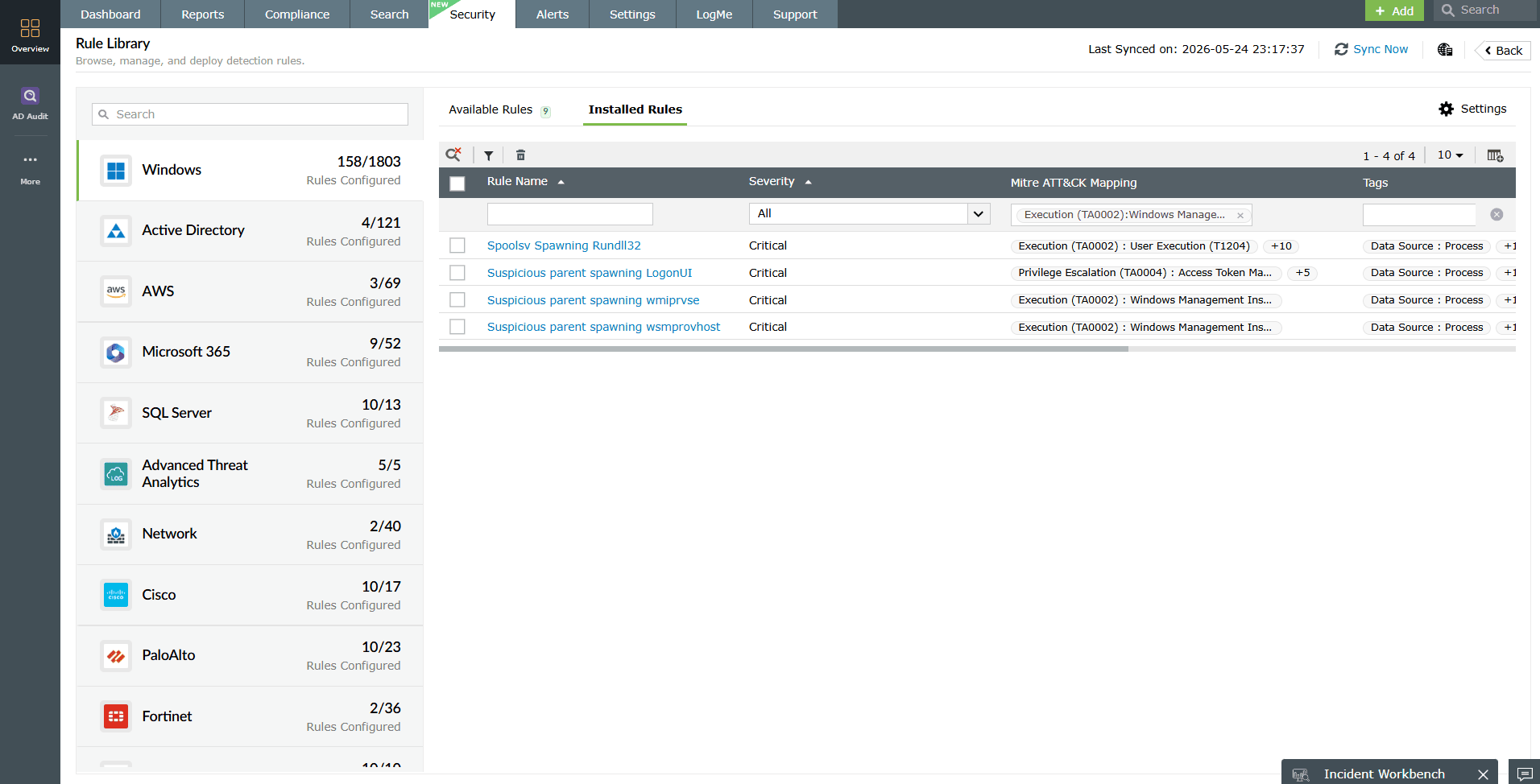
Log360's real-time correlation engine monitors Windows process creation events and WMI operational logs for the three abuse patterns described above. Six built-in rules provide coverage across the full WMI attack surface.
Detecting anomalous WMI process ancestry
In legitimate WMI operations, wmiprvse.exe is spawned by svchost.exe (the WMI service host). When wmiprvse.exe itself spawns suspicious child processes like cmd.exe, powershell.exe, or scripting engines, it indicates remote code execution through WMI. Log360's correlation engine continuously evaluates parent-child process relationships and fires an alert when the ancestry deviates from the expected baseline.
The Suspicious parent spawning wmiprvse rule (Critical severity) fires when wmiprvse.exe's parent is not the expected svchost.exe WMI service. This catches DLL injection attacks and process hollowing targeting the WMI provider. The Suspicious parent spawning wsmprovhost rule catches the same pattern for the WinRM-based WMI execution path, where wsmprovhost.exe should only be spawned by svchost.exe hosting the WinRM service.
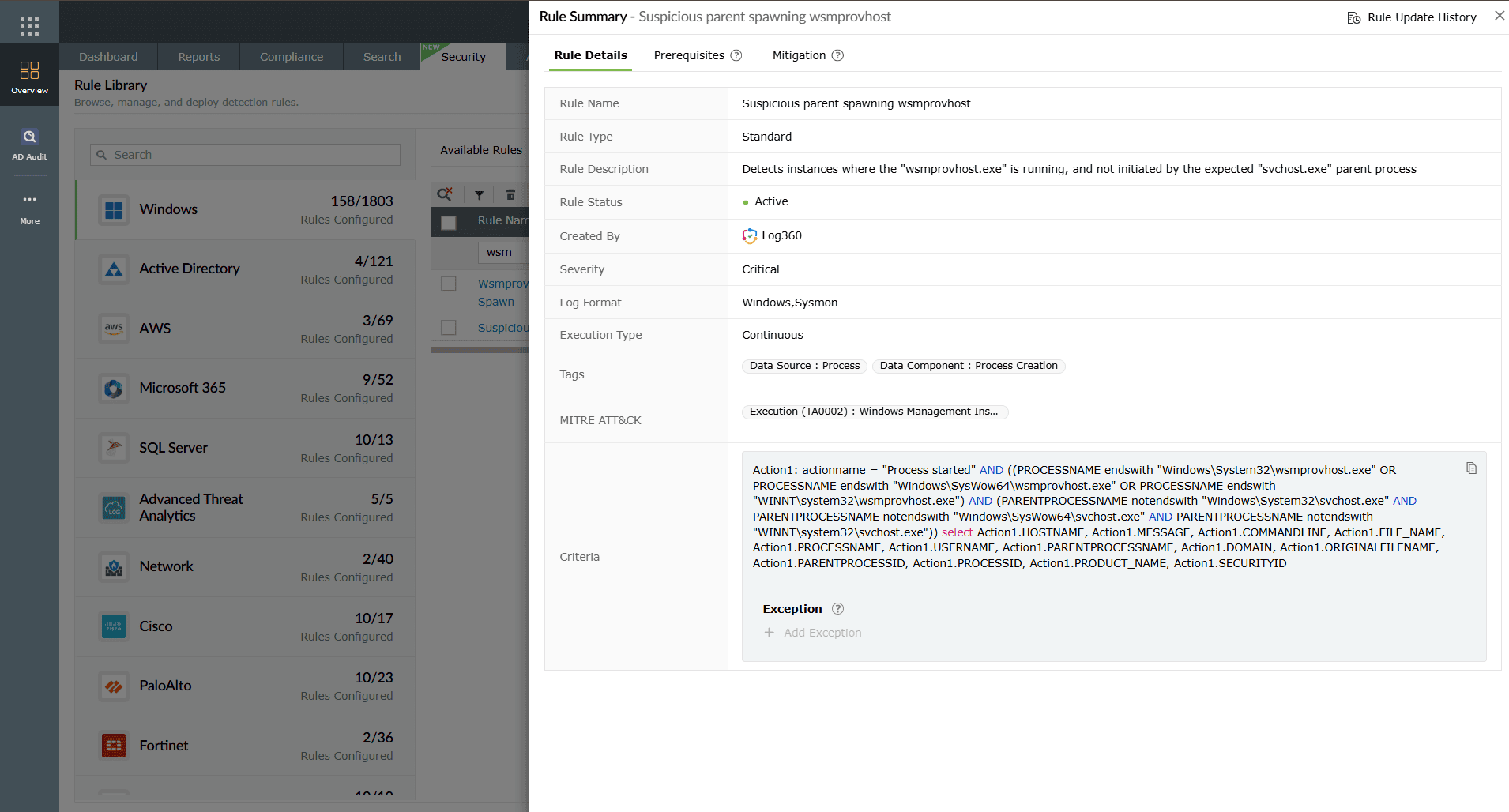
Detecting WMI event consumer abuse
When an attacker creates a permanent WMI event subscription, the event consumer eventually spawns a process to execute its payload. Log360 monitors for this specific behavior. The Script Event Consumer Spawning Process rule fires when a script event consumer launches an executable. The WMI ActiveScriptEventConsumers Activity rule detects the broader category of ActiveScript consumer behavior, catching both VBScript and JScript payloads embedded in WMI subscriptions.
These two rules together provide coverage for the persistence variant of T1047 that overlaps with Persistence (TA0003) technique T1546.003 (WMI Event Subscription).
Detecting offensive tooling signatures
The HackTool - Wmiexec Default PowerShell Command rule targets the default output patterns generated by Impacket's wmiexec.py. Impacket redirects command output to a temporary file under ADMIN$ with a predictable naming pattern. This rule catches operators who use wmiexec without customizing its output handler.
The Wmiprvse Wbemcomn DLL Hijack rule monitors for integrity violations in the WMI component DLL chain. If wbemcomn.dll is loaded from an unexpected path or with an unexpected hash, this indicates DLL sideloading targeting the WMI execution environment.
Coverage note: These 6 rules address the high-value detection surface. For organizations facing advanced threats, supplement with T1059 script detection rules (50+ rules) to catch the payloads that WMI delivers.
Detection rule summary
| Rule name | Abuse pattern | Severity | Key indicator |
|---|---|---|---|
| Suspicious parent spawning wmiprvse | Process ancestry | Critical | Unexpected parent of wmiprvse.exe |
| Suspicious parent spawning wsmprovhost | Process ancestry | Critical | Unexpected parent of wsmprovhost.exe |
| Script Event Consumer Spawning Process | Event consumer | Trouble | Consumer script launching executable |
| WMI ActiveScriptEventConsumers Activity | Event consumer | Trouble | ActiveScript consumer registration or execution |
| Wmiprvse Wbemcomn DLL Hijack | Component tampering | Trouble | wbemcomn.dll loaded from non-standard path |
| HackTool - Wmiexec Default PowerShell Command | Offensive tooling | Trouble | Impacket wmiexec output redirection pattern |
Investigation workflow in Log360
When a T1047 alert fires, the analyst needs to answer four questions: Who initiated it? What did it execute? Where else did it reach? Is persistence installed?
- Validate process ancestry: Open the alert and inspect the parent-child process chain. Is the parent of wmiprvse.exe or wsmprovhost.exe the expected svchost.exe service host? If the parent is an unusual process (explorer.exe, a browser, or an unknown binary), this confirms malicious invocation. Check the SubjectUserName field to identify which account triggered the WMI call.
- Decode the command line: WMI-delivered payloads frequently use Base64-encoded PowerShell. Decode the -Enc or -EncodedCommand parameter to reveal the actual payload. Look for download cradles (Invoke-WebRequest, Net.WebClient), reconnaissance commands (whoami, ipconfig, net group), or credential-access tools (Mimikatz invocations).
- Check for WMI event subscriptions: Query the WMI-Activity/Operational log for Event 5861 on the affected host. Any new permanent consumer created outside of known software installations is a persistence indicator. Document the consumer name, filter query, and script text.
- Identify lateral movement scope: Search for the same account, the same command-line pattern, or the same WMI consumer name across all monitored hosts. If the attacker used wmiexec for lateral movement, the same credential and output redirection pattern will appear on multiple targets within a short time window. Use Log360's UEBA module to check if the account shows anomalous behavior across hosts.
- Correlate with adjacent tactics: Check the same host and user timeline for execution signals (T1059 script alerts), persistence indicators (scheduled tasks, services), and credential access attempts. WMI abuse rarely occurs in isolation.
Response playbook
Immediate containment
- Isolate the affected host: Remove network access to prevent further lateral movement through WMI. If the attacker has credentials, they can reach any host where those credentials are valid.
- Kill the malicious process tree: Terminate the process spawned by wmiprvse.exe and any child processes it created. Use process ID from the alert to target the exact tree.
- Remove WMI event subscriptions: Delete any unauthorized event filters, consumers, and bindings. In PowerShell: Get-WmiObject -Namespace root\subscription -Class __EventConsumer lists all consumers. Remove anything not documented in your baseline.
- Rotate the compromised credential: The account shown in SubjectUserName has been compromised. Reset the password, revoke active sessions, and review where that account has administrative access.
Long-term remediation
- Restrict remote WMI access: Use Windows Firewall rules to limit DCOM (TCP 135) and WinRM (TCP 5985/5986) access to approved management hosts only. Block all other sources. Follow CIS Controls guidance on limiting remote management surface area.
- Implement WMI namespace ACLs: Restrict which accounts can execute WMI operations in sensitive namespaces. Standard users should not need remote WMI access to other hosts.
- Deploy process command-line auditing: Without command-line auditing, Security Event 4688 contains no useful payload data. Enable this GPO across all endpoints.
- Baseline legitimate WMI usage: Document which management tools, admin accounts, and jump hosts generate WMI traffic. Add these to rule exclusion lists. Revisit monthly as tooling changes.
Automated response with Log360 SOAR
Configure Log360's SOAR framework to automate the first response steps:
- Critical ancestry alerts: Automatically disable the initiating account in Active Directory and create a ServiceDesk Plus P1 ticket.
- Event consumer alerts: Execute a PowerShell script that exports the full WMI subscription inventory from the affected host for forensic review.
- Wmiexec alerts: Block the source IP at the network perimeter and notify the incident response team.
Detection tuning guidance
| Tuning objective | Action | Outcome |
|---|---|---|
| Reduce false positives from SCCM | Whitelist the SCCM service account and management server IP in ancestry rules. | Eliminates noise from legitimate software distribution WMI calls. |
| Reduce false positives from monitoring tools | Add Nagios, PRTG, and inventory agents to the exclusion list for wmiprvse ancestry. | Stops alerts on known monitoring infrastructure. |
| Increase confidence for event consumer alerts | Require that the consumer script text contains encoded commands, download cradles, or known offensive patterns. | Only fires on high-confidence malicious subscriptions. |
| Detect custom wmiexec variants | Create a custom rule matching any wmiprvse.exe > cmd.exe chain where the command line contains output redirection to ADMINorC shares. | Catches modified Impacket forks that change default patterns. |
| Maintenance window suppression | Schedule alert suppression for ancestry rules during documented patch deployment windows. | No analyst interruption during known admin WMI operations. |
Log source requirements
T1047 detection requires these log sources forwarded to Log360:
- Windows Security (Event 4688): Process creation with command line auditing enabled via GPO. This provides the parent-child relationship and command line for every process on the host.
- Sysmon (Event 1, 19, 20, 21): Enriched process creation with full ancestry, plus WMI event subscription events (filter, consumer, binding creation). Sysmon provides more context than native Security events.
- WMI-Activity/Operational: Events 5857-5861 log provider operations and consumer registrations. Essential for detecting the event subscription persistence pattern.
- Windows PowerShell/Script Block Logging: When WMI delivers an encoded PowerShell payload, script block logging captures the decoded content. Pair with T1059 rules for full coverage.
Forward all sources to Log360 through the Windows Event Log collection agent. Verify that command-line auditing is active by checking that Event 4688 entries include the CommandLine field with actual values, not empty strings.
Need to explore ManageEngine Log360? Schedule a personalized demo
FAQ
1. Is every wmiprvse.exe process suspicious?
No. WMI is legitimate administration infrastructure used by SCCM, monitoring tools, and enterprise management platforms. Suspicion increases when the parent process, child process, or command line deviates from baseline. Pair detection context with the Execution triage thresholds for severity decisions.
2. Which T1047 rule should I prioritize first?
Start with the two process ancestry rules (Suspicious parent spawning wmiprvse and Suspicious parent spawning wsmprovhost). These catch the broadest range of WMI abuse with the lowest false positive rate when properly baselined. Add event consumer rules next for persistence coverage.
3. How does T1047 connect to persistence techniques?
WMI event subscriptions (T1546.003) provide persistence that survives reboots. Attackers use T1047 for initial execution and then create permanent event consumers for persistence.
4. What if my environment does not collect Sysmon?
Log360's T1047 rules work with native Windows Security Event 4688 as long as command-line auditing is enabled. Sysmon adds enriched ancestry data and WMI subscription events (19, 20, 21) that improve detection confidence. Deploy Sysmon for best coverage, but the rules function without it.
5. Can WMI abuse be detected without endpoint agents?
Yes. The core detection relies on System Event 7045 and Security Event 4697, both available from native Windows auditing. Sysmon adds registry monitoring for direct service registry manipulation and process hash data for binary validation. Deploy Sysmon for enriched context, but the adjacent built-in rules function without it.
- What is T1047
- Key facts
- How the attack works
- What it looks like in logs
- Real-world attacks
- How Log360 detects T1047
- Detection rule summary
- Investigation workflow
- Response playbook
- Detection tuning
- Log source requirements
- FAQ

