


What is exfiltration over C2 channel (T1041)?
When adversaries have already established a command-and-control session inside your network, they face a choice: open a new transfer path to move stolen data out, or simply reuse the channel that is already working. Exfiltration Over C2 Channel (T1041) describes the second option, where the attacker piggybacks data theft on the same encrypted, outbound connection they use for remote access and tasking.
This technique is attractive precisely because it is invisible to most perimeter controls. The C2 session had already passed the firewall when it was established. Proxy logs already classify it as allowed traffic. The only thing that changes is the volume and pattern of data flowing through that session, and that shift is what a well-instrumented SIEM can catch.
T1041 sits under Exfiltration (TA0010) in the MITRE ATT&CK framework and is one of the most frequently observed exfiltration methods in real-world intrusions because it requires no additional tooling, no new network connections, and no protocol changes that might trigger alerts.
Key insight: T1041 detection is fundamentally a behavioral analytics problem. The channel is already trusted; only the traffic pattern reveals malicious intent. Log360 combines session baselines, endpoint context, and file-access correlation to surface this shift.
Key facts about T1041
| Attribute | Detail |
|---|---|
| MITRE ATT&CK ID | T1041 |
| Tactic | Exfiltration (TA0010) |
| Platforms | Windows, Linux, macOS, Network |
| Data sources | Network traffic flow, network connection creation, command execution, file access |
| Requires | Established C2 session (TA0010 depends on TA0010) |
| Log360 coverage | Adjacent built-in rules + custom recommended correlations |
| Detection difficulty | High - traffic blends with legitimate C2 heartbeats |
How the attack works
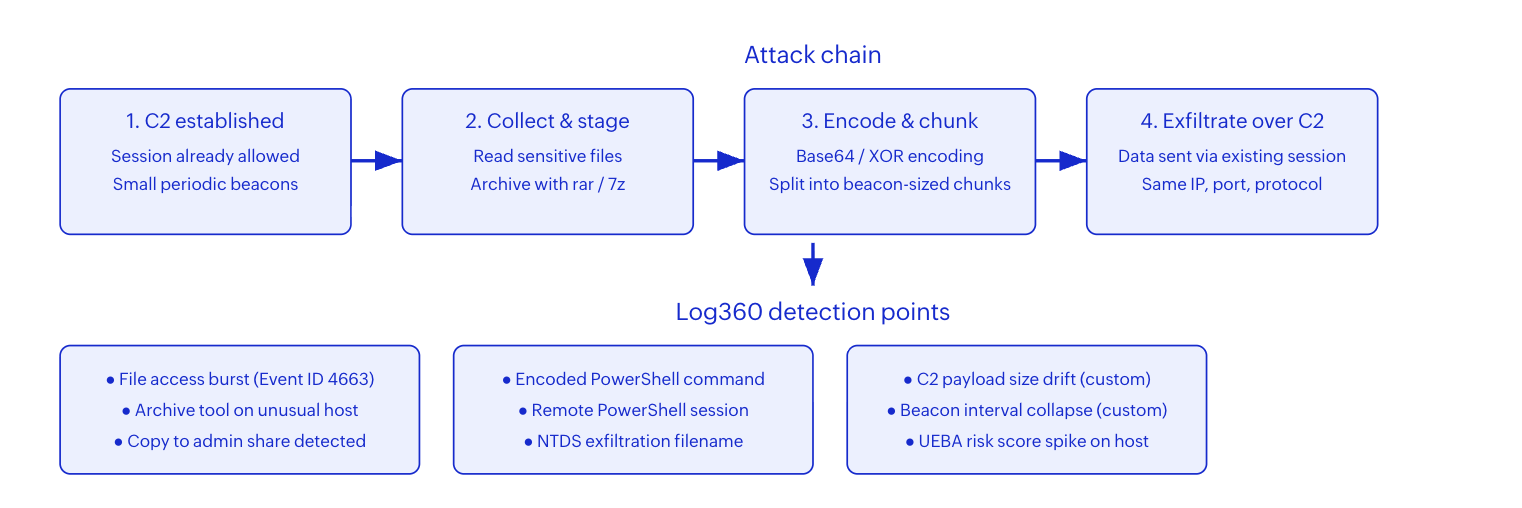
T1041 follows a predictable operational sequence that creates detection opportunities at each stage, even though the final transfer may look like normal C2 traffic.
Stage 1: Data collection and staging
Before exfiltration begins, the attacker identifies and collects target data. This typically involves reading sensitive files from network shares, databases, or email stores, then staging them in a local directory. Tools like rar.exe, 7z.exe, or PowerShell's Compress-Archive cmdlet package the data into manageable archives. At this point, Log360 can detect abnormal file-access bursts through Windows file auditing (Event ID 4663) and process creation events showing archive tools on hosts that do not normally use them.
Stage 2: Encoding and chunking
To avoid triggering DLP or content-inspection systems, attackers encode the staged data. Base64 encoding via PowerShell is the most common approach, but custom XOR routines and encryption are also used. The encoded payload is then split into chunks that fit within the C2 protocol's expected message size, making individual transfer look like a normal beacon response. Log360's Suspicious Encoded PowerShell Command Line rule (Trouble, Windows) fires when encoded PowerShell commands appear, catching this preparation stage.
Stage 3: Transfer over the existing C2 session
The chunks are sent to the C2 server through the already-established session. From a network perspective, the destination IP, port, and protocol are unchanged. The only observable difference is a shift in session behavior: larger payloads, more frequent transmissions, or sustained data flow where the baseline showed only periodic heartbeats. This behavioral shift is the primary detection signal for T1041.
Real-world attacks using T1041
APT29 (Cozy Bear)
APT29 routinely exfiltrates data over their existing C2 channels. During the SolarWinds campaign, the group used the Sunburst backdoor's HTTP-based C2 protocol to send stolen data disguised as legitimate Orion API responses. The exfiltrated data was compressed and encoded within the normal C2 traffic pattern, making it nearly indistinguishable from routine application telemetry without deep session analysis.
FIN7
FIN7 uses their Carbanak backdoor to collect payment card data and exfiltrate it directly through the same HTTPS C2 channel. The group splits large datasets into small encrypted chunks that fit within normal POST request sizes, throttling transfers across hours or days to avoid volume-based detection thresholds.
Lazarus Group
Lazarus Group has been observed using custom RATs that bundle collected files into the C2 communication protocol. Their tooling encodes stolen data within crafted HTTP headers or cookies, blending exfiltration traffic with the session's normal beacon cadence.
How to detect T1041 with Log360
Log360 does not currently ship a dedicated T1041-labeled rule family. This is consistent with the nature of the technique: T1041 reuses existing channels rather than creating new observable artifacts. Detection therefore relies on combining built-in adjacent rules with custom correlations that target the behavioral shift from normal C2 heartbeats to active data transfer.
Built-in rules that contribute to T1041 detection
The outbound-anomaly detection layer begins with the Uncommon Outbound Kerberos Connection rule (Trouble, Windows), which flags unexpected Kerberos traffic leaving the environment. While primarily a lateral-movement indicator, outbound Kerberos to external destinations is a strong C2-abuse signal, especially when correlated with file-access activity on the same host.
Where attackers abuse remote administration tools as their C2 channel, the Outbound RDP Connections Over Non-Standard Tools rule (Trouble, Windows) detects RDP sessions initiated by processes other than mstsc.exe. This is a common pattern for RATs that tunnel data exfiltration through RDP-like protocols to blend with legitimate remote-access traffic.
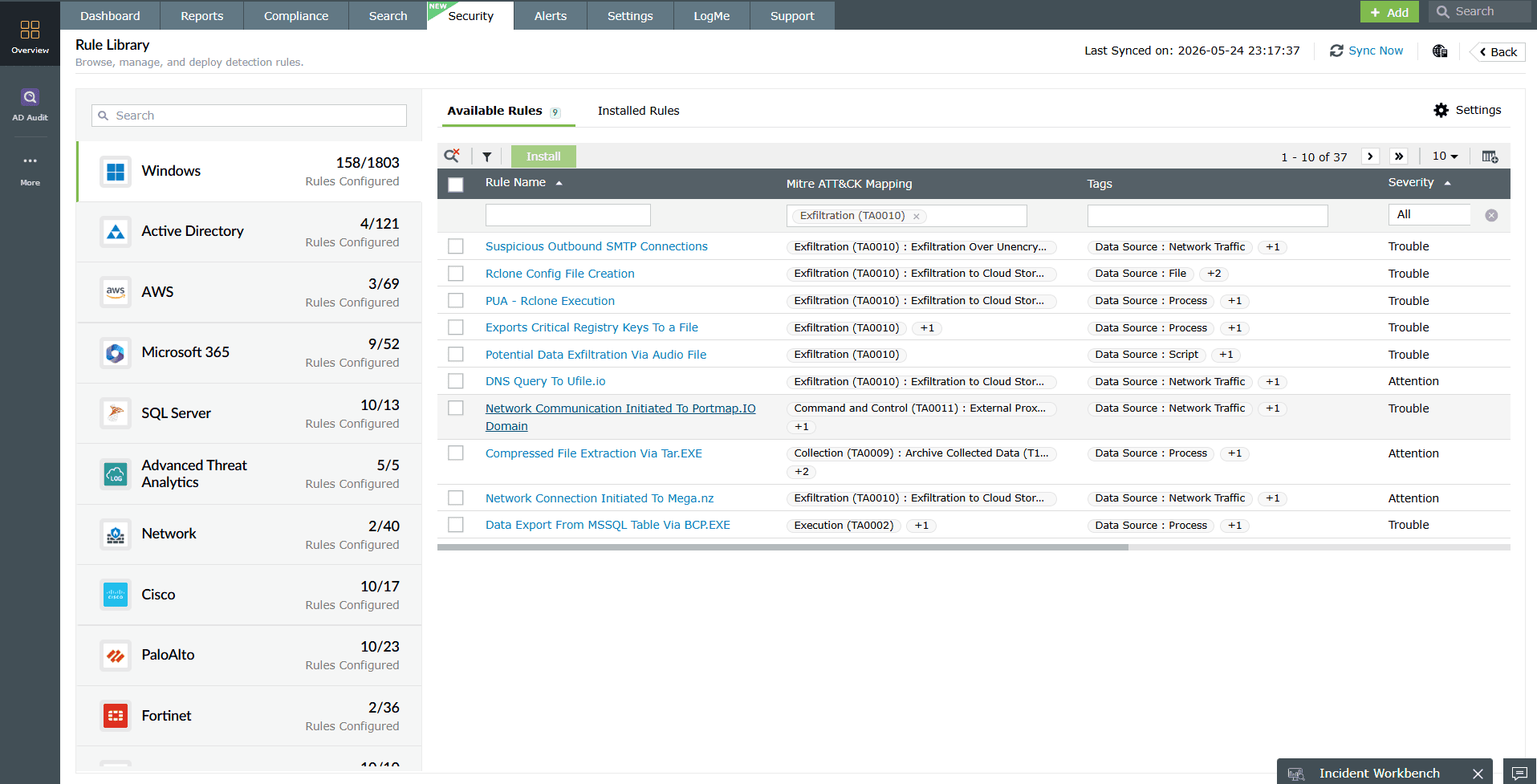
On the endpoint, the Suspicious Encoded PowerShell Command Line rule (Trouble, Windows) catches the encoding stage that precedes C2 exfiltration. Encoded PowerShell on a server or workstation that does not normally run encoded commands is a preparation indicator. Similarly, the Remote PowerShell Session Host Process rule (Trouble, Windows) detects remote PowerShell sessions that attackers use as interactive C2 channels for both command execution and data transfer.
For file-staging indicators, the Copy From Or To Admin Share Or Sysvol Folder rule (Trouble, Windows) highlights data movement to admin shares, which attackers commonly use as staging locations before pushing data through the C2 channel. When Active Directory databases are the target, the NTDS Exfiltration Filename Patterns rule (Trouble, AD) catches characteristic file-naming patterns associated with NTDS.dit extraction and staging for exfiltration.
Investigation workflow
When adjacent rules fire or a UEBA risk score spikes on a host, the analyst should follow this investigation sequence in Log360.
- Identify the session: Search for the host's outbound connections in the investigation window. Filter by destination IP and port to isolate the suspected C2 session.
- Baseline the session: Review the session's historical behavior over the past 7-30 days. What was the normal beacon interval? What was the typical payload size per request?
- Detect the drift: Compare the alert-window behavior against the baseline. A host that normally sends 200-byte heartbeats every 60 seconds but suddenly transmits 50KB payloads every 10 seconds has a clear behavioral anomaly.
- Correlate upstream: Check for file-access events (Event ID 4663) and process creation events (Event ID 4688) on the same host in the hours preceding the session anomaly. Look for archive tools, encoding commands, and access to sensitive shares.
- Scope the exposure: If the correlation confirms data staging followed by C2-session payload drift, determine what data was accessed, what was archived, and how much was transferred. Log360's raw log search and correlated timeline make this scoping possible without pivoting between tools.
Hunting queries
Use these queries in Log360's search interface to hunt for T1041 indicators:
process_name:"powershell.exe" AND action:"process_created" AND (user:admin* OR user:SYSTEM)
Identify PowerShell execution by privileged accounts, which may indicate encoded C2 data-transfer commands. Scope to Windows log sources.
event_id:4663 AND action:"file_read" AND timestamp:[now-4h TO now]
Hunt for abnormal file-read bursts in the recent window. Correlate results with the host's outbound session activity.
process_name:"rar.exe" OR process_name:"7z.exe" OR process_name:"winrar.exe"
Find archive tool usage on endpoints. If the host does not normally run these tools, the result is a staging indicator.
severity:Trouble AND (action:"outbound_connection" OR action:"remote_session") AND timestamp:[now-24h TO now]
Broad sweep for outbound anomaly alerts in the past day. Cross-reference with hosts that also show file-access or encoding activity.
Custom correlation rules for T1041
Because T1041 relies on behavioral shifts rather than unique signatures, custom correlation rules are essential for reliable detection. Build these in Log360's correlation rule builder:
| Custom rule | Trigger logic | Log sources | Severity |
|---|---|---|---|
| C2 Payload Size Drift | Outbound session to a known or baselined destination shows payload-size increase exceeding 10x the 7-day rolling average for that host-destination pair. | Firewall session logs, proxy logs | Critical |
| Staging-Then-Transfer Sequence | Archive tool execution (rar.exe, 7z.exe, tar) on a host, followed by encoded PowerShell execution, followed by outbound session spike, all within a 30-minute window. | Windows process creation, firewall logs | Critical |
| Sensitive File Access + Sustained Outbound | More than 50 file-read events on sensitive shares within 10 minutes, correlated with a sustained outbound session (duration > 5 minutes, payload > 1MB) from the same host. | Windows file audit (4663), firewall logs | Critical |
| Beacon Interval Collapse | A host's outbound connection to a previously low-frequency destination shifts from > 60-second intervals to < 10-second intervals for more than 5 consecutive minutes. | Firewall session logs, Sysmon Event ID 3 | Trouble |
| New Encoded Outbound on Privileged Host | Encoded PowerShell or certutil execution on a domain controller or database server, followed by any new outbound connection to an external IP within 15 minutes. | Windows process creation, firewall logs | Critical |
Key insight: These custom rules should be tuned against your environment's baseline. Start in monitor-only mode for 7 days before enabling automated response to establish false-positive rates and refine thresholds.
Remediation and hardening
Immediate containment (when T1041 is confirmed).
- Block the C2 destination: Add the destination IP/domain to your firewall and proxy blocklists. If the C2 uses a CDN or cloud service, block the specific URI path rather than the entire service.
- Isolate the host: Remove the compromised endpoint from the network to prevent further data transfer and lateral movement.
- Preserve evidence: Export the Log360 correlated timeline, raw logs, and UEBA risk-score history before any remediation that might alter log state.
- Revoke credentials: Reset credentials for all accounts that authenticated on the compromised host during the incident window.
Long-term hardening
- Egress filtering: Implement application-layer egress controls that inspect outbound traffic content, not just destination. Restrict outbound connections from servers to only necessary destinations.
- Network segmentation: Isolate sensitive data stores (file servers, databases, domain controllers) into segments with dedicated monitoring and strict outbound rules.
- PowerShell constraints: Enable PowerShell Script Block Logging and Constrained Language Mode on sensitive systems. Log360 can ingest these logs for real-time correlation.
- C2 framework detection: Deploy rules that detect known C2 framework signatures (Cobalt Strike, Sliver, Mythic) at the network layer. Log360's correlation engine can match these signatures against endpoint behavior for high-confidence alerts.
- Outbound traffic baselining: Use Log360's UEBA module to continuously baseline outbound session patterns per host and alert on deviations, providing a durable detection layer that adapts as your environment changes.
Detect convert C2 exfiltration with ManageEngine Log360
Correlate endpoint, network, and identity signals to catch data theft hiding inside established channels. Real-time alerting, UEBA behavioral baselines, and automated response.
Need to explore ManageEngine Log360? Schedule a personalized demo
FAQ
1. What is exfiltration over C2 channel (T1041)?
T1041 is a MITRE ATT&CK technique where adversaries steal data by sending it through the same command-and-control channel they already use to operate inside the victim network. Because the channel is already established and may already be allowed by firewall rules, it avoids the need to open a new, potentially detectable transfer path.
2. Does Log360 have built-in rules for T1041?
Log360 does not ship a rule family explicitly labeled T1041. Detection relies on combining adjacent built-in rules such as Uncommon Outbound Kerberos Connection, Outbound RDP Connections Over Non-Standard Tools, and Suspicious Encoded PowerShell Command Line with custom correlation rules for beacon payload drift and session-volume anomalies.
3. How is T1041 different from T1048 (Exfiltration Over Alternative Protocol)?
T1041 reuses the existing C2 channel so no new protocol or destination appears. T1048 opens a separate, often unexpected protocol path such as DNS tunneling or FTP to move data out. Detection for T1041 focuses on payload-size and session-behavior anomalies inside known connections, while T1048 detection targets new or unusual protocol usage.
4. What log sources are essential for detecting T1041?
Prioritize Windows process creation logs (Event ID 4688 with command-line auditing), Sysmon network connection events (Event ID 3), firewall session logs with byte-count data, proxy logs, and endpoint detection telemetry. Log360 collects from 750+ log sources across these categories.
5. Can behavioral analytics help detect C2 exfiltration?
Yes. Log360's UEBA module baselines normal outbound session volumes per host and user. When a host that typically sends small C2 heartbeats suddenly transmits large payloads, the risk score spikes. This behavioral layer catches low-and-slow exfiltration that signature-based rules miss.
- What is T1041?
- Key facts
- How the attack works
- Real-world examples
- Detect with Log360
- Investigation workflow
- Custom correlation rules
- Remediation and hardening
- FAQ

