


What is Impact (TA0040)?
In the MITRE ATT&CK framework, Impact (TA0040) captures the techniques adversaries use to disrupt availability or destroy the integrity of systems and data. This is the tactic where the attacker achieves their final objective: encrypting files for ransom, wiping databases, defacing public resources, or halting business-critical services.
Unlike earlier tactics that focus on stealth and positioning, impact techniques are designed to be visible. The attacker needs the victim to notice. A ransomware operator needs the victim to see the ransom note. A nation-state actor deploying a wiper wants to paralyze operations. This visibility works in the defender's favor because impact-stage behavior generates detectable signals in file systems, service control logs, and backup infrastructure. The challenge is detecting those signals fast enough to limit damage.
According to the IBM Cost of a Data Breach Report 2025, organizations that contained breaches within 200 days spent an average of $3.3 million less than those that took longer. At the impact stage, every minute of containment delay translates directly to destroyed data, lost revenue, and recovery cost.

Key insight: By the time an attacker reaches TA0040, they have already traversed multiple tactics. The best impact defense is early detection at initial access, execution, and lateral movement. But a robust impact-detection layer is your last safety net, and it must be fast enough to limit catastrophic damage.
The impact threat landscape
Ransomware dominates the impact landscape. The Verizon 2025 DBIR found that ransomware was present in 44% of breaches involving data destruction or encryption. But the impact is broader than ransomware alone. Nation-state actors deploy wipers (NotPetya, WhisperGate, HermeticWiper) that permanently destroy data with no decryption option. Hacktivist groups deface websites and disrupt services for publicity. Insider threats can result in mass data deletion driven by disgruntlement.
Three impact patterns dominate in real-world incidents:
- Ransomware encryption (T1486): Files are encrypted, shadow copies deleted, and a ransom demand is presented. The attacker's revenue depends on the victim paying, so services are deliberately disrupted to maximize pressure.
- Data destruction (T1485): Files are overwritten or deleted without any recovery path. Wiper malware targets master boot records, partition tables, and file system structures. Unlike ransomware, there is no economic incentive for the attacker to preserve recoverability.
- Service disruption (T1489, T1529): Critical services are stopped, systems are shut down or rebooted, and recovery mechanisms are sabotaged. This can be the primary objective or a supporting step in a ransomware deployment.
Impact techniques at a glance
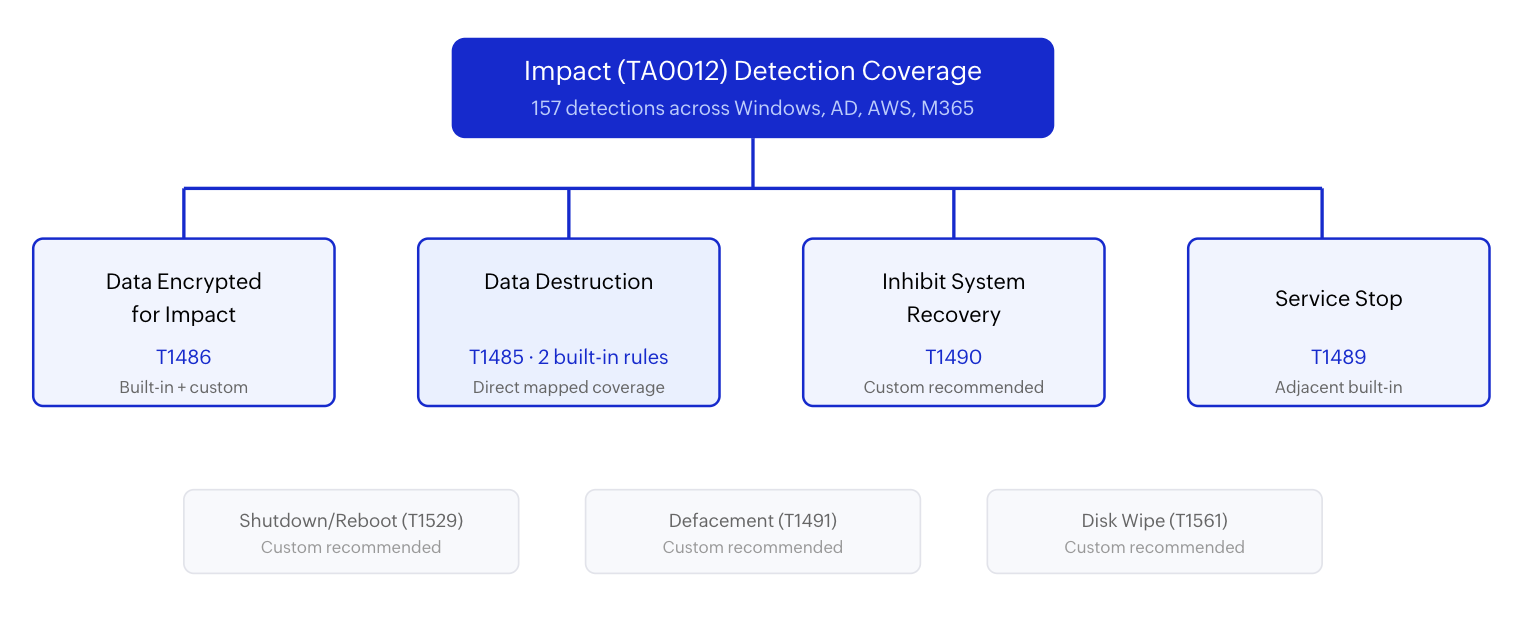
| Technique | ID | Log360 coverage |
|---|---|---|
| Data Encrypted for Impact | T1486 | Built-in + custom recommended |
| Data Destruction | T1485 | Built-in (2 rules) |
| Inhibit System Recovery | T1490 | Custom recommended |
| Service Stop | T1489 | Adjacent built-in coverage |
| System Shutdown/Reboot | T1529 | Custom recommended |
| Defacement | T1491 | Custom recommended |
| Disk Wipe | T1561 | Custom recommended |
Detecting ransomware encryption (T1486)
Ransomware encryption is a frequent and costly impact technique. When an attacker deploys an encryptor, files are renamed with new extensions, bulk file modification events flood the Windows audit log, and shadow copies are deleted to prevent free recovery. The operational signature is rapid, high-volume file system activity that deviates sharply from any normal business pattern.
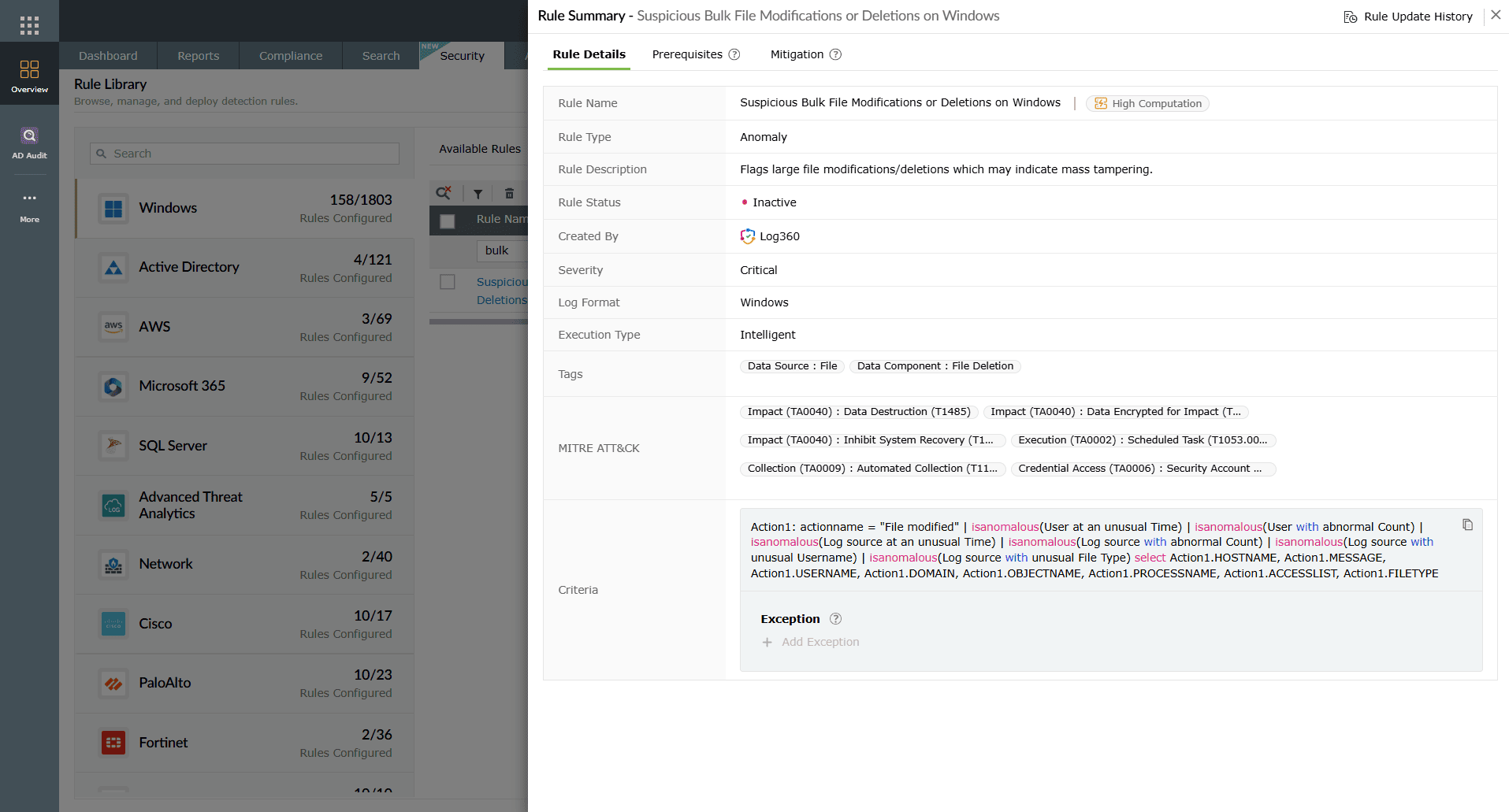
Log360 detects the destructive file activity through the built-in Suspicious Bulk File Modifications or Deletions on Windows rule (Critical, Windows), which fires when file rename, overwrite, or deletion rates exceed defined thresholds in a short time window. This signal catches both ransomware encryption and wiper-style destruction, making it a foundational impact-stage detection.
For the service-disabling behavior that commonly precedes and accompanies encryption, the Excessive Attempt To Disable Services rule (Critical, Windows) detects mass service stopping. Ransomware groups like Wizard Spider routinely stop database, backup, and security services before launching encryption to maximize damage and prevent recovery.
Additional T1486 detection should be strengthened with the following custom correlations:
| Custom rule | Trigger logic | Severity |
|---|---|---|
| Shadow Copy Deletion via Vssadmin | Process creation event with vssadmin.exe or wmic.exe targeting shadow copy deletion. | Critical |
| BCDEdit Boot Recovery Tampering | bcdedit.exe executed with recoveryenabled set to no or bootstatuspolicy set to ignoreallfailures. | Critical |
| Ransom Note File Creation | Mass creation of identically named text or HTML files across multiple directories within short window. | Critical |
Detecting data destruction (T1485)
Data destruction differs from encryption in one critical way: there is no recovery offer. Wiper malware overwrites data at the sector level, corrupts file systems, and targets backup infrastructure. Incidents involving WhisperGate and HermeticWiper demonstrated that nation-state actors deploy wipers to cause maximum operational paralysis.
Log360 provides two directly mapped built-in detections for T1485. The Excessive Attempt To Disable Services rule (Critical, Windows) catches the mass service disabling that often precedes or accompanies destruction operations. The Suspicious Bulk File Modifications or Deletions on Windows rule (Critical, Windows) detects the high-velocity file operations that characterize active destruction.
In wiper incidents, the analyst should immediately check whether the destruction is reversible. If shadow copies, backup agents, and system restore points have also been targeted, the incident is likely a dedicated wiper rather than opportunistic deletion. Correlating the destruction timeline with authentication events in Log360 reveals whether the attacker used compromised admin credentials or deployed the wiper through automated lateral movement.
Detecting recovery inhibition (T1490)
T1490 (Inhibit System Recovery) targets backup, shadow copy, and system restore infrastructure. Adversaries delete shadow copies, disable backup agents, modify boot configuration, and destroy recovery partitions. This technique is nearly always combined with T1486 or T1485 to ensure the victim cannot recover without paying the ransom or rebuilding from scratch.
Log360 does not currently have a prebuilt rule family labeled as T1490. Detection relies on custom correlations and adjacent signals:
| Custom rule | Trigger logic | Severity |
|---|---|---|
| Vssadmin Shadow Copy Deletion | vssadmin.exe delete shadows or wmic shadowcopy delete on any endpoint. | Critical |
| BCDEdit Recovery Sabotage | bcdedit.exe /set {default} recoveryenabled no or similar recovery-disabling commands. | Critical |
| Backup Agent Service Stopped | Service stop event targeting known backup agent services (Veeam, Commvault, Acronis, Windows Server Backup). | Critical |
| WBAdmin Catalog Deletion | wbadmin.exe delete catalog -quiet command detected on process creation. | Critical |
The adjacent Excessive Attempt To Disable Services rule catches bulk service disabling, which overlaps operationally with backup-service targeting. SOC teams should tune this rule's alert context to flag backup-related service names specifically.
Detecting service disruption (T1489)
T1489 (Service Stop) describes adversaries stopping critical services to disrupt operations, prevent defenses from running, or prepare the environment for encryption. Database services, antivirus agents, and backup processes are common targets.
Log360 provides adjacent built-in coverage through the Excessive Attempt To Disable Services rule (Critical, Windows), which fires when multiple services are stopped in rapid succession. For targeted single-service disruption, teams should deploy custom logic that alerts when specific high-value services (SQL Server, Exchange, backup agents, AV) are stopped outside approved maintenance windows.
In environments with Log360 UEBA, behavioral baselines for service control activity provide additional signal: a service stop by a service account that has never performed that action before generates a risk score escalation even without a dedicated correlation rule.
Other impact techniques
- System shutdown/reboot (T1529): Adversaries force reboots to complete destructive operations or interrupt defender response. Boot-sector wipers rely on reboot to activate. Log360 does not carry a prebuilt T1529-specific rule. Teams should implement a custom correlation for unexpected shutdown.exe /r /f or restart-computer commands executed by non-standard accounts or outside maintenance windows.
- Defacement (T1491): T1491 targets external-facing resources (websites, portals) or internal messaging systems. In cloud environments, monitor for unauthorized S3 bucket policy changes, CloudFront distribution modifications, and Azure Blob public access changes via respective audit logs in Log360. For on-premises web servers, correlate web root file modifications with Execution (TA0002) signals.
- Disk wipe (T1561): T1561 targets the physical disk structure: MBR overwrite, partition table destruction, or raw disk writing. Detection depends on process-level monitoring for tools that perform raw disk access (dd, diskpart, format) in non-standard contexts. The Suspicious Bulk File Modifications or Deletions on Windows rule can catch preliminary file-level destruction, but disk-level wiping also requires endpoint telemetry from Sysmon or EDR integration.

Investigation workflow
Impact investigations require rapid response. The priority sequence differs from earlier-tactic cases because containment comes before investigation completeness.
- Isolate affected hosts and segments: Prevent spread by removing network connectivity from confirmed-impacted systems. Every second of delay may mean additional encrypted or destroyed data.
- Assess scope: Use Log360 correlated alerts to identify all hosts and identities with similar impact indicators (bulk file events, service stops, shadow copy deletion) in the same time window.
- Trace the kill chain backward: From the impact event, pivot to execution indicators, then lateral movement, then initial access. This reverse chain identifies the entry point and reveals whether additional dormant footholds exist.
- Verify backup integrity: Before beginning recovery, confirm that backups are clean and not themselves compromised. Check backup infrastructure logs for unauthorized access.
- Preserve forensic evidence: Image affected systems before recovery begins. Evidence is critical for insurance claims, law enforcement referral, and post-incident hardening.
Response and recovery playbook
When impact is confirmed, the response objective changes from detection to damage limitation and business continuity.
- Contain immediately: Isolate hosts, disable compromised accounts, block attacker infrastructure at the network perimeter.
- Preserve evidence: Create forensic images of impacted systems. Do not reboot or clean before imaging.
- Assess recoverability: Determine whether backups are intact and whether shadow copies survived. This determines whether recovery is hours or weeks.
- Activate business continuity plans: Communicate with leadership, legal, and (if applicable) law enforcement. Start recovery from verified clean backups.
- Harden the entry path: Before restoring full operations, remediate the initial access vector and close lateral movement paths that enabled the attacker to reach impact stage.
For a full multi-stage response workflow, follow the Ransomware Full Kill Chain scenario page and align with NIST SP 800-61r3 Incident Handling guidance.
Hardening against impact
| Control area | Priority action | Defensive benefit |
|---|---|---|
| Backup resilience | Maintain offline or immutable backups. Test restore procedures quarterly. Monitor backup infrastructure with Log360 alerting. | Ensures recovery even if on-host backups are destroyed. |
| Shadow copy protection | Restrict vssadmin and wmic access to approved admin accounts. Alert on any shadow copy deletion. | Prevents ransomware from eliminating fast recovery paths. |
| Service control hardening | Limit service stop/start permissions to designated admin tiers. Monitor via Windows Event 7036. | Reduces attacker ability to disable defenses and backups. |
| Network segmentation | Isolate critical data stores and backup networks from general user segments. | Slows attacker lateral reach to high-value targets. |
| Cross-tactic correlation | Link impact alerts to upstream execution, privilege escalation, and lateral movement detections in Log360. | Enables faster root-cause identification and prevents repeat compromise. |
Operationalize TA0040 detection with Log360
Map impact alerts to attacker kill chain, automate containment workflows, and maintain backup-aware correlation with prebuilt and custom detection rules across Windows, AWS, and M365.
How TA0040 connects to other tactics
Impact is never an isolated event. It is the culmination of a multi-stage campaign. Every ransomware engagement traverses Initial Access (TA0001) for entry, Execution (TA0002) for code launch, lateral movement for spread, privilege escalation for domain control, and defense evasion for stealth. If the SOC detects at any one of those earlier stages, impact is prevented.
Effective defense against TA0040 requires comprehensive detection across the full kill chain, not just impact-layer rules. Use the ransomware attack chain scenario and the full kill chain scenario to build analyst intuition for cross-tactic correlation.
Need to explore ManageEngine Log360? Schedule a personalized demo
FAQ
1. How many Log360 detections map to TA0040?
Log360 maps 157 detections to impact-related behavior. Direct built-in coverage is strongest for T1485 data destruction, with custom recommendations extending coverage to T1486 encryption and T1490 recovery inhibition.
2. Can Log360 detect ransomware encryption in real time?
Log360 detects ransomware indicators through the Suspicious Bulk File Modifications or Deletions rule, which fires on high-velocity file changes. This pairs with custom rules for shadow copy deletion and boot configuration tampering to create a layered encryption detection strategy.
3. What should the SOC do first when an impact alert fires?
Isolate affected endpoints immediately. Every second of delay increases damage. Then assess scope, trace the kill chain backward, verify backup integrity, and preserve forensic evidence.
4. How does TA0040 relate to ransomware attacks?
Ransomware culminates in TA0040 through T1486 (encryption) and T1490 (recovery inhibition). But the full kill chain starts at initial access and traverses execution, lateral movement, and privilege escalation. The Initial Access attack chain scenario shows how early detection prevents impact entirely.
5. What log sources are essential for impact detection?
Process creation, file audit events, Service Control Manager logs, Volume Shadow Copy events, cloud audit trails (AWS CloudTrail, M365 UAL), and backup infrastructure logs. Log360 supports 750+ log sources across these categories.
- What is Impact (TA0040)?
- The impact threat landscape
- Impact techniques at a glance
- Detecting ransomware encryption (T1486)
- Detecting data destruction (T1485)
- Detecting recovery inhibition (T1490)
- Detecting service disruption (T1489)
- Other impact techniques
- Investigation workflow
- Response and recovery playbook
- Hardening against impact
- How TA0040 connects to other tactics
- FAQ

