


What is service stop (T1489)?
T1489 (Service Stop) describes adversaries stopping or disabling system services to disrupt legitimate functionality. Targets include database services, email servers, antivirus agents, backup processes, and any Windows service whose interruption causes operational damage or creates a permissive environment for follow-on attacks.
Service stopping serves two adversary goals: stopping critical business services (SQL Server, Exchange, domain controllers) directly disrupts operations, and stopping security and backup services clears the path for ransomware encryption (T1486) or data destruction (T1485).
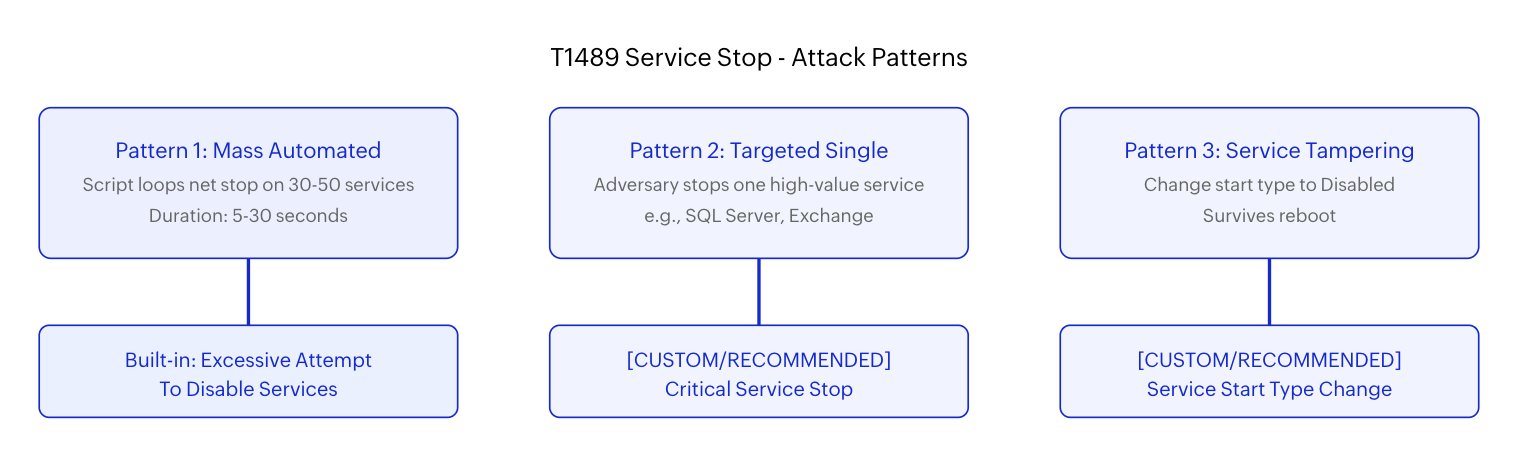
Ransomware groups like Wizard Spider and APT29 systematically stop services using scripts that iterate through service lists via net stop, sc stop, or PowerShell's Stop-Service cmdlet. The script typically targets 30-50 services in rapid succession, creating a distinctive pattern of mass service state changes that is detectable in Windows event logs.
Why service stop matters in the kill chain
T1489 is often an early warning signal for imminent data destruction or encryption. In post-incident analyses of ransomware engagements, service stopping consistently appears 30 seconds to 5 minutes before the encryption payload or wiper executes. This makes service stop detection one of the highest-value early warning signals for impact-stage attacks.
The CrowdStrike Global Threat Report documented that ransomware groups have reduced their average breakout time - the period between initial compromise and lateral movement to the point of impact. When the attacker's operational window is measured in hours, the service-stop-to-encryption window of seconds to minutes becomes a critical last detection opportunity.
The services targeted reveal the adversary's intent:
| Target category | Example services | Adversary intent |
|---|---|---|
| Security agents | Windows Defender, CrowdStrike Falcon, Carbon Black, Sophos | Prevent detection and blocking of follow-on payload |
| Backup agents | Veeam Agent, Commvault, Acronis, Windows Server Backup | Eliminate recovery options before encryption |
| Databases | MSSQLSERVER, MySQL, OracleService, PostgreSQL | Release file locks so database files can be encrypted |
| Email / collaboration | MSExchangeIS, Exchange Transport, SharePoint | Maximize operational disruption and ransom pressure |
| Shadow copies | Volume Shadow Copy (VSS) | Prevent free recovery from shadow copies |
Log360 detection coverage
Log360 does not currently carry a rule explicitly labeled as T1489 Service Stop. However, the primary operational behavior - mass service stopping - is detected by existing built-in rules with operational overlap.
Adjacent built-in rule
The Excessive Attempt To Disable Services rule (Critical severity, Windows platform) fires when multiple services are stopped in rapid succession. This rule was originally mapped to T1562 (Impair Defenses) and T1485 (Data Destruction), but its detection logic directly catches the most dangerous T1489 pattern: automated mass service stopping.
When this rule fires, the alert provides the host, the user context executing the stop commands, and the count of services affected. An analyst who sees 10+ services stopped within a 30-second window from a non-administrative context should treat this as near-certain adversary activity and begin containment immediately.
Coverage transparency: The built-in rule catches mass automated service stopping. It does not fire on targeted single-service stops or service start-type changes. Those patterns require the custom rules described below.
Custom detection recommendations
| Custom rule | Trigger logic | Severity |
|---|---|---|
| Critical Service Stop - Database | Service stop event (Event ID 7036) for MSSQLSERVER, MySQL, OracleService, PostgreSQL outside defined maintenance windows. | Critical |
| Critical Service Stop - Security Agent | Service stop event for Windows Defender, endpoint detection agents, or SIEM forwarder services from non-approved admin accounts. | Critical |
| Critical Service Stop - Backup Agent | Service stop event for Veeam, Commvault, Acronis, or Windows Server Backup services outside maintenance windows. | Critical |
| Service Start Type Changed to Disabled | Event ID 7040 showing a service's start type changed to Disabled. Especially critical when targeting security, database, or backup services. | High |
| sc.exe or net.exe Mass Stop Pattern | Process creation (4688 or Sysmon Event 1) showing sc.exe stop or net stop executed 5+ times within 60 seconds from same host and user. | Critical |
| PowerShell Stop-Service Enumeration | PowerShell script block logging showing Stop-Service, Get-Service | Stop-Service, or service enumeration followed by stop commands. |
Log sources and detection tuning
Effective T1489 detection requires three complementary log sources, each capturing a different phase of the service stop operation:
| Log source | Key events | What it captures |
|---|---|---|
| Service Control Manager (System log) | Event ID 7036 (service state change), Event ID 7040 (start type change), Event ID 7045 (new service installed) | The actual service state transition. Authoritative source for what happened. |
| Process creation (Security log / Sysmon) | Event ID 4688 or Sysmon Event 1 with command line: sc.exe stop, net stop, Stop-Service | The command that caused the stop. Reveals the user, process chain, and execution context. |
| PowerShell (Script Block Logging) | Event ID 4104 with Stop-Service, service iteration patterns, WMI Win32_Service method invocations | Script-level visibility into automated service enumeration and stopping. |
Tuning to reduce false positives
Maintenance windows, patching operations, and legitimate admin activity generate service stop events. Effective tuning separates malicious from benign activity:
- Maintenance window suppression: Define scheduled maintenance windows per host group and suppress service stop alerts during those windows. Any mass service stopping outside defined windows is highly suspicious.
- Admin account allowlisting: Allowlist known admin service accounts (e.g., SCCM agent, WSUS agent, Intune management) that legitimately stop services during updates. Flag activity from user accounts or unknown service accounts.
- Service category filtering: Not all service stops are equal. Prioritize alerts for security, database, backup, and email services. Generic Windows services (e.g., Print Spooler) can be lower priority unless stopped in bulk.
- Velocity thresholds: Single service stops are common and mostly benign. Multiple service stops within a short window (>5 in 60 seconds) are the high-confidence adversary pattern.
Investigation workflow
When a service stop alert fires, determine whether this was a planned operation or an adversary preparing for impact.
- Validate the actor: Check which account executed the service stop. Was it a recognized admin account during a scheduled maintenance window? If not, escalate immediately.
- Check the command method: Review process creation events. Was the stop issued via sc.exe, net.exe, PowerShell, or WMI? Automated scripts that loop through service lists indicate pre-impact behavior, not ad hoc administration.
- Assess the target services: Security agents, backup agents, and database services stopped outside maintenance windows are high-confidence pre-ransomware indicators. Cross-reference with the target table above.
- Look for follow-on activity: Within 5 minutes of service stops, check for bulk file modification events (Suspicious Bulk File Modifications), shadow copy deletion, or suspicious process creation. If present, this is active ransomware or wiper activity.
- Trace upstream: Pivot from the service stop to how the adversary reached the host. Check execution indicators, logon events (Event ID 4624), and lateral movement signals.
Analyst priority: If multiple security and backup services are stopped on a host that is not in a maintenance window, treat the alert as pre-ransomware activity. Begin containment (host isolation) immediately, before waiting for the encryption stage to confirm. Waiting for encryption confirmation means data loss.
Response playbook
Response to T1489 depends on whether the service stopping is confirmed malicious and whether follow-on impact activity has already begun.
If caught before follow-on impact
- Isolate the host: Pull network connectivity to prevent lateral spread and follow-on payload delivery.
- Re-enable critical services: Restart stopped security, backup, and database services. Verify they remain running - some malware watchdog processes re-stop services.
- Check service start types: Verify that disabled services are restored to their correct startup type (Automatic, Manual). Event ID 7040 changes survive reboot.
- Kill the attacker's process: Identify the parent process that issued the stop commands and terminate the process tree.
- Investigate root cause: Trace how the adversary gained the ability to stop services. This typically requires local admin or SYSTEM privileges, so credential compromise investigation follows.
If followed by encryption or destruction
- Activate the impact response workflow: Follow the Impact pillar response and recovery guidance.
- Preserve forensic evidence: Image affected systems before remediation. Service stop timestamps are critical for establishing the incident timeline.
- Scope the blast radius: Use Log360 to identify all hosts with service stop indicators in the same time window. Ransomware lateral deployment often stops services across multiple hosts simultaneously.
- Report and recover: Align with NIST SP 800-61r3 and begin backup-based recovery.
Catch pre-ransomware service stopping with Log360
Log360 detects mass service stopping through built-in critical-severity rules. Add custom correlations for targeted database, backup, and security service disruption to cover the full T1489 threat spectrum.
Hardening against service disruption
| Control | Implementation | Defensive benefit |
|---|---|---|
| Service ACL hardening | Use sc sdset to restrict stop/start permissions to designated admin tiers. Deny service control to standard user accounts. | Prevents non-admin attackers from stopping services even with local access. |
| Protected services | Configure critical security agents as Protected Process Light (PPL) on Windows 10+. Enable tamper protection in endpoint security tools. | Prevents even admin-level processes from stopping security services. |
| Service watchdog monitoring | Configure automatic service restart with recovery options in Service Properties. Alert when a service fails to restart after auto-recovery. | Ensures services self-heal from transient stops and flags persistent adversary interference. |
| Least privilege for service control | Remove local admin rights from standard accounts. Use CIS Controls tiered admin model. | Raises the privilege bar the attacker must clear before T1489 is possible. |
| Maintenance window governance | Document and enforce scheduled maintenance windows. Any service control outside windows triggers investigation. | Creates a clear behavioral boundary between legitimate and suspicious activity. |
Cross-technique context
T1489 sits at the intersection of defense evasion and impact. It enables and amplifies other techniques:
- T1486 (Data Encrypted for Impact): Ransomware stops database and backup services to release file locks and prevent recovery before launching encryption.
- T1485 (Data Destruction): Wiper malware stops security agents and backup services before executing irreversible file or disk-level destruction.
- T1490 (Inhibit System Recovery): Stopping the Volume Shadow Copy service (VSS) is both a T1489 event and a T1490 tactic, eliminating fast recovery paths.
- T1562 (Impair Defenses): Stopping security agents overlaps with defense evasion. The same alert may fire under both technique mappings.
- T1531 (Account Access Removal): Adversaries may combine service disruption with account lockouts to maximize operational paralysis.
The Ransomware Full Kill Chain scenario traces how T1489 connects to the full multi-stage path from initial access through encryption.
Need to explore ManageEngine Log360? Schedule a personalized demo
FAQ
1. What is T1489 Service Stop in MITRE ATT&CK?
T1489 describes adversaries stopping or disabling system services to disrupt operations, disable security tools, or prepare for destructive follow-on attacks like ransomware. It falls under the Impact (TA0040) tactic.
2. Does Log360 have a dedicated T1489 detection rule?
No dedicated T1489-labeled rule exists. The built-in Excessive Attempt To Disable Services rule detects mass service stopping, which is the most dangerous T1489 pattern. Targeted single-service stops require custom rules. See the Log360 rule library for the full built-in catalog.
3. Why do ransomware groups stop services before encryption?
Stopping database services releases file locks, enabling encryption of database files. Stopping backup agents prevents recovery point creation. Stopping security agents prevents detection of the encryptor. See the Ransomware Full Kill Chain for the complete operational sequence.
4. What is the most reliable indicator of malicious service stopping?
Mass service stopping (10+ services in 60 seconds) outside a scheduled maintenance window, from a non-administrative or unexpected account, targeting security, backup, or database services. This pattern has near-zero false positive rates. Correlate with T1486 encryption indicators for confirmation.
5. How does T1489 overlap with defense evasion (T1562)?
Stopping security services is both a service disruption (T1489) and a defense impairment (T1562). The Excessive Attempt To Disable Services rule covers both patterns. The Impact pillar discusses how these overlapping techniques work together in real-world attacks.
- What is service stop (T1489)?
- Why service stop matters in the kill chain
- Log360 detection coverage
- Log sources and detection tuning
- Investigation workflow
- Response playbook
- Hardening against service disruption
- Cross-technique context
- FAQ

