


What is exploitation of public-facing applications?
When your organization exposes a web server, VPN appliance, email gateway, or cloud application to the internet, attackers will find it. T1190 describes the technique where adversaries exploit software vulnerabilities in these internet-facing services to gain their first foothold with no user interaction required, no phishing email needed. The attacker sends a carefully crafted request, the vulnerable application processes it, and code executes on your server.
This technique is the second most common initial access vector after phishing, according to the Verizon 2025 DBIR. What makes it particularly dangerous is the speed: vulnerability disclosure to mass exploitation now takes hours, not weeks. The CISA KEV catalog added 187 actively exploited vulnerabilities in 2025, and ransomware groups like Wizard Spider and LAPSUS$ routinely exploit public-facing applications as their primary entry vector.
Part of the Initial Access (TA0001) attack tactic.
Key facts about T1190
| MITRE ID | T1190 |
| Tactic | Initial Access (TA0001) |
| Severity | Critical to High |
| Affected platforms | Windows, Linux, macOS, Cloud (AWS, Azure, GCP) |
| Common tools | Metasploit, Cobalt Strike, custom exploit scripts, Nuclei |
| Detection difficulty | Moderate: process anomaly monitoring is highly effective |
| Log360 coverage | 16 prebuilt rules |
| Key log sources | Windows Event Logs (4688), web server logs, IPS/WAF alerts, AWS CloudTrail |
| Related sub-techniques | None (T1190 has no sub-techniques) |
How the attack works: Attack scenario
Stage 1: Reconnaissance and target selection
The attacker scans internet-facing assets using tools like Shodan, Censys, or custom scanners to identify applications running vulnerable software versions. For high-value targets, a threat group like APT29 may spend weeks mapping the attack surface, while ransomware affiliates simply scan for specific CVE signatures across millions of IPs.
Stage 2: Exploit delivery
The attacker sends a crafted HTTP request, SQL query, or protocol-level payload to the vulnerable application. For example, the MOVEit Transfer exploit (CVE-2023-34362) used a SQL injection in the web interface to chain into remote code execution. The Fortinet authentication bypass exploited a flaw in the admin login flow to gain access without credentials.
What this looks like in logs:
Process Create: w3wp.exe > cmd.exe /c whoami

Source: 185.220.x.x | Target: WEBSERVER01 | Event ID: 4688

Parent: C:\Windows\System32\inetsrv\w3wp.exe

Child:  C:\Windows\System32\cmd.exe /c "whoami && net user"
The signature indicator: IIS worker process (w3wp.exe) spawning a command shell. This never happens in normal operations. IIS serves web pages, it does not run system commands.
Stage 3: Post-exploitation
Once code execution is achieved, the attacker typically drops a web shell for persistent access, enumerates the server, and begins lateral movement. The web shell allows them to return at any time through a simple HTTP request, even after the vulnerability is patched. This is why detection and response must happen before patching.
Real-world attacks using T1190
| Year | Incident | Vulnerability | Impact |
|---|---|---|---|
| 2025 | Cleo file transfer exploitation | CVE-2024-50623 | Mass data theft from enterprises using Cleo Harmony and VLTrader |
| 2024 | Fortinet authentication bypass campaign | CVE-2024-55591 | Network perimeter compromise across thousands of Fortinet appliances |
| 2023 | MOVEit Transfer mass exploitation | CVE-2023-34362 | 2,500+ organizations breached, Cl0p ransomware data extortion |
| 2023 | Confluence data center exploitation | CVE-2023-22518 | Critical data destruction and ransomware deployment via Confluence admin reset |
These incidents share a common pattern: each vulnerability was exploited at scale within days of disclosure, the attacker used automated tooling, and organizations that detected the exploitation quickly (through process monitoring) contained the breach before data exfiltration occurred.
How to detect and investigate T1190 with Log360
Log360's detection strategy for T1190 operates at two layers: endpoint process monitoring catches exploitation that succeeds, and network perimeter rules catch exploitation attempts before they reach the application.
Real-time detection
Detecting web shell execution and post-exploitation commands
The most reliable T1190 indicator is a web server process spawning a command interpreter. Log360's real-time correlation engine monitors Windows process creation events (Event ID 4688) and flags abnormal parent-child relationships. The Suspicious Process By Web Server Process rule (Trouble, Windows) triggers when IIS (w3wp.exe), Apache, or Nginx spawns cmd.exe, PowerShell, certutil, or other living-off-the-land binaries. When this rule fires, the analyst immediately sees the parent process path, command-line arguments, source IP from correlated web logs, and the timestamp, providing enough context to confirm exploitation within seconds, not hours.
For exploitation through Windows Remote Management, the Suspicious Processes Spawned by WinRM rule (Trouble, Windows) monitors for WinRM spawning unexpected executables. This pattern is heavily used during Exchange Server exploitation campaigns. Similarly, the Terminal Service Process Spawn rule (Trouble, Windows) catches exploitation through Terminal Services, and the Suspicious Child Process Of SQL Server rule (Trouble, Windows) detects SQL Server spawning shell commands. This is a hallmark of SQL injection leading to command execution via xp_cmdshell.
Detecting CVE-specific exploitation
Log360 carries targeted rules for high-impact CVEs that have been widely exploited. The Potential MOVEit Transfer CVE-2023-34362 rule (Trouble, Windows) detects the specific file activity pattern, specifically temporary file creation in MOVEit's working directory, which indicates SQL injection exploitation in progress. The CVE-2024-50623 Exploitation Attempt - Cleo rule (Trouble, Windows) catches the Cleo file transfer exploitation, and the Fortinet Appliance Auth Bypass rule (Critical, Fortinet) detects authentication bypass attempts on Fortinet appliances. This vulnerability was exploited across thousands of devices before many organizations noticed.
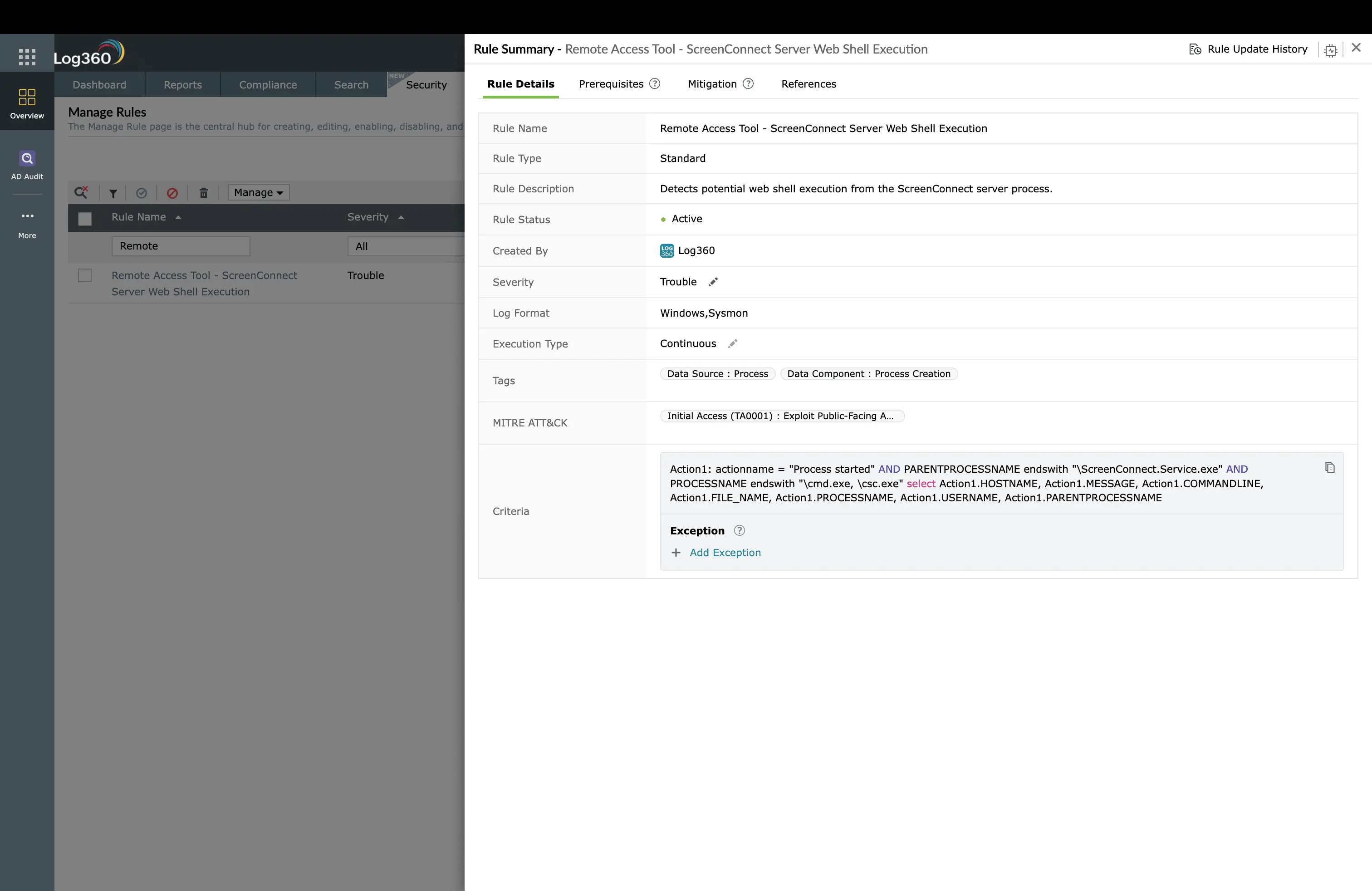
For Exchange Server attacks, the Suspicious MSExchangeMailboxReplication ASPX Write rule (Trouble, Windows) catches web shell drops by the Exchange mailbox replication service. This is the exact technique used in the HAFNIUM campaign. The ScreenConnect Server Web Shell Execution rule (Trouble, Windows) detects exploitation of the ConnectWise ScreenConnect vulnerability that was widely exploited in early 2024.
Detecting exploitation at the network perimeter
Not every exploitation attempt succeeds, but knowing that someone is trying is itself valuable intelligence. Log360 correlates firewall and IPS logs to surface attack patterns. The Repeated SQL Injection Attempts rule (Critical, Miscellaneous) fires when multiple SQL injection payloads arrive from a single source IP, indicating automated scanning or targeted exploitation. On Cisco infrastructure, the Cisco FTD Intrusion Event Detected rule (Trouble, Cisco) surfaces IPS detections that correlate with exploitation patterns. On Fortinet, the SQL Injection Detection and Generic Attacks Detection rules (Trouble, Fortinet) catch attack signatures at the WAF layer.
In cloud environments, the LoadBalancer Security Group Modification rule (Trouble, AWS) detects unauthorized changes to load balancer security groups. This is a post-exploitation action where the attacker modifies network ACLs to allow their traffic or exfiltrate data through the load balancer.
ManageEngine Log360 for T1190 detection
16 prebuilt correlation rules detecting web shell execution, CVE-specific exploitation, SQL injection, and post-exploitation activity across Windows, Cisco, Fortinet, and AWS, all in real time.
Investigation workflow in Log360
When a T1190 alert fires, follow this workflow:
- Confirm the process chain: Open the alert detail and review the parent-child process tree. A legitimate admin session will show explorer.exe or sshd as the parent. Exploitation shows w3wp.exe, httpd, or java spawning cmd.exe or PowerShell.
- Identify the source IP: Correlate the process creation timestamp with web server access logs to find the originating IP address and the exact HTTP request that triggered the exploit.
- Check for lateral movement: Search the same timeframe for the compromised server initiating connections to internal hosts (SMB, RDP, WMI, or SSH to other servers). This indicates the attacker has already moved beyond the initial foothold. Check for Lateral Movement (TA0008) alerts on the same host.
- Hunt for persistence: Search for web shells (new .aspx, .php, .jsp files in web directories), scheduled tasks, registry run keys, or new user accounts created by the compromised server process.
- Determine blast radius: Use Log360's search to find other servers running the same vulnerable software version. If one server was exploited, assume the attacker scanned and attempted all instances.
Behavioral detection with UEBA
Log360's UEBA module adds a behavioral layer beyond rule-based detection. It baselines normal process behavior for each server and flags deviations. Even novel exploitation techniques that don't match any specific rule trigger a risk score increase when the server suddenly executes commands it has never run before. This catches zero-day exploitation where no CVE-specific rule exists yet.
How to remediate and prevent T1190 attacks
Immediate containment
- Isolate the server: Remove the compromised server from the network or move it to a quarantine VLAN. Do not shut it down and preserve memory and running processes for forensic analysis.
- Block the source IP: Add the attacker's source IP to the firewall blocklist. Use Log360's automated response to execute this immediately when the alert fires.
- Preserve evidence: Export the Log360 alert timeline, raw process creation logs, and web server access logs before any remediation steps that might alter evidence.
Root cause remediation
- Patch the vulnerability: Apply the vendor patch or mitigation immediately. Reference the CISA KEV catalog for priority guidance.
- Remove web shells: Search all web-accessible directories for files created during the exploitation window. Check common web shell signatures and compare file hashes against known clean versions.
- Rotate credentials: Any credentials accessible from the compromised server (database passwords, service accounts, API keys) must be rotated. Assume they were harvested.
Long-term hardening
- Web Application Firewall: Deploy WAF in front of public-facing applications with OWASP Core Rule Set.
- Vulnerability management: Establish a patch SLA aligned to the NIST Cybersecurity Framework: critical CVEs patched within 48 hours, high within 7 days.
- Network segmentation: Isolate public-facing servers in a DMZ with strict egress filtering. Exploitation should not grant direct access to internal networks.
- Process allowlisting: On web servers, configure application control policies to prevent unauthorized binaries from executing. Even if the attacker gains code execution, the payload cannot run.
Log360 automated response configuration
Navigate to Log360's Alert Profiles for each T1190 rule and configure these automated responses:
- Block source IP: When exploitation alerts fire, automatically add the source IP to the firewall blocklist via API integration with Cisco, Fortinet, or Palo Alto.
- Create incident ticket: Auto-create a ServiceDesk Plus ticket with the full alert context, process chain, source IP, and affected server.
- Email/SMS notification: Alert the on-call SOC analyst and the server owner immediately.
- Custom script: Execute a PowerShell script that captures the server's process list, network connections, and recent file modifications for forensic evidence preservation.
FAQ
What is Exploit Public-Facing Application (T1190)?
T1190 is a MITRE ATT&CK® technique where adversaries exploit vulnerabilities in internet-facing applications such as web servers, VPN appliances, and mail gateways to gain initial access. Recent high-profile examples include MOVEit Transfer (CVE-2023-34362) and Confluence (CVE-2023-22518). Log360 detects exploitation with 16 prebuilt rules across Windows, Cisco, Fortinet, and AWS.
How does Log360 detect web shell execution?
Log360 monitors process creation events on web-facing servers. When IIS, Apache, or Nginx spawns unexpected child processes like cmd.exe or PowerShell, the Suspicious Process By Web Server Process correlation rule fires immediately. The analyst sees the parent-child process chain, source IP, and timeline context in the correlated alert view.
What log sources are needed to detect T1190?
Effective T1190 detection requires Windows Security Event Logs (process creation Event ID 4688), web server access logs, firewall/IPS logs from Cisco or Fortinet, and AWS CloudTrail for cloud resource modifications. Log360 collects from 750+ log sources covering all these categories.
What is the difference between T1190 and T1189?
T1190 targets server-side vulnerabilities in applications the organization exposes to the internet. T1189 (Drive-by Compromise) targets client-side vulnerabilities in the user's browser. T1190 is far more common in enterprise breaches because it allows direct server access without user interaction.
- What is exploitation of public-facing applications?
- Key facts about T1190
- How the attack works
- Real-world attacks using T1190
- How to detect and investigate T1190 with Log360
- How to remediate and prevent T1190 attacks
- FAQ

