


What is external remote service abuse?
Every organization provides some form of remote access; VPN for employees, RDP for administrators, Citrix for remote workers, and cloud-based collaboration tools for distributed teams. T1133: External Remote Services describes how attackers abuse these same services to gain initial access or maintain persistent access to your network.
Unlike exploitation (T1190), which targets software vulnerabilities, T1133 typically involves using valid credentials or pre-installed remote access software. The attacker logs into the VPN with stolen credentials and immediately has the same network access as the employee whose credentials were compromised—or worse, the attacker installs TeamViewer on a compromised endpoint during a previous intrusion, creating a persistent access channel that survives password resets, network changes, and even endpoint reimaging if the tool auto-starts from a cloud account.
The post-COVID explosion of remote work has massively expanded this attack surface. The CrowdStrike 2025 Global Threat Report documents a 45% year-over-year increase in attacks leveraging remote access services, driven by the persistence of hybrid work and the corresponding expansion of VPN and remote desktop exposure.
Part of the Initial Access (TA0001) attack tactic.
Key facts about T1133
| MITRE ID | T1133 |
|---|---|
| Tactic | Initial Access (TA0001), also Persistence |
| Severity | High; provides direct network access |
| Affected platforms | Windows, Linux, macOS, Network appliances |
| Common services targeted | VPN (Cisco AnyConnect, Fortinet FortiClient, Palo Alto GlobalProtect), RDP Gateway, Citrix NetScaler, SSH |
| Common RATs used | TeamViewer, AnyDesk, RustDesk, ConnectWise ScreenConnect |
| Detection difficulty | Hard; uses legitimate services; behavioral analytics required |
| Log360 coverage | 3 prebuilt rules + UEBA behavioral detection |
| Key log sources | VPN authentication logs, endpoint process logs, DNS server logs, RDP Gateway audit logs |
How the attack works
Vector 1: VPN credential abuse
The attacker obtains VPN credentials through phishing, info-stealer malware, credential stuffing, or dark web purchase. They connect to the organization's VPN from their own infrastructure, gaining the same network access as the legitimate user. If MFA is not enforced on VPN connections, a username and password are all that's needed. Even with MFA, techniques like SIM swapping, social engineering of help desk, or push notification fatigue can bypass the second factor.
Vector 2: Unauthorized remote access tools
Remote access tools like TeamViewer, AnyDesk, and RustDesk provide full desktop control and file transfer capabilities. Attackers install these tools on compromised endpoints to maintain persistent access. Unlike a reverse shell or custom backdoor, these tools are legitimate software. They are signed, they do not trigger antivirus alerts, and their network traffic blends with normal business communication.
The tool authenticates to its cloud service, establishing a tunnel that bypasses firewall restrictions.
Vector 3: DNS infrastructure exploitation
DNS services often have broad network access and are overlooked in segmentation strategies. Attackers who compromise DNS infrastructure can pivot through it to reach internal networks, modify DNS records to redirect traffic, or use DNS tunneling for covert communication. The DNS service (dns.exe on Windows) normally performs predictable operations. When it starts spawning child processes or deleting files, something is seriously wrong.
Real-world attacks using T1133
| Year | Campaign / actor | Method | Impact |
|---|---|---|---|
| 2025 | Black Basta / Cactus ransomware | Exposed RDP with stolen credentials | Ransomware deployment across healthcare and manufacturing |
| 2024 | Scattered Spider | Social engineering for VPN credential reset + MFA bypass | Cloud infrastructure compromise of major enterprises |
| 2024 | Akira ransomware affiliates | Compromised Cisco AnyConnect VPN accounts | Ransomware across small and medium businesses |
| 2023 | BlackCat (ALPHV) affiliates | TeamViewer for persistent access after initial compromise | Long-term presence enabling targeted data exfiltration |
How to detect T1133 with Log360
Detecting T1133 requires a different mindset than detecting exploitation or malware. The attacker is using legitimate software and valid credentials. There is no malicious signature to match. Detection relies on catching unauthorized tool usage and behavioral anomalies in remote access patterns.
Rule-based detection: Remote access tools
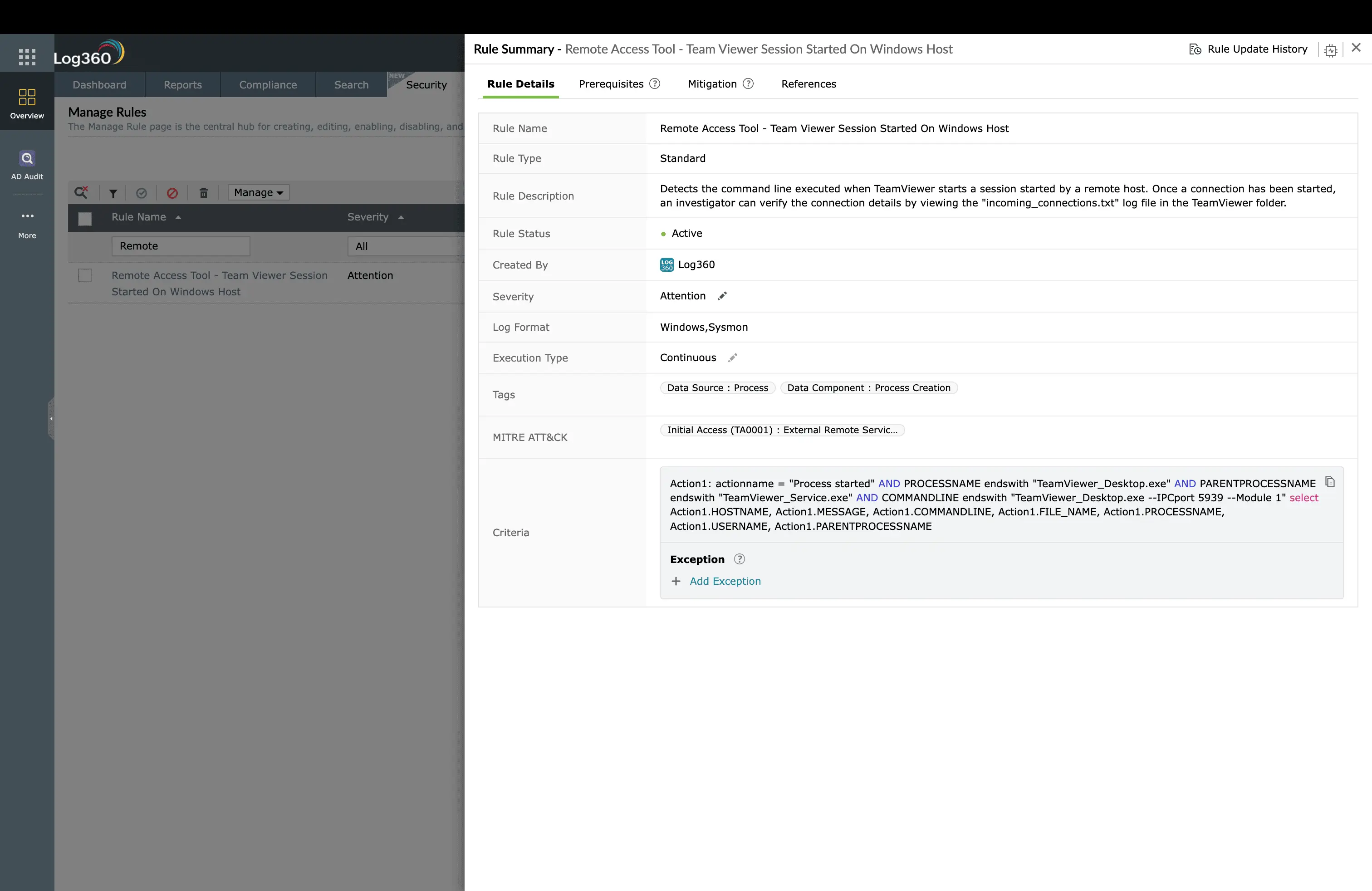
Log360 monitors endpoint process creation to detect unauthorized remote access tool usage. The Remote Access Tool - TeamViewer Session Started On Windows Host rule (Attention, Windows) fires when a TeamViewer session is established on a Windows endpoint. In organizations where TeamViewer is not part of the approved software catalog, this alert is a strong signal. Either an employee is installing unauthorized software (a policy violation worth investigating), or an attacker has established a persistent remote access channel.
The value of this rule extends beyond initial detection. TeamViewer sessions that appear on endpoints where no remote support was requested, that activate during off-hours, or that connect from accounts not associated with IT support all warrant immediate investigation. Log360 provides the context to make that determination: which user was logged in, when the session started, and how long it remained active.
Rule-based detection: DNS exploitation
DNS infrastructure is a high-value target because DNS servers typically have broad network access and are trusted by firewalls. Log360 monitors DNS service behavior through two rules. The Unusual Child Process of dns.exe rule (Trouble, Windows) fires when the DNS service (dns.exe) spawns child processes it should never create, cmd.exe, PowerShell, or any executable other than its normal worker processes. This is a hallmark of DNS service exploitation, where the attacker gains code execution through vulnerability exploitation or configuration abuse.
The Unusual File Deletion by Dns.exe rule (Trouble, Windows) catches another exploitation indicator: the DNS service deleting files. DNS does not normally perform file deletion as part of its operations. This pattern indicates either exploitation (the attacker is cleaning up dropped tools) or DNS cache poisoning (the attacker is manipulating cached records by forcing reloads).
UEBA behavioral detection: the critical layer
With only 3 built-in correlation rules, T1133 is where Log360's UEBA module becomes the primary detection mechanism. UEBA does not need a specific rule for each attack pattern. It learns what normal remote access looks like and alerts on deviations.
Geographic anomaly detection
Log360's UEBA module tracks the source IP geolocation for every VPN authentication event and builds a baseline of normal locations for each user. When an employee who always connects from California suddenly authenticates from a VPN exit node in Eastern Europe, the geographic anomaly generates a risk score spike. If that login is followed by a second login from California within a time window that makes physical travel impossible (impossible travel), the risk score escalates further.
Temporal and behavioral baselines
Beyond geography, UEBA monitors login times, session durations, and accessed resources. An employee who typically connects between 9 AM and 6 PM on weekdays suddenly connecting at 2 AM on a Saturday triggers a temporal anomaly. A VPN session that typically lasts 1-2 hours suddenly running for 18 hours triggers a duration anomaly. These patterns individually might be benign (an employee working late), but when combined with other anomalies, they build a risk picture that exposes credential abuse.
Failed-then-success correlation
Log360 correlates failed VPN authentication attempts followed by a successful login from a different source IP. This pattern, credential stuffing followed by a successful login from the attacker's infrastructure, is invisible to simple log review but stands out clearly in UEBA's correlated view.
Key insight: T1133 detection effectiveness depends on comprehensive VPN and remote access log ingestion. Ensure Log360 receives authentication logs from all VPN concentrators, RDP gateways, and remote access platforms. Without these logs, UEBA cannot build baselines, and behavioral detection is blind.
ManageEngine Log360 for remote access monitoring
Rule-based detection for unauthorized remote access tools, DNS exploitation rules, and UEBA behavioral analytics that baseline VPN access patterns and flag geographic anomalies, temporal deviations, and impossible travel, all without writing custom rules.
Investigation workflow
- Validate the access: When a remote access anomaly is flagged, contact the user through an out-of-band channel (phone, not email) to confirm whether they initiated the session. If the user confirms they did not log in, the credentials are compromised.
- Review the session activity: In Log360, pull the full activity log for the VPN session: which internal systems were accessed, what data was transferred, and whether any administrative actions were performed.
- Check for lateral movement: Search for authentication events originating from the VPN client IP to internal systems. Did the attacker RDP to other servers, access file shares, or query Active Directory?
- Correlate with other tactics: Check whether Persistence mechanisms were established during the session, such as new scheduled tasks, service installations, or credential harvesting activity.
- Timeline the compromise: Determine when the credentials were first compromised versus when they were first used for unauthorized access. The gap reveals how long the attacker had the credentials before using them.
How to remediate and prevent T1133 attacks
Immediate containment
- Disable the compromised VPN account: Immediately revoke VPN access for the affected credentials. Force a password reset and MFA re-enrollment.
- Terminate active sessions: Kill any active VPN or remote access sessions from the compromised account. Remove any remote access tools found on compromised endpoints.
- Block the source: Add the attacker's source IP ranges to the VPN concentrator's blocklist.
Long-term hardening
- Enforce MFA on all remote access: Every VPN, RDP Gateway, and Citrix connection must require multi-factor authentication. Use phishing-resistant MFA (FIDO2) where possible.
- Maintain a remote access tool allowlist: Create an application control policy that allowlists only authorized remote access tools and blocks all others (TeamViewer, AnyDesk, RustDesk) on endpoints where they are not approved.
- Segment VPN access: Implement split-tunnel VPN with access controls; VPN users should only reach the specific resources they need, not the entire internal network.
- Monitor vendor/MSP access: For third-party VPN accounts, enforce scheduled access windows and alert on any activity outside those windows.
- DNS hardening: Run DNS services on isolated systems with minimal additional services, apply CIS benchmark hardening, and monitor for any process creation by dns.exe beyond its normal operation.
FAQ
What is External Remote Services (T1133)?
T1133 describes adversaries using legitimate remote access services (VPNs, RDP gateways, Citrix NetScaler, TeamViewer) to gain initial access or maintain persistence. Unlike exploitation (T1190), the attacker uses valid credentials or pre-installed tools rather than software vulnerabilities. See our Initial Access detection guide for context.
How does Log360 detect unauthorized remote access?
Log360 combines rule-based detection for known remote access tool usage (TeamViewer session detection, DNS exploitation) with UEBA behavioral analytics that baseline normal VPN access patterns and flag anomalies, unusual login hours, impossible geographic travel, and access from new devices. This dual approach catches both unauthorized tools and credential-based VPN abuse.
What is the difference between T1133 and T1021?
T1133 covers remote services used for initial access from outside the network (VPN, RDP exposed to internet). T1021 (Remote Services) covers remote services used for lateral movement within the network (SMB, RDP between internal hosts, SSH). The boundary is the network perimeter.
How do I detect VPN credential theft?
Monitor for impossible travel (sequential VPN logins from geographically distant locations), login attempts outside business hours from unusual source IPs, and multiple failed attempts followed by success from a new IP. Log360's UEBA module automates all three detection patterns across VPN authentication logs.
- What is external remote service abuse?
- Key facts about T1133
- How the attack works
- Real-world attacks using T1133
- How to detect T1133 with Log360
- UEBA behavioral detection: the critical layer
- How to remediate and prevent T1133 attacks
- FAQ

