


What is Persistence (TA0003)?
Persistence in the MITRE ATT&CK® framework covers the techniques adversaries use to maintain access to a compromised environment. Without persistence, an attacker loses their foothold the moment the victim reboots, patches, or rotates credentials. With it, the attacker returns reliably, often through mechanisms that look identical to legitimate system components.
The tactic spans a wide range of mechanisms: scheduled tasks that execute malicious payloads on a timer, Windows services that launch attacker code at boot, Registry keys that auto-run malware at logon, WMI event subscriptions that trigger fileless payloads, web shells embedded in compromised applications, and backdoor accounts with elevated privileges. What they share is intent: the attacker wants to stay.
ManageEngine Log360 addresses persistence detection by combining real-time correlation rules, behavioral analytics through UEBA, and cross-tactic investigation workflows. For TA0003 specifically, Log360 provides over 330 mapped detections covering the most commonly observed persistence mechanisms in enterprise environments.
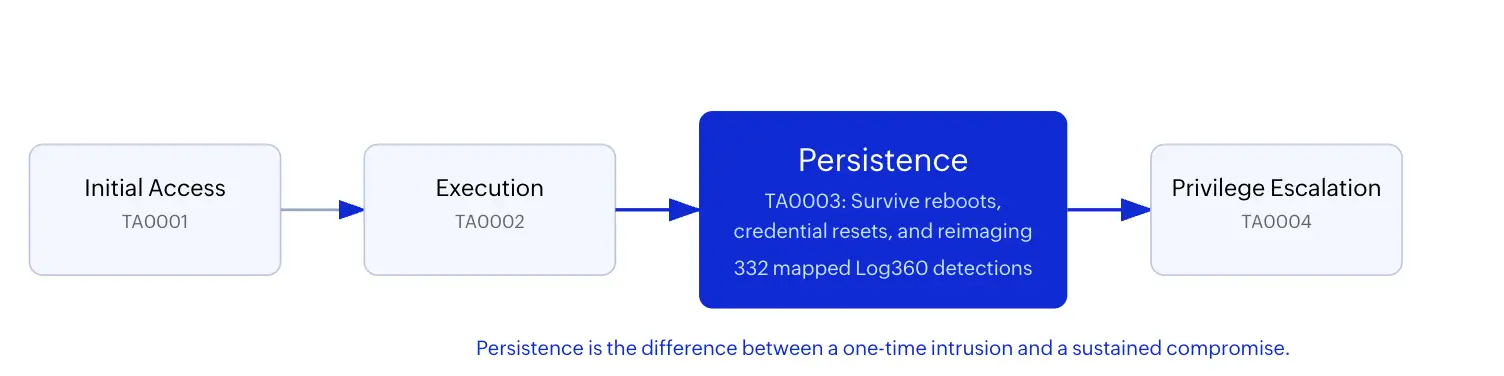
Key insight: Every persistence mechanism an attacker installs is a bet that you will not notice. The goal of TA0003 detection is to make that bet fail, consistently.
Why TA0003 matter to defenders?
Persistence is the dividing line between an incident and a campaign. When attackers achieve persistence, dwell time extends from hours to months. The Verizon 2026 DBIR reports that the median time to discover breaches involving persistence mechanisms is 197 days, compared to 12 days for incidents where persistence was never established. Those extra months translate directly into larger blast radii, more data exfiltrated, and dramatically higher remediation costs.
TA0003 also deserves dedicated attention because persistence mechanisms are inherently durable. A scheduled task or malicious service survives the actions that resolve most other indicators: patching the initial vulnerability, rotating credentials, even reimaging the compromised workstation may not remove a persistence mechanism planted on a different host. Teams that detect persistence early interrupt the entire attack lifecycle. Teams that miss it find themselves chasing the same attacker across multiple incident response cycles.
This is consistent with NIST SP 800-61r3 guidance, which emphasizes that early containment of attacker footholds is the strongest predictor of favorable incident outcomes.
Persistence techniques at a glance
| Technique | ID | Coverage posture |
|---|---|---|
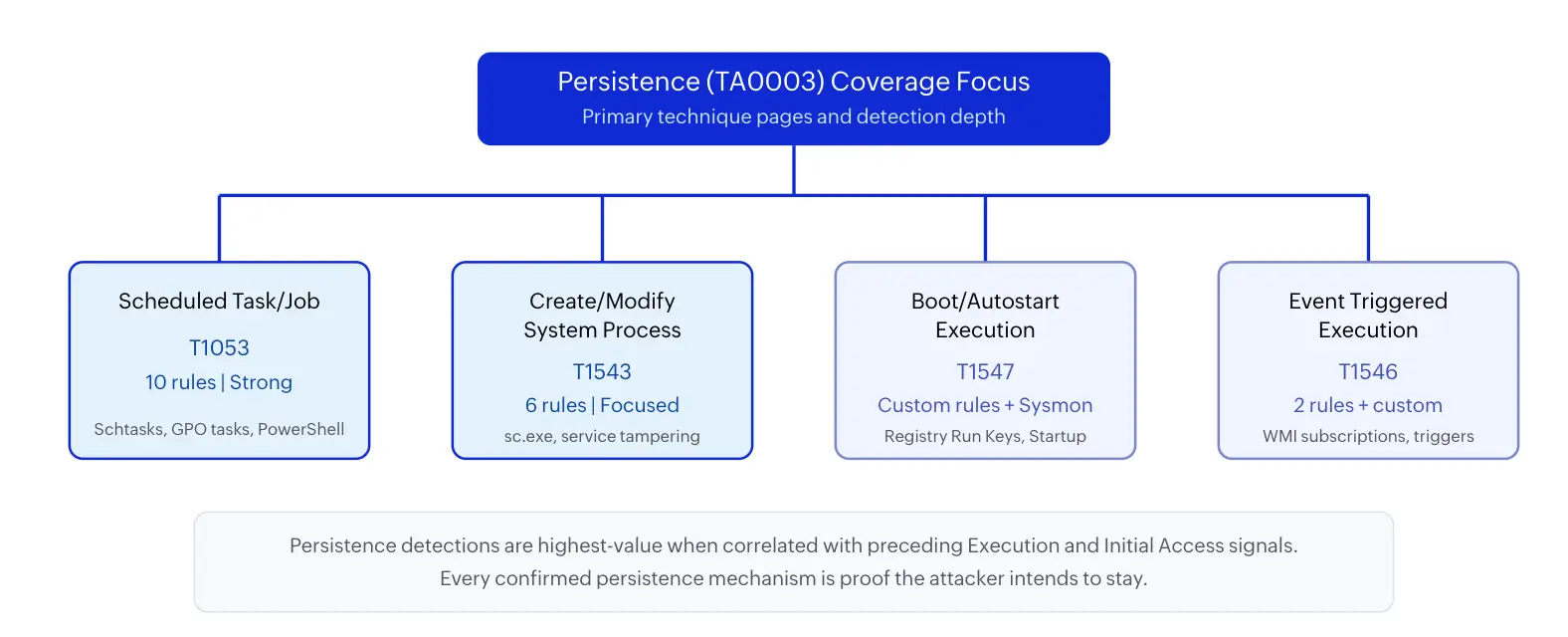
| Scheduled Task/Job | T1053 | Strong (10 prebuilt rules) |
| Create/Modify System Process | T1543 | Focused (6 prebuilt rules) |
| Boot/Autostart Execution | T1547 | Custom rules + Sysmon |
| Event Triggered Execution | T1546 | Partial (2 rules + custom) |
Detecting T1053 scheduled task/job abuse
Scheduled tasks are the workhorse of persistence because they are trivially easy to create, survive reboots, run with configurable privileges, and blend seamlessly with legitimate administrative automation. Attackers from commodity ransomware operators to state-sponsored groups like APT29 rely on T1053 precisely because it hides in plain sight.
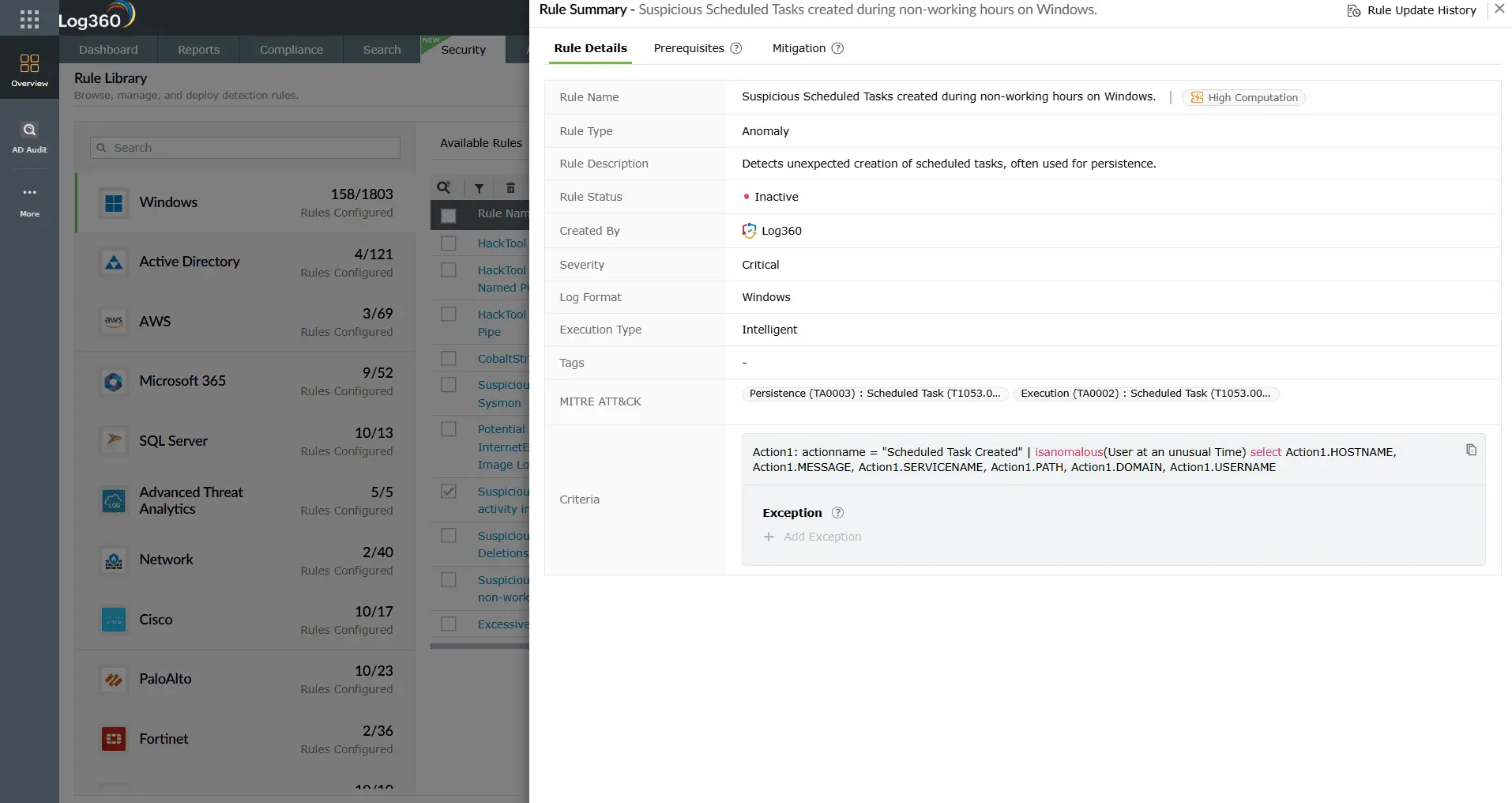
Log360 monitors scheduled task creation and modification through Windows Event IDs 4698 and 4702, correlating the creating process, the user context, and the task payload to identify anomalies. The SharPersist Detection rule (Critical, Windows) targets the SharPersist persistence toolkit explicitly - when this fires, an attacker is using a known offensive tool to install scheduled task persistence, and the severity reflects the high confidence of compromise. The Suspicious Scheduled Tasks created during non-working hours rule (Critical, Windows) catches tasks created outside normal business hours, a behavioral indicator that correlates heavily with after-hours intrusion activity.
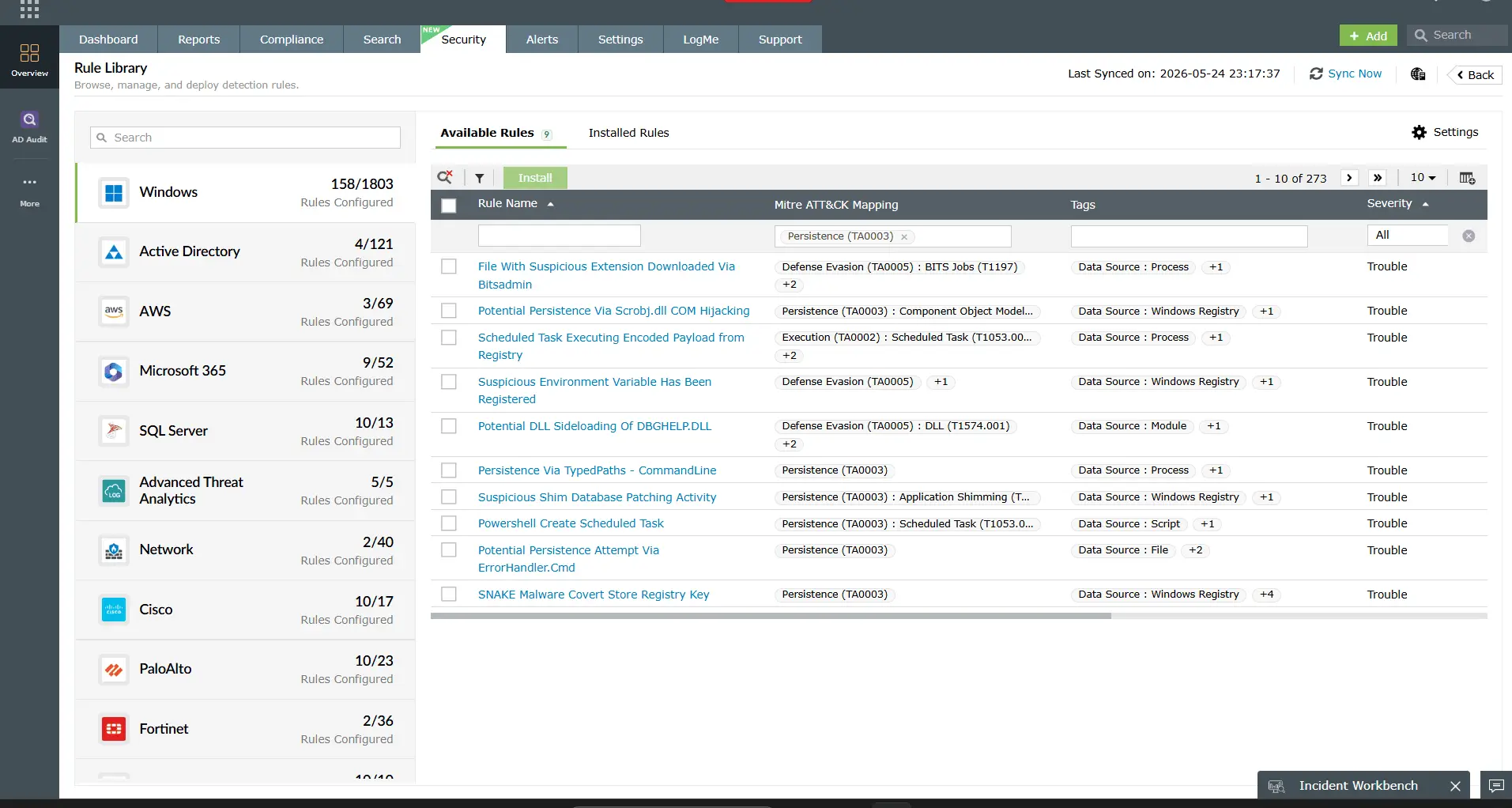
For less obvious abuse, Log360 detects tasks pointing to suspicious paths with the Suspicious Schtasks Execution AppData Folder rule (Trouble, Windows) and the Suspicious Scheduled Task Creation Involving Temp Folder rule (Trouble, Windows), both of which flag tasks that execute payloads from user-writable directories, a hallmark of malware persistence. Tasks that pull encoded payloads from the Registry are caught by the Scheduled Task Executing Encoded Payload from
Registry rule (Trouble, Windows), which detects a fileless persistence technique where the payload lives in a Registry value and the scheduled task merely decodes and executes it.
Domain-wide persistence through Group Policy is addressed by the Persistence and Execution at Scale via GPO Scheduled Task rule (Trouble, AD), which alerts when scheduled tasks are deployed across multiple hosts via Group Policy, a technique that gives the attacker persistence on every domain-joined machine simultaneously.
Detecting T1543 malicious service creation
Creating or modifying a Windows service gives the attacker SYSTEM-level execution that starts automatically at boot. Ransomware groups and advanced persistent threats both use T1543 because a malicious service provides high-privilege persistence that appears identical to any other system service in the Services console. The challenge is distinguishing attacker-created services from the hundreds of legitimate services in a typical enterprise environment.
Log360's correlation engine monitors Windows Event IDs 4697 and 7045 (new service installation events) and applies behavioral context. The Suspicious parent spawning wininit/services/csrss rule (Critical, Windows) detects the most dangerous variant: when a suspicious parent process spawns core Windows processes (wininit.exe, services.exe, csrss.exe), indicating process injection or replacement of critical system services - this is the kind of persistence that survives almost any remediation short of full reimaging.
For service creation through common command-line tools, the New Service Creation Using Sc.EXE rule (Attention, Windows) monitors sc.exe service creation commands, while the New Kernel Driver Via SC.EXE rule (Trouble, Windows) escalates to higher severity when the new service is a kernel-mode driver, a technique used for rootkit persistence. The Suspicious Service Path Modification rule (Trouble, Windows) catches a subtler attack: modifying an existing legitimate service to point to a malicious binary, so the attacker inherits the service's auto-start behavior and trust context without creating any new service entries.

ManageEngine Log360 for TA0003 persistence detection
Over 330 prebuilt correlation rules detecting scheduled task abuse, malicious service creation, autostart manipulation, and WMI subscriptions, correlated with execution and initial access signals for complete attack chain visibility.
Detecting T1547 boot/autostart execution
Registry Run Keys and Startup Folder entries are among the oldest persistence techniques, and they remain effective because they are simple, reliable, and present on every Windows system. T1547 covers a family of sub-techniques including Run/RunOnce Registry keys (T1547.001), Authentication Packages (T1547.002), Winlogon Helper DLLs (T1547.004), and Security Support Providers (T1547.005).
Log360 does not currently have dedicated prebuilt rules for T1547 Registry persistence. However, this coverage gap that has been addressed with custom correlation rules and Sysmon deployment. When Sysmon is configured to log Registry modifications (Event IDs 12, 13, 14), Log360 can ingest these events and apply custom correlation logic to detect writes to the known autostart Registry paths: HKLM\SOFTWARE\Microsoft\Windows\CurrentVersion\Run, HKCU\SOFTWARE\Microsoft\Windows\CurrentVersion\RunOnce, and the corresponding WOW6432Node keys.
The dedicated T1547 guide provides three complete custom correlation rule templates that teams can deploy in Log360: one for Registry Run Key monitoring, one for Startup Folder file creation, and one for Authentication Package and SSP persistence. These templates include the specific Registry paths, file system paths, and process context conditions that distinguish malicious autostart entries from legitimate software installations.
Detecting T1546 event triggered execution
Event Triggered Execution covers persistence mechanisms that fire in response to system events rather than on a schedule or at boot. The most dangerous sub-technique is WMI Event Subscription (T1546.003), which allows attackers to register a WMI consumer that executes code whenever a specified system event occurs, a process starting, a user logging in, a timer expiring. Because the persistence mechanism lives entirely in the WMI repository, it leaves no files on disk and no obvious Registry entries, making it a favorite of advanced threat actors.
Log360 detects WMI subscription abuse through two focused rules. The Script Event Consumer Spawning Process rule (Trouble, Windows) triggers when a WMI script event consumer (scrcons.exe) spawns a child process, this is the execution moment when the attacker's persistence payload actually runs. The WMI ActiveScriptEventConsumers Activity rule (Trouble, Windows) monitors for the creation and activation of ActiveScript event consumers, catching the installation phase of WMI persistence.
For broader T1546 coverage including Windows Event Log triggers, accessibility feature replacement, and AppInit DLL abuse, custom correlation rules are recommended. The T1546 page provides detection templates for each sub-technique along with investigation workflows and Sysmon configuration guidance.

How to investigate TA0003 alerts
Persistence alerts demand a specific investigation discipline. Unlike execution or access alerts that may represent transient activity, a persistence alert means the attacker has taken a deliberate step to ensure they can return. Every confirmed persistence mechanism is proof of sustained adversary intent.
- Identify the creator: Determine which user account and process created the persistence mechanism. Log360's alert detail shows the originating process chain, user SID, and authentication context.
- Check the timeline: Use Log360's correlated timeline to find what happened on the same host in the minutes and hours before the persistence mechanism was created. Look for Initial Access (TA0001) indicators and Execution (TA0002) events.
- Inspect the payload: For scheduled tasks, examine the task action (command or script). For services, check the binary path. For Registry keys, decode any obfuscated values. For WMI subscriptions, query the WMI repository for the consumer script content.
- Assess lateral spread: Search for the same persistence mechanism on other hosts. Attackers commonly deploy persistence across multiple systems for redundancy.
- Document the mechanism: Record the exact persistence path, payload, and creator for incident response and threat intelligence. This feeds future detection tuning.

Response and containment playbook
When a persistence mechanism is confirmed malicious, speed matters, every minute the mechanism remains active is a minute the attacker can use it to re-enter the environment.
- Remove the mechanism: Delete the scheduled task, stop and remove the malicious service, delete the Registry key, or clear the WMI subscription. Verify removal with a second check, some persistence mechanisms reinstall themselves if the attacker's payload is still running.
- Kill active processes: Terminate any processes launched by the persistence mechanism before removing it. Otherwise the running payload may recreate the mechanism.
- Isolate the host: Move the compromised system to a quarantine network segment while investigation continues.
- Rotate credentials: Reset passwords and revoke tokens for all accounts that had active sessions on the compromised host. Assume the attacker harvested credentials.
- Hunt for secondary persistence: Attackers rarely install just one persistence mechanism. Search for additional scheduled tasks, services, startup entries, and WMI subscriptions created within the same time window.
Log360's automated response framework can execute containment actions automatically when persistence alerts fire: disable accounts, execute cleanup scripts, create ServiceDesk Plus tickets, and notify the SOC team.
Hardening recommendations
Detection is strongest when combined with attack surface reduction. Use TA0003 investigation findings to drive continuous hardening.
| Control area | What to harden | Operational impact |
|---|---|---|
| Scheduled task governance | Restrict task creation to administrative accounts, audit all tasks on a weekly cadence, and monitor Event IDs 4698/4702 in real time. | Reduces attacker ability to create tasks from non-privileged contexts. |
| Service installation control | Enforce driver signing requirements, restrict sc.exe usage via AppLocker or WDAC, and baseline legitimate services per server role. | Makes malicious service creation significantly harder and more visible. |
| Registry key protection | Deploy Sysmon with Registry monitoring, audit Run/RunOnce key modifications, and consider Protected Process Light (PPL) for critical processes. | Provides visibility into autostart manipulation that native Windows auditing misses. |
| WMI hygiene | Audit WMI event subscriptions regularly (use Get-WMIObject -Namespace root\subscription -Class __EventConsumer), restrict remote WMI access, and monitor scrcons.exe process creation. |
Eliminates dormant WMI persistence mechanisms left by previous intrusions. |
| Cross-tactic correlation | Configure Log360 to correlate TA0003 alerts with TA0001 and TA0002 indicators as standard triage policy, per NIST CSF detection and response guidance. | Reduces missed chained attacks and shortens dwell time. |
Operationalize TA0003 detection with Log360
Map persistence alerts to attacker intent with correlated telemetry, prebuilt rule intelligence, and investigation workflows your SOC can execute under pressure.
How TA0003 connects to other tactics
Persistence is rarely the attacker's final objective, it is the infrastructure that supports everything else. Understanding how TA0003 connects upstream and downstream improves triage accuracy and investigation speed.
Upstream, persistence follows Execution (TA0002): the attacker runs code, then installs a mechanism to ensure that code runs again. Tracing backward from a persistence alert to the originating execution event reveals the initial payload and, often, the Initial Access (TA0001) vector. Downstream, persistence enables Privilege Escalation (TA0004) and Defense Evasion (TA0005) - a service running as SYSTEM provides both persistent access and elevated privileges.
This cross-tactic context is why your persistence detection should always be consumed alongside adjacent tactic pillars. Log360's MITRE ATT&CK dashboard visualizes these connections, showing which persistence alerts correlate with execution and access events on the same hosts.
Need to explore ManageEngine Log360? Schedule a personalized demo
FAQ
What is Persistence in MITRE ATT&CK?
Persistence (TA0003) is the tactic where adversaries establish mechanisms to maintain access across reboots, credential resets, and other interruptions. Techniques include scheduled task abuse (T1053), malicious service creation (T1543), Registry Run Key manipulation (T1547), and WMI event subscriptions (T1546).
How many persistence detection rules does Log360 have?
Log360 maps over 330 detection rules to TA0003 behavior, with strong coverage for scheduled task abuse and service creation. For techniques without dedicated built-in rules (such as T1547 Registry Run Keys), custom correlation rule templates are documented in the dedicated T1547 guide.
What are the most common persistence techniques used by attackers?
In enterprise Windows environments, scheduled task/job (T1053) is the most frequently observed persistence technique because it requires only standard privileges, survives reboots, and blends with legitimate administrative tasks. Malicious Windows service creation (T1543.003) is preferred for SYSTEM-level persistence, while Registry Run Keys (T1547.001) appear in commodity malware. Nation-state actors favor WMI event subscriptions (T1546.003) for fileless persistence.
What Windows Event IDs are most relevant for persistence detection?
Key Event IDs: 4698 (scheduled task created), 4702 (scheduled task updated), 4697 and 7045 (new service installed), 4720/4728/4732/4756 (account and group changes). For Registry Run Keys (T1547), Sysmon Event IDs 12/13/14 cover registry operations. Log360 collects all these when Windows Security Event Log and Sysmon are deployed as log sources.
Is persistence detectable without Sysmon?
Yes, but with gaps. Log360 detects scheduled task persistence via Event IDs 4698/4702, service creation via 4697/7045, and account manipulation via 4720/4728/4732 without Sysmon. However, Registry Run Key persistence (T1547) and WMI subscriptions (T1546) require Sysmon for comprehensive monitoring. Log360 deployment guidance recommends Sysmon as a supplementary source for full TA0003 coverage.
What should I do when a persistence alert fires?
Investigate immediately: determine who created the persistence mechanism and from which process. Use Log360's correlated timeline to check for Initial Access (TA0001) or Execution (TA0002) events on the same host. If the mechanism was created by a non-administrative account or by a known malicious process, treat it as confirmed compromise, isolate the host, remove the mechanism, and begin incident response.
- What is Persistence (TA0003)?
- Why TA0003 matters to defenders
- Persistence techniques at a glance
- Detecting T1053 Scheduled Task abuse
- Detecting T1543 malicious service creation
- Detecting T1547 autostart execution
- Detecting T1546 event triggered execution
- How to investigate TA0003 alerts
- Response and containment playbook
- Hardening recommendations
- How TA0003 connects to other tactics
- FAQ

