


What is create or modify system process (T1543)?
MITRE ATT&CK® T1543 describes the technique of creating new system processes primarily Windows services or modifying existing ones to execute attacker-controlled code with elevated privileges. Windows services run as SYSTEM by default, making them a natural privilege escalation vehicle: create a service pointing to your malicious binary, start it, and your code runs as SYSTEM.
T1543 sub-technique T1543.003 (Windows Service) is the most prevalent on Windows endpoints. It encompasses three primary attack patterns: new service creation with a malicious binary, modification of an existing service's binary path, and kernel driver installation (both malicious drivers and bring-your-own-vulnerable-driver attacks). All three patterns are logged in Windows Event Logs and detectable by Log360's pre-built rule set. Comprehensive log collection from both Security and System channels is required for complete T1543 visibility.
T1543 overlap with T1068 and T1053: T1543 is frequently chained with other TA0004 techniques. After T1068 exploitation succeeds (SYSTEM access achieved), attackers often immediately create a T1543 service to make that SYSTEM access persistent across reboots. Similarly, T1543 services and T1053 scheduled tasks are used together as redundant persistence/escalation mechanisms.
How attackers create and modify system processes
The T1543 attack flow follows one of three primary paths, each requiring different detection approaches:
Path 1: New service creation (most common)
The attacker creates a new Windows service using sc.exe create [service-name] binpath= "[path-to-malware]" start= auto or equivalent PowerShell/WMI calls. The service is configured with automatic start type (runs at system boot) and defaults to running as SYSTEM. The attacker then starts the service immediately: sc.exe start [service-name]. The malicious binary executes as SYSTEM, granting full local privilege.
This creates Windows Event IDs 4697 (Security log) and 7045 (System log) with the service name, binary path, and creating account directly actionable by Log360's service creation rules.
Path 2: Service path tampering (stealth)
Rather than creating a visible new service, the attacker modifies an existing service's binary path to point to their malicious payload. On the next service restart or system reboot, the malicious binary runs as SYSTEM under a legitimate-looking service name. Unquoted service path vulnerabilities where a service binary path contains spaces and is unquoted allow attackers in lower-privilege directories to create a binary that Windows resolves before the legitimate service path. Log360's "Suspicious Service Path Modification" rule detects changes to service binary entries in the Windows registry. The file integrity monitoring capability complements registry-based detection by alerting on unauthorized binary replacements at the file system level.
Path 3: Kernel driver installation (highest privilege)
Windows kernel drivers run in kernel space with Ring-0 privileges the highest possible privilege level, above SYSTEM. Attackers install malicious or vulnerable kernel drivers using sc.exe create [name] type= kernel binpath= "[driver path]". Two variants exist: direct malicious driver installation (detected immediately by modern EDR and Log360), and Bring Your Own Vulnerable Driver (BYOVD) where a legitimately signed but vulnerable driver is loaded to exploit its vulnerability for unsigned kernel code execution.
BYOVD Detection: Log360's "New Kernel Driver Via SC.EXE" rule fires on any kernel driver installation command regardless of whether the driver is legitimately signed. Organizations can further enhance detection by configuring Sysmon Event ID 6 to capture driver loads and correlating unsigned or low-reputation driver loads with the service creation event.
Detection indicators for T1543
Effective T1543 detection combines service creation event analysis, process lineage monitoring, and binary path verification:
- Service binary paths in user-writable locations: Legitimate system services have binaries in C:\Windows\System32\, C:\Program Files\, or signed installer locations. Services with binaries in %TEMP%, %AppData%, user home directories, or network shares are immediately suspicious.
- Service creation by non-SYSTEM accounts via unusual parents: When sc.exe is spawned by scripting engines (wscript, cscript, powershell) or interactive user sessions rather than configuration management tools, it indicates manual attacker activity rather than legitimate software installation. Correlate with incident detection data from the same account to establish whether this is part of a broader compromise pattern.
- Critical process spawning anomalies: The processes wininit.exe, services.exe, and csrss.exe have well-defined parent processes in normal Windows operation. Any of these processes appearing with unexpected parents is a high-fidelity indicator of service manipulation or exploitation. Log360's "Suspicious parent spawning wininit/services/csrss" (Critical) rule targets this pattern.
- Kernel driver type in service creation: SC.EXE service creation with type= kernel parameter is rare in legitimate administrative operations. Any non-vendor, non-OS kernel driver installation warrants immediate review.
- Service modifications on existing critical services: Changes to service binary paths, start types, or account credentials for existing services especially Windows OS services should fire alerts. Log360's "Potential Persistence Attempt Via Existing Service Tampering" rule addresses this.
Log360 detection rules for T1543
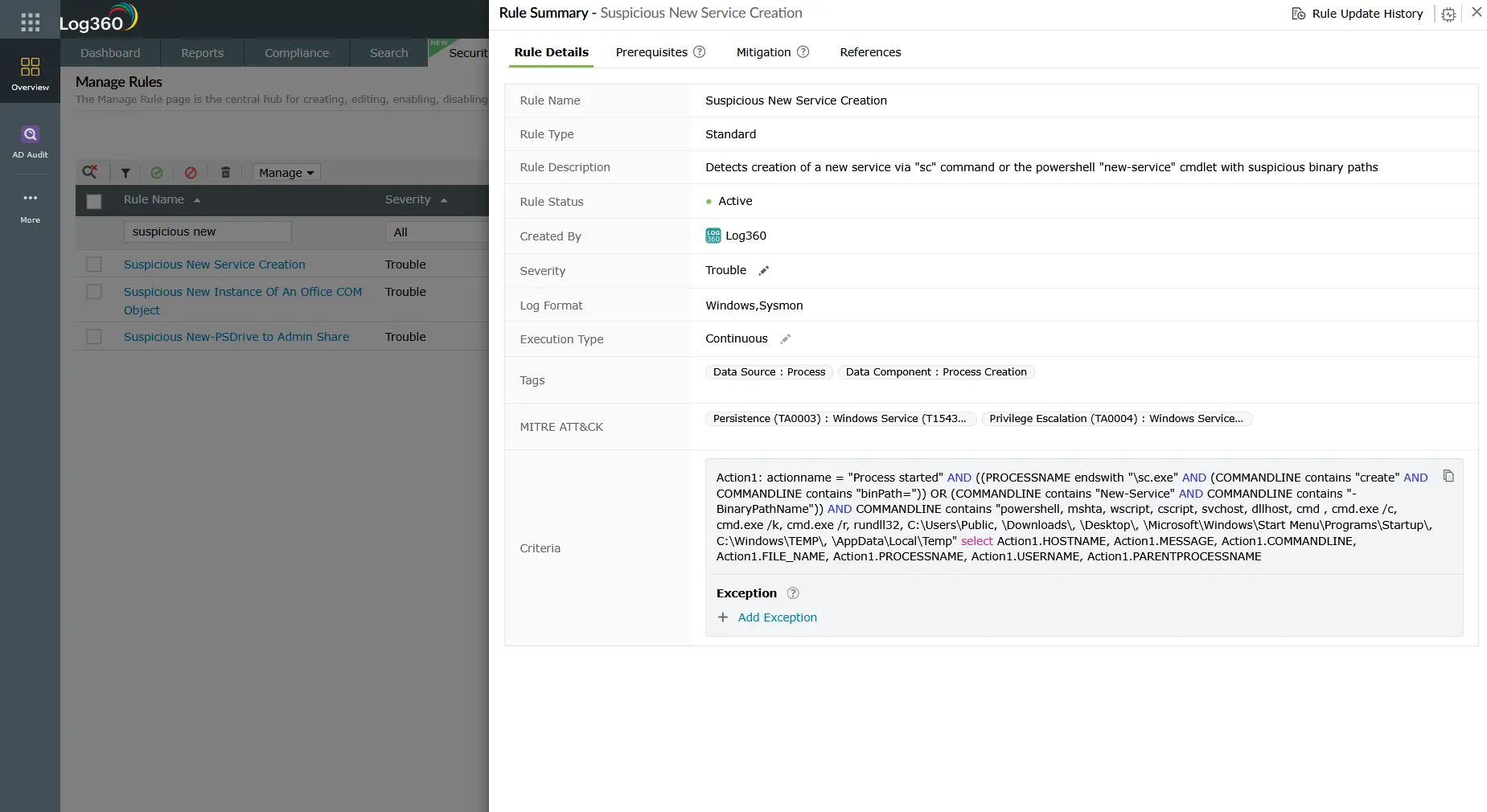
| Rule name | Platform | Severity | What it detects |
|---|---|---|---|
| Suspicious parent spawning wininit/services/csrss | Windows | Critical | Critical Windows processes with unexpected parent processes indicates service exploitation or T1068/T1543 chaining |
| New Kernel Driver Via SC.EXE | Windows | Trouble | SC.EXE command with type=kernel parameter kernel driver installation outside normal administrative operations |
| New Service Creation Using Sc.EXE | Windows | Attention | Any new service registered via SC.EXE broad coverage for all service creation, enables baseline-driven triage |
| Suspicious Service Path Modification | Windows | Trouble | Service binary path modified via SC.EXE config or registry covers binary replacement and unquoted path exploitation |
| Potential Persistence Attempt Via Existing Service Tampering | Windows | Trouble | Modifications to existing service configurations consistent with tampering for persistence or privilege escalation |
| Suspicious New Service Creation | Windows | Trouble | New service with binary paths in user-writable or temporary directories high-confidence malicious payload staging indicator |
Enrichment tip: For environments with Sysmon deployed, configure Log360 to ingest Sysmon Event ID 6 (DriverLoad) alongside Windows Security Events. Correlating Event 7045 with Sysmon ID 6 that has SignatureStatus = "Invalid" or Signed = "false" provides high-fidelity BYOVD detection that Windows native logging alone cannot achieve.
Investigation steps
- Verify the service binary: Extract the binary path from Event 4697 or 7045. Check whether the binary exists, verify its digital signature (unsigned binaries from non-vendor publishers are immediately suspicious), and check the file hash against VirusTotal or your threat intelligence platform. Log360 can integrate with VirusTotal for automated hash enrichment.
- Trace the service creation source: Who created the service? What process spawned SC.EXE or the PowerShell cmdlet? Use Log360's process lineage view to trace the creation back through the parent chain. A user terminal, management tool, or legitimate installer are benign. A scripting engine, web server process, or unusual system process are red flags.
- Check the parent process of services.exe: If Log360's "Suspicious parent spawning wininit/services/csrss" alert fired, investigate the anomalous parent immediately. This indicates that services.exe itself was spawned unexpectedly suggesting a service manipulation exploit rather than a simple new service creation.
- Review service account and privileges: Was the service configured to run as SYSTEM, LocalService, NetworkService, or a custom high-privilege account? Services running as SYSTEM with no legitimate business need are escalation risks even when not immediately malicious.
- Check for execution evidence: Has the service started? Look for Event ID 7036 (service entered running/stopped state) and any process creation events from the service binary after the 4697/7045 events. If the service executed, assess what actions the SYSTEM-level process performed.
- Survey for companion techniques: T1543 is rarely standalone. Search the same time window for T1053 scheduled task creation, T1078 group membership changes, and credential access activity. These are the most common companion techniques in real-world T1543 incidents.
Response playbook
- Stop the malicious service immediately: Use sc.exe stop [service-name] followed by sc.exe delete [service-name]. For kernel driver services, use sc.exe stop first do not unload a kernel driver while it is active without understanding its cleanup behavior, as abrupt termination can cause system instability.
- Quarantine the service binary: Move the malicious binary to a quarantine location (do not delete it preserve it as forensic evidence). Compute the file hash and share it with your threat intelligence provider. Submit to VirusTotal if policy permits.
- For service path tampering: Restore the original service binary path to the legitimate value. If the original binary was replaced, restore from a known-good backup or system image. Check whether the tampering was made via registry modification and review the full registry audit trail.
- For kernel driver incidents: Treat as a critical incident requiring full incident response activation. A successfully loaded malicious or exploited kernel driver may have disabled security controls, hooked system calls, or hidden other malicious artifacts. A memory forensics investigation is strongly recommended before reimaging. Review threat hunting playbooks for post-kernel-compromise indicators established threat actors using BYOVD often have characteristic lateral movement behaviors that can be profiled with cyber threat intelligence.
- Audit all services on affected hosts: Use Get-Service | Select-Object Name, Status, StartType, @{N='BinaryPath';E={(Get-WmiObject Win32_Service -Filter "Name='$($_.Name)'").PathName}} to export a complete service listing from affected hosts and review for additional malicious entries created in the same attack window.
- Harden service creation controls: Restrict who can install services using Windows built-in privileges. Review the SeLoadDriverPrivilege and SeServiceLogonRight assignments. Implement WDAC policies preventing execution of unsigned binaries, which blocks most service-based T1543 attacks even when detection fails.
ManageEngine Log360 for T1543 detection
Log360's six pre-built T1543 detection rules cover all major Windows service abuse patterns new service creation, kernel driver installation, service path modification, and critical process lineage anomalies. The rules are tuned to minimize false positives by focusing on the highest-signal patterns (user-directory binary paths, kernel type flag, unexpected process parents) rather than alerting on all service creation activity.
Explore related privilege escalation detection guides
Return to the complete TA0004 Privilege Escalation overview covering all four techniques, their detection difficulty ratings, the full Log360 rule reference table, and the cross-platform investigation playbook for Windows, AD, AWS, and M365.
See how attackers exploit OS and driver vulnerabilities to gain SYSTEM access frequently used in the same attack chain as T1543, where the exploit provides the initial SYSTEM session that is then made persistent through a malicious service installation.
Frequently asked questions
How do attackers use Windows services for privilege escalation?
Windows services run as SYSTEM by default, so creating a service that executes a malicious binary is a direct path to SYSTEM-level privilege. Attackers use sc.exe create, PowerShell's New-Service, or WMI to register a service pointing to their payload, then start it. The T1543 malicious service executes the payload as SYSTEM, completing the escalation. Log360's pre-built rules detect this through service creation Event IDs 4697 and 7045. See the full TA0004 detection guide for complete coverage.
What is BYOVD (Bring Your Own Vulnerable Driver)?
BYOVD is a T1543 kernel driver technique where attackers deploy a legitimately signed but vulnerable kernel driver, then exploit its vulnerability to execute unsigned kernel-mode code. Because the driver is legitimately signed, it bypasses Driver Signature Enforcement and most policy controls. Log360 detects BYOVD through its "New Kernel Driver Via SC.EXE" rule, which fires on all kernel driver service creation regardless of the driver's signature status enabling investigation before exploitation occurs.
What Windows Event IDs detect T1543 malicious service creation?
The primary Event IDs for T1543 detection are 4697 (service installed in Security log with binary path) and 7045 (new service installed in System log often logged before 4697). Both contain the service binary path, which Log360 evaluates for suspicious locations. SC.EXE command-line analysis via Event 4688 or Sysmon Event 1 provides additional context. For kernel driver detection, Sysmon Event 6 with driver signature status is the highest-fidelity data source. See the TA0004 pillar page for the full Event ID reference.
How does Log360 reduce false positives for service creation alerts?
Log360's T1543 detection rules are scoped to the highest-precision indicators binary paths in user-writable directories, kernel driver type flags, and anomalous parent process relationships rather than alerting on all service creation activity. For environments with high legitimate service creation (e.g., during patch cycles or software deployments), Log360 supports allowlisting by service name, binary path pattern, and creating account. Correlating service creation alerts with change management system data further reduces actionable false positive rates to near zero in well-tuned environments.
What compensating controls prevent T1543 service-based privilege escalation?
Effective prevention for T1543 includes: Windows Defender Application Control (WDAC) or AppLocker policies blocking execution of unsigned binaries (prevents most service payload execution); Hypervisor-Protected Code Integrity (HVCI) enforcing strict kernel driver signature requirements (prevents BYOVD); restricting SeLoadDriverPrivilege and service installation rights to authorized administrator accounts; and enabling Credential Guard to protect service account credentials. These controls complement Log360's TA0004 detection coverage with preventive layers that remain effective even against novel T1543 variants.
- What is T1543 — Create or modify system process?
- How attackers create and modify system processes
- Detection indicators for T1543
- Log360 detection rules for T1543
- Investigation steps
- Response playbook
- Explore related privilege escalation detection guides
- Frequently asked questions

