


What is reconnaissance (TA0043)?
Reconnaissance is the information-gathering phase of an attack, covering every technique an adversary uses to learn about their target before acting on that knowledge. In MITRE ATT&CK® TA0043, it maps to the reconnaissance tactic and sits at the very beginning of the attack lifecycle, preceding initial access. Attackers who conduct thorough reconnaissance make fewer mistakes, choose more reliable attack vectors, and cause more damage when they do gain access.
The tactic spans two broad categories. External reconnaissance happens before any access is gained: scanning internet-facing systems, searching public databases for employee information, harvesting email addresses, and profiling the target's technology stack from publicly available sources. Open source intelligence (OSINT) techniques drive the bulk of this pre-access phase. Internal reconnaissance happens after initial access and is far more detectable: scanning internal subnets, querying Active Directory for privilege maps, running network topology discovery tools, and enumerating running services on adjacent hosts. Log360 maps 38 correlation rules to TA0043, covering active reconnaissance techniques on Windows endpoints and through network perimeter devices. Visit the SIEM platform overview to understand how event ingestion and correlation underpin this detection capability.
MITRE ATT&CK TA0043 — Reconnaissance: Log360 covers this tactic with 38 detection rules across Windows endpoint and network device platforms. Key techniques include active scanning (T1595), gather victim host information (T1592), gather victim network information (T1590), gather victim identity information (T1589), and search open technical databases (T1596). View the full rule set at the Log360 detection rules library.
Why it matters in 2026
Detecting reconnaissance early is the most cost-effective intervention point in the attack lifecycle. An attacker who completes internal network mapping before they are detected has already gathered the intelligence they need to reach a target system, escalate privileges, and move laterally. By the time they act on that intelligence, stopping them requires containing an active intrusion rather than blocking a probe.
Three reasons reconnaissance detection deserves dedicated investment:
- Reconnaissance failures stop attacks before they start: An attacker who triggers a network scan alert at the perimeter, before gaining internal access, can be blocked with a firewall rule. The same attacker who completes internal reconnaissance without detection is already past the most effective containment points.
- Internal recon is a high-confidence breach indicator: When a workstation account starts enumerating domain admins, querying trust relationships, or scanning subnets it has never touched, that behavior is a strong anomaly signal. It typically indicates a compromised credential or an exploited host. UEBA baselines can surface these deviations automatically.
- Post-breach recon precedes lateral movement: According to the CrowdStrike 2025 Global Threat Report, the average breakout time between initial compromise and lateral movement is 62 minutes. Internal reconnaissance is what fills that window. Detecting it gives the security team their best chance to contain the breach before it spreads. Understanding the cyber kill chain context clarifies exactly why that window is so consequential.
Reconnaissance in the attack chain
External reconnaissance feeds initial access decisions:
- Which phishing lure to use
- Which public-facing application to target
- Which credentials to try
Internal reconnaissance feeds lateral movement decisions:
- Which systems contain the high-value data
- Which accounts have domain admin rights
- Which network segments are less monitored
Detecting internal reconnaissance is detecting the attack at the planning stage of its second phase, before damage occurs.
How reconnaissance works
Reconnaissance techniques vary significantly depending on whether the attacker is operating from outside the network (pre-access) or from an internal foothold (post-compromise). Log360's coverage focuses primarily on the active, internal reconnaissance techniques that generate detectable log activity, while also detecting the downstream consequences of passive external techniques. Understanding threat detection and incident response (TDIR) workflows helps frame how these five technique areas map to detection priorities:
1. Active scanning (T1595)
Active scanning covers direct probing of systems to identify open ports, running services, and vulnerabilities. Port sweeps (scanning multiple ports on a single host), host discovery sweeps (sending packets to multiple hosts to identify live systems), and service fingerprinting (sending protocol-specific probes to identify software versions) all fall under T1595. Vulnerability scanning, where automated tools test identified services for known exploits, is a sub-technique (T1595.002) that often occurs as a follow-on to port scanning. These probes form part of the broader cyberattack landscape that security teams must instrument against.
At the network perimeter, active scanning generates firewall and IPS log events. Cisco, Fortinet, and other supported network devices capture inbound scanning behavior, and Log360 ingests these logs to apply correlation rules that distinguish scanning patterns from normal connection attempts. An internal host initiating rapid sequential connection attempts to multiple ports or multiple hosts is flagged immediately.
2. Gather victim host information (T1592)
This technique covers gathering detailed information about specific hosts: operating system versions, installed software, running services, network configurations, and hardware profiles. Attackers with internal access commonly use built-in Windows commands (systeminfo, ipconfig, tasklist, wmic) as well as purpose-built tools for this purpose.
On Windows endpoints, these activities leave a clear trace in process creation events. Systeminfo, ipconfig /all, and wmic process list are legitimate administrative commands, but their execution from unusual parent processes (cmd.exe spawned by a user-facing application, or PowerShell running from a temp folder) is anomalous. Sysmon Event ID 1 or Windows Event ID 4688 captures these process creation events. Log360 applies behavioral correlation rules that flag enumeration commands running in suspicious contexts while suppressing the noise from legitimate IT administrative activity. Log analysis across these event types surfaces the patterns that matter.
3. Gather victim network information (T1590)
Attackers map the internal network to identify high-value targets, understand security boundaries, and plan lateral movement routes. Techniques include subnet enumeration (ping sweeps, ARP scanning), routing discovery (traceroute, route print), and Active Directory topology mapping using tools like BloodHound, which collects group membership, session, and ACL data from the AD environment to compute privilege escalation paths.
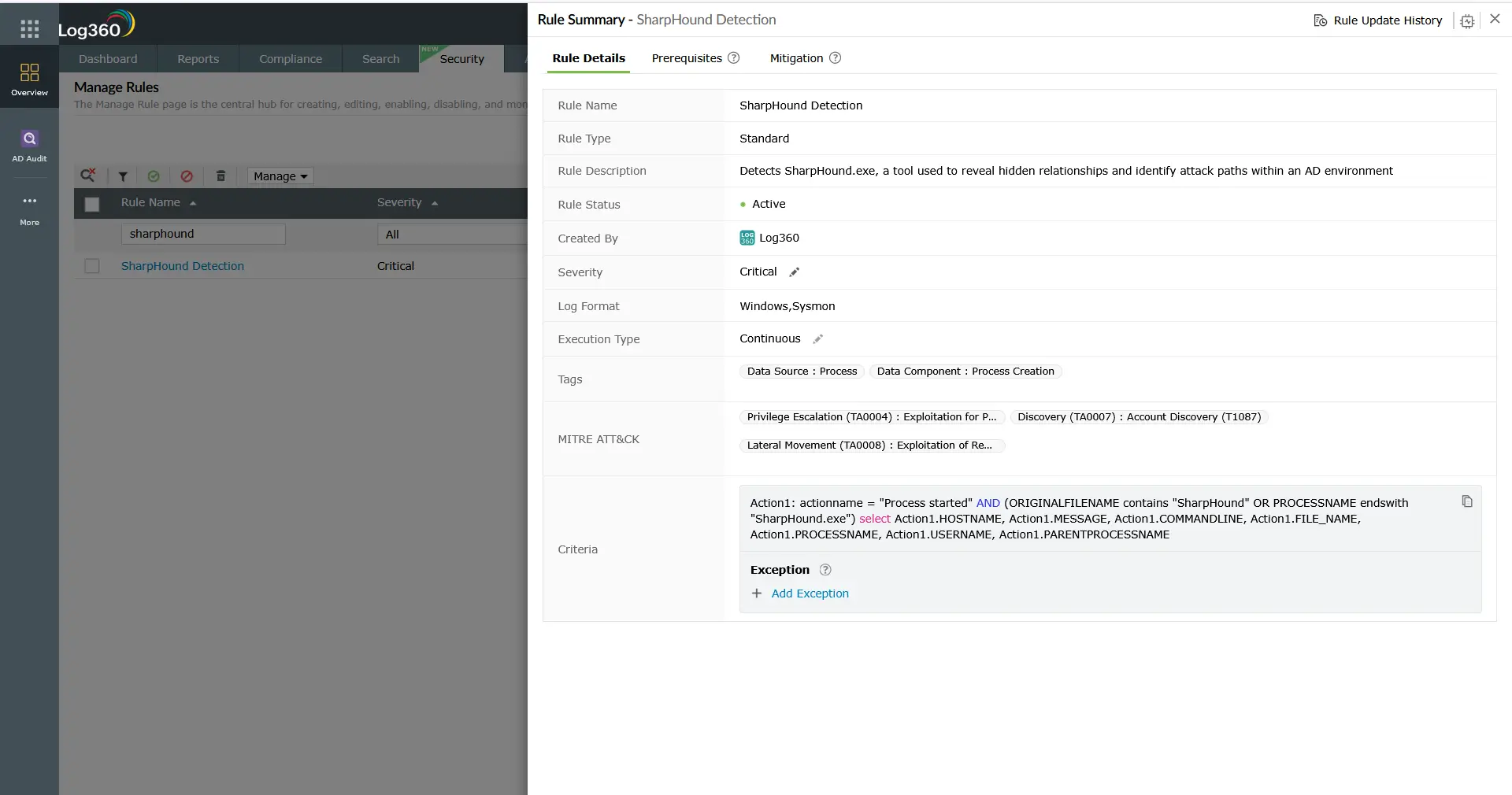
AD topology discovery with BloodHound (running as SharpHound.exe or as an obfuscated binary) generates a distinctive pattern of LDAP queries against domain controllers, along with process creation events that match known tool signatures. Log360 includes dedicated SharpHound detection rules that fire on both the process signature and the LDAP query volume pattern. Log360 detects both behavioral signals. Network topology commands running from endpoints generate recognizable process creation events. Combined with network-level scanning detection from perimeter device logs, the coverage gives a layered view of internal network reconnaissance. This information often feeds directly into privilege escalation planning.
4. Gather victim identity information (T1589)
Before launching an intrusion, adversaries collect identity-related data about target personnel: employee names and roles (T1589.003) harvested from LinkedIn and corporate websites, employee email addresses (T1589.002) enumerated from public directories and email format patterns, and credentials (T1589.001) obtained from public data breach repositories such as HaveIBeenPwned, RaidForums dumps, and dark web monitoring sources. This intelligence feeds directly into credential stuffing attacks against public-facing authentication endpoints, spearphishing campaigns, and MFA fatigue attempts.
Because T1589 is a purely passive technique occurring on third-party platforms, it generates no log events within the target organization at collection time. Log360 detects the downstream consequences: authentication log correlation across Windows, Active Directory, and Microsoft 365 surfaces the credential stuffing patterns, MFA failure bursts, and first-seen-device login anomalies that reveal when harvested identity data is being weaponized. Notable account lockout events, UEBA-based behavioral deviation alerts, and MFA failure correlation are the primary detection signals.
5. Search open technical databases (T1596)
Open technical databases catalogued on the public internet give attackers a pre-built inventory of an organization's exposed infrastructure without requiring any direct interaction with the target. Shodan and Censys index internet-facing services and their version banners, allowing queries like "org:CompanyName port:3389" to instantly return exposed RDP endpoints. WHOIS registries expose IP ownership and domain registration data (T1596.002). Passive DNS databases reveal historical resolution records for a domain's infrastructure. Certificate transparency logs (T1596.005) expose every subdomain for which an organization has issued an SSL/TLS certificate, including development and staging environments that were never intended to be public. CDN configuration data reveals infrastructure topology and origin server IP ranges.
Like T1589, T1596 reconnaissance occurs entirely outside the target's infrastructure and generates no SIEM-visible events at collection time. Log360 detects the downstream exploitation phase. When attackers act on intelligence gathered from Shodan or certificate transparency logs, the resulting exploitation attempts arrive as IPS events at network perimeter devices. Cisco FTD Intrusion Event Detected, Generic Attacks Detection (Fortinet), Fortinet Appliance Auth bypass, and CVE-specific rules cover the exploitation probe patterns that follow T1596 reconnaissance of exposed services.
Key techniques under TA0043
The table below summarizes the five primary reconnaissance technique areas covered in this cluster, including detection difficulty and Log360's coverage approach for each:
| Technique | Description | Platforms | Detection difficulty | Log360 coverage |
|---|---|---|---|---|
| Active scanning (T1595) | Probes systems to discover open ports, services, and vulnerabilities via port sweeps, host discovery, and vulnerability scanners | Network (Cisco, Fortinet, SonicWall), Windows | Low to medium — network-facing scanning produces IPS/IDS alert events; internal scanning requires endpoint process monitoring | Network perimeter IPS rules across Cisco, Fortinet, and SonicWall platforms; Windows endpoint rules for scanning tool signatures |
| Gather victim host information (T1592) | Uses commands and tools to enumerate OS details, installed software, running services, and hardware configuration on target hosts | Windows | Medium — commands are legitimate in admin contexts; anomaly detection requires behavioral baselines | Windows process creation rules for enumeration commands (systeminfo, wmic, tasklist) running in suspicious contexts |
| Gather victim network information (T1590) | Maps internal network topology, subnet structure, and AD trust relationships using ping sweeps, traceroute, and tools like BloodHound | Windows, Network | Medium — AD enumeration tools have detectable signatures; command-based discovery blends with admin activity | BloodHound/SharpHound process signature rules; AD query volume anomaly rules; network topology command detection on Windows |
| Gather victim identity information (T1589) | Collects employee credentials from breach databases, enumerates email addresses, and profiles personnel from LinkedIn and public directories for downstream credential attacks | PRE (external — no direct log source) | High for collection phase (passive, off-target); medium for downstream detection via authentication anomaly correlation | Downstream: authentication failure burst rules (Windows, AD, M365); MFA failure correlation; first-seen device/location alerting via UEBA |
| Search open technical databases (T1596) | Queries Shodan, Censys, WHOIS, passive DNS, and certificate transparency logs to build a pre-attack inventory of exposed services and subdomains | PRE (external — no direct log source) | High for collection phase (passive, off-target); medium for downstream detection via perimeter IPS event correlation | Downstream: Cisco FTD Intrusion Event Detected; Generic Attacks Detection (Fortinet); CVE-specific exploitation probe rules triggered when Shodan-catalogued services are targeted |
Detection strategies for reconnaissance
Reconnaissance detection works across three levels: perimeter monitoring for external scanning activity, endpoint monitoring for internal enumeration, and downstream authentication monitoring for passive identity and database reconnaissance. No single layer provides full coverage. T1595 and active techniques generate direct log events; T1589 and T1596 are passive and require detecting what happens after the intelligence is collected.
Layer 1: Network perimeter monitoring
Incoming port scans, ICMP sweeps, and service fingerprinting attempts all produce events in the logs of perimeter network devices. Cisco, Fortinet, SonicWall, and Sophos firewalls and IPS devices all generate alert records when scanning patterns are detected by their built-in signatures. Log360 ingests these device logs and applies additional correlation rules that identify scanning behavior across event types, including connection attempt volume thresholds and sequential port access patterns against single hosts.
The priority alerts from this layer are: IPS intrusion events classified as reconnaissance (rule categories covering network scanning, host sweep, and service probing), high-volume connection failure patterns from a single external IP, and anomalous ICMP traffic volumes. These events feed directly into incident detection workflows and are routed through the SOAR response pipeline when triage and containment automation is configured. This layer also catches the exploitation-phase activity that follows T1596 reconnaissance, when attackers target services they discovered through Shodan or certificate transparency enumeration.
Layer 2: Windows endpoint process monitoring
Internal reconnaissance is primarily a process-level phenomenon. The commands and tools used to enumerate a Windows environment all start as processes. Windows event logging (Event ID 4688 for process creation, enhanced with Sysmon Event ID 1 for full command-line capture) provides the raw data. Log360 applies correlation rules that flag enumeration command executions in suspicious contexts: a net group "Domain Admins" /domain command run by a standard user account, or nltest /domain_trusts executed from a workstation that has never run it before.
Key process-level indicators for reconnaissance:
- Active Directory enumeration commands: net user, net group, net localgroup, nltest, dsquery, and ldifde when run by non-administrative accounts or from unexpected parent processes.
- Network topology commands: arp -a, route print, ipconfig /all, and tracert run sequentially or from unusual process parents suggest automated enumeration.
- Known tool signatures: SharpHound.exe, BloodHound.exe, PowerView module loads, and ADRecon.ps1 have recognizable process names and command-line patterns that Log360 matches against pre-built rule signatures.
- Systeminfo and wmic chains: Multiple discovery commands run in rapid succession from the same parent process (particularly cmd.exe or PowerShell) indicate automated host profiling scripts rather than manual administration.
Layer 3: Active Directory query monitoring
BloodHound and similar AD enumeration tools generate LDAP queries against domain controllers at a volume and pattern that is distinct from normal authentication and directory lookups. Monitoring domain controller event logs for unusual LDAP query patterns, particularly high-volume queries from workstation accounts or service accounts that do not normally perform directory lookups, surfaces this activity. Log360's Active Directory monitoring module provides this visibility as part of its standard security monitoring rule set.
Layer 4: UEBA for behavioral anomaly detection
Many reconnaissance activities, particularly those performed by a compromised legitimate account using built-in tools, produce no individual high-confidence alert. A user account that has never run net group suddenly running it once will not reach a volume threshold. This is where behavioral analytics closes the gap. Anomaly detection in cybersecurity works by establishing what normal looks like and flagging deviations, the same principle that drives Log360's UEBA engine. It maintains per-user baselines of process execution history, network access patterns, and resource access behavior. A single deviation from an established baseline, such as a user running AD query commands for the first time, generates a risk score increment that can trigger an analyst review even without a matching correlation rule firing.
Layer 5: Authentication anomaly monitoring for T1589 downstream detection
Gather victim identity information (T1589) cannot be detected at collection time because it occurs on third-party platforms. The detectable signal arrives when harvested credentials are used. Log360 surfaces this through authentication event correlation across Windows, Active Directory, and Microsoft 365:
- Credential stuffing detection: The Notable Account Lockouts rule fires when repeated failed authentication attempts trigger lockout events across multiple accounts, the signature of bulk credential stuffing from a breach database.
- MFA failure correlation: MFA Challenge Failed During Authentication (M365) detects attackers who have valid passwords from breach data but cannot satisfy the MFA requirement. This is the most actionable signal that harvested credentials are actively being tested.
- Stale credential use: Login to Disabled Account (M365) surfaces attempts against accounts that were disabled after a breach notification — attackers using stale breach data frequently target these.
- First-seen device and location alerts: Risky Sign-in with Device Registration (M365) and UEBA first-seen-device baselines detect sign-ins from actor-controlled infrastructure using valid credentials, distinguishing attacker use from legitimate user authentication.
Log360 detection coverage
Log360 includes 38 correlation rules mapped to TA0043 reconnaissance, spanning Windows endpoint and network device platforms. These rules cover active scanning detection through network perimeter logs, internal enumeration tool detection through Windows log analysis, and AD topology discovery through domain controller event analysis. They also include downstream detection for passive techniques including identity information gathering and open technical database reconnaissance. The threat detection engine correlates events across all these sources to surface reconnaissance chains rather than isolated alerts.
Coverage highlights include:
- Network perimeter scanning (T1595, T1596 downstream): Rules across Cisco, Fortinet, SonicWall, and Sophos logs detect incoming port sweeps, ICMP host discovery, vulnerability scanning patterns, and exploitation attempts against services discovered via open technical databases.
- Windows enumeration tool detection (T1592, T1590): Rules covering known tool signatures (SharpHound, BloodHound, PowerView) and suspicious command-line patterns for built-in Windows enumeration commands running in anomalous contexts.
- AD query volume anomalies (T1590): Rules that detect high-volume LDAP query patterns from accounts or hosts that do not typically perform directory enumeration.
- Authentication anomaly correlation (T1589 downstream): Rules detecting credential stuffing (account lockout bursts), MFA failure patterns (MFA Challenge Failed During Authentication), stale credential use (Login to Disabled Account), and first-seen device/location sign-ins that reveal harvested identity data being weaponized.
For the complete list of TA0043 detection rules, including prerequisites, MITRE ATT&CK sub-technique mappings, and severity classifications, visit the Log360 detection rules library.
Note: Reconnaissance is a pre-compromise and early-compromise tactic. Passive external reconnaissance techniques such as OSINT, credential harvesting from breach databases (T1589), and searching Shodan and certificate transparency logs (T1596) do not generate log events in the target's infrastructure at collection time, so direct SIEM detection is not possible at that stage. Log360's 38 TA0043 rules cover active reconnaissance behaviors that leave detectable traces on network devices and Windows endpoints. They also surface the downstream authentication and exploitation signals that expose when passive reconnaissance intelligence has been weaponized. Organizations should supplement SIEM detection with external attack surface management (EASM) tools and dark web monitoring services for full pre-compromise visibility.
Investigation and response
A reconnaissance alert requires a different response posture than a malware execution or credential dumping alert. The attacker may still be in an information-gathering phase, which means there is an opportunity to detect and isolate the threat before active exploitation begins. Speed and determination of scope are the two investigation priorities.
Investigation checklist
- Identify the source host and account: Where did the reconnaissance activity originate? Which user account performed it? For network-level scanning, which external IP or internal host is the source? Cross-reference with your asset inventory to determine whether the host is a managed asset or an unknown device.
- Classify as external or internal: External scanning from an unrecognized IP is likely a pre-intrusion probe. Internal scanning from a managed workstation or server is a post-compromise indicator and should be treated with higher urgency. An internal host initiating scanning almost certainly means that host is compromised or that a legitimate account has been stolen.
- Determine scope and duration: How long has the reconnaissance been occurring? What systems were scanned or enumerated? A single enumeration command run once is different from an automated scanning script that has been running for hours. Use the Log360 log search to build a timeline of all reconnaissance-related events from the identified source.
- Check for initial access indicators: If internal reconnaissance is confirmed, work backwards to determine how the attacker or compromised account gained access to the network. Look for preceding authentication events, phishing-related file executions, or exploit indicators in the 24-48 hours before the reconnaissance activity started. Threat intelligence feeds can help correlate observed indicators of compromise against known adversary infrastructure.
- Assess what information was gathered: Review the specific commands and queries executed. Did the attacker identify domain admin accounts? Did they map the network segments that contain high-value servers? Understanding what intelligence the attacker has collected informs both the containment priority and the likely next phase of the attack.
- Look for follow-on activity: Reconnaissance typically precedes initial access (if external) or lateral movement (if internal). Query Log360 for activity from the same source that followed the reconnaissance window: new connections to high-value servers, credential use events, download or file staging behaviors. For T1589 downstream indicators, look for successful authentications from compromised accounts following the credential stuffing activity, a successful authentication after a lockout burst is the highest-priority follow-on indicator.
- Assess exposure via open technical databases (T1596): If perimeter IPS events suggest targeted exploitation of a specific service or subnet, query Shodan and Censys for your organization's IP ranges and domains to determine whether the targeted service is publicly catalogued. Attackers who use T1596 are targeting specific services they researched, the IPS event and the Shodan entry for the same service are correlated intelligence that elevates urgency.
Response actions
- For external scanning alerts (T1595): Block the scanning source IP at the perimeter firewall. Review whether the scanned services are appropriately restricted. If any scanned service is an exploitable public-facing application, prioritize patching or temporarily restricting access while investigation continues.
- For internal reconnaissance from a managed host (T1592, T1590): Isolate the host immediately for forensic investigation. Reset the credentials of the associated account. Assume that initial access was already achieved and activate your incident management process. Do not simply remove the reconnaissance tool and return the host to production without a full forensic review.
- For AD enumeration activity (T1590): Identify which AD data was collected (group memberships, trust relationships, ACL configurations). Determine whether the collected data is sufficient for an attacker to identify a privilege escalation path. If so, escalate to a full AD security review, checking for unauthorized changes to group memberships, ACLs, or trust configurations. The CIS Controls framework provides specific benchmark configurations for Active Directory hardening.
- For credential stuffing and authentication anomalies (T1589 downstream): Lock affected accounts immediately and force password resets. Check HaveIBeenPwned and similar services for confirmed exposure of organizational email addresses. Review whether the affected accounts had MFA enforced — if not, prioritize MFA enablement. Treat the event as an indicator that a broader set of organizational credentials may be circulating in breach marketplaces and audit all accounts for suspicious recent sign-ins.
- For IPS exploitation events preceded by T1596 indicators: Identify the targeted service and cross-reference it against your Shodan/Censys footprint. If the exploited service appears in open technical database search results, treat the targeting as deliberate rather than opportunistic. Restrict the exposed service behind VPN or zero-trust access controls. Review certificate transparency records for your domains to identify additional subdomains that may be catalogued and targeted next.
- Harden the enumeration surface: Review whether standard user accounts have permission to query sensitive AD attributes. Implement LDAP query logging on domain controllers if not already enabled. Restrict tools like BloodHound at the endpoint level using application control policies. Consult CISA advisories for current hardening guidance specific to Active Directory environments.
- Update detection baselines: After a reconnaissance incident, update behavioral baselines in Log360 to reflect the normal vs. anomalous classification for the affected accounts and hosts. This improves detection sensitivity for future events from the same environment.
ManageEngine Log360 for reconnaissance detection
Log360's 38 TA0043 correlation rules combine network perimeter log ingestion from Cisco, Fortinet, SonicWall, and Sophos with Windows endpoint process monitoring and Active Directory query analysis. UEBA behavioral baselines catch low-volume enumeration activity that threshold-based rules miss. When a reconnaissance alert fires, pre-built investigation dashboards surface the full event chain from the initial probe through to any follow-on activity, so analysts spend time on decisions rather than data collection.
Need to explore ManageEngine Log360? Schedule a personalized demo
Frequently asked questions
What is reconnaissance in cybersecurity?
Reconnaissance is the information-gathering phase of a cyberattack, covering both passive techniques (researching publicly available information about the target) and active techniques (directly probing systems to discover infrastructure details). In the MITRE ATT&CK® framework, it is classified as tactic TA0043 and is the first tactic in the kill chain. Security teams using the MITRE ATT&CK and D3FEND pairing can directly map detection countermeasures to each TA0043 sub-technique. Log360 maps 38 correlation rules to this tactic, focusing on the active reconnaissance techniques that leave detectable traces on network devices and Windows endpoints.
Can passive reconnaissance be detected with a SIEM?
Passive external reconnaissance, such as reviewing a company's LinkedIn profile, searching DNS records, or checking certificate transparency logs, does not generate events in your own infrastructure and cannot be detected by a SIEM directly. A SIEM can only detect activity that generates log events within systems it monitors. For passive external reconnaissance monitoring, organizations use external attack surface management (EASM) tools that monitor your external digital footprint from outside your network. Log360 supplements this by detecting the active reconnaissance and initial access attempts that follow a passive reconnaissance phase.
What is BloodHound and why is it used for reconnaissance?
BloodHound is an open-source threat hunting and Active Directory enumeration tool that maps user, group, and computer objects along with their relationships and permissions. Learn more about purpose-built SharpView detection rules that complement BloodHound/SharpHound coverage. It uses a graph database to compute the shortest privilege escalation path from any account to domain admin, making it extremely valuable to attackers for planning privilege escalation and lateral movement after gaining initial access. The data collection component, SharpHound, generates a recognizable pattern of LDAP queries against domain controllers and produces process creation events that match its tool signature. Log360 includes rules that detect both the SharpHound process and the associated high-volume LDAP query patterns.
How does Log360 detect T1589 gather victim identity information?
T1589 gather victim identity information is a passive technique that occurs on third-party platforms such as breach databases, LinkedIn, and public directories, so it cannot be detected in real time within the target's infrastructure. Log360 detects its downstream consequences through authentication event correlation. When harvested credentials are used in credential stuffing attacks, the Notable Account Lockouts rule fires when multiple accounts experience lockout events within a short window. MFA Challenge Failed During Authentication (M365) surfaces attackers who have valid passwords but cannot bypass MFA. Login to Disabled Account (M365) catches attempts against stale accounts in breach data. UEBA first-seen device and location baselines detect sign-ins from actor-controlled infrastructure using valid credentials. Together, these signals expose when T1589-harvested identity intelligence has moved from collection to weaponization.
What is T1596 search open technical databases and how does it affect detection?
T1596 covers adversary use of Shodan, Censys, WHOIS registries, passive DNS databases, and certificate transparency logs to build a pre-attack inventory of an organization's internet-exposed infrastructure. Because this reconnaissance occurs entirely on third-party platforms, it produces no events in the target's security stack during the collection phase. Log360 detects T1596 indirectly through the exploitation phase: when attackers target services they identified through Shodan or certificate transparency enumeration, the resulting connection attempts and exploit probes arrive as IPS events at network perimeter devices. Rules including Cisco FTD Intrusion Event Detected, Generic Attacks Detection (Fortinet), and CVE-specific signatures cover this downstream activity. Organizations should also query Shodan and Censys for their own IP ranges periodically to understand what attackers see and reduce exposed attack surface proactively.
How do I reduce the attack surface for reconnaissance?
Reducing the reconnaissance attack surface involves both external and internal controls. Understanding the cyber kill chain context helps prioritize which controls matter most at this stage. The defense in depth model applied systematically ensures no single control failure exposes the full reconnaissance surface. Externally, minimize open ports on internet-facing systems, remove unnecessary information from public DNS records, monitor HaveIBeenPwned and breach notification services for organizational credential exposure, set up Shodan Monitor alerts for your IP ranges, and audit certificate transparency logs to identify unintended subdomain exposure. Internally, restrict which accounts can query sensitive Active Directory attributes, enable LDAP query logging on domain controllers, deploy application control policies that block known enumeration tools, and implement network segmentation so that a compromised workstation cannot reach all internal subnets. These controls raise the cost and detectability of reconnaissance significantly.
What comes after reconnaissance in the MITRE ATT&CK kill chain?
After external reconnaissance, the next phase is typically initial access (TA0001), where the attacker uses the intelligence gathered to select and execute an entry vector: a phishing campaign tailored to gathered employee information, exploitation of a discovered public-facing vulnerability, or use of harvested credentials. After gaining access, internal reconnaissance feeds directly into privilege escalation and lateral movement planning. Detecting internal reconnaissance before those subsequent phases begin is the highest-leverage intervention available to a security team after initial access has occurred.
- What is reconnaissance?
- Why it matters in 2026
- How reconnaissance works
- Key techniques (TA0043)
- Detection strategies
- Log360 detection coverage
- Investigation and response
- Frequently asked questions

