

- Home
- SIEM use cases
- Port Scanning
Detecting network port scanning
In this page
Understanding the threat - What is port scanning?
A port scan is a reconnaissance technique where an attacker sends connection requests to a range of ports on a target system. The goal is to discover which ports are open, closed, or filtered by a firewall. An open port indicates a running service (e.g., a web server on port 80, SSH on port 22, or RDP on port 3389).
For enterprises, a port scan is the digital equivalent of a burglar walking around a building and testing every door and window. It is not the attack itself, but a critical, preliminary step where an attacker maps out the network, identifies running services, and finds the exact vulnerable entry point they will use for the main attack.
Category:
- External threat
Relevant MITRE ATT&CK® mapping
This use case directly maps to the reconnaissance tactic:
- TA0001—Reconnaissance:
T1595—Active scanning: This technique covers probing victim infrastructure to identify hosts, services, and vulnerabilities. Port scanning (T1046, a discovery technique) is the internal equivalent of T1595, the external-facing reconnaissance this use case detects.
Relevant compliance mapping
- CMMC - SI.L1-3.14.1
- NIST SC-7 (Boundary Protection)
- CIS 13.3 (IG1)
Scenario
A security analyst at a retail company receives a high-priority alert for a successful brute-force login on one of their public-facing RDP servers. As the analyst investigates the server, they see the brute-force attack (thousands of failed logins) started at 3:30pm from a single IP address.
Curious, the analyst checks the firewall logs for that same IP address just before the attack. They find a massive spike in connection denied logs that started at 3:28pm. The logs show that the same IP tried to connect to port 21 (FTP), 22 (SSH), 80 (HTTP), 443 (HTTPS), 1433 (MSSQL), and two dozen other common ports on that exact server. All were denied by the firewall until it hit port 3389 (RDP) which was open. The brute-force attack began two minutes later.
The port scan was a clear warning shot, but was missed because its generated firewall logs were seen as noise. The system logged thousands of individual denied packets but failed to correlate them into a single port scan incident.

What went wrong?
- Lack of correlation: The firewall correctly blocked the scans, but the logs were not correlated. A single connection denied log is noise, but 100 connection denied logs from one source to many ports on a host in 60 seconds is a clear attack pattern.
- No behavioral alerting: The system was not configured to detect this specific behavior. It was only looking for a single successful compromise, not the reconnaissance activity that came before it.
- Missed proactive opportunity: The security team missed the chance to block the attacker's IP during the port scan phase, which would have prevented the subsequent brute-force attack entirely.
How port scan monitoring helps
- Turns noise into signals: A SIEM correlation engine is designed to connect thousands of low-level, disparate firewall logs into a single high-priority, actionable alert like Potential Port Scan Detected.
- Enables proactive defense: It allows security teams to identify an attacker during the reconnaissance phase, not just the attack phase. This allows them to block the scanning IP before it ever finds an open port.
- Provides attack context: When an exploit does happen, having the port scan data provides analysts with the full story, showing them what the attacker was looking for and what they found.
Threats at the gate: Real-world trends
- Automated scanner botnets: Attackers constantly use global botnets to scan the entire internet for common, easy-to-exploit open ports, like RDP or unpatched web servers. This is no longer just a targeted activity.
- Low-and-slow scanning: To evade simple detection, advanced attackers scan from multiple different IP addresses or scan very slowly (e.g., one port every five minutes) to make the activity look like random, benign network traffic.
Use case objective
To proactively detect, correlate, and send alerts on systematic port scanning activities from external sources. This enables security teams to identify and block reconnaissance before it finds a vulnerability and leads to an exploit, a brute-force attack, or initial access.
Prerequisites:
- Firewall, router, or server logs that record connection denied events must be forwarded to the Log360 server.
- The pre-built correlation rule must be enabled and tuned for your environment's baseline.
How to detect port scanning with Log360
Log360’s real-time event correlation engine is the primary tool for this use case.
- Ingests perimeter logs: Log360 collects all connection denied and connection accepted logs from your firewalls, routers, and IDS/IPS devices.
- Pre-built correlation rule: The solution has out-of-the-box correlation rules specifically for port scanning.
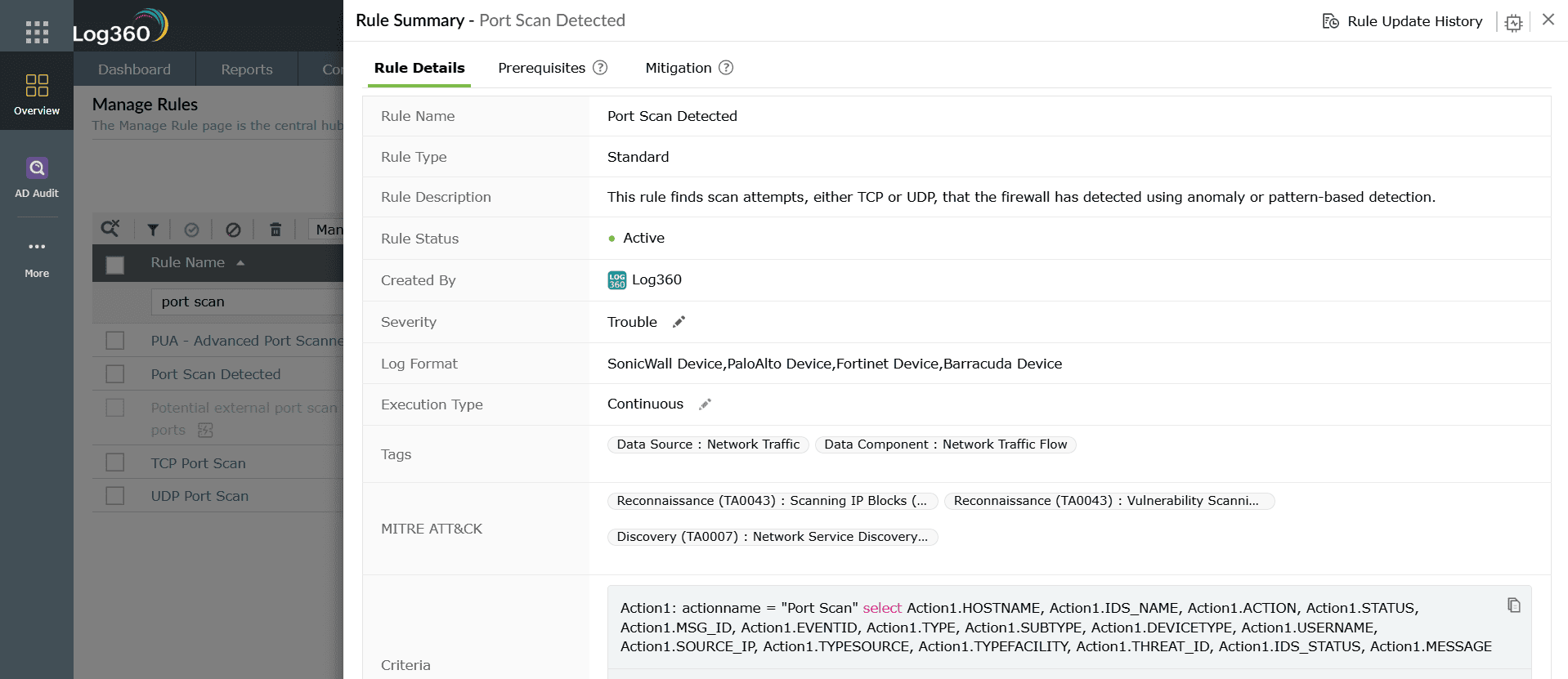
- Actionable alerting: When this rule is triggered, Log360 generates a single, high-priority alert. The alert provides the analyst with the source IP of the attacker, the target host they were scanning, and a list of the ports they attempted to connect to.

Next steps
- Automate response: Create a workflow in Log360 that automatically adds the source IP detected by a high confidence port scan alert to a temporary firewall blocklist.
- Investigate the target: If the scan did find an open port, immediately escalate the investigation on the target server to check for signs of compromise.

