

- Home
- SIEM use cases
- SQL injection
How to detect SQL injection attempts
In this page
Understanding the threat
SQL injection (SQLi) is a critical vulnerability where an attacker inserts malicious SQL code into an input field or parameter, tricking the back-end database into executing unintended commands. This occurs when applications fail to properly sanitize user inputs before including them in database queries.
For an enterprise, a successful SQLi attack can be catastrophic. It allows attackers to bypass authentication, view sensitive customer data (PII), modify or delete records, and in some cases, gain administrative control over the entire database server. Because databases are the crown jewels of most organizations, SQLi remains one of the most persistent and high-impact threats in the application security landscape.
Category
Application threat
Scenario
What went wrong
During a routine security review, the SOC team identified that an unauthorized user had successfully accessed the administrative dashboard of its legacy client portal. The investigation revealed that the portal's login form was vulnerable to a classic SQLI attack. An attacker had entered the string ' OR '1'='1 into the username field, which caused the back-end query to evaluate as true regardless of the password, granting immediate access.
The primary failure was that the legacy application was not utilizing parameterized queries, and the organization’s generic firewall rules were not configured to inspect HTTP POST bodies for SQL syntax. Furthermore, the database service account was running with db_owner privileges, which allowed the attacker to not only bypass login but also execute a UNION SELECT command to dump the entire Customer_Credit_Cards table.
How SQL monitoring helps
Monitoring for SQLi patterns at both the application and database levels ensures that even if code is vulnerable, the attempt is blocked or alerted. It provides:
- Pattern matching: Detection of common SQLi signatures, such as UNION SELECT, OR 1=1, and comment markers (--, #) within web requests.
- Error analysis: Identification of a high frequency of database syntax errors (e.g., an unclosed quotation mark) originating from a single IP, which often indicates an attacker is "fuzzing" the application to find injection points.
Real-world trends
- Massive exploitation of managed file transfer tools: Recent high-profile breaches (such as the MOVEit and Accellion incidents) have highlighted how a single zero-day SQLi vulnerability in widely used file transfer software can lead to data theft in thousands of downstream companies.
- Automated blind SQLi via AI: Attackers are increasingly using automated tools and AI-driven scripts to perform "blind" SQLi attacks. These attacks do not return data directly but infer database structure through time delays or Boolean responses, making them much harder to detect with traditional, signature-based rules.
How to detect SQLi attempts with Log360
Prerequisites
- Make sure your SQL logs are flowing into Log360.
Detecting with Log360
Step 1: Visualize trends
- Navigate to Reports > Applications > SQL Server. From the Security Reports category on the left-hand side, select SQL Injection. This report provides a comprehensive overview of injection events and targeted assets across the network.
Step 2: Configure real-time alerting
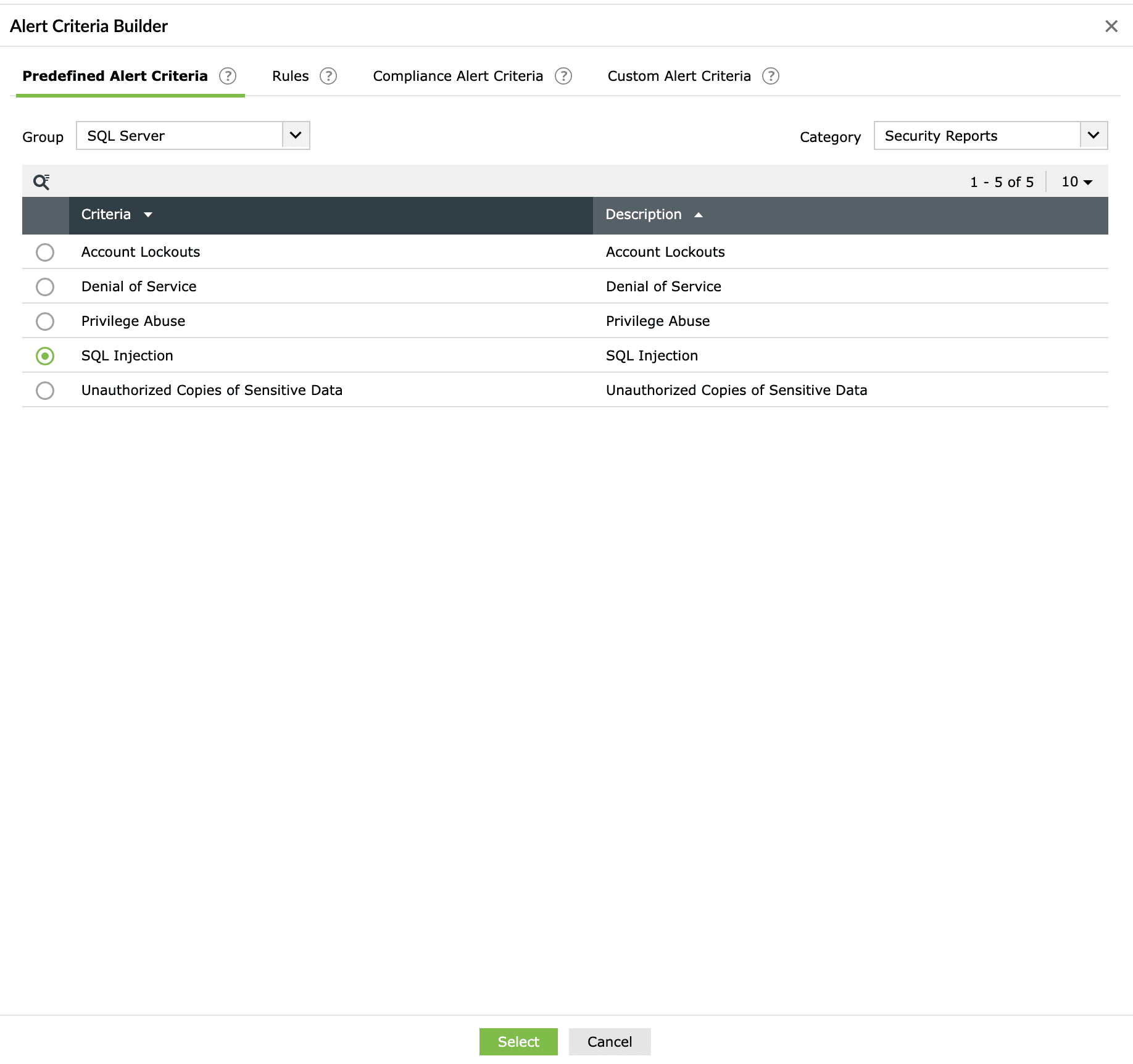
- Go to the Alerts tab and click Add Alert Profile. Under the Criteria section, select SQL Server from the Group drop-down and Security Reports from the Category drop-down. In the listed criteria, select SQL Injection.
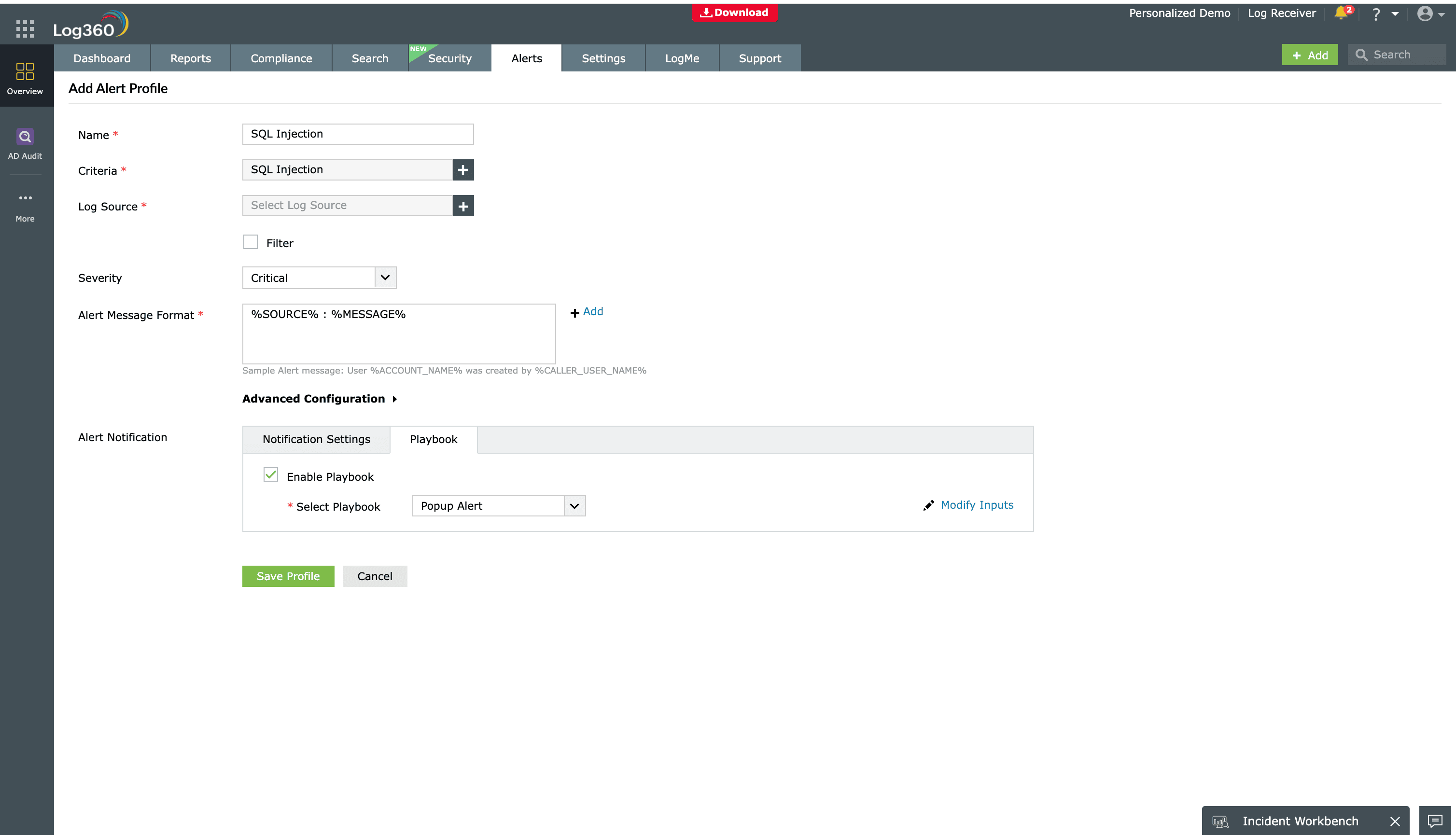
- Name the alert and assign a severity (e.g., Critical, Trouble, or Attention). Configure your preferred notification channel and select a workflow from the available options to trigger an immediate response.


Step 3: Deploy advanced detection rules
- Go to Security > Manage Rules > Rule Library. Search for and install the predefined rules SQL Injection Detection and SQL Injection Match Set Changes to monitor for sophisticated injection patterns in real time.
Next steps
- Utilize the Log360 Incident Workbench to conduct deep-dive investigations into the timeline of the SQLialert, correlating web logs with database activities to determine the extent of the impact.
- Leverage the Zia AI assistant to gain instant context on complex SQLi patterns and receive intelligent recommendations for remediation steps, such as specific input validation techniques or database hardening.

