

Incident response plan: The complete guide to building, testing, and executing an IR plan
Most organizations have an incident response plan on paper. Few have one that works under pressure. This guide covers how to build an IR plan that maps to the NIST SP 800-61 framework, integrates with your detection and response tools, and actually executes when an attacker is active in your environment.
In this page
- What is an incident response plan?
- Why every organization needs an incident response plan
- The six phases of incident response
- Building your IR plan: Step by step
- IR team roles and responsibilities
- Severity classification matrix
- Communication and escalation framework
- Incident response playbook templates
- Testing and maintaining your IR plan
- Common IR plan mistakes
- How Log360 powers your incident response plan
What is an incident response plan?
An incident response plan is a documented, actionable framework that defines how your organization detects, investigates, contains, eradicates, and recovers from cybersecurity incidents. It is not a policy document that lives in a SharePoint folder and gets reviewed annually. A functional IR plan is an operational playbook that SOC analysts, IT administrators, and business stakeholders reference during an active incident, under pressure, with real consequences.
Most organizations have an IR plan on paper, but few have one that works in practice. The IBM Cost of a Data Breach Report 2025 found that organizations with a tested incident response plan saved $2.66 million on average compared to those without one. Specifically, organizations that had tested it. The plan itself is the starting point. Testing, iterating, and integrating it into your actual detection and response tooling is what delivers the savings.
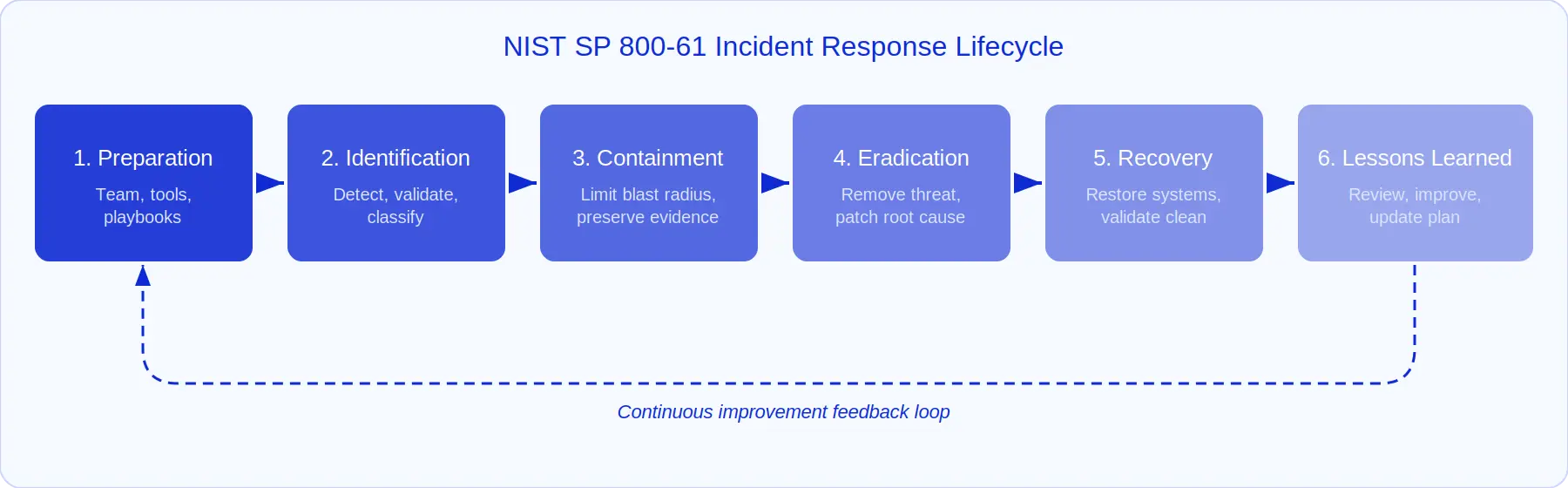
The NIST SP 800-61 framework provides the most widely adopted foundation for incident response planning. It defines six phases (Preparation, Identification, Containment, Eradication, Recovery, and Lessons Learned) that form a continuous cycle rather than a linear checklist. Every IR plan should map to these phases, even if your organization adapts the terminology or adds organization-specific stages.
Key highlights
- $2.66M savings → average cost reduction with a tested IR plan vs. none (IBM 2025)
- 54% of organizations → lack a comprehensive IR plan that covers all major incident categories (Ponemon 2025)
- 48-min breakout time → median time for attackers to move laterally (CrowdStrike 2025), making rapid IR execution critical
- 6 phases → NIST SP 800-61 lifecycle: Preparation, Identification, Containment, Eradication, Recovery, Lessons Learned
- 70% MTTR reduction → organizations that integrate SIEM + SOAR into their IR plan see median MTTR drop from hours to minutes
Why every organization needs an incident response plan
Security incidents are inevitable. The Verizon 2026 DBIR documented over 10,000 confirmed breaches across every industry vertical. The question is not whether your organization will face an incident, but whether your team will handle it with a tested, practiced process or scramble through improvisation while the attacker is still active in your environment.
Without an IR plan, incident response defaults to ad hoc coordination. Analysts waste time deciding who should investigate, what tools to check, who to notify, and what authority they have to take containment actions. Those delays are measured in minutes and hours, giving the attacker time to escalate privileges, move laterally, and exfiltrate data. CrowdStrike's 2026 Global Threat Report reports a median breakout time of 48 minutes. If your IR process cannot identify and contain a threat faster than that, the attacker has the advantage.
Compliance mandates require a documented IR plan
Regulatory frameworks do not treat incident response as optional. PCI DSS Requirement 12.10 explicitly mandates an incident response plan with annual testing. HIPAA requires covered entities to have response and reporting procedures for security incidents. GDPR Article 33 imposes a 72-hour breach notification window, a deadline that is nearly impossible to meet without pre-defined response workflows. SOX, FISMA, and ISO 27001 all have comparable requirements.
A SIEM solution with built-in compliance reporting does not replace the IR plan, but it provides the detection and evidence infrastructure that makes the plan executable. Log360 includes pre-built compliance reports mapped to PCI DSS, HIPAA, SOX, GDPR, and ISO 27001, which means the evidence collection and audit trail components of your IR plan are automated from day one.
Business continuity depends on response speed
The financial impact of an incident is directly proportional to the time it takes to contain it. The IBM 2025 report found that breaches contained in under 200 days cost $1.02 million less on average than those that took longer. An IR plan that integrates with automated response capabilities compresses that timeline from days to hours, or even minutes for well-defined incident types.
The six phases of incident response
The NIST SP 800-61 Revision 3 framework defines six phases that form a continuous improvement cycle. Each phase has specific objectives, deliverables, and tooling requirements. Your IR plan should address all six. Critically, the phases are not linear. Containment often happens in parallel with investigation, and lessons learned should feed directly back into preparation.
Phase 1: Preparation
Preparation is where 80% of IR success is determined. This phase covers everything you do before an incident occurs: assembling the team, deploying detection tools, building playbooks, establishing communication channels, and running exercises.
Preparation is not a one-time activity. Every post-incident review (Phase 6) should generate preparation updates: new detection rules, revised playbooks, and additional training. Organizations that treat preparation as a static document rather than a living process find their plans outdated within months.
- Deploy centralized detection: A SIEM that collects logs from all critical sources and applies real-time correlation rules to surface security events. Log360 ships with 2,000+ pre-built correlation rules mapped to the MITRE ATT&CK framework, which means your detection capability is operational from deployment, not after months of rule tuning.
- Build response playbooks: Document step-by-step procedures for your most common incident types. Map each playbook to SOAR workflows so the automated steps execute immediately when the playbook is triggered.
- Establish communication channels: Define out-of-band communication methods (phone trees, encrypted messaging, backup email) that work even if the primary network is compromised.
- Integrate ticketing: Connect your SIEM to incident management so every alert automatically creates a trackable incident with ownership, SLA timers, and audit trail.
Phase 2: Identification
Identification is where most organizations struggle. The median dwell time (the gap between intrusion and detection) is still measured in weeks for many organizations, according to Mandiant's M-Trends 2025 report. The Identification phase answers three questions: Is this a real incident? How severe is it? What is affected?
This is where your SIEM's detection engine is the first line of defense. Log360's correlation engine cross-references events across log sources to distinguish isolated anomalies from coordinated attack patterns. When a correlation rule fires, the alert includes the matched events, involved entities, and severity classification. This gives the analyst enough context to validate the incident within minutes rather than starting a manual log hunt.
UEBA (User and Entity Behavior Analytics) adds a behavioral layer that catches threats correlation rules miss. When a user's behavior deviates from their established baseline (accessing unusual systems, working at unusual hours, downloading atypical volumes of data), UEBA flags the anomaly even if no single event triggers a correlation rule. This is particularly relevant for insider threats and compromised accounts, where the attacker uses valid credentials and legitimate tools.
Phase 3: Containment
Containment is the most time-sensitive phase, and automation has the biggest impact. The goal is to limit the blast radius - prevent the attacker from expanding their foothold - while preserving forensic evidence for investigation.
Containment has two sub-phases: short-term containment (stop the bleeding) and long-term containment (stabilize while you eradicate). Short-term containment might mean isolating an endpoint from the network or disabling a compromised account. Long-term containment might mean deploying additional monitoring on related systems while you rebuild the compromised host.
Log360's SOAR workflows support both tiers. For short-term containment, automated response actions (disable account, block IP, run containment script) execute in seconds when an analyst approves the staged action. For long-term containment, enhanced monitoring rules can be deployed automatically to watch for attacker re-entry attempts while remediation is in progress.
Phase 4: Eradication
Eradication removes the root cause of the incident. While containment stops the spread, eradication addresses the root cause. This means eliminating malware, closing the vulnerability that was exploited, removing unauthorized access, and resetting compromised credentials.
The risk in this phase is incomplete eradication: removing the obvious indicators while missing backdoors or persistence mechanisms the attacker established. This is where MITRE ATT&CK mapping is valuable: if the alert mapped to an Initial Access technique, your eradication checklist should include checks for Persistence techniques the attacker likely used after gaining access. Log360's MITRE ATT&CK dashboard shows which tactics and techniques are associated with the incident, guiding the eradication scope.
Phase 5: Recovery
Recovery restores affected systems to normal operation and validates that the environment is clean. This is not just "bring the server back online." Recovery includes restoring from known-good backups, re-imaging compromised endpoints, rotating all credentials that may have been exposed, and monitoring the restored environment for signs of re-infection.
The monitoring aspect is critical and often under-prioritized. After recovery, deploy enhanced detection rules specifically targeting the attack vector that was used. Log360's custom correlation rule builder lets you create targeted rules for the specific indicators of compromise (IOCs) observed during the incident, providing early warning if the same threat actor attempts re-entry.
Phase 6: Lessons learned
The lessons-learned phase is what prevents organizations from getting breached the same way twice. Within 72 hours of incident resolution, conduct a structured review covering: What happened? When was it detected? How was it contained? What could be improved? What gaps did the incident expose?
Log360's forensic search and audit trail provide the evidence base for this review. Every alert, investigation step, response action, and resolution is logged with timestamps, making it possible to reconstruct the exact sequence of events and identify where delays occurred. Feed the findings back into Phase 1: update detection rules, revise playbooks, adjust severity classifications, and run a tabletop exercise simulating the incident to validate the improvements.
Map your IR plan to Log360 in minutes
Log360 ships with pre-built correlation rules, SOAR playbooks, and ticketing integration that map directly to each NIST IR phase. Deploy a unified detection-through-response pipeline without months of custom integration.
Building your IR plan: Step by step
An IR plan that works under pressure has specific characteristics: it is concise enough to follow during an active incident, detailed enough to prevent improvisation, and integrated with your actual detection and response tools so steps execute with minimal manual overhead. Here is how to build one.
Step 1: Define scope and incident classification
Start by defining what constitutes a security incident for your organization. Not every alert is an incident. Establish clear criteria that separate security events (routine anomalies, informational alerts) from security incidents (confirmed or high-confidence threats requiring formal response). This prevents your IR team from context-switching on every noisy alert, a problem that contributes directly to alert fatigue.
Define incident categories that match your environment:
- Unauthorized access: Credential compromise, privilege escalation, valid account abuse
- Malware and ransomware: Endpoint infection, lateral spread, file encryption
- Data exfiltration: Unauthorized data transfers, DLP policy violations, insider threats
- Phishing: Credential harvesting, spearphishing with attachments or links, business email compromise
- Denial of service: Volumetric attacks, application-layer attacks, resource exhaustion
- Cloud security incidents: Misconfiguration exploitation, cloud access anomalies, unauthorized cloud resource creation
- Supply chain compromise: Third-party software, exploitation of public-facing applications
Step 2: Establish the severity classification matrix
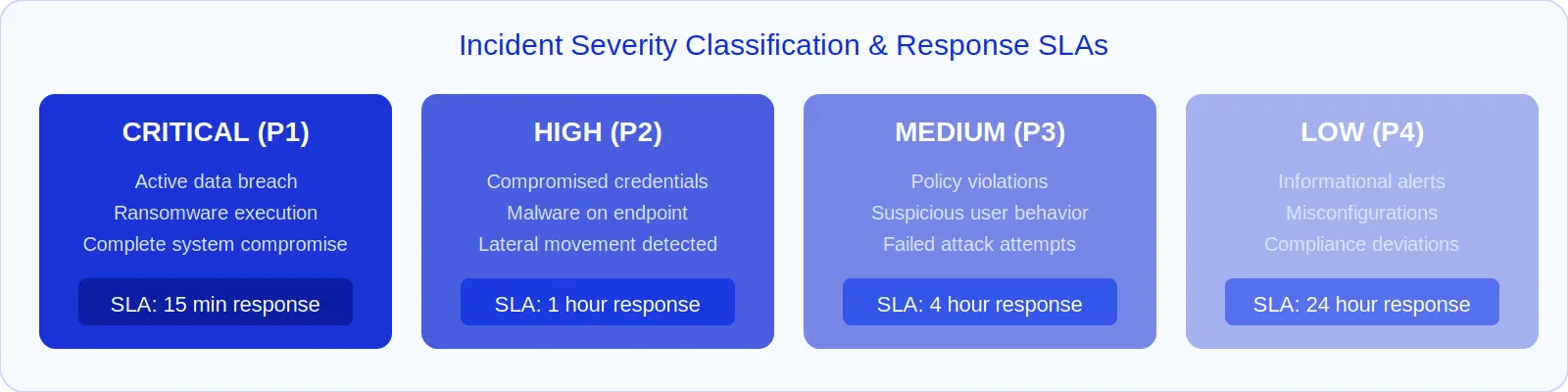
Every incident category needs a severity level that drives response urgency, resource allocation, and communication requirements. A four-tier model works for most organizations:
| Severity | Criteria | Response SLA | Escalation | Communication |
|---|---|---|---|---|
| Critical (P1) | Active data breach, ransomware executing, complete system compromise, critical infrastructure impacted | 15 minutes | Immediate: CISO, CTO, Legal | Executive team, board notification, regulatory body (if required), PR team |
| High (P2) | Confirmed credential compromise, malware on production endpoint, lateral movement detected, privileged account abuse | 1 hour | SOC lead, IR lead, system owner | IT management, affected department heads |
| Medium (P3) | Policy violations, suspicious user behavior flagged by UEBA, failed attack attempts, non-critical vulnerability exploitation | 4 hours | SOC lead for review | IT team, system owner |
| Low (P4) | Informational alerts, misconfigurations, minor compliance deviations, reconnaissance activity | 24 hours | Standard queue | Ticket to system owner |
Log360's correlation rules include built-in severity levels (Critical, Trouble, and Attention) that map directly to your classification matrix. When a rule fires, the alert carries the severity tag, which SOAR workflows use to route the incident to the correct playbook and escalation path automatically.
Step 3: Assemble your incident response team
An IR plan without an assigned team is a suggestion, not a plan. Define the team structure with clear roles, authority levels, and escalation paths.
Step 4: Build response playbooks for each incident category
Generic guidance ("contain the threat") is not actionable during an active incident. Each incident category needs a specific playbook with concrete steps. Map these playbooks directly to your SOAR automation engine so the manual steps have automated counterparts wherever possible.
Step 5: Integrate your IR plan with detection and response tools
The most common failure point in IR plan execution is the gap between the plan (a document) and the tools (what analysts actually use). When these are disconnected, analysts resort to improvisation. The fix is integration: your IR plan's playbooks should be configured as SOAR workflows in your SIEM, your severity matrix should map to alert severity levels, and your escalation paths should match your ticketing system's routing rules.
IR team roles and responsibilities
An effective IR team is not just SOC analysts. It is a cross-functional group with pre-defined authority to act during an incident. Without clear role definitions, incidents devolve into committee discussions while the attacker is still active.
| Role | Responsibilities | Authority | When activated |
|---|---|---|---|
| IR Lead / Incident Commander | Overall coordination, decision-making, resource allocation, external communication approval | Full authority over containment and eradication decisions; can authorize system shutdowns | All P1 and P2 incidents; P3 by escalation |
| SOC Analyst (Tier 1/2) | Initial alert triage, investigation using SIEM, evidence collection, containment execution | Can execute pre-approved containment actions (disable accounts, isolate endpoints via SOAR) | All incidents |
| Forensic Analyst | Deep investigation, malware analysis, root cause determination, evidence preservation for legal | Read-only access to all systems; can request full disk images and memory dumps | P1 and P2 incidents; P3 if scope expands |
| System / Network Administrator | Execute containment and recovery actions on infrastructure, apply patches, restore from backups | Change authority on their systems; must get IR Lead approval for production changes during incidents | P1 and P2 incidents affecting their systems |
| Legal / Compliance | Regulatory notification assessment, evidence preservation requirements, breach notification drafting | Can mandate evidence hold and preservation requirements; advises on regulatory timelines | All P1 incidents; P2 involving regulated data |
| Communications / PR | Internal and external communications, media response, customer notification | All external communications must be approved by Legal and IR Lead | P1 incidents; P2 with potential public impact |
| Executive Sponsor (CISO/CTO) | Strategic decisions, budget authorization, board communication, external partner engagement | Can authorize external IR firm engagement, business process changes, and public statements | All P1 incidents |
Practical tip: Pre-authorize your Tier 1 and Tier 2 SOC analysts to execute specific containment actions (account disabling, endpoint isolation, IP blocking) without waiting for IR Lead approval for P2 and below. The approval gate should be in the SOAR workflow configuration, not in a human escalation chain that adds 15-30 minutes of latency. For P1 incidents, keep the approval gate but make it a one-click confirmation, not a meeting.
Severity classification matrix
Your severity classification is the most important decision framework in the IR plan because it determines everything else: who gets notified, how fast the response must happen, what containment actions are authorized, and whether external parties (regulators, customers, law enforcement) need to be informed.
The matrix above provides a starting template. Adapt it to your organization by calibrating severity thresholds to your specific data sensitivity, system criticality, and regulatory requirements. A healthcare organization handling PHI will classify a credential compromise differently than a SaaS company handling anonymized usage data.
Integrate the severity matrix directly into your SIEM. Log360's alert profiles allow you to map correlation rule severity levels to your organizational severity tiers. When a Critical-severity rule fires, the SOAR workflow automatically routes it through your P1 playbook, including executive notification, evidence preservation, and staged containment actions, without the analyst manually classifying the incident.
Communication and escalation framework
Communication failures during incidents often cause more damage than the technical issues themselves. When the wrong people are notified too late, or the wrong information reaches the wrong audience, the incident's impact multiplies through operational confusion, regulatory violations, and reputational harm.
Internal communication matrix
| Severity | Who to notify | Timeline | Channel | Content |
|---|---|---|---|---|
| Critical (P1) | CISO, CTO, CEO, Legal, PR, affected department heads | Within 15 minutes of confirmation | Phone call + encrypted messaging | Incident type, known scope, immediate actions taken, next update ETA |
| High (P2) | CISO, IT Director, affected system owners | Within 1 hour | Encrypted messaging + email | Incident summary, containment status, investigation progress |
| Medium (P3) | SOC Lead, IT Manager | Within 4 hours | Ticketing system notification | Alert details, triage findings, recommended action |
| Low (P4) | System owner | Next business day | Ticketing system | Finding, remediation recommendation |
External communication triggers
Certain incidents require external notification. Your IR plan must define the triggers clearly because notification decisions made under pressure are frequently wrong: either delayed past regulatory deadlines or prematurely disclosed.
- Regulatory notification: GDPR requires notification within 72 hours of awareness. HIPAA requires notification within 60 days for breaches affecting 500+ individuals. PCI DSS requires notification to acquirer and card brands immediately upon confirmation of cardholder data compromise.
- Customer notification: When personal data is compromised, affected individuals must be notified. Pre-draft notification templates as part of your IR plan. Do not draft them during the incident.
- Law enforcement: For incidents involving criminal activity (ransomware, espionage, fraud), coordinate with legal counsel before contacting law enforcement. Document the decision criteria in your IR plan.
- Third-party partners: If the incident affects shared infrastructure, supply chain, or partner data, notification obligations may exist contractually.
Log360's incident management integration supports automated notification workflows (email, SMS, and ticketing system alerts) triggered by severity level. For P1 incidents, the SOAR workflow can simultaneously create the incident ticket, page the on-call IR lead, and email the pre-defined executive notification template, eliminating the manual notification chain that adds 10-20 minutes of delay.
Incident response playbook templates
Playbooks are the operational heart of your IR plan. Each playbook transforms a general incident category into a specific, repeatable response procedure. The key is to design playbooks that work at two levels: the automated level (what the SOAR platform executes) and the analyst level (what the human decides).
Playbook: Phishing incident response
Trigger: User-reported suspicious email, email security gateway alert, or Log360 correlation rule detecting phishing indicators (suspicious attachment pattern, anti-phishing policy change, Office document spawning script processes).
Automated actions (SOAR)
- Extract IOCs: Parse sender address, domain, URLs, attachment hashes from the reported email
- Enrich: Check extracted IOCs against threat intelligence feeds for reputation scores
- Search mailboxes: Identify all recipients of the same email across the organization
- Create ticket: Open incident in ServiceDesk Plus with all enrichment data pre-populated
Analyst decisions
- Confirm malicious: Review enrichment data and email content to confirm threat
- Approve quarantine: Remove the email from all recipient mailboxes (one-click approval in SOAR)
- Assess exposure: Check if any recipients clicked links or opened attachments
- Credential reset: Force password reset for users who interacted with the phishing email
Recovery
Block sender domain at email gateway, update email filtering rules, send awareness notification to all users who received the email.
Playbook: Unauthorized access / credential compromise
Trigger: UEBA risk score spike, valid account abuse correlation rule, impossible travel detection, MFA bypass attempt, or login from disabled account.
Automated actions (SOAR)
- Enrich: Pull user's authentication history, recent activity, device information, and geolocation
- AI investigate: Trigger Zia AI investigation to correlate the user's activity across all data sources and map to MITRE ATT&CK
- Stage containment: Pre-stage account disable action in Active Directory (await analyst approval)
- Collect evidence: Snapshot the user's recent file access, email activity, and VPN sessions
Analyst decisions
- Validate compromise: Review AI investigation summary to confirm unauthorized access vs. legitimate anomaly
- Approve account disable: One-click confirmation to disable the account across AD and connected services
- Scope assessment: Determine what data the compromised account accessed during the unauthorized period
- Lateral movement check: Query for the compromised account's access to other systems during the window
Recovery
Reset credentials, revoke all active sessions, re-enable account with MFA enforcement, review and revoke any unauthorized access grants made during the compromise window.
Playbook: Malware / ransomware
Trigger: Endpoint detection alert, Log360 correlation rule matching known malware process behavior, ransomware file extension patterns, or mass file encryption activity.
Automated actions (SOAR)
- Isolate endpoint: Network isolation via endpoint management integration (immediate, pre-authorized)
- Hash lookup: Check file hashes against threat intelligence and VirusTotal
- Evidence snapshot: Capture process list, network connections, and running services from the affected host
- Lateral movement scan: Query logs for the same file hashes, process names, or C2 communications on other hosts
Analyst decisions
- Scope determination: Identify all affected endpoints and shared resources
- Eradication approach: Decide between clean-up or full re-image based on infection depth
- Backup validation: Confirm backup integrity before initiating recovery
- Executive notification: For ransomware, engage executive sponsor and legal immediately (P1)
Recovery
Re-image affected endpoints, restore data from validated backups, patch the exploitation vector, deploy enhanced monitoring for the specific malware indicators.
Testing and maintaining your IR plan
An untested IR plan is a document, not a capability. The Ponemon Institute's research consistently shows that the difference between organizations with fast and slow incident response is not the quality of their plan on paper; it is how often they test and update it.
Tabletop exercises (quarterly)
Tabletop exercises walk the IR team through a hypothetical incident scenario in a conference room setting. The objective is not to test tools; it is to test decision-making, communication, and role clarity. Present the team with a scenario (e.g., "A SOC analyst finds evidence of data exfiltration from the finance department's file server"), then work through the IR plan step by step.
- Evaluate decision points: Who decides to escalate? Who authorizes containment? When does legal get notified?
- Test communication paths: Can the IR lead reach the CISO in under 10 minutes at 2 AM on a Saturday?
- Identify gaps: Does the plan cover this scenario? Are the playbook steps specific enough to execute?
- Update the plan: Document every gap identified and update the plan within one week of the exercise.
Technical simulations (annually)
Annual simulations test the full IR workflow end-to-end (detection, investigation, containment, communication) using a controlled attack simulation against actual systems. This validates that your detection rules fire correctly, your SOAR playbooks execute as designed, your communication paths work in practice, and your IR team can execute the plan under time pressure.
Continuous maintenance
- After every real incident: Update the plan based on lessons learned within 72 hours
- After infrastructure changes: New systems, new cloud environments, new integrations → update detection rules and playbooks
- After regulatory changes: New notification requirements or compliance mandates → update communication procedures and timelines
- After threat landscape shifts: New attack techniques targeting your industry → add new detection rules and playbook scenarios. Log360's detection rules library is updated regularly to cover emerging threats.
Common IR plan mistakes
After working with hundreds of organizations on their incident response capabilities, these are the patterns that consistently undermine otherwise solid IR plans.
- The plan exists but nobody has read it. An IR plan that lives in a SharePoint folder and gets reviewed annually is not a plan; it is a compliance artifact. Every IR team member should be able to describe their role and the first three steps of the plan from memory. If they cannot, the plan is not embedded in your operational culture.
- Playbooks are too generic to execute. "Contain the threat" is not actionable. "Disable the compromised account via Active Directory, revoke all active sessions, and isolate the user's primary workstation via endpoint management" is actionable. Specificity is the difference between a playbook that works under pressure and one that gets abandoned for improvisation.
- The plan is disconnected from the tools. If your IR plan says "investigate the alert" but your SIEM requires the analyst to manually query four different consoles and correlate events by hand, the plan's timeline estimates are fiction. Integrate your playbooks into your SOAR workflows so the plan and the tools are the same system.
- Severity classification is ambiguous. If two analysts can look at the same incident and classify it differently, your severity criteria are not specific enough. Use objective, measurable criteria (data sensitivity level, number of affected systems, regulatory data involved), not subjective judgment.
- Communication is an afterthought. The IR plan covers technical response in detail but has one paragraph on "communicate with stakeholders." Define exactly who gets notified, by whom, through what channel, with what information, and within what timeline, for each severity level.
- No post-incident review process. Without structured lessons learned, your team makes the same mistakes repeatedly. Schedule the review within 72 hours (not "when things calm down"), use the forensic timeline from your SIEM as the evidence base, and track action items to completion.
- Testing is annual or nonexistent. Quarterly tabletop exercises and annual full-scale simulations are the minimum. Organizations that test quarterly respond 40% faster during real incidents than those that test annually, per the IBM breach report.
How Log360 powers your incident response plan
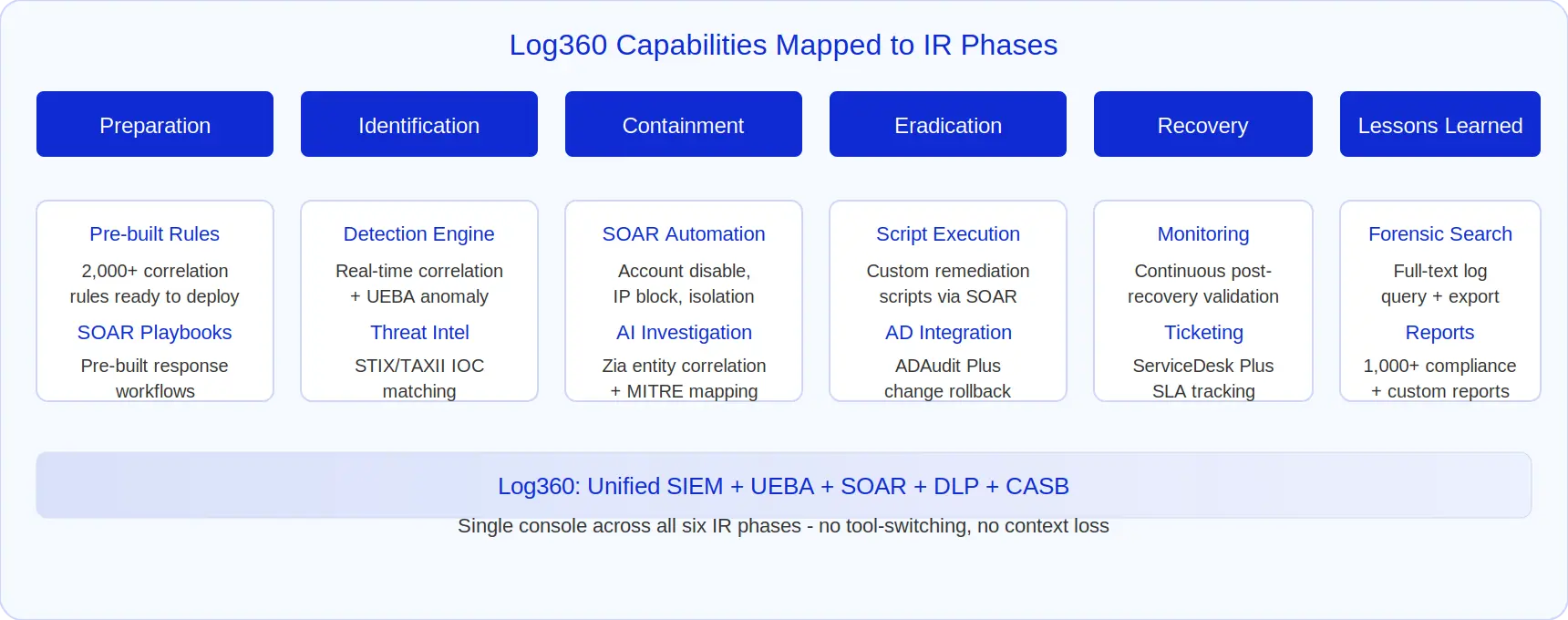
An IR plan is only as effective as the tools that execute it. The gap between "what the plan says" and "what the analyst does" is where incident response breaks down. Log360 closes that gap by providing a unified console that covers every IR phase, from detection through automated response to forensic review, without tool-switching or data fragmentation.
Preparation: Detection rules and playbooks ready from day one
Log360 ships with 2,000+ correlation rules mapped to the MITRE ATT&CK framework, covering all 14 tactics. This means your detection capability is operational the day you deploy, not after months of custom rule development. For your IR plan, this translates to immediate coverage of common incident types: phishing, brute-force attacks, credential compromise, web application exploitation, and insider threats.
The SOAR automation engine includes pre-built playbooks for common incident types. Each playbook maps to a SOAR workflow that automates the repeatable steps (enrichment, evidence collection, ticket creation, notification) while staging containment actions for analyst approval. Your IR plan's playbooks and Log360's SOAR playbooks should be the same document, not parallel systems.
Identification: Real-time correlation + UEBA + threat intelligence
Log360's detection works across three layers simultaneously. The real-time correlation engine matches event patterns against known attack signatures. UEBA detects behavioral anomalies that signature-based rules miss: compromised accounts operating within "normal" parameters but deviating from the user's established baseline. Threat intelligence integration via STIX/TAXII feeds automatically enriches events with IOC reputation data, adding context before the analyst touches the alert.
When these three layers converge on the same entity (a correlation rule fires, the user's UEBA risk score spikes, and an associated IP matches a known IOC), the resulting alert carries enough context for the analyst to validate and classify the incident in minutes rather than building the investigation from scratch.
Containment: SOAR-driven response in seconds
Once an incident is confirmed, Log360's SOAR workflows execute containment actions at machine speed. The analyst reviews the AI-generated investigation summary, confirms the threat assessment, and approves the staged containment: account disable, IP block, endpoint isolation, or custom script execution. The containment executes across integrated systems in seconds.
For pre-authorized response scenarios (as defined in your IR plan), containment can be fully automated with no human gate. Low-risk, high-confidence actions, like blocking an IP that matches three threat intelligence feeds or quarantining a known-malicious email across all mailboxes, execute automatically while the SOAR workflow creates the ticket and notifies the SOC lead.
Eradication and recovery: Guided remediation
Log360's Zia AI investigation generates remediation recommendations based on the incident's MITRE ATT&CK mapping. If the incident involved credential compromise followed by persistence mechanism creation, Zia's investigation summary identifies both the immediate credential issue and the persistence artifacts that need removal, preventing incomplete eradication.
During recovery, Log360 maintains enhanced monitoring on recovered systems. You can configure temporary custom correlation rules targeting the specific IOCs from the incident, providing early warning if the threat actor attempts re-entry through the same or adjacent attack vectors.
Lessons learned: Forensic evidence for post-incident review
Every action during the incident (alerts, investigations, response actions, ticket updates, analyst notes) is logged in Log360 with timestamps. The forensic search engine lets you query across the full incident timeline, reconstruct the sequence of events, and identify where detection or response delays occurred. Export the timeline as an incident report for the post-incident review, feeding improvements directly back into your detection rules and SOAR playbooks.
See Log360's incident response capabilities in action
From correlation-based detection through SOAR-automated containment to forensic post-incident review - see how Log360 executes every phase of your IR plan in a single console.
FAQ
1. What is an incident response plan?
An incident response plan is a documented framework that defines how your organization detects, investigates, contains, eradicates, and recovers from cybersecurity incidents. It assigns team roles, establishes severity classifications, provides response playbooks, and defines communication protocols. The NIST SP 800-61 framework is the most widely adopted foundation, and integrating the plan with a SIEM solution like Log360 ensures the detection and response steps are executable rather than theoretical.
2. What are the six phases of incident response?
The six phases from NIST SP 800-61 are: Preparation (team, tools, playbooks), Identification (detect and validate), Containment (limit blast radius), Eradication (remove root cause), Recovery (restore and validate), and Lessons Learned (review and improve). These form a continuous cycle - findings from Lessons Learned feed directly back into Preparation. Log360 maps to each phase through its correlation engine, SOAR automation, and forensic search.
3. How does a SIEM support an incident response plan?
A SIEM provides the detection and evidence infrastructure that makes an IR plan executable. It centralizes logs from all sources, applies real-time correlation rules to surface threats, and provides the forensic evidence for investigation and post-incident review. Log360 extends this with built-in SOAR workflows for automated response and integrated ticketing for incident tracking - closing the gap between the plan document and actual operations.
4. What should an incident response plan include?
An effective IR plan includes: incident classification criteria, severity matrix with response SLAs, IR team roles and contact information, response playbooks for each incident category, communication and escalation procedures, evidence preservation guidelines, recovery validation steps, and a post-incident review framework. The plan should be integrated with your SOAR platform so playbooks execute as automated workflows rather than manual checklists.
5. How often should you test your incident response plan?
Test quarterly through tabletop exercises (scenario walkthroughs with the IR team) and annually through full-scale technical simulations. Additionally, test after every real incident, major infrastructure change, or regulatory update. Automated response playbooks should be validated monthly to confirm SOAR workflows still behave correctly as the environment evolves. Organizations that test quarterly respond 40% faster during real incidents than those testing annually.
6. What is the difference between an incident response plan and a disaster recovery plan?
An incident response plan addresses security incidents (unauthorized access, malware, data breaches, insider threats) focusing on detection, containment, and eradication. A disaster recovery plan addresses business continuity after catastrophic events (hardware failures, natural disasters, site outages) focusing on system restoration. The plans overlap when a security incident causes operational disruption, so both should cross-reference each other and use shared incident management workflows.
7. How does Log360 help execute an incident response plan?
Log360 covers every IR phase in a single console: 2,000+ correlation rules for identification, SOAR playbooks for automated containment, AI investigation via Zia for rapid triage, ServiceDesk Plus integration for incident tracking, and forensic log search for post-incident review. The unified platform eliminates tool-switching during active incidents, the factor that causes the most response delays.

