

- Home
- Play books
- Okta - Account lockout response
Okta - Account lockout response
In this page
Playbook Description
This playbook streamlines user lockout investigations by assessing IP reputation, device trust, and historical activity alerts. When a threat is verified, it automatically suspends the user, terminates active sessions, and blocks malicious IPs to secure the environment.
MITRE ATT&CK mapping
| Tactics | Techniques | Sub-techniques |
|---|---|---|
| Impact (TA0040) | Account Access Removal (T1531) | - |
| Credential Access (TA0006) | Brute Force (T1110) | - |
MITRE D3FEND mapping
| Tactics | Techniques | Sub-techniques |
|---|---|---|
| Credential Eviction (D3-CE) | D3 - CE | Account Locking (D3-AL) |
Playbook input type
Alert
Prerequisites
API access with below scopes:
- okta.networkZones.read
- okta.networkZones.manage
- okta.policies.manage
Playbook creation input
connectionName - Connection name of VirusTotal
Dependencies
Extensions - Okta
- okta_suspendAUser
- okta_endUserSession
- okta_resetPassword
- okta_getUserRole
Extensions - VirusTotal
- virustotal_ipReputation
- virustotal_calculateRiskScore
Utility functions
- utility_getRequiredTime
- utility_extractFieldFromList
- utility_validateResponses
- utility_convertTimeToUTC
Connections
- VirusTotal API connection – Connect to the VirusTotal API using an API key to retrieve and check malware IP details.
- Okta connection – Need to connect Okta using API Key.
Sub playbooks
Okta - Block IP or ASN
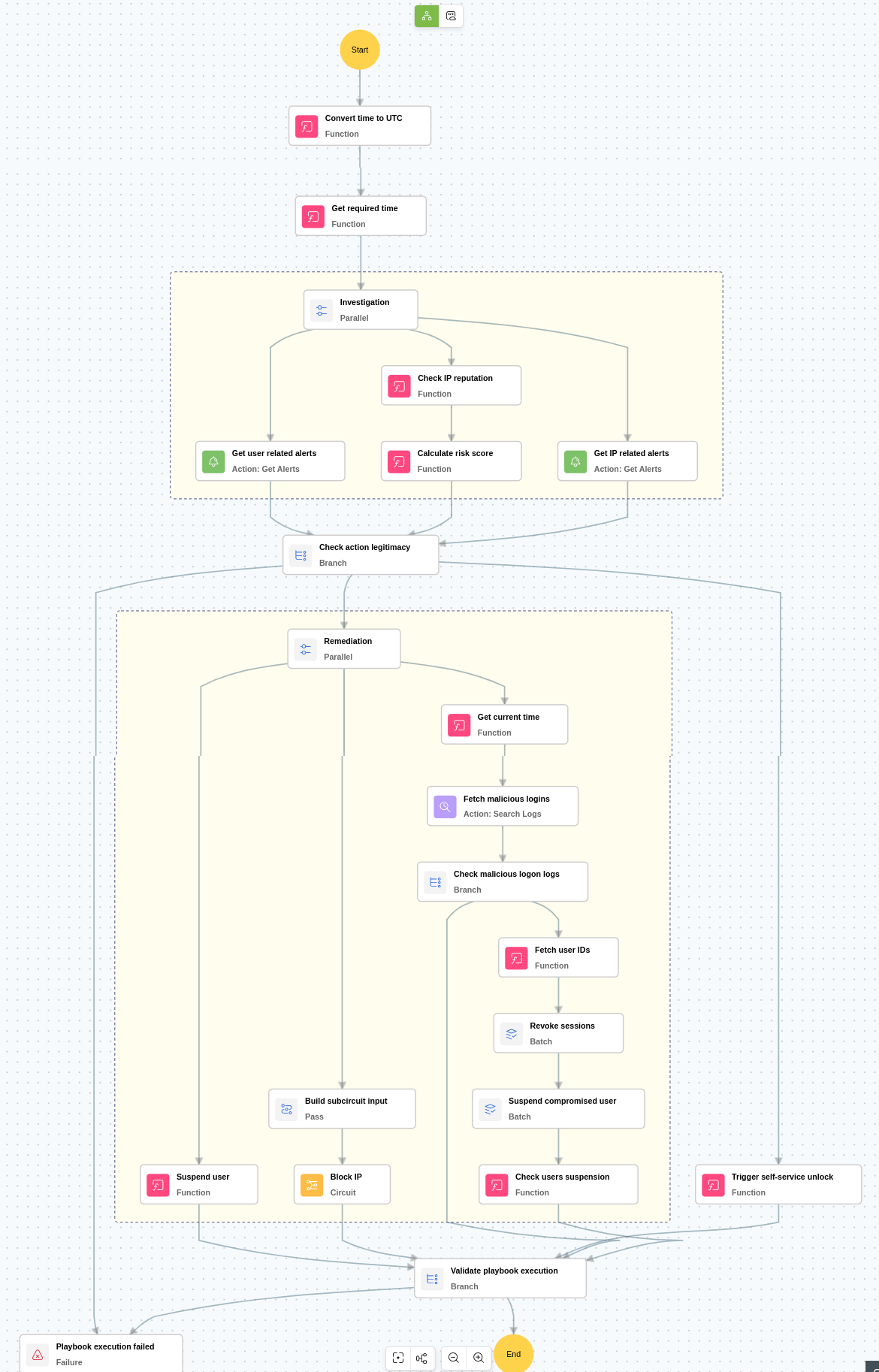
Execution workflow
Investigation:
- Checks the IP reputation to identify whether the access originated from a known malicious source.
- Checks whether the Okta login is from an unknown or unrecognized device to detect unauthorized or suspicious access.
- Checks whether critical alerts were triggered in the past three days for the same actor to determine whether the user has a history of suspicious or malicious behavior.
- Checks whether critical alerts were triggered in the past three days for the same IP address to determine whether the IP has a history of suspicious or malicious activity.
Decision logic:
- Proceeds to remediation if:
- The IP risk score is high, or
- The IP risk score is medium and there is a history of IP related critical alerts, or
- The Okta login is from an unknown or unrecognized device and there is a history of user related critical alerts.
- Skips remediation if none of the above conditions indicate malicious activity.
Remediation:
- Suspends the affected Okta user account to prevent further unauthorized activity.
- Checks for any additional logins from the same IP address to identify other potentially compromised sessions.
- Revokes active sessions of other compromised users to immediately block ongoing malicious access.
- Suspends other compromised accounts to contain the threat across users.
- Blocks the source IP address associated with the malicious activity to mitigate ongoing and future threats.
- Notifies the security team about the actions taken.
Post execution procedure
- Verify zone enforcement: Confirm that the newly created or updated network zone is correctly applied across all relevant Okta security policies.
- Handling false positives: If later analysis determines that the blocked IP or ASN is not malicious, promptly remove it from the network zone created by the playbook to restore normal access and prevent unnecessary disruption.

