

- Home
- Play books
- Cisco Duo - Block IP
Cisco Duo - Block IP
In this page
Playbook Description
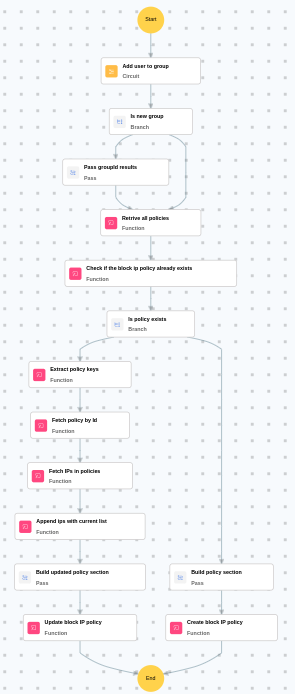
It adds the flagged user to a designated group via a sub‑playbook ("Duo - Add User to Group"), then ensures a Duo policy blocks the offending IP address — either by updating an existing block list or creating a new one if none exists yet.
MITRE D3FEND mapping
| Tactics | Techniques | Sub-techniques |
|---|---|---|
| Isolate (D3 - Isolate) | D3 - NI | Network Traffic Filtering (D3 - NTF) |
Playbook input type
Alert
Prerequisites
- Cisco Duo configuration - Need to connect Cisco Duo using HMAC connection with Integration and secret key.
Dependencies
Extensions - Cisco Duo
- ciscoduo_updatePolicy
- ciscoduo_createPolicy
- ciscoduo_retrievePolicies
- ciscoduo_retrievePolicyById
Utility functions:
- utility_extractFieldFromList
- utility_appendValues
- utility_filterAndMatchEvents
Connections
Cisco Duo connection - Need to connect Cisco Duo using Integration Key, Secret Key and API Hostname.
Sub playbooks
- Cisco Duo - Add user to group
Execution workflow
Investigation:
- Executes the "Cisco Duo - Add user to group" sub-playbook.
Decision logic:
- Proceeds to remediation based on the following conditions:
- Related investigation findings are present.
- If no malicious indicators are confirmed, the playbook ends with no further actions.
Remediation:
- Retrieves all policies.
- Checks if the block IP policy already exists.
- Checks whether policy exists.
- Builds the policy section.
- Creates the block IP policy.
Post execution procedure
- Review the blocked IP address to ensure no legitimate traffic was affected.
- Verify that the block IP policy was successfully created or updated in Cisco Duo.
- Monitor for any bypass attempts from alternate IP addresses by the same threat actor.
- Review the IP block policy periodically and remove entries that are no longer relevant.
- Investigate the source of the blocked IP for additional threat intelligence.