

- Home
- Play books
- Windows - Credential theft containment
Windows - Credential theft containment
In this page
Playbook Description
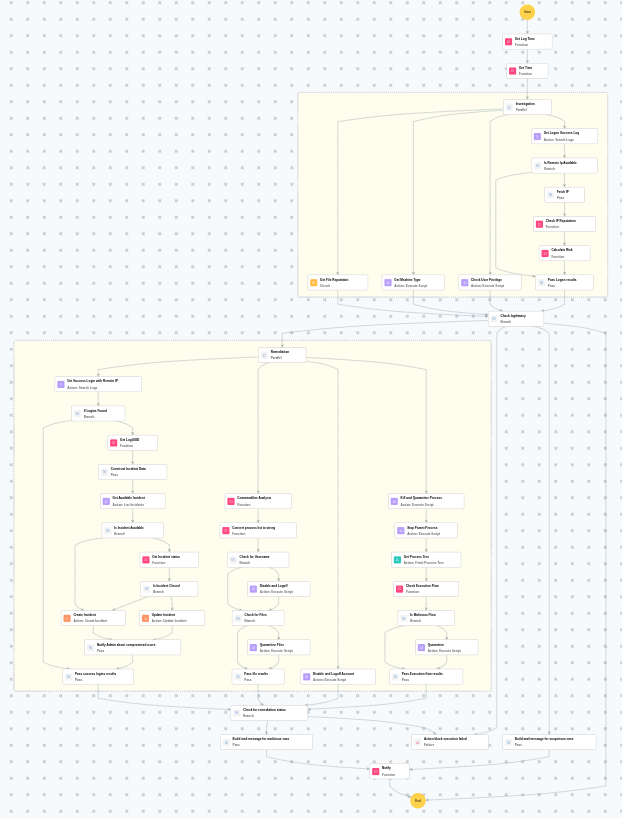
This playbook investigates credential theft alerts by analyzing file reputation, user privileges, machine type, and successful logon events from remote IPs in parallel, then determines response severity — automatically remediating confirmed threats by killing and quarantining malicious processes, stopping parent processes, disabling and logging off the compromised user, and quarantining suspicious files, while sending a manual-review notification for lower-confidence suspicious cases.
MITRE ATT&CK mapping
| Tactics | Techniques | Sub-techniques |
|---|---|---|
| Credential Access(TA0006) | Brute Force(T1110) | Password Spraying(T1110.003) |
| Credential Access(TA0006) | Brute Force(T1110) | Credential Stuffing(T1110.004) |
MITRE D3FEND mapping
| Tactics | Techniques | Sub-techniques |
|---|---|---|
| Evict(D3-Evict) | Credential Eviction(D3-CE) | Account Locking(D3-AL) |
Playbook input type
Alert
Prerequisites
- PowerShell 3.0+
- Script Execution Policy
- Windows Credentials - Go to Settings -> Devices -> Windows Devices. Provide/update the credentials of the respective Windows device with admin privileges.
Playbook creation input
- connectionName - Provide the VirusTotal connection name for executing the VirusTotal APIs.
Dependencies
Extensions - VirusTotal
- virustotal_ipReputation
- virustotal_calculateRiskScore
Utility functions:
- utility_convertToString
- utility_extractFieldFromList
- windows_commandLineAnalysisHydra
- windows_detectMaliciousProcessChain
- utility_getRequiredTime
- utility_convertTimeToUTC
- utility_getIncidentStatusDetails
- utility_sendMail
Scripts
| Script Name | Description | Arguments |
|---|---|---|
| GetMachineType.ps1 | Checks whether the local machine is joined to an Active Directory domain. Returns True if the machine is domain-joined, False otherwise. | -- |
| StopAndQuarantineProcess.ps1 | # Terminates processes by PID (decimal/hex) or by executable file path, then quarantines the executable to a forensic directory. # Protects critical OS processes and the SOAR agent from termination. | ProcessIdentifiers |
| QuarantineFiles.ps1 | Moves one or more files to a quarantine directory ( %USERPROFILE%\Forensic_Quarantine ), strips inherited permissions via .NET ACL API, and grants read-only access to Administrators. Skips protected PowerShell executables. | filePaths |
| TerminateSession.ps1 | Logs off one or more user sessions using logoff , with optional RDP-only filtering by remote IP | userName |
| FetchUserDetails.ps1 | Fetches detailed user information (password expiry, group memberships, admin status) for both domain (AD) and local users | name |
| StopProcess.ps1 | Stops processes by PID or file path. Supports hex PIDs and comma-separated inputs. Skips protected PowerShell executables. | ProcessIdentifiers |
Connections
VirusTotal connection - Need to connect with VirusTotal API and fetch access key to check the malware IP/URL/File details.
Sub playbooks
- Windows - File enrichment
- Log360Cloud - Create or Update Incident
Execution workflow
Investigation:
- Executes the "Windows - File enrichment" sub-playbook.
- Checks the user privileges.
- Retrieves the machine type.
- Retrieves the Logon Success log.
- Checks whether remote IPis available.
- Fetches the IP.
- Checks the IPreputation.
- Calculates the risk.
- Passes logon results.
Decision logic:
- Proceeds to remediation based on the following conditions:
- The file or process reputation indicates high risk.
- The calculated risk score exceeds the malicious threshold.
- The user has administrator privileges.
- The file or process reputation indicates medium or higher risk.
- If suspicious but not confirmed malicious, sends a notification for manual review and stops further actions.
- If no malicious indicators are confirmed, the playbook ends with no further actions.
Remediation:
- Terminates and quarantines the process.
- Stops the parent process.
- Retrieves the process tree.
- Checks the execution flow.
- Checks whether malicious flow exists.
- Quarantines the process.
- Passes execution flow results.
- Disables and logs off account.
- Analyzes the command line for suspicious patterns, URLs, or file paths.
- Checks for username.
- Disables and logs off the user.
- Checks for files.
- Quarantines the files.
- Retrieves successful logins with remote IP.
- Checks if such logins are found.
- Retrieves the LogUUID.
- Construct incident data.
- Retrieves the available incident.
- Checks whether incident is available.
- Creates the incident.
- Notifies the Admin about compromised users.
- Passes successful login results.
- Checks for remediation status.
- Builds the notification email with remediation details and findings.
- Sends a notification email regarding the actions taken and required next steps.
Post execution procedure
- Reset the password for the user and other accounts targeted by the brute-force attack.
- Review the incident for evidence of successful logins from suspicious remote IPs.
- Check for lateral movement from the compromised host.
- Audit accounts for unauthorized privilege escalation.
- Implement account lockout policies if not already in place.

