

- Home
- Play books
- Windows - InstallUtil Download Investigation
Windows - InstallUtil Download Investigation
In this page
Playbook Description
Investigates InstallUtil download activities by analyzing process reputation, command line URLs, and process tree. If malicious, the playbook terminates the process, quarantines files, blocks URLs, and restricts execution.
MITRE ATT&CK mapping
| Tactics | Techniques | Sub-techniques |
|---|---|---|
| Defense Evasion(TA0005) | System Binary Proxy Execution(T1218) | InstallUtil(T1218.004) |
MITRE D3FEND mapping
| Tactics | Techniques | Sub-techniques |
|---|---|---|
| Model(D3-Model) | Application Hardening(D3-AH) | Process Segment Execution Prevention(D3-PSEP) |
Playbook input type
Alert
Prerequisites
- VirusTotal connection - Need to connect with VirusTotal API to check URL and file hash reputation. Keep your API key secure and do not share it.
- Log360 Cloud - Connection to execute PowerShell scripts on the target Windows host for investigation and remediation actions.
- Privileges - Admin privileges on the target host are required.
Playbook creation input
- connectionName - Provide the VirusTotal connection name for executing the VirusTotal APIs.
Dependencies
Extensions - VirusTotal
- virustotal_fileReputation
Utility functions:
- utility_convertToString
- utility_getRequiredTime
- utility_extractFieldFromList
- utility_setKeyValue
- utility_convertTimeToUTC
- windows_commandLineAnalysis
- windows_detectMaliciousProcessChain
- utility_sendMail
Scripts
| Script Name | Description | Arguments |
|---|---|---|
| TerminateSession.ps1 | Logs off one or more user sessions using logoff, with optional RDP-only filtering by remote IP. | UserNames |
| StopAndQuarantineProcess.ps1 | Terminates processes by PID (decimal/hex) or by executable file path, then quarantines the executable to a forensic directory. Protects critical OS processes and the SOAR agent from termination. | ProcessIdentifiers |
| BlockURLTraffic.ps1 | Blocks traffic to a given URL by resolving its domain to IP addresses, creating inbound and outbound Windows Firewall block rules (via New-NetFirewallRule) for each resolved IP, and flushing the DNS cache. | Url |
| AddSoftwareRestrictionPolicy.ps1 | Creates Software Restriction Policy (SRP) rules in the Windows registry to block execution of programs from specified paths. For each path, it checks if an SRP rule already exists — if so and it's not set to "Disallowed", it updates the existing rule; otherwise it creates a new GUID-keyed rule under HKLM:\SOFTWARE\Policies\Microsoft\Windows\Safer\CodeIdentifiers\0\Paths. Enables SRP enforcement (TransparentEnabled=1, PolicyScope=0) on each run. | RestrictedPath |
| EnableASARuleForMaliciousDownloadViaWeb.ps1 | Enables the ASR rule to prevent malicious web downloads (Rule ID: BE9BA2D9-53EA-4CDC-84E5-9B1EEEE46550). | - |
| QuarantineFiles.ps1 | Moves one or more files to a quarantine directory (%USERPROFILE%\Forensic_Quarantine), strips inherited permissions via .NET ACL API, and grants read-only access to Administrators. Skips protected PowerShell executables. | FilePaths |
Connections
VirusTotal connection - Need to connect with VirusTotal API and fetch access key to check the malware IP/URL/File details.
Sub playbooks
- Windows - File enrichment
- VirusTotal - URL reputation check
- Log360 Cloud - Create or update incident
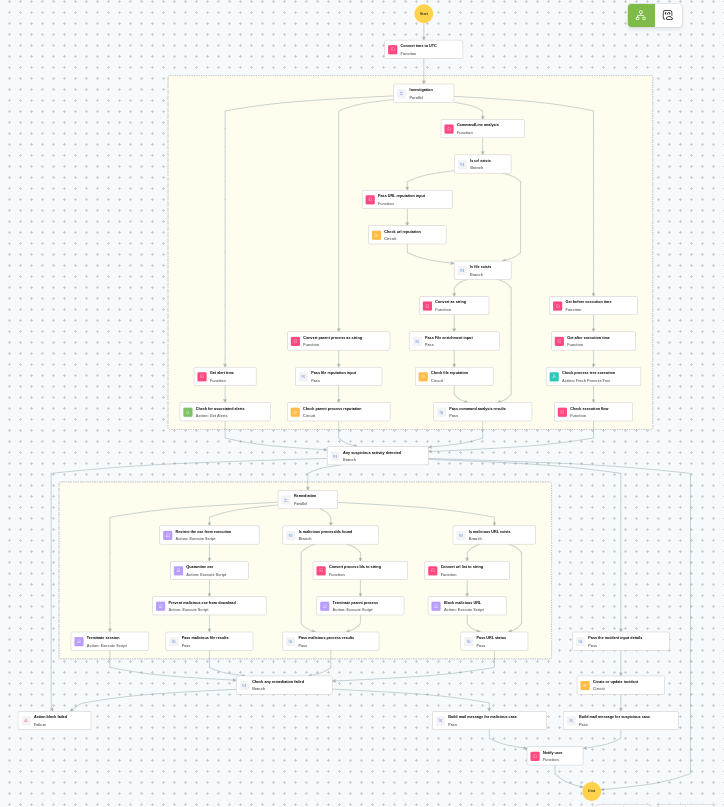
Execution workflow
Investigation:
- Checks for associated alerts.
- Executes the "Windows - File enrichment" sub-playbook.
- Analyzes the command line for suspicious patterns, URLs, or file paths.
- Checks whether URL exists.
- Pass URL reputation input.
- Executes the "VirusTotal - URL reputation check" sub-playbook.
- Checks whether file exists.
- Executes the "Windows - File enrichment" sub-playbook.
- Pass command analysis results.
- Checks the process tree execution.
- Checks the execution flow.
Decision logic:
- Proceeds to remediation based on the following conditions:
- The file or process reputation indicates high risk.
- The file or process reputation indicates medium or higher risk.
- A malicious execution flow was detected in the process tree.
- Malicious IP addresses were identified.
- Related investigation findings are present.
- If no malicious indicators are confirmed, the playbook ends with no further actions.
Remediation:
- Terminates the session.
- Restrict the exe from execution.
- Quarantines the exe.
- Prevent malicious exe from download.
- Pass malicious file results.
- Terminates the parent process.
- Checks whether malicious URL exists.
- Blocks the malicious URL.
- Checks if any remediation failed.
- Builds the notification email with remediation details and findings.
- Sends a notification email regarding the actions taken and required next steps.
Post execution procedure
- Review the quarantined files for further analysis and threat intelligence extraction.
- Investigate whether the downloaded payload was executed before remediation.
- Check for any additional LOLBin abuse or living-off-the-land techniques by the user.
- Review network logs for any data exfiltration attempts from the affected host.
- Audit other endpoints in the organization for similar InstallUtil abuse patterns.