

- Home
- Play books
- Windows - Privilege escalation threat containment
Windows - Privilege escalation threat containment
In this page
Playbook Description
This playbook investigates privilege-escalation alerts by evaluating process/file reputation, malicious process-chain behavior, sudo-related execution anomalies, and recent escalation events, then automatically remediates confirmed high-risk threats by terminating and quarantining malicious/related processes and files, logging off compromised and escalated users, and removing persistence, while routing medium-risk activity to manual review with notification.
MITRE ATT&CK mapping
| Tactics | Techniques | Sub-techniques |
|---|---|---|
| Defense Evasion(TA0005) | Masquerading(T1036) | Masquerade Task or Service(T1036.004) |
| Privilege Escalation(TA0004) | Exploitation for Privilege Escalation(T1068) |
MITRE D3FEND mapping
| Tactics | Techniques | Sub-techniques |
|---|---|---|
| Detect(D3-Detect) | Identifier Analysis(D3-ID) | File Hash Reputation Analysis(D3-FHRA) |
| Evict(D3-Evict) | Credential Eviction(D3-CE) | Account Locking(D3-AL) |
Playbook input type
Alert
Prerequisites
- Windows device configuration - Please provide Windows Administrator credentials in Windows device configuration page.
- Username: DOMAIN\Administrator or .\Administrator (for local accounts). Password: .
Playbook creation input
- connectionName - Provide the VirusTotal connection name for executing the VirusTotal APIs
Dependencies
Extensions - VirusTotal
- virustotal_fileReputation
- virustotal_calculateRiskScore
Utility functions:
- utility_extractFieldFromList
- windows_commandLineAnalysisSweetPotato
- windows_detectMaliciousProcessChain
- utility_convertToString
- utility_convertTimeToUTC
- utility_getRequiredTime
- utility_sendMail
Scripts
| Script Name | Description | Arguments |
|---|---|---|
| QuarantineFile.ps1 | Moves one or more files to a quarantine directory ( %USERPROFILE%\Forensic_Quarantine ), strips inherited permissions via .NET ACL API, and grants read-only access to Administrators. Skips protected PowerShell executables. | FilePaths |
| TerminateSession.ps1 | Logs off one or more user sessions using logoff , with optional RDP-only filtering by remote IP | UserNames |
| StopAndQuarantineProcess.ps1 | # Terminates processes by PID (decimal/hex) or by executable file path, then quarantines the executable to a forensic directory. # Protects critical OS processes and the SOAR agent from termination. | ProcessIdentifiers |
| FetchPersistenceEntries.ps1 | Scans for persistence mechanisms including scheduled tasks, registry Run/RunOnce keys, startup folder entries, and services to identify potential malicious persistence | - |
| StopProcess.ps1 | Stops processes by PID or file path. Supports hex PIDs and comma-separated inputs. Skips protected PowerShell executables. | ProcessIdentifiers |
Connections
VirusTotal connection - Need to connect with VirusTotal API and fetch access key to check the malware IP/URL/File details.
Sub playbooks
- Windows - File enrichment
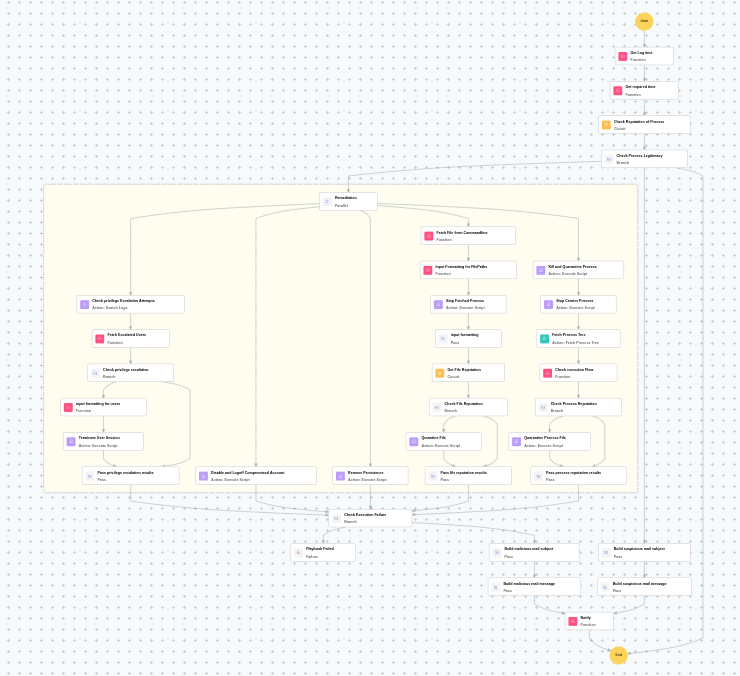
Execution workflow
Investigation:
- Executes the "Windows - File enrichment" sub-playbook.
Decision logic:
- Proceeds to remediation based on the following conditions:
- The file or process reputation indicates high risk.
- If suspicious but not confirmed malicious, sends a notification for manual review and stops further actions.
- If no malicious indicators are confirmed, the playbook ends with no further actions.
Remediation:
- Checks for privilege escalation attempts.
- Fetches the escalated users.
- Checks the privilege escalated.
- Terminates the user session.
- Passes privilege escalation results.
- Disables and logs off compromised account.
- Removes persistence.
- Analyzes the command line for suspicious patterns, URLs, or file paths.
- Stops the fetched process.
- Formats input for sub playbook.
- Executes the "Windows - File enrichment" sub-playbook.
- Checks the file reputation.
- Quarantines file.
- Terminates and quarantines process.
- Stops the creator process.
- Fetches the process tree.
- Checks the execution flow.
- Checks the process reputation.
- Quarantines the process file.
- Passes process reputation results.
- Validates if all remediation actions are completed successfully.
- Builds the malicious mail subject.
- Builds the notification email with remediation details and findings.
- Sends a notification email regarding the actions taken and required next steps.
Post execution procedure
- Verify that all privilege escalation attempts have been contained and compromised accounts are disabled.
- Review quarantined files and terminated processes for further forensic analysis.
- Investigate the attack vector and check for additional persistence mechanisms.
- Audit other accounts for similar privilege escalation patterns.
- Review and strengthen endpoint privilege management policies.
- Monitor the affected endpoint for recurring escalation attempts.