

- Home
- Play books
- Windows - Repeated registry entry failure analysis
Windows - Repeated registry entry failure analysis
In this page
Playbook Description
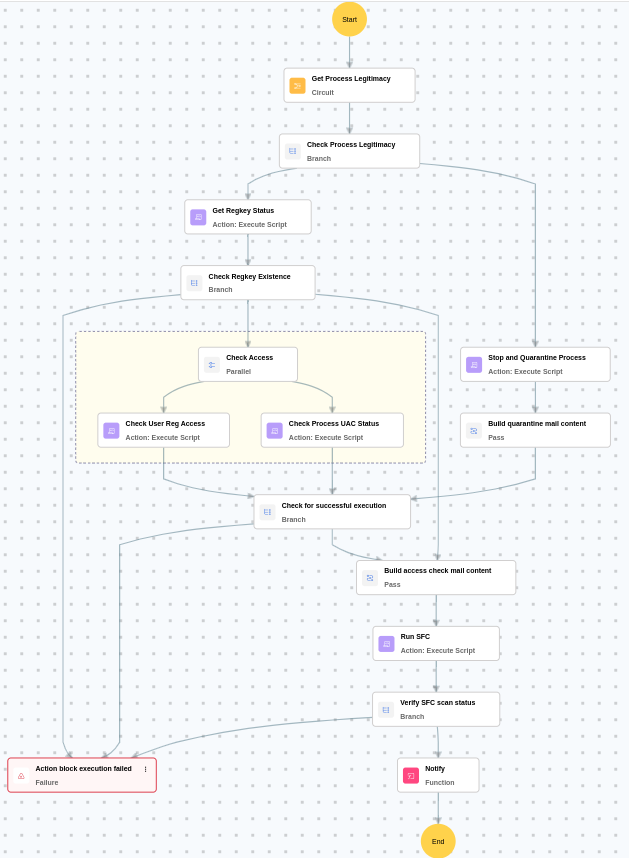
This playbook investigates repeated registry entry modifications by evaluating process legitimacy, then — for high/medium-risk processes — automatically stops and quarantines the malicious process, while for legitimate processes, it verifies registry key existence, checks user access permissions, and evaluates UAC virtualization status before sending the appropriate notification.
MITRE ATT&CK mapping
| Tactics | Techniques | Sub-techniques |
|---|---|---|
| Persistence(TA0003) | Modify Registry(T1112) | - |
| Persistence(TA0003) | Boot or Logon Autostart Execution(T1547) | Registry Run Keys / Startup Folder(T1547.001) |
MITRE D3FEND mapping
| Tactics | Techniques | Sub-techniques |
|---|---|---|
| Detect(D3-Detect) | Identifier Analysis(D3-ID) | File Hash Reputation Analysis(D3-FHRA) |
| Isolate(D3-Isolate) | Content Filtering(D3-CF) | Content Quarantine(D3-CQ) |
| Evict(D3-Evict) | Process Eviction(D3-PE) | Process Termination(D3-PT) |
Playbook input type
Alert
Prerequisites
- PowerShell 3.0+
- Script Execution Policy
- Windows Credentials - Go to Settings -> Devices -> Windows Devices. Provide/update the credentials of the respective Windows device with admin privileges.
Dependencies
Utility functions:
- utility_sendMail
Scripts
| Script Name | Description | Arguments |
|---|---|---|
| VerifyRegKeyExist.ps1 | Checks whether a given registry key exists, with automatic conversion from native \REGISTRY\... paths to standard HKEY_... format. | RegKey |
| IsUACVirtualizationEnabled.ps1 | Checks whether UAC Virtualization is enabled for a given process by reading the system-wide EnableVirtualization registry key and determining (via WMI/CIM process-owner query) whether the process runs under a system account (exempt from virtualization) or a standard user account (subject to virtualization). | ProcessID |
| CheckUserACLToRegKey.ps1 | Checks whether a specified user has access control entries on a given registry key. | KeyPath, User |
| RunSystemFileChecker.ps1 | Runs DISM /Restorehealth followed by SFC /scannow to repair corrupted system files. | RegKey |
| StopAndQuarantineProcess.ps1 | Terminates processes by PID (decimal/hex) or by executable file path, then quarantines the executable to a forensic directory. Protects critical OS processes and the SOAR agent from termination. | ProcessIdentifiers |
Sub playbooks
- Windows - File enrichment
Execution workflow
Investigation:
- Executes the "Windows - File enrichment" sub-playbook.
- Checks the process legitimacy.
- Stops and quarantines the process.
- Builds the quarantine mail content.
- Checks for successful execution.
- Builds the access check mail content.
- Runs the SFC.
- Verifies the SFC scan status.
- Checks the execution path.
- Builds the mail for legitimate case.
- Sends a notification email to the relevant stakeholders.
Post execution procedure
- Review the quarantined process artifacts for forensic analysis.
- Investigate the source of the malicious process on the host.
- Check for any additional indicators of compromise related to the process.
- Review SFC scan results for any corrupted system files.
- Monitor the host for recurring registry modification alerts.

