

- Home
- Play books
- Okta - Self-service unlock abuse response
Okta - Self-service unlock abuse response
In this page
Playbook Description
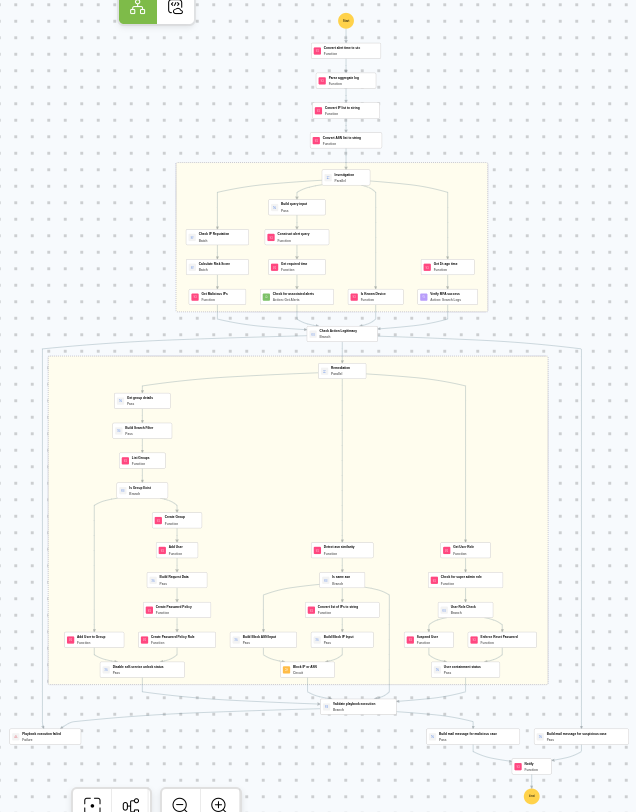
This playbook checks IP legitimacy, associated alerts, device trust, and MFA success. If malicious, it disables self-service unlock, checks user role, suspends or enforces password reset based on privilege, blocks the source IP, and alerts the security team.
MITRE ATT&CK mapping
| Tactics | Techniques | Sub-techniques |
|---|---|---|
| Initial Access(TA0001) | Valid Accounts(T1078) | Cloud Accounts(T1078.004) |
MITRE D3FEND mapping
| Tactics | Techniques | Sub-techniques |
|---|---|---|
| Evict(D3-Evict) | Credential Eviction(D3-CE) | Account Locking(D3-AL) |
Playbook input type
Alert
Prerequisites
- VirusTotal API - Need to connect with VirusTotal API and fetch access key to check the malware IP details.
- Okta configuration - Need to connect Okta using API key.
Playbook creation input
- connectionName - Provide the VirusTotal connection name for executing the VirusTotal APIs
Dependencies
Extensions - Okta
- okta_suspendAUser
- okta_resetPassword
- okta_createPolicyRule
- okta_getUserRole
- okta_createPolicy
- okta_listGroup
- okta_createGroup
- okta_addToGroup
Extensions - VirusTotal
- virustotal_ipReputation
- virustotal_calculateRiskScore
Utility functions:
- utility_getRequiredTime
- utility_convertToString
- utility_convertTimeToUTC
- utility_extractMaliciousEntitiesByRiskScore
- utility_classifyListUniformity
- utility_constructQuery okta_detectDeviceType
- utility_parseAggregateLog
- utility_filterAndMatchEvents
- utility_sendMail
Connections
Okta connection - Need to connect Okta using API Key.
VirusTotal connection - Need to connect with VirusTotal API and fetch access key to check the malware IP/URL/File details.
Sub playbooks
- Okta - Block IP or ASN
Execution workflow
Investigation:
- Parses the aggregate log.
- Checks the IP reputation in batch.
- Calculates the risk score in batch.
- Identifies malicious entities based on their risk scores.
- Constructs alert query.
- Checks for associated alerts.
- Checks whether known device exists.
- Verifies if MFA is successful.
Decision logic:
- Proceeds to remediation based on the following conditions:
- Malicious IP addresses were identified.
- Related investigation findings are present.
- MFA related anomalies are detected.
- If suspicious but not confirmed malicious, sends a notification for manual review and stops further actions.
- If no malicious indicators are confirmed, the playbook ends with no further actions.
Remediation:
- Retrieves the group details.
- Builds the search filter.
- Lists the groups.
- Checks whether the group exist.
- Adds the user to the group.
- Disables the self-service unlock status.
- Detects the ASN similarity.
- Checks whether same ASN exists.
- Builds the Block ASN input.
- Executes the "Okta - Block IP or ASN" sub-playbook.
- Retrieves the user role.
- Checks for super admin role.
- Check user role.
- Suspends the user.
- Checks user containment status.
- Validates if all remediation actions are completed successfully.
- Builds the notification email with remediation details and findings.
- Sends a notification email regarding the actions taken and required next steps.
Post execution procedure
- Verify that remediation actions were successfully applied for the user.
- Review the blocked IP addresses and ASN numbers to ensure no legitimate traffic was affected.
- Confirm that the self-service unlock password policy is active and properly assigned.
- Investigate whether the compromised account was used to access any sensitive resources or data.
- Review Okta system logs for any lateral movement.
- Consider enforcing additional MFA factors for the affected user before re-enabling access.
- Audit other accounts in the organization for similar self-service unlock abuse patterns.

