

- Home
- Play books
- Windows - Unauthorized SAM export remediation
Windows - Unauthorized SAM export remediation
In this page
Playbook Description
Analyzes unauthorized SAM exports by checking process reputation, dumped file location, user behavior, and risk score. Remediates by quarantining dumped files, logging off the user, terminating processes, removing persistence, and alerting the security team.
MITRE ATT&CK mapping
| Tactics | Techniques | Sub-techniques |
|---|---|---|
| Credential Access(TA0006) | OS Credential Dumping(T1003) | Security Account Manager(T1003.002) |
| Credential Access(TA0006) | OS Credential Dumping(T1003) | LSA Secrets(T1003.004) |
MITRE D3FEND mapping
| Tactics | Techniques | Sub-techniques |
|---|---|---|
| Detect(D3-Detect) | Identifier Analysis(D3-ID) | File Hash Reputation Analysis(D3FHRA) |
| Detect(D3-Detect) | User Behavior Analysis(D3-UBA) | Local Account Monitoring(D3-LAM) |
| Detect(D3-Detect) | User Behavior Analysis(D3-UBA) | Domain Account Monitoring(D3-DAM) |
Playbook input type
Alert
Prerequisites
- PowerShell 3.0+
- Script Execution Policy
- Provide credentials with domain/local admin privileges.
- Windows Credentials - Go to Settings -> Devices -> Windows Devices. Provide/update the credentials of the respective Windows device with admin privileges.
Dependencies
Utility functions:
- utility_getRequiredTime
- utility_filterByStartsWith
- windows_commandLineAnalysisSam
- windows_detectMaliciousUser
- windows_detectMaliciousProcessChain
- utility_convertTimeToUTC
- utility_convertToString
- utility_sendMail
Scripts
| Script Name | Description | Arguments |
|---|---|---|
| QuarantineFiles.ps1 | Moves one or more files to a quarantine directory (%USERPROFILE%\Forensic_Quarantine), strips inherited permissions via .NET ACL API, and grants read-only access to Administrators. Skips protected PowerShell executables. | FilePaths |
| FetchUserDetails.ps1 | Fetches detailed user information (password expiry, group memberships, admin status) for both domain (AD) and local users. | Name |
| FetchPersistenceEntries.ps1 | Scans for persistence mechanisms including scheduled tasks, registry Run/RunOnce keys, startup folder entries, and services to identify potential malicious persistence. | - |
| StopProcess.ps1 | Stops processes by PID or file path. Supports hex PIDs and comma-separated inputs. Skips protected PowerShell executables. | ProcessIdentifiers |
| TerminateSession.ps1 | Logs off one or more user sessions using logoff, with optional RDP-only filtering by remote IP. | UserNames |
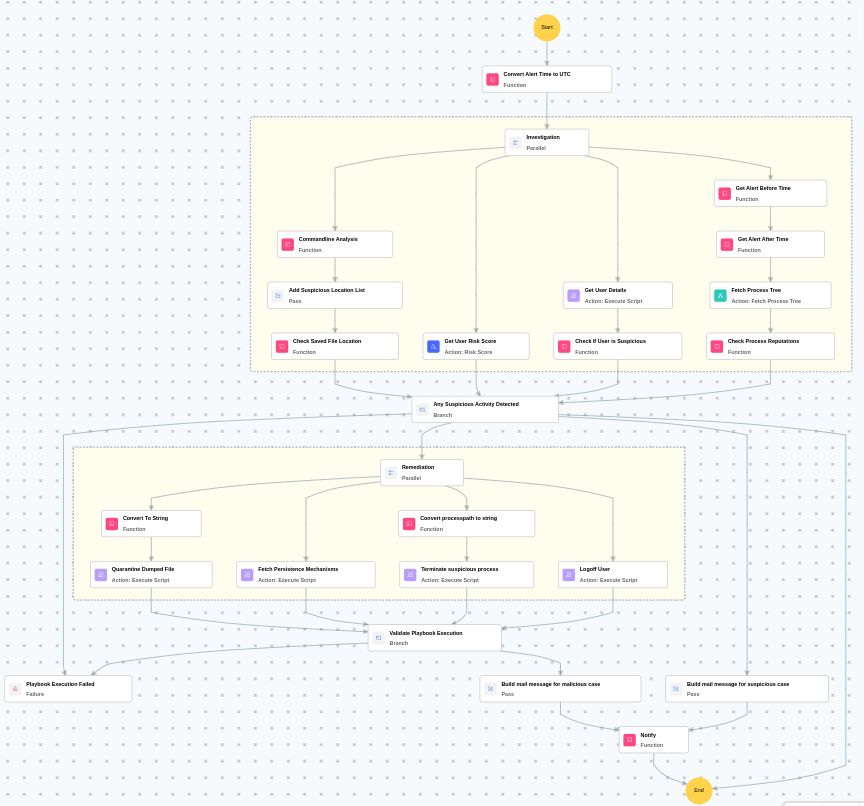
Execution workflow
Investigation:
- Analyzes the command line for suspicious patterns, URLs, or file paths.
- Adds the suspicious location list.
- Checks the saved file location.
- Retrieves the user details.
- Checks if user is suspicious.
- Retrieves the user risk score.
- Fetches the process tree.
- Checks the process reputations.
Decision logic:
- Proceeds to remediation based on the following conditions:
- The user is flagged as malicious based on behavior analysis.
- The user risk score exceeds the threshold.
- A malicious execution flow was detected in the process tree.
- If suspicious but not confirmed malicious, sends a notification for manual review and stops further actions.
- If no malicious indicators are confirmed, the playbook ends with no further actions.
Remediation:
- Quarantines the dumped file.
- Terminates the suspicious process.
- Fetches the persistence mechanisms.
- Logs off the user.
- Validates that all remediation actions are completed successfully.
- Builds the notification email with remediation details and findings.
- Sends a notification email regarding the actions taken and required next steps.
Post execution procedure
- Investigate the quarantined dump file for evidence of credential theft.
- Reset passwords for all accounts that may have been exposed via the SAM export.
- Review process execution history on the host for lateral movement indicators.
- Check if the compromised account was used to access other systems.
- Confirm if the affected user is notified about the actions taken.

