

- Home
- Play books
- Windows - Defender Protection
Windows - Defender Protection
In this page
Playbook Description
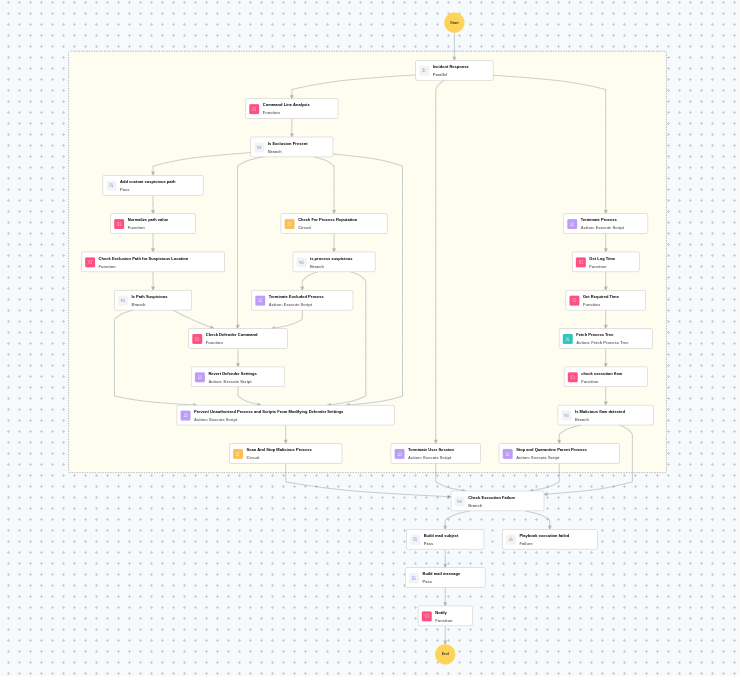
This playbook mitigates Windows Defender protection-tampering attacks by analyzing process lineage and command-line activity to detect malicious execution and unauthorized Defender exclusions. It stops the attack by terminating the malicious/excluded process and blocking further Defender-setting changes, then restores the altered Defender settings via a scan and quarantine action. It also handles the compromised account by terminating the user's session and notifies the security team with the investigation outcome.
MITRE ATT&CK mapping
| Tactics | Techniques | Sub-techniques |
|---|---|---|
| Defense Evasion(TA0005) | Impair Defenses(T1562) | Disable or Modify Tools(T1562.001) |
MITRE D3FEND mapping
| Tactics | Techniques | Sub-techniques |
|---|---|---|
| Detect(D3-Detect) | Process Analysis(D3-PA) | Script Execution Analysis(D3-SEA) |
Playbook input type
Alert
Prerequisites
- Windows Credentials - Go to Settings -> Devices -> Windows Devices. Provide/update the credentials of the respective Windows device with admin privileges.
Dependencies
Utility functions:
- utility_convertTimeToUTC
- utility_getRequiredTime
- windows_commandLineAnalysisWinDefender
- utility_filterByStartsWith
- windows_detectMaliciousProcessChain
- windows_createRevertDefenderCommand
- utility_normalizeValue
- utility_sendMail
Scripts
| Script Name | Description | Arguments |
|---|---|---|
| StopProcess.ps1 | Stops processes by PID or file path. Supports hex PIDs and comma-separated inputs. Skips protected PowerShell executables. | ProcessIdentifiers |
| StopAndQuarantineProcess.ps1 | Terminates processes by PID (decimal/hex) or by executable file path, then quarantines the executable to a forensic directory. Protects critical OS processes and the SOAR agent from termination. | ProcessIdentifiers |
| TerminateSession.ps1 | Logs off one or more user sessions using logoff, with optional RDP-only filtering by remote IP. | UserNames |
| RevertDefenderSettings.ps1 | Reverts Windows Defender settings tampered by an attacker. Removes malicious exclusions (path/extension/process) or re-enables Defender features that were disabled. Uses structured parameters with allowlist validation. | Action, Flag, Value |
| EnableASRToPreventModifyDefender.ps1 | Enables multiple ASR rules: block LSASS credential stealing, block malicious web downloads, and block obfuscated script execution. | - |
Sub playbooks
- Windows - File enrichment
- Windows Defender quick scan
Execution workflow
Investigation:
- Analyzes the command line for suspicious patterns, URLs, or file paths.
- Checks whether exclusion path is present.
- Adds the custom suspicious path.
- Normalizes path value.
- Checks the exclusion path for suspicious location.
- Checks whether the path is suspicious.
- Checks the Defender command.
- Revert Defender settings.
- Prevent unauthorized process and scripts from modifying Defender settings.
- Executes the "Windows Defender quick scan" sub-playbook.
- Terminates the process.
- Fetches the process tree.
- Checks the execution flow.
- Checks whether malicious flow is detected.
- Stops and quarantines the parent process.
- Terminates the user session.
- Checks the execution failure.
- Builds the mail subject.
- Builds the notification email with the analysis results.
- Sends a notification email to the relevant stakeholders.
Post execution procedure
- Verify that all reverted Defender settings are correctly restored and active.
- Confirm that unauthorized exclusion paths have been removed from Defender configuration.
- Review the quick scan results for any additional threats on the endpoint.
- Investigate terminated processes and their parent process trees for further indicators of compromise.
- Audit other endpoints for similar Defender tampering attempts.
- Consider enforcing tamper protection policies across the organization.

