Security orchestration in Log360

Security teams manage dozens of disconnected tools. When a phishing alert fires, the analyst manually pivots between email security, endpoint consoles, identity systems, and ticketing platforms. That fragmentation adds minutes or even hours to every incident. Log360's security orchestration eliminates those manual hand offs. Visual playbooks coordinate actions across your endpoints, firewalls, identity providers, and ITSM tools from a single workflow. A centralized Playbook Credentials authenticates each action automatically, and prebuilt integrations connect the tools you already run. As a result, you have a consistent, repeatable response that is executed in minutes instead of hours.

How Log360 benefits your organization


Eliminates manual hand offs between tools:

When an incident requires action across email, endpoint, identity, and ticketing systems, analysts typically copy and paste between consoles. Orchestration playbooks coordinate those multi-step actions into a single automated workflow, reducing mean time to respond (MTTR) by up to 60%.


Centralizes credential management:

A hardened Playbook Credentials stores authentication credentials for Windows, Linux, firewalls, and cloud platforms. Playbooks reference stored credentials at runtime. Analysts never see or handle raw secrets.


Enables rapid response design:

Drag-and-drop playbook builders (Zoho Qntrl engine for cloud, block-based builder for on-premises) let analysts design multi-step workflows without scripting. For advanced use cases, Python and Deluge custom functions are available.


Connects to your existing stack:

Bidirectional integrations with ServiceDesk Plus, Jira, ServiceNow, Zendesk, Endpoint Central, and security tools. Data flows in (alerts, context) and actions flow out (tickets, blocks, account changes) through prebuilt connectors.


Provides full execution auditability:

Every playbook run is logged with step-by-step status, timestamps, inputs, and outputs. Three months of execution history is retained per organization. Credential configurations and playbook associations are visible from a single management console.

How Log360 coordinates automated response

Tool sprawl slows response. When each action requires a different console, even well-trained analysts lose time. Log360's orchestration framework ties those tools together, executing automated workflows that leverage centralized credentials and prebuilt connectors across endpoints, firewalls, identity systems, and ITSM platforms.

  • AI-powered playbook engine
  • Centralized credential and ecosystem integration
  • Threat intelligence and MITRE ATT&CK-mapped response
  • Complete orchestration life cycle management
  •  

AI-powered playbook engine

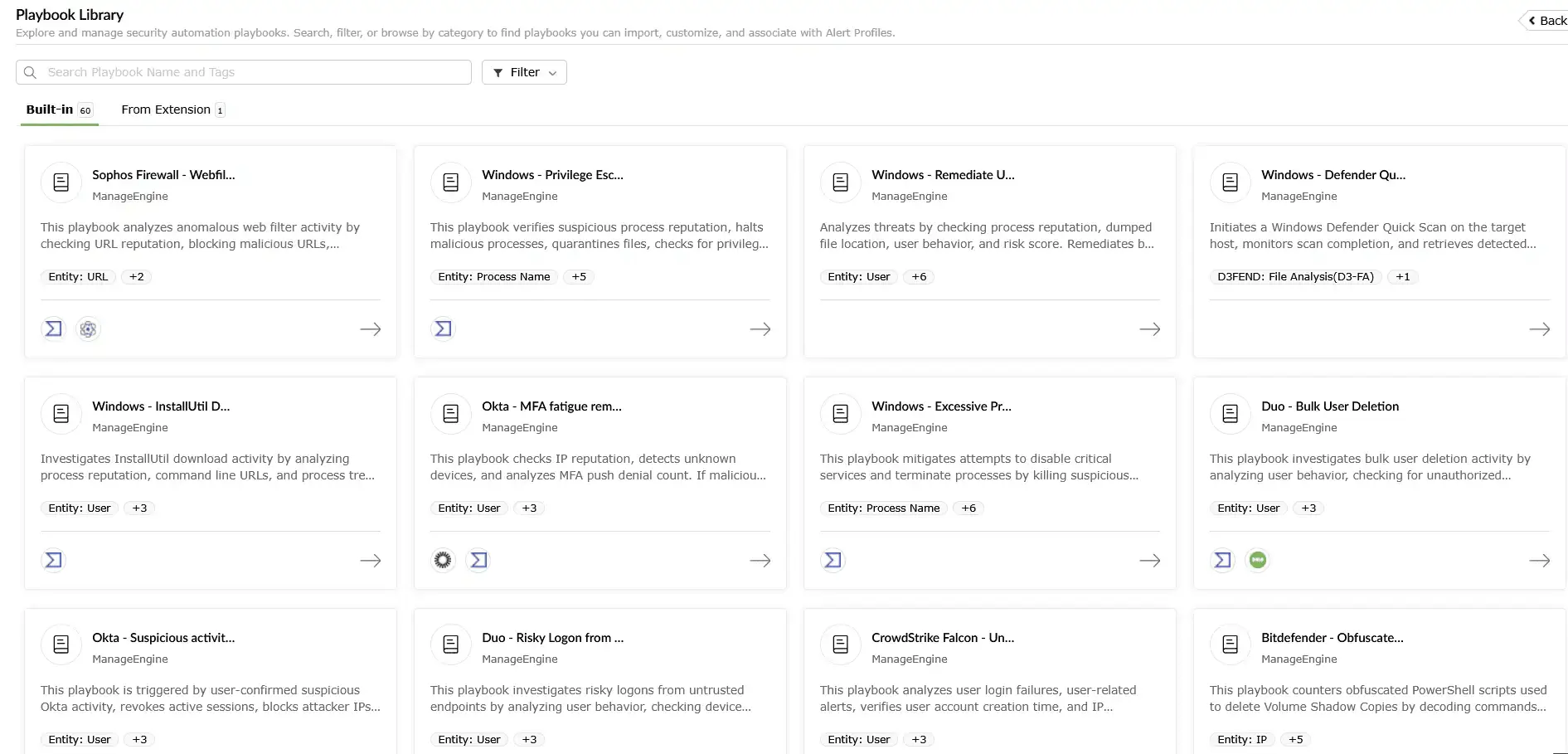
The orchestration core is a playbook engine that coordinates sequential and parallel response actions across your environment. For full details on the visual builder (Branch, Parallel, Wait, Batch, and Sub-playbook states), see the SOAR playbook builder overview.

  • Visual playbook design: The block-based builder (on-premises) and Zoho Qntrl engine (cloud) both provide drag-and-drop workflow design. Analysts create multi-step response workflows without writing code. For advanced logic, Python and Deluge custom functions are available.
  • Context-aware playbook recommendations: When a security alert fires, Log360 analyzes the threat context and recommends the most relevant playbooks from the library. Analysts accept or adjust the recommendation before execution begins.
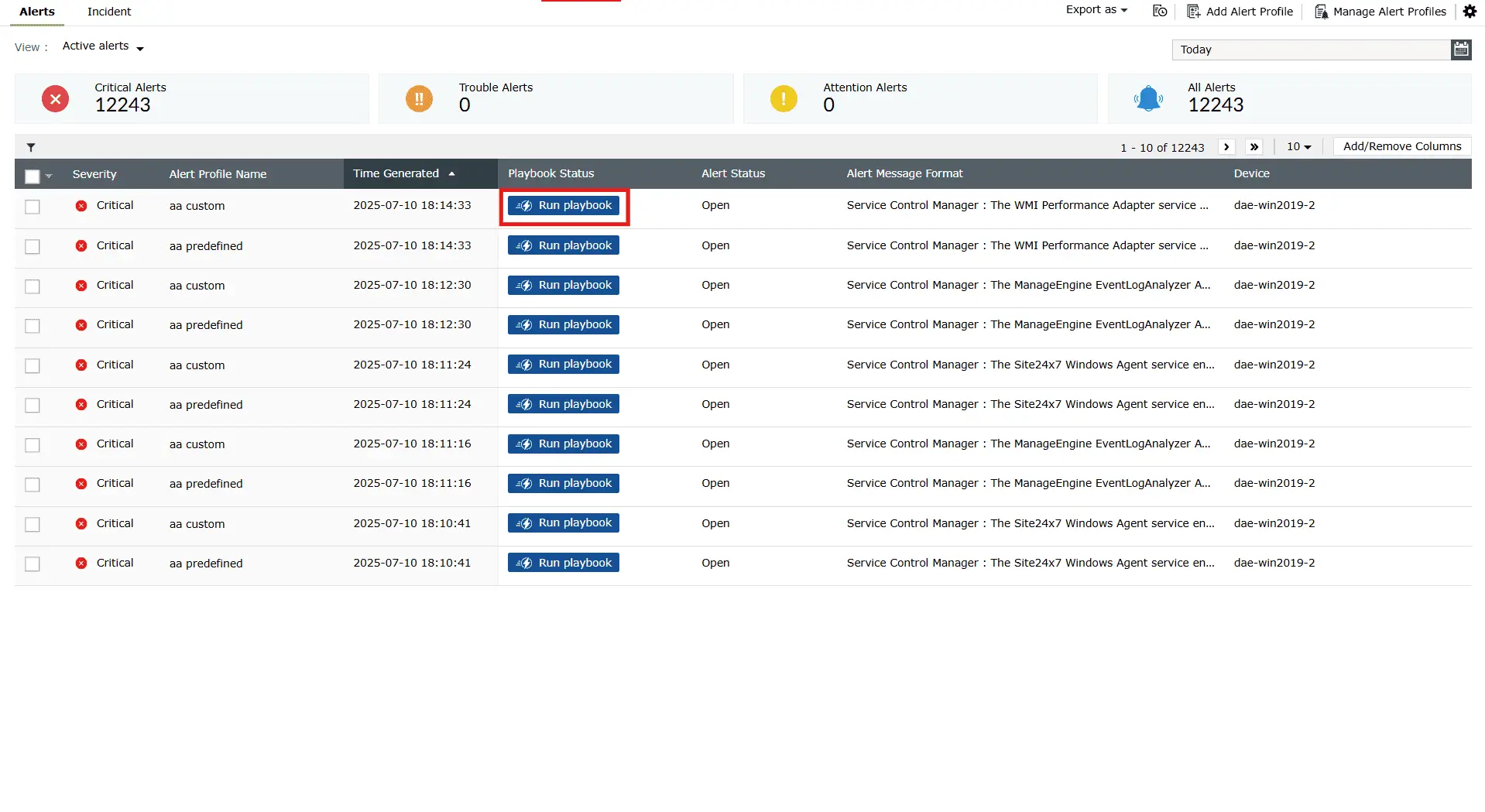
  • Execution triggers: Playbooks run automatically when bound to an alert profile, or on-demand from any incident. This covers both policy-driven enforcement and analyst-controlled execution.
  • Action library: Execute commands on Windows and Linux endpoints via the ManageEngine agent (restart, shutdown, log off, disable USB, run scripts, manage services). This includes: Modify AD, add inbound/outbound rules on Cisco ASA firewalls, and block IPs directly from a playbook step. Over 1,000 predefined alert criteria trigger automated responses.

Benefit: Consistent, immediate action for every incident and no manual pivoting between consoles.

AI-powered playbook engine

Centralized credential and ecosystem integration

Automated playbook execution requires two critical components: stored credentials to authenticate against target systems and pre-configured connectors to reach those systems. Log360 provides both through centralized credential management and prebuilt integrations.

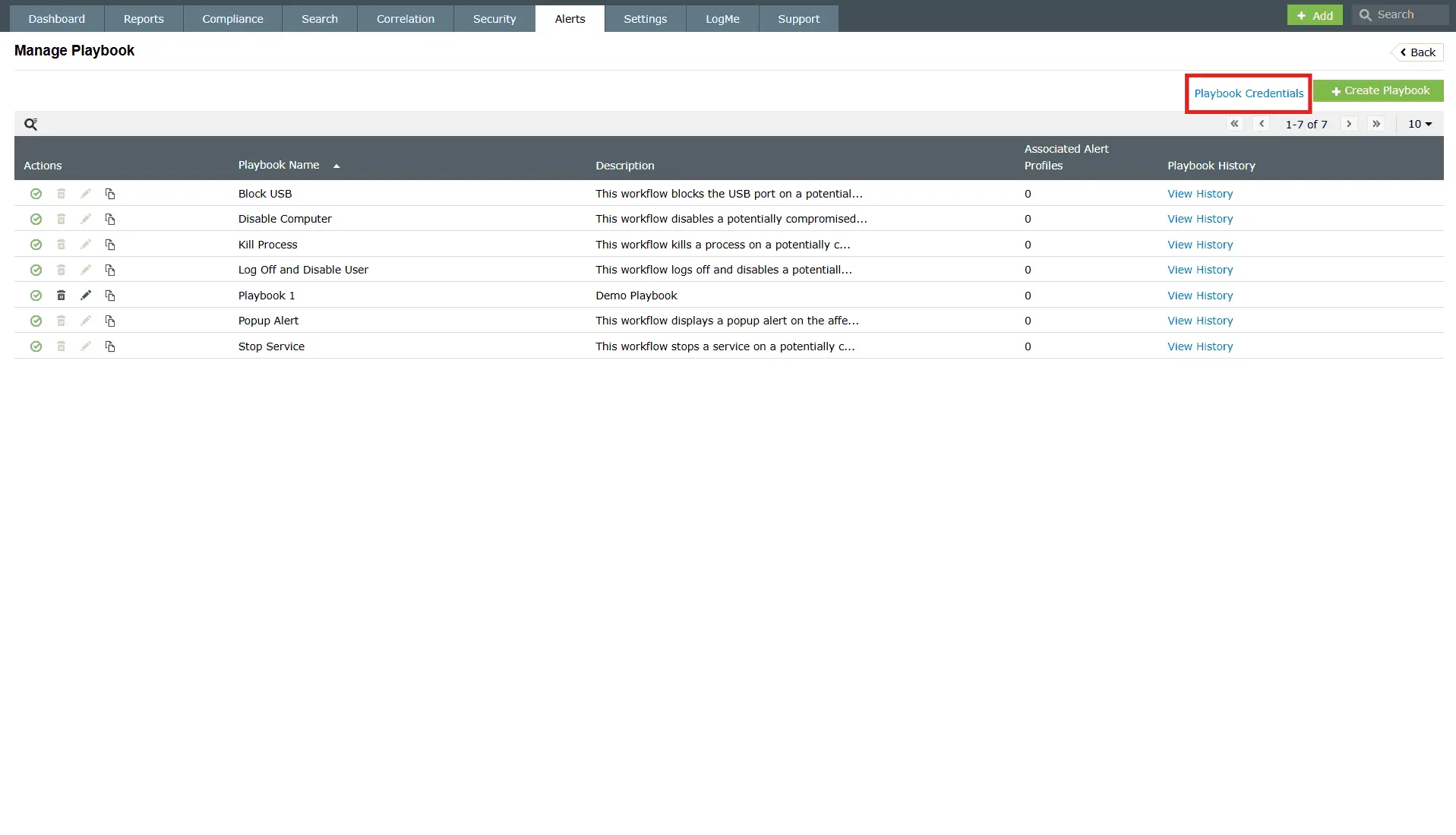
  • Centralized playbook credentials: The Playbook Credentials section, accessible from the Alerts tab, centrally stores and manages all authentication credentials required for playbook execution, including Windows domain accounts, Linux SSH credentials (username, password, port), firewall admin credentials for Cisco, FortiGate, Palo Alto, Sophos XG, and Barracuda CloudGen devices, as well as API tokens for integrations like ADManager Plus. Analysts can design and trigger workflows without handling raw secrets directly.
  • Cloud connections: For cloud deployments, reusable Connections manage external API authentication methods including OAuth 2.0, API Key, and AWS Signature. Each connection is configured once and shared across playbooks that need it.
  • ITSM and security tool integrations: Log360 enables bi-directional sync with service desks including ManageEngine ServiceDesk Plus, ServiceNow, Jira Service Desk, and Zendesk. Playbooks can automatically create tickets, update status and severity, and attach evidence. Native actions for ADManager Plus (user enable/disable, password reset, group management) and Endpoint Central provide deeper identity and endpoint response capabilities.

Benefit: Enable credential-free automation across your technology stack. Security and IT operations teams can share workflows without exposing secrets or adding integration overhead.

Streamlined threat investigation with Zia Insights

Threat intelligence and MITRE ATT&CK-mapped response

Automated responses are only as good as the intelligence behind them. Log360 integrates threat intelligence and MITRE framework mapping directly into playbook workflows, so response actions are informed by real-time context, not guesswork.

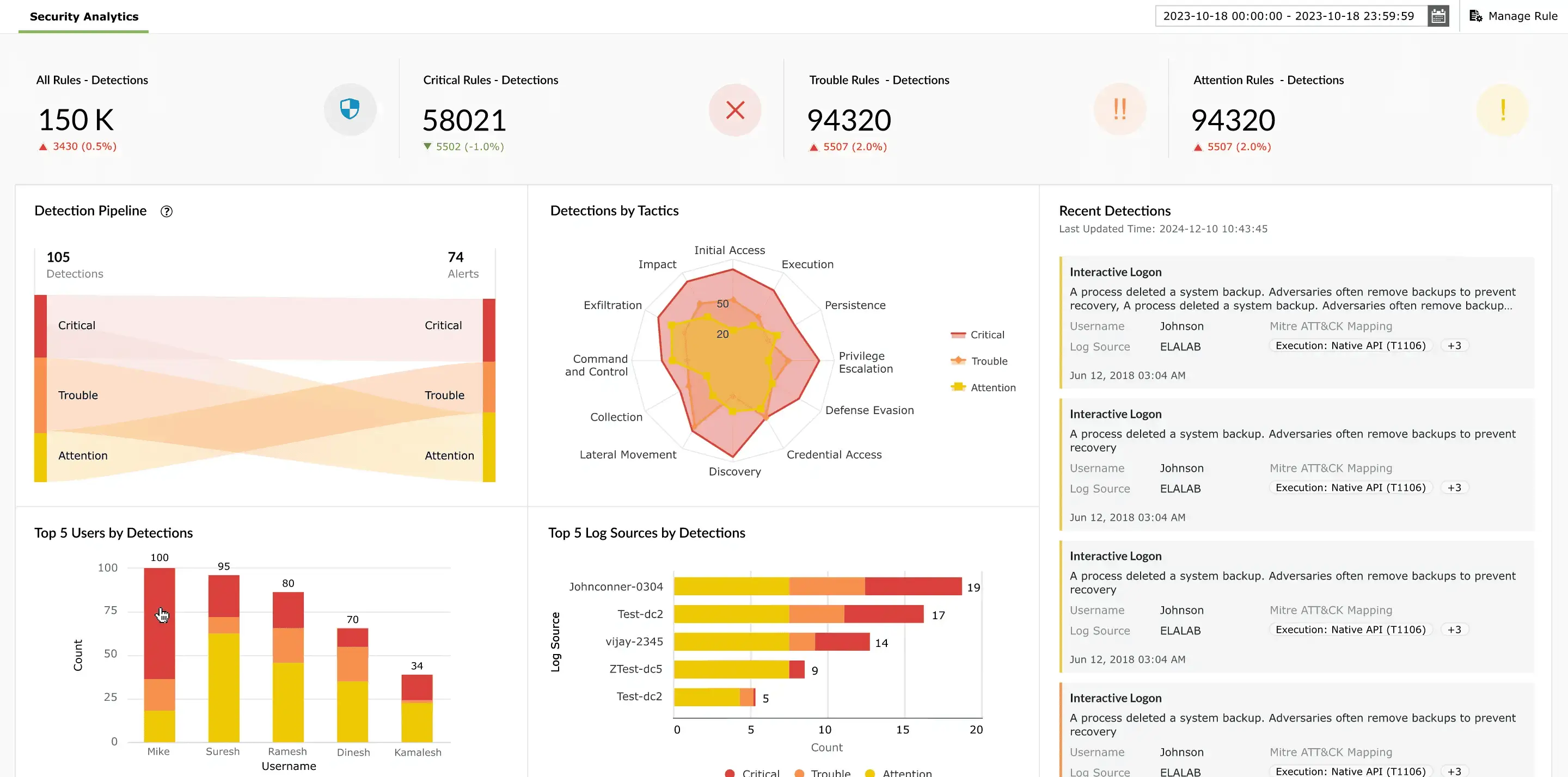
  • MITRE ATT&CK-mapped response: Every playbook in the library is tagged to MITRE ATT&CK tactics, techniques, and D3FEND countermeasures. When a playbook fires, the execution record shows which adversary technique triggered it and which defensive technique was applied.
  • Threat intelligence enrichment: Playbooks enrich incidents with IP reputation scores from VirusTotal, dark web monitoring signals, and custom threat feeds (STIX/TAXII). Enrichment results drive branch logic. A playbook can conditionally block an IP, isolate a user, or escalate to an analyst based on the reputation score returned.
  • Investigation guidance: After containment, Log360 surfaces recommendations for post-incident investigation and hardening: What to check next, what to harden, and what to monitor going forward.

Benefit: Automated responses informed by real-time threat context and mapped to industry frameworks. Useful for incident reviews, audit preparation, and SOC maturity reporting.

MITRE ATT&CK-aligned dashboards

Complete orchestration life cycle management

Building playbooks is one half of orchestration. The other half is managing, testing, auditing, and optimizing those playbooks over time. Log360 provides a single management console for the full life cycle.

  • Centralized playbook management: A single console to manage all workflows. Enable, disable, edit, or clone playbooks with visibility into their alert profile associations and execution history. Up to 500 playbooks per organization. Most mid-market SOCs run 20 to 50 active playbooks.
  • Execution history and audit trail: Every playbook execution is logged with step-by-step status (success, failed, aborted), timestamps, inputs, and outputs. Dashboards surface execution trends, volume, success rates, and failure patterns.
  • Validation and testing: Validate playbooks for configuration errors before deployment. The Save & Test function runs workflows with sample data. Review execution logs and outputs before enabling for production incidents.
  • Compliance reporting: Log360 includes over 1,000 compliance report templates for SOC 2, HIPAA, GDPR, and PCI DSS. Note: the SIEM log data (not the SOAR execution log) is the authoritative audit record for compliance. SIEM retention follows your configured policy; SOAR execution history is retained for three months.

Benefit: Full auditability and data-driven control. Measure effectiveness, debug failures, demonstrate compliance, and refine workflows from one console.

Automated response with MITRE ATT&CK-aligned playbooks

Real-world security orchestration with Log360

Log360's orchestration capabilities automate complex, multi-system responses, so every incident gets the same structured treatment regardless of which analyst is on shift.

  • Automated vulnerability patching orchestration

    Log360 orchestrates across vulnerability scanners, patch management tools, and notification systems to remediate critical flaws automatically.

    Example scenario: A critical vulnerability is discovered on a production server. Log360 automates the entire workflow from detection to verification.

  • Insider threat investigation and containment

    Log360 orchestrates data collection, analysis, and containment actions across logs, UEBA, and endpoint tools.

    Example scenario: A UEBA alert indicates unusual download of large data volumes. Log360 orchestrates rapid investigation and containment across multiple systems.

How Log360 responds:

  • Phishing click detection: A phishing click is detected and an alert fires with full context: URL, sender, and recipient details.
  • Endpoint isolation: Log360 triggers an isolation script on the affected endpoint, removing it from the network.
  • Account containment: The compromised user's AD account is disabled and a password reset is forced. Both actions execute from the same playbook step.
  • Firewall blocking: A deny rule is added to the perimeter firewall for the phishing source IP.
  • Incident ticketing: A high-priority incident ticket is created in ServiceDesk Plus with the full alert timeline and actions already taken.
  • Evidence collection: Endpoint logs are forwarded to a secure server for forensic preservation.

How Log360 responds:

  • Vulnerability detection: Log360 correlates vulnerability scan logs with the asset inventory and identifies a critical flaw on a production server.
  • Patch approval: The playbook approves the required patch and triggers a deployment job on the affected server.
  • Deployment initiation: The patch deployment job is executed automatically on the target machine.
  • Compliance verification: A verification script runs on the patched machine to confirm installation and check system status.
  • Notification and closure: The associated Jira ticket is updated to "Resolved" with patch verification evidence attached. A confirmation notification is sent to the sysadmin team.

How Log360 responds:

  • Behavioral alert: UEBA generates a Data Exfiltration Risk alert with the user's risk score and anomaly details.
  • Evidence gathering: The playbook collects endpoint processes, network connections, and file access logs from the flagged machine.
  • Context enrichment: An automated search pulls the user's activity logs and access patterns across all monitored sources.
  • Risk assessment: If the data matches sensitive patterns, the playbook disables the user's account and revokes VPN access.
  • Evidence preservation: Endpoint logs and user activity evidence are forwarded to a secure server for forensic preservation.
  • Management escalation: Summarized findings are sent to the CISO via SMS for an escalation decision.

Turn disconnected tools into a coordinated response.

Log360 orchestrates actions across your endpoints, identity systems, firewalls, and ITSM platforms from a single playbook. See it in your environment.

Strengthen every layer of your security operations

Beyond orchestration, Log360 is a full SIEM platform with built-in UEBA, compliance reporting, and threat intelligence. These capabilities work alongside orchestration, not as separate products.


Scalable and resilient architecture

Built on a distributed, high-availability architecture to support growing log volumes while ensuring uninterrupted collection, indexing, and analysis.

Learn more  
 

Real-time threat visibility

Delivers unified insights across endpoints, networks, and cloud environments, enabling faster detection, investigation, and response.

Learn more  
 

Advanced threat detection

Leverages over 2,000 MITRE ATT&CK–mapped correlation rules and UEBA to detect multi-stage attacks such as insider threats and anomalous user behavior.

Learn more  
 

External and dark web intelligence

Enriches alerts with real-time threat intelligence, adding IP reputation, geolocation, and risk-based prioritization to accelerate investigation and triage.

Learn more  
 

Streamlined compliance management

Simplifies adherence to over 30 regulatory mandates including the GDPR, HIPAA, the PCI DSS, and more with secure log archiving and audit-ready compliance reports.

Learn more  
 

Flexible, extensible security ecosystem

Integrates seamlessly across hybrid infrastructures and extends capabilities seamlessly without disrupting ongoing operations.

Learn more  
  •  

    We wanted to make sure that one, we can check the box for different security features that our clients are looking for us to have, and two, we improve our security so that we can harden our security footprint.

    Carter Ledyard

  •  

    The drill-down options and visual dashboards make threat investigation much faster and easier. It’s a truly user-friendly solution.

    Sundaram Business Services

  •  

    Log360 helped detect insider threats, unusual login patterns, privilege escalations, and potential data exfiltration attempts in real time.

    CIO, Northtown Automotive Companies

  •  

    Before Log360, we were missing a centralized view of our entire infrastructure. Now, we can quickly detect potential threats and respond before they escalate.Log360 has been invaluable for improving our incident response and ensuring compliance with audit standards. It’s a game-changer for our team.

    ECSO 911

Fill this form to schedule a
personalized web demo

  • By clicking " Submit", you agree to processing of personal data according to the Privacy Policy.

Your request for a demo has been submitted successfully. Our support technicians will get backto you at the earliest.

Frequently Asked Questions

Automation executes individual tasks, such as disabling a user account, blocking an IP, creating a ticket. Orchestration coordinates multiple automated tasks into a single workflow that spans several tools. In response to a brute force alert, orchestration would lock the account in AD, block the source IP on the firewall, scan the endpoint for lateral movement, and create a ticket in ServiceDesk Plus. All of this runs as one coordinated process without manual hand offs.

No. Visual drag-and-drop builders (the Zoho Qntrl engine for cloud and the block-based builder for on-premises) let security analysts design multi-step workflows without coding. For advanced use cases, custom functions support Python and Deluge scripts.

All playbook executions are logged in Execution History with full detail: step status, timestamps, inputs, outputs, and error messages. Export logs and generate compliance reports from the analytics dashboard.

Yes. Playbooks include validation to check for configuration errors before deployment. Use the Save & Test function to run workflows with sample data, reviewing execution logs and step outputs before enabling for production incidents.

The Playbook Credentials stores authentication credentials (Windows domain accounts, Linux SSH keys, firewall admin credentials, cloud API tokens) in an encrypted store. Playbooks reference credentials by name. Analysts trigger workflows without seeing or handling raw secrets. For cloud deployments, reusable Connections manage external API authentication with OAuth, API key, or bearer token methods. See how credential management works in Log360.

Yes. Log360 integrates with ServiceNow, Jira, Zendesk, Cisco ASA, VirusTotal, and custom STIX/TAXII threat feeds alongside ManageEngine tools like ServiceDesk Plus and Endpoint Central. The extension marketplace provides additional connectors, and custom functions (Python, Deluge) can call any API.

Connect your tools. Coordinate your response.

Log360's security orchestration ties your endpoints, identity systems, firewalls, and ITSM platforms into a single response workflow. No separate product. No per-execution fee.