

As enterprises shift to the cloud, ensuring robust web security becomes essential for safeguarding critical data and maintaining productivity. Web filtering is central to web security, enabling organizations to control internet usage, block malicious websites, and enforce corporate policies. Web filtering also includes URL filtering, which involves restricting access to specific websites or categories of websites based on their URLs.
In today’s digital landscape, where cyberthreats evolve constantly, having a comprehensive web filtering solution, especially within a cloud access security broker (CASB) framework, empowers enterprises to stay one step ahead of attackers.
Understanding web filtering
Web filtering refers to techniques used to restrict or control what content users can access on the internet. It can block access to certain websites, applications, or types of content to protect users from malicious sources or enforce organizational policies. While web filtering is commonly associated with parental controls for home use, it plays a critical role in enterprise environments, helping to boost productivity and security.
What is web filtering?
Web filtering is a fundamental security measure that enables enterprises to restrict access to certain websites or content, ensuring that employees only access safe, appropriate, and compliant web resources. By doing so, it helps protect the network from potential exposure to malicious sites and ensures that corporate policies regarding internet usage are upheld.
This is achieved by techniques such as:
- URL filtering: Blocks or allows access to websites based on their URLs by comparing them against a predefined database.
- IP filtering: Blocks access to websites based on their IP address, which helps block entire categories of sites or servers.
- DNS filtering: Stops the resolution of certain domain names to prevent access to malicious or inappropriate websites.
- Web content filtering: Analyzes the actual content of a website (such as text, images, and videos) and applies rules to block or allow access accordingly.
What is URL filtering?
URL filtering is a specific subset of web filtering where websites are blocked or allowed based on their URL. This technique compares the URL to a database of known trusted, malicious, or policy-violating sites and blocks access accordingly. URL filtering is highly effective at preventing access to phishing sites, malware, and other harmful web content.
However, conventional web filtering methods often lack the context needed to analyze the true risk of a URL. As a result, they may block entire categories of websites or mistakenly block legitimate ones. Additionally, many traditional filters struggle to keep up with newly created malicious sites due to a lack of real-time updates. This calls for integrated web filtering solutions that offer threat intelligence and CASB capabilities for holistic enterprise web security.
Leveraging web filtering to control shadow IT and unauthorized access
Shadow IT refers to the use of unsanctioned applications or services within an organization, often without the knowledge or approval of the IT department. These unsanctioned tools can expose enterprises to significant security risks. Web filtering software helps curb shadow IT by blocking access to unauthorized applications and domains, thereby limiting the risk of data leaks and security breaches.
Effective shadow IT control starts with contextual analysis—discovering which shadow applications employees use, analyzing the top websites accessed, determining the credibility or risk score of the URLs or domains, and categorizing them. From there, IT teams can block and monitor those deemed risky.
Examples of categories into which websites may be sorted:
- Phishing sites
- Botnets, malware, and ransomware sites
- Exploits and spam sources
- Shopping or eCommerce sites
- Personal or cloud storage service
Key benefits of web filtering solution in a CASB framework
Integrating web filtering software within a CASB framework provides enhanced visibility and control over web traffic. Acting as a gateway at the network perimeter, CASBs analyze all outbound and inbound traffic, ensuring that web access is safe and compliant with corporate policies. They offer insights that can help security teams make informed decisions.
CASBs can provide analysis on:
- Top websites accessed
- Top devices accessing web apps
- Top users accessing web apps
- Top web app categories
- Low-reputed apps
- Top users accessing banned apps
By monitoring these metrics, organizations gain a deeper understanding of user behavior, which can help preempt security risks and improve overall web security posture. This level of visibility allows businesses to enforce customized security policies, block access to dangerous or distracting websites, and ensure compliance.
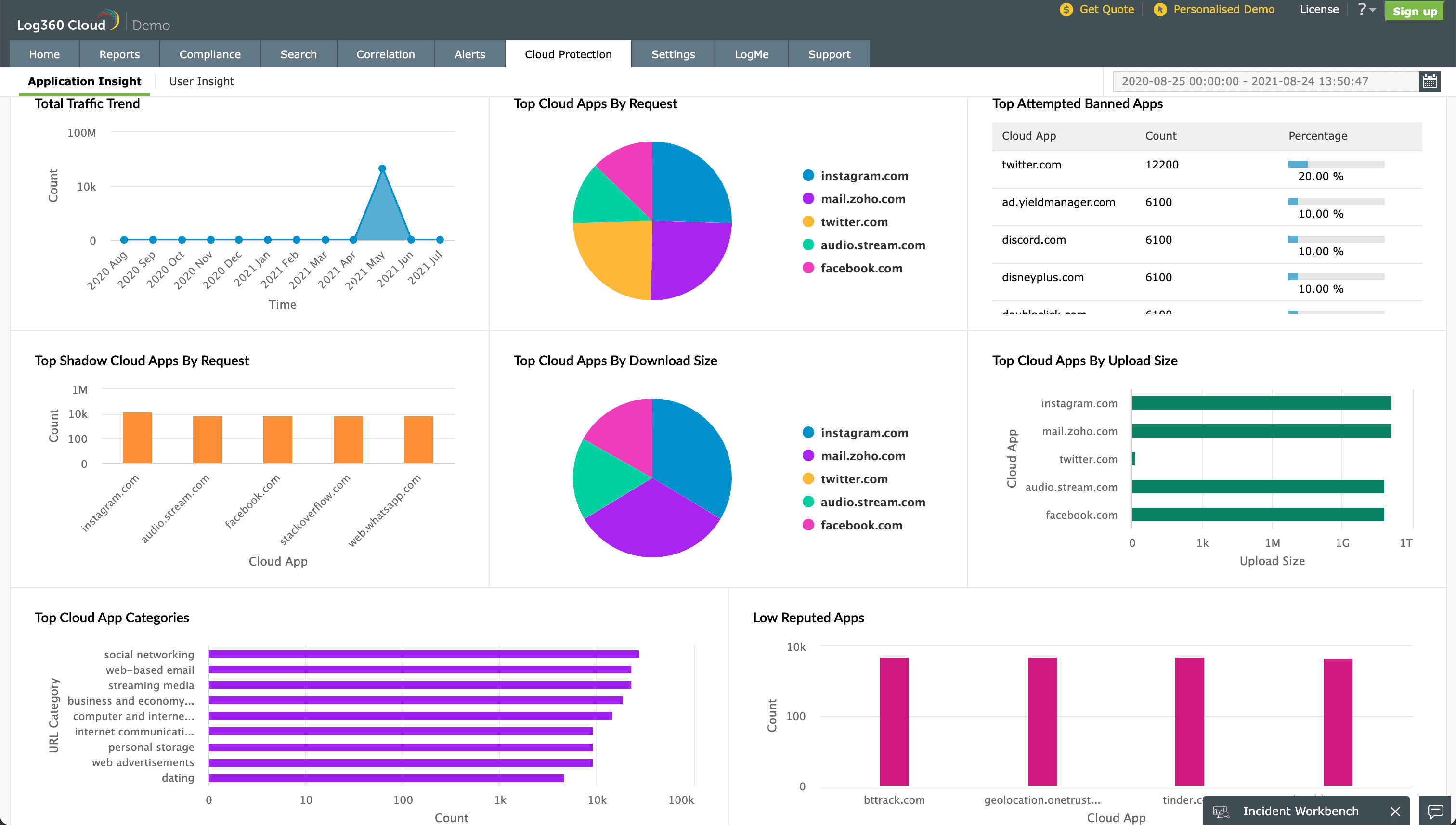
Figure 1: Cloud protection dashboard offering a comprehensive view of all web traffic.
Choosing the right web filtering software for businesses
When choosing web filtering software for business, it’s important to consider three main factors:
Ease of deployment: The chosen software should be easy to install, configure, and integrate into your existing security infrastructure without disrupting operations.
Reporting, insights, and alerting:Look for web filtering software that offers real-time analytics and customizable alerts, giving IT teams the visibility needed to quickly respond to suspicious activity or breaches.
Integration with other security tools: The ability to integrate the web filtering software with other cybersecurity tools—such as firewalls, CASBs, and SIEM solutions—is crucial for providing comprehensive protection.
ManageEngine's CASB solution
ManageEngine Log360 Cloud is a cloud SIEM solution with integrated CASB capabilities that helps improve overall enterprise web security. It empowers IT teams to discover shadow applications, sanction or block them, and monitor all user activities in the cloud, including uploads and downloads. IT teams can also continuously monitor network traffic, detect threats in real time, receive instant alerts, and respond swiftly to incidents, ensuring both security and compliance.
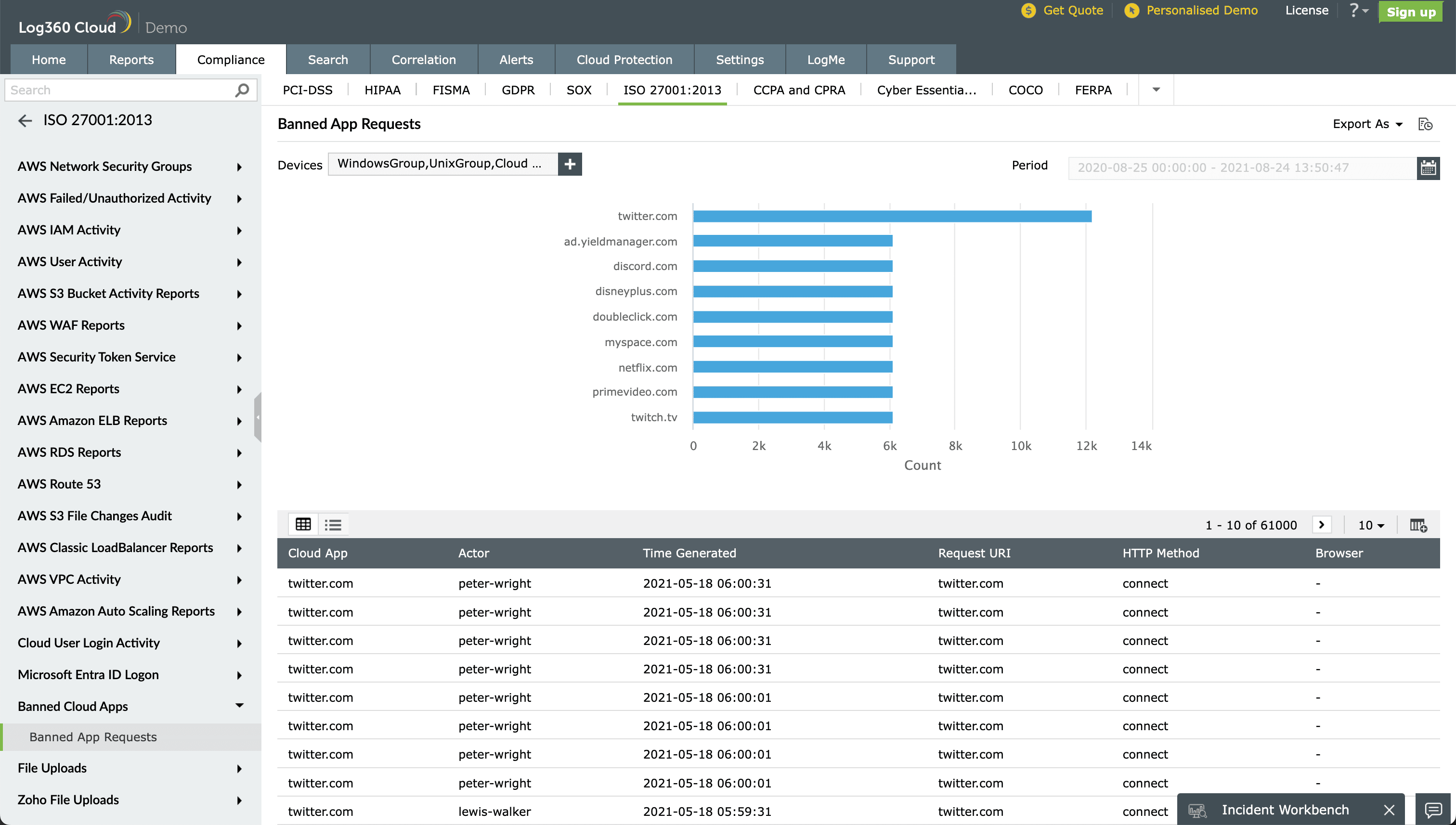
Figure 2: Log360 Cloud reports displaying accesses to blocked URLs and websites as part of ISO compliance.

