What are network mapping and network monitoring?
Network mapping is the process of discovering, documenting, and maintaining an up-to-date model of a network's devices, interfaces, IP addresses, and their relationships. Network monitoring continuously tracks the operational health and performance of those devices, interfaces, and connections by collecting metrics such as availability, latency, bandwidth utilization, and faults.
Together, they provide two complementary views of the same network: one explains how the network is built, while the other reveals how it is behaving at any given moment. Both perspectives are essential for troubleshooting, planning, and operating modern networks effectively.
In this article, we'll explore how network mapping and network monitoring complement one another, where they differ, how they support day-to-day network operations, and what to evaluate in a solution that combines both capabilities.
What do you lose when network mapping and network monitoring are not integrated?
A network rarely fails in ways that can be understood through performance data alone. Likewise, a network diagram by itself cannot reveal whether devices are healthy or services are degrading. Most operational decisions require both perspectives.
Suppose monitoring reports that a distribution switch has gone offline. It identifies the affected device, when the issue occurred, and the resulting performance impact. Network mapping provides the missing context by showing where that switch sits in the topology, which downstream devices depend on it, and which business services may be affected.
This relationship extends beyond fault management. Capacity planning, change management, infrastructure documentation, and service impact analysis all depend on combining the structural understanding provided by network mapping with the real-time operational insight provided by network monitoring.
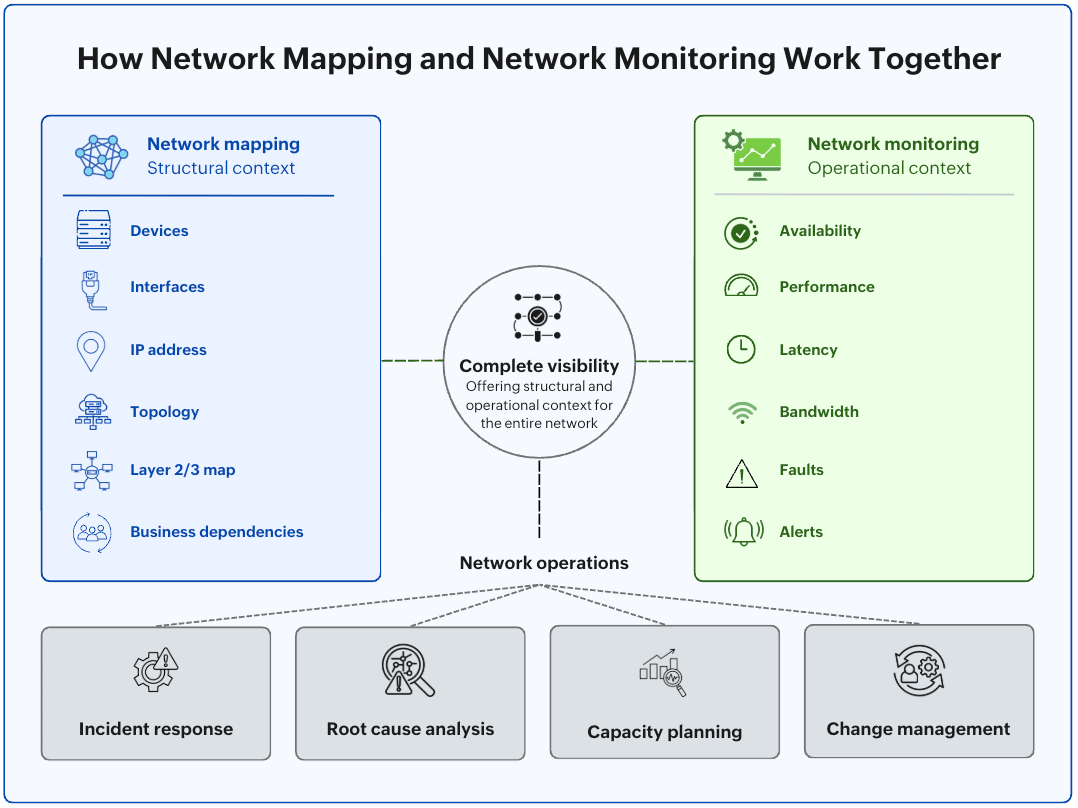
Network mapping vs. network monitoring: Key differences
| Aspect | Network mapping | Network monitoring |
|---|---|---|
| Primary purpose | Discover and maintain network structure | Monitor operational health and performance |
| Primary focus | Devices, interfaces, IP addresses, and relationships | Availability, performance, utilization, and faults |
| Primary output | Network model, topology maps, inventory | Dashboards, alerts, performance metrics, reports |
| Data sources | SNMP discovery, LLDP, CDP, ARP, routing tables | ICMP, SNMP polling, NetFlow, syslog, telemetry |
| Best for | Answering how the network is built | Answering how the network is performing |
What questions does each capability answer?
| Operational question | Primary | Supporting |
|---|---|---|
| What devices exist on the network? | Mapping | - |
| How are devices connected? | Mapping | - |
| Which interface connects two devices? | Mapping | - |
| Is a device reachable? | Monitoring | Mapping (topology context) |
| Is latency increasing? | Monitoring | - |
| Is bandwidth nearing capacity? | Monitoring | - |
| Which devices or services depend on this switch? | Mapping | Monitoring (current status) |
| Which part of the network will be affected if this device fails? | Mapping | Network monitoring |
Where network mapping and network monitoring create the most value
Incident response: When a network outage occurs
When a critical device fails (which is answered by monitoring), the first question is: what else is affected? That's where network mapping steps in, revealing the downstream devices, network segments, and services that depend on the failed component, helping prioritize recovery efforts.
Root cause analysis: Finding the real cause behind an alert
Alerts point to symptoms, not necessarily causes. A latency spike, packet loss, or application response time may originate several hops away from the system reporting the issue. By combining monitoring data with the relationships revealed through network mapping, admins can follow the affected path, identify shared dependencies, and isolate the infrastructure component responsible.
Capacity planning: Preparing for future growth
Capacity planning, more than finding the busiest device, is usually for understanding where growth will place pressure on the network, making an ideal use case for the synergy of monitoring and mapping. Monitoring spots usage trends, while mapping shows where the device(s) sit in the topology, so admins can decide where capacity addition will have the highest operational benefit.
Change management: Making infrastructure changes safely
Every infrastructure change carries some level of uncertainty. Before a switch replacement, firmware upgrade, or network redesign, mapping helps identify the devices and services that could be affected. Once the change is complete, monitoring confirms that those systems are operating normally, the much-needed confidence teams need after rolling out a network change.
What makes an effective network mapping and monitoring platform
The value of a solution depends on how well its mapping and monitoring capabilities work together rather than on either capability in isolation.
When evaluating a platform, look for one that:
- Maintains a unified network model so topology, monitoring data, and visualizations remain synchronized
- Automatically includes newly discovered devices in the monitoring scope, eliminating the need for separate onboarding
- Provides topology-aware alerts, allowing admins to immediately see where an issue sits within the network and what downstream devices or services may be affected
- Makes monitoring metrics, topology maps, and dependency information accessible from the same interface, enabling troubleshooting without switching between disconnected tools
ManageEngine OpManager: Network monitoring with integrated network mapping
ManageEngine OpManager is a comprehensive network monitoring solution that combines automated network mapping, continuous performance monitoring, fault management, and rich network visualization within a single platform. Automated discovery continuously maintains an up-to-date network model, which powers Layer 2 and Layer 3 topology maps, business views, rack and floor views, and site maps. The same network model provides structural context for dashboards, performance graphs, alerts, and dependency analysis, enabling admins to understand how the network is built, monitor how it is performing, and troubleshoot issues without switching between disconnected tools.
FAQ
Can network monitoring work without network mapping?
Yes. A monitoring solution can collect performance metrics and generate alerts without maintaining a network map. However, admins lose important structural context, such as how devices are connected and which systems depend on them, making troubleshooting and impact analysis more difficult.
Do small networks need both network mapping and network monitoring?
Which comes first: network mapping or network monitoring?
Does every network monitoring tool include network mapping?
Network discovery, mapping, and monitoring made simple
ManageEngine OpManager for enterprise network monitoring
Download nowBy Javith Razvi,
ManageEngine Team