What are MFA tokens and how do they work?
Every year, attackers get better at logging in and slipping quietly through environments meant to stop them. Whether it’s stolen passwords, replayed tokens, hijacked sessions, or OAuth consent scams, their techniques keep evolving and becoming efficient enough to bypass authentication methods once considered strong.
This is where MFA tokens step in. MFA tokens offer something a password alone can’t: a real proof of possession. However, not all tokens work the same way, and not every setup protects you from modern attacks.
How MFA tokens actually work
An MFA token is a second identity check. Passwords confirm what you know. Tokens confirm what you have.
Sometimes, this token is a small key you plug in. Sometimes, it’s an app on your phone that generates a six-digit code. Both approaches do the same job but in different ways.
Here’s a simple breakdown:
A server and user share a secret (sensitive credentials) stored safely on the device or token.
The token generates a short-lived code—usually valid for 30 or 60 seconds.
The user enters the code when prompted.
The server checks the code against its own calculation.
If they match, the login continues.
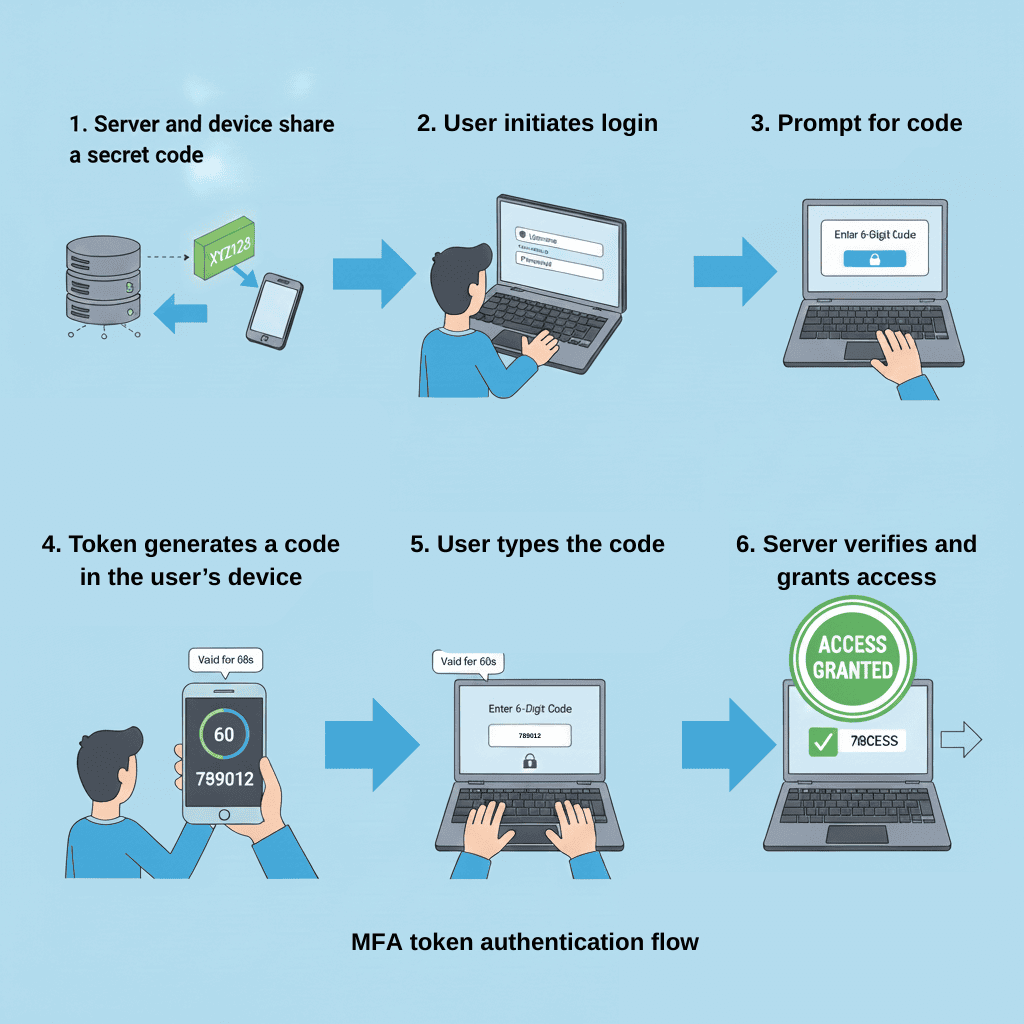
Alt text: An illustration showing the MFA token authentication flow.
File name: mfa-token-authentication-flow
Even if a hacker steals a password, they can’t move forward with it because they don’t have the token that creates the code granting login access. Modern MFA solutions build this token flow directly into your login process, whether you’re using biometrics, passkeys, or classic TOTPs.
Soft tokens vs. hard tokens
Soft tokens
Soft token apps rely on a shared secret that sits safely in the user’s device. They generate short-lived codes that refresh every 30 or 60 seconds. You type the code in, the server confirms it, and you're in.
It’s simple, but the security gain is huge. Even if a password leaks, the attacker can’t move forward with it without the token. And because nothing travels over SMS, the risk of SIM swaps or OTP interception goes down dramatically.
Soft token examples: Google Authenticator, ADSelfService Plus mobile app, Microsoft Authenticator.
Soft tokens are good for remote employees, general workforce, and BYOD companies.
Hard tokens
Some environments need a stronger guarantee that the user is who they claim to be. This is where hardware tokens shine. They’re phishing-resistant, work entirely offline, and stay with the user as a separate object.
Hard token examples: YubiKey, OTP fobs, smart cards.
Hard tokens will be good for manufacturing floors, hospitals, critical roles, high-security environments, or any place where mobile phones aren't allowed.
Most organizations rely on enterprise authentication tools that support hard and soft token methods and use both depending on the risk level of the role. This approach scales well across frontline workers, executives, contractors, remote users, and everyone in between.
MFA tokens vs. OAuth tokens
MFA tokens are authentication factors like TOTPs, hardware keys, push approvals, and soft-token apps. They verify the user’s identity during login.
OAuth tokens are authorization tokens like access tokens, refresh tokens, and ID tokens. They’re issued after authentication and determine what the user can access.
Confusion between these tokens usually happens because modern identity systems chain the two processes together. Once MFA confirms the user is legitimate, an OAuth token gets issued for session access to access applications and APIs.
Token theft: the threat behind the threat
Attackers don’t just steal passwords, they steal tokens and sessions too. Push fatigue attacks, OAuth token misuse, cookie theft, and replay attacks all bypass legacy MFA setups.
This is why modern systems like ADSelfService Plus are shifting toward phishing-resistant, passwordless MFA.
Building the right MFA token strategy
There’s no single “best” MFA method anymore. Different users, devices, and risk levels require different approaches. The strongest setups blend multiple token types so authentication stays secure without slowing users down.
A modern strategy usually includes:
Passkeys for passwordless logins
They remove the weakest link entirely. No passwords to steal, reuse, or phish; just secure, device-bound authentication.TOTPs as the everyday backup
Time-based codes from an authenticator app work even when offline and cover most workforce scenarios reliably.Hardware tokens for high-assurance roles
Security keys and OTP devices add a physical layer that’s almost impossible to tamper with. It's ideal for admins, executives, and regulated environments.SMS or voice as emergency-only options
They’re not the strongest methods, but they help users who lack smartphones or when all other methods fail.Adaptive MFA to react to real-world risk
Modern MFA needs to adjust itself. If the user signs in from a trusted device on a known network, it creates a smooth login. If the system detects a new device, risky location, impossible travel, or repeated failures, it enforces stronger factors automatically. This closes the gap between static MFA and actual threat behavior.Phishing-resistant MFA for sensitive accounts
Passkeys, FIDO2 keys, and WebAuthn-based methods stop replay attacks, MFA bombing, and fake login pages. Every privileged or high-impact role should use these by default.Continuous auditing and risk scoring
Strong MFA isn’t just about enforcing factors. It’s about constantly watching sign-in patterns, flagged devices, token misuse, and privilege sprawl.
How ADSelfService Plus strengthens your MFA token strategy
ADSelfService Plus doesn’t stop at offering diverse authenticator options. It builds a full identity protection layer around them, one that adjusts to risk through adaptive MFA, supports the way different teams work, and keeps access updated.
Passwordless authentication sits at the core of this approach. Users sign in with biometrics, FIDO2 passkeys, push approvals, or TOTPs instead of passwords, which means attackers can no longer rely on stolen or reused credentials.
Condition-based MFA adds another layer of intelligence. Every login is checked against various access conditions. If something looks unusual, the system steps up authentication automatically. If everything looks normal, users pass through without friction.
Phishing-resistant factors such as FIDO2 passkeys, Microsoft authenticator, and hardware keys protect high-risk roles from token replay, fake login pages, and man-in-the-middle tricks. These authenticators can also work offline, essential for frontline teams, remote sites, and users operating without stable connectivity.
For everyday use, ADSelfService Plus keeps things flexible with soft tokens. TOTPs generated through the ADSelfService Plus mobile app or third-party authenticators reliably work online and offline to give users a simple, predictable way to verify their identity.
Visibility ties it all together. Detailed MFA reports show who has enrolled which authenticators, where failures are happening, and which accounts show unusual patterns. It’s the kind of clarity that lets admins catch weak spots long before they turn into incidents.
A good MFA token strategy gives you reliable proof of identity through passkeys, TOTPs, hard tokens, and risk-based checks. When these layers work together and adapt when something looks unusual, you get a system that quietly blocks impersonation attempts while keeping logins smooth for real users. Even if a password leaks or a session is hijacked, strong MFA tokens make sure access stays in the right hands.
Stop relying on passwords. Build a stronger, token-driven MFA strategy with ADSelfService Plus.